
This summary lesson condenses the Nginx module into a cheat sheet: the essential gestures, five behaviors that surprise, twelve recipes to paste into conf.d/, and the directives sorted by family. It is aimed at someone who has followed the earlier lessons of the module, or who already knows Nginx and needs a syntax or a diagnostic reflex. It documents Nginx 1.31.8 (the mainline branch) installed from the nginx.org repository; the reference stable branch is 1.30.6. Each gesture is covered in depth by a lesson, which the text cites where it is useful.
What you will learn
Level: Beginner → Intermediate
By the end of this lesson, you will be able to:
- Recall in a few lines the gesture of each lesson in the module, and the lesson that goes deeper
- Predict the evaluation order of
locationblocks and the difference betweenrootandalias - Copy a recipe suited to your case, with the context where it belongs
- Find the syntax and context of a directive with the cheat sheet
- Avoid the eight traps that pass
nginx -twithout an error
Prerequisites
This lesson assumes an installed Nginx and a configuration that reloads: Install Nginx teaches the installation, the contexts and the validate, then reload cycle. Knowing how to read an HTTP request helps with the diagnostic sections; the guide HTTP and HTTPS (in French) covers the basics.
Where to start depending on your need?
Each need maps to a lesson in the module, and the natural order is: install, serve, publish, encrypt, then protect and observe. A server built from scratch follows Install Nginx, then serving files and a static application, then publishing an application and serving TLS.
An existing installation is consulted by symptom. A 502 or a 504 leads to Diagnose Nginx. The choice of server and location is explained in Choose the right server and the right location. Distribution across several backends is in Nginx upstream, and long-lived streams (WebSocket, SSE, gRPC) in Nginx: long-lived streams. The cache has its lesson, Nginx cache, protection has Nginx limits and Protect and observe Nginx, and observation has Observe Nginx. Finally, the upgrade lesson teaches how to move to a new version without downtime.
Nginx in 60 seconds
Nginx (pronounced "engine-x") combines four roles in a single process, and a site's configuration chooses which ones to enable. The sections below cover each of them, from installation to observation.
- A web server for static files (HTML, CSS, JS, images)
- A reverse proxy to forward requests to backend applications
- A load balancer to spread traffic across several servers
- A cache to speed up responses
Install Nginx and read its files
Distribution packages lag several branches behind: the recommended path is the official nginx.org repository, whose signing key must be verified. The key file published by nginx.org contains three keys, and the installation page cites only one, which no longer signs the packages. Comparing a copied fingerprint is therefore not verifying a repository: the lesson Install Nginx has you check the whole file and names the active key.
Once installed, two commands confirm the result: systemctl status nginx must show active (running), and nginx -v the version.
nginx -vThe nginx.org packages put everything under /etc/nginx/: the main file nginx.conf sets the global context (worker_processes auto;, worker_connections, server_tokens off;), and its line include /etc/nginx/conf.d/*.conf; enables one file per site dropped into conf.d/. These packages do not create a sites-available or sites-enabled tree: a site is created by dropping a .conf file into conf.d/, with no symbolic link. The workers run under the nginx account, created by the package; this is the account that must be able to read your static files and your certificates.
Serve a static site
A static site takes one server, one root and one try_files. try_files $uri $uri/ =404; first looks for the requested file, then for a directory of that name, then returns a 404: this is the standard pattern. The block below is a minimal example, to drop into /etc/nginx/conf.d/monsite.conf; the "Static site" recipe further down repeats it with its context.
server {    listen 80;    server_name monsite.local;    root /var/www/monsite;    index index.html;
    location / {        try_files $uri $uri/ =404;    }}
The full gesture is always the same: test with sudo nginx -t, apply with sudo systemctl reload nginx, then verify with curl -I http://localhost, which must answer HTTP/1.1 200 OK. MIME types, the fallback for a single-page application and read permissions are in serving files and a static application.
Configure a reverse proxy
A reverse proxy puts Nginx in front of an application that listens on a non-privileged port: Nginx terminates TLS, applies cache and limits, then relays the request. Without the four proxy_set_header lines of the block below, the backend sees every request arriving from 127.0.0.1 over HTTP: its logs become unusable and the redirects it generates go out in clear text. The $proxy_add_x_forwarded_for variable appends to the existing chain instead of overwriting it, which matters as soon as a CDN (content delivery network, servers that relay and cache traffic in front of your site) or a load balancer sits upstream.
server {    listen 80;    server_name api.example.com;
    location / {        proxy_pass http://127.0.0.1:3000;        proxy_set_header Host $host;        proxy_set_header X-Real-IP $remote_addr;        proxy_set_header X-Forwarded-For $proxy_add_x_forwarded_for;        proxy_set_header X-Forwarded-Proto $scheme;    }}
The default timeouts are 60 seconds for proxy_connect_timeout, proxy_send_timeout and proxy_read_timeout; a slow route lengthens them locally, without touching the others. HTTP/1.1 is the version used toward the backend by default, and persistent connections to upstreams are active out of the box (32 per worker process): no directive needs to be added for that. The trailing slash of proxy_pass changes the forwarded URI, a point covered in the surprising behaviors below. The complete publication, with automatic certificates, is in Publish an application with Nginx.
For WebSockets, the trap is that Upgrade and Connection are hop-by-hop headers, specific to one connection: Nginx does not relay them on its own. The "WebSocket" recipe below gives the block, and Nginx: long-lived streams also covers SSE and gRPC. Distribution across several instances (upstream, least_conn, backup) is in Nginx upstream.
Enable HTTPS with Let's Encrypt
Nginx does not obtain certificates itself: an ACME client does it, drops the files on disk, then Nginx re-reads them through a reload. Let's Encrypt certificates from the tlsserver profile now last 45 days (since 2026-05-13), and renewal targets two thirds of their lifetime, around day thirty: automation is no longer optional. The lesson Nginx TLS: serve and renew a certificate takes an external client as the main route, certbot remains the proven plan B, and the native ngx_http_acme_module module is in preview (HTTP-01 and TLS-ALPN-01, no DNS-01). Automatic certificates compares the challenges.
A TLS server receives the certificate's full chain, the private key and a list of protocols. http2 on; enables HTTP/2 (directive available since 1.25.1); the old form listen 443 ssl http2; is deprecated.
server {    listen 443 ssl;    http2 on;    server_name example.com www.example.com;
    ssl_certificate     /etc/letsencrypt/live/example.com/fullchain.pem;    ssl_certificate_key /etc/letsencrypt/live/example.com/privkey.pem;
    # Force TLS 1.2/1.3 explicitly    ssl_protocols TLSv1.2 TLSv1.3;
    # HSTS: start with 5 minutes, lengthen after checking (see the box)    add_header Strict-Transport-Security "max-age=300" always;}
# Redirect HTTP to HTTPSserver {    listen 80;    server_name example.com www.example.com;    return 301 https://$host$request_uri;}
With certbot, sudo certbot --nginx -d example.com -d www.example.com obtains the certificate and modifies the configuration, then sudo certbot renew --dry-run tests the renewal. Never use TLSv1 or TLSv1.1 in production: forcing ssl_protocols TLSv1.2 TLSv1.3; removes any ambiguity.
For an error on the certificate side (incomplete chain, wrong SNI, expiry), rely on the guide TLS diagnostics with openssl. The SNI (Server Name Indication) is the site name that the client announces at the start of the TLS connection, which lets the server choose the right certificate.
Troubleshoot an Nginx error
Nginx troubleshooting always follows the same order: the process, the configuration, the log, then the request. The useful distinction separates the errors Nginx produces itself from those it merely relays. It decides on its own about the 401, 403 and 404 that come from the file system (permissions or root) or from a deny rule (deny, limit_except, auth_basic), and error.log says so in most cases (access forbidden by rule, open() failed), a missing identifier leaving a trace only at the info level.
These three codes do not always belong to it, however. Behind a reverse proxy, they can come from the backend and pass through Nginx without it being the author, and the log is what settles it: a refusal decided by Nginx leaves a trace in error.log, a code simply relayed leaves none. The 502 and 504, for their part, always come from the backend, and no change to the Nginx configuration fixes them if the application does not answer. The lesson Diagnose Nginx walks through the full procedure.
Always test before reloading. nginx -T (capital T) prints the configuration actually loaded, with every include resolved: this is what reveals a duplicate server block or a file forgotten in conf.d/.
# 1. Is Nginx running?systemctl status nginx
# 2. Is the configuration valid?sudo nginx -t
# 3. Full dump of the configuration (includes resolved)sudo nginx -T | less
# 4. Service journaljournalctl -u nginx --since "10 min ago"
# 5. Nginx error logsudo tail -20 /var/log/nginx/error.log
# 6. Is the port listening?ss -tlnp | grep :80
The following table links the observed code to the most probable cause. The workers account is nginx: it needs a read permission on your files, never ownership.
| Error | Probable cause | Solution |
|---|---|---|
| 403 Forbidden | A link in the path is not readable by nginx, or a deny rule refuses | namei -l on the file path finds the closed link; fix the file concerned (read access through the nginx group, never chmod 777), see serving static files |
| 404 Not Found | Wrong root or missing file | Check the path in the configuration |
| 502 Bad Gateway | Backend unreachable, or SELinux blocks the outgoing connection | Read the errno in error.log |
| 504 Gateway Timeout | Timeout shorter than a legitimate slowness, or backend slow or unavailable | First case: tune proxy_read_timeout on that route. Second case: repair the backend, because lengthening the timeout only keeps a worker busy for longer; see Diagnose Nginx |
| "Address already in use" | Port already taken | ss -tlnp | grep :80 to identify |
A single 502 covers two cases, which the errno number in parentheses in error.log tells apart: connect() … failed (111: Connection refused) means the backend is not listening, while connect() … failed (13: Permission denied) points to SELinux (RHEL, Rocky) forbidding Nginx from opening an outgoing connection. The fix for the second case is sudo setsebool -P httpd_can_network_connect on. To decide between permissions and application, replay the request under the service account with sudo -u nginx curl http://127.0.0.1:3000: if curl succeeds as root and fails under this account, the problem is not the application.
Optimize: compression and cache
Three levers act on the perceived response time: gzip compression, the proxy cache and load distribution. gzip on; reduces the volume transferred for text content (Nginx only compresses text/html until gzip_types is extended), the cache avoids bothering the backend for a response already served, and upstream spreads what is left. They add up, but the cache introduces a gap between the real content and the served content that must be accepted and measured.
A badly tuned cache can serve one account's response to another. Cache-Control: private, no-cache and no-store prevent caching, but two conditions cancel this protection: proxy_ignore_headers Cache-Control; and a valid X-Accel-Expires header emitted by the origin. The "Proxy cache" recipe below gives the minimal block; Nginx cache teaches the cache key, Vary and the proof that no private response leaks.
Secure Nginx
A server exposed to the Internet receives automated traffic within its first hours of life, and four measures cover distinct risks. Security headers constrain the browser, rate limiting (limit_req) absorbs bursts, the allow / deny lists close administration paths, and limit_except restricts HTTP methods. The "Rate limiting", "IP allowlist" and "Basic Auth" recipes below give the blocks; Nginx limits and Protect and observe Nginx teach them with their proof.
Two header behaviors cannot be guessed. The always keyword matters as much as the header: without it, Nginx omits the header on error responses, precisely the ones an attacker tries to provoke. And inheritance is not cumulative: a single add_header declared in a location cancels all those of the parent server block, which must then be repeated. Finally, X-XSS-Protection is obsolete, modern browsers ignore it: prefer a Content-Security-Policy.
allow and deny apply to the address Nginx actually sees: behind a load balancer or a CDN, it is the address of the upstream device, and the filtering then lets everyone through.
Observe Nginx
Open source Nginx has neither active probes nor native Prometheus metrics: stub_status is the only built-in counter, and it gives neither response codes nor per-route timings. It exposes active connections, accepted and handled requests, and the split between reading, writing and waiting. The module is not always compiled in: check for --with-http_stub_status_module in the output of nginx -V. The control API introduced in 1.31.5 (--with-control-api) drives processes and configuration, but exposes no traffic counter and does not replace stub_status.
The endpoint must stay restricted to the loopback interface, because it reveals the traffic volume of the server.
server { location /stub_status { stub_status; allow 127.0.0.1; deny all; }}The command curl http://127.0.0.1/stub_status returns four lines: Active connections, the trio accepts handled requests, then Reading, Writing and Waiting. A Prometheus exporter converts these values into metrics, and the response codes as well as the timings are read in a JSON-format access log: the setup is in Observe Nginx. Nginx Amplify, F5's former monitoring service, was shut down on 31 January 2026: ignore it for a new deployment.
Five behaviors that surprise
The five questions below cover the points where Nginx behaves differently from what is expected: the evaluation order of location blocks, the difference between root and alias, proxy_pass failures, reloading without downtime, and hosting several sites on the same machine.
Why doesn't my regex location match?
Nginx evaluates location blocks in a precise order:
=(exact): absolute priority- longest prefix: Nginx remembers it, and if it carries
^~it wins without trying any regex ~/~*(regex): the first regex that matches overrides the remembered prefix- remembered prefix: used if no regex matches
location = /api { } # Exactly /api onlylocation ^~ /static/ { } # /static/* without looking for a regexlocation ~ \.php$ { } # Regex: .php fileslocation / { } # Catch-allThe following diagram shows this decision tree: look at where a request goes when its prefix carries ^~, and where it goes otherwise.
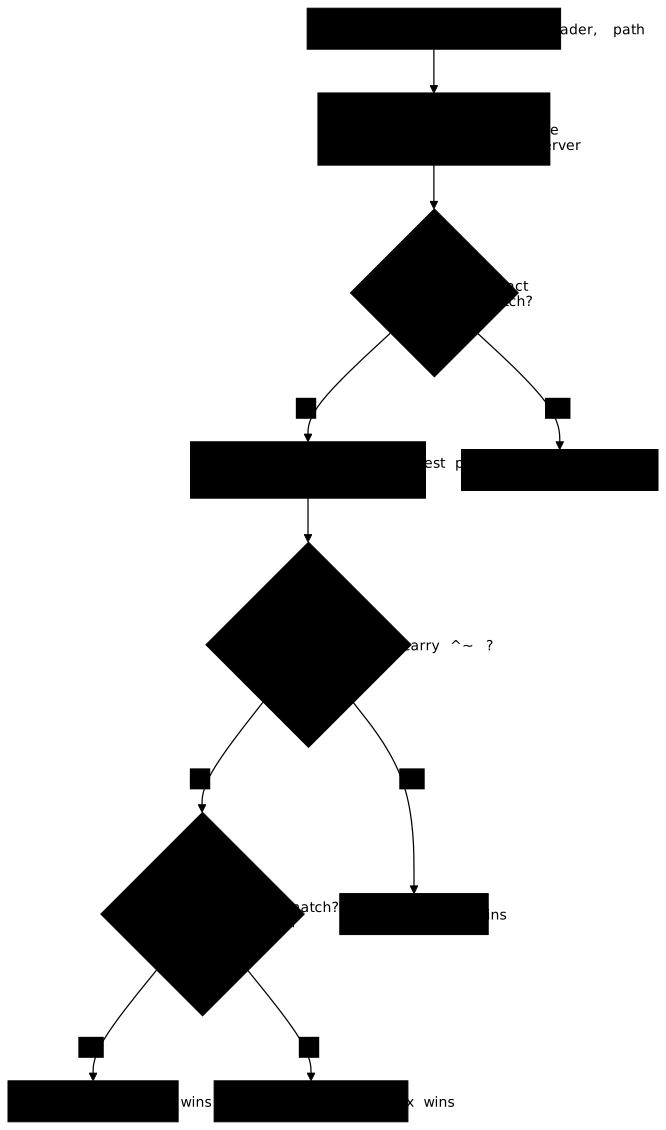
Common trap: the / prefix does not stop your regexes from running, but a more specific prefix declared with ^~ rules them out on its path. If your regex does not fire, first look for a ^~ or an = that captures the request before it. Conversely, a regex such as location ~ /\. (to block hidden files) also intercepts /.well-known/, hence the ACME HTTP-01 challenge: a location ^~ /.well-known/ placed before it lets the challenge through, provided it is the longest matching prefix.
A predicate location (the location $variable form, introduced in 1.31.5 and not used in this module) is tested after the regular expressions: the order above therefore does not change for =, ^~ and ~.
What is the difference between root and alias?
root: the URI path is appended to the rootalias: the URI path is replaced by the alias
# With root: /images/photo.jpg → /var/www/images/photo.jpglocation /images/ {    root /var/www;}
# With alias: /images/photo.jpg → /data/photos/photo.jpglocation /images/ {    alias /data/photos/;}
Simple rule: use root by default, alias only when you want to map a URL to a completely different path.
Why doesn't my proxy_pass work?
Check in order:
- Is the backend running? →
curl http://127.0.0.1:3000 - The trailing slash: with or without
/, the behavior changes
# Without slash: the full URI is forwardedlocation /api/ {    proxy_pass http://backend:3000;}# /api/users → http://backend:3000/api/users
# With slash: the URI is rewrittenlocation /api/ { proxy_pass http://backend:3000/;}# /api/users → http://backend:3000/users- SELinux (RHEL) →
setsebool -P httpd_can_network_connect on - Firewall → is the port open?
- Logs →
tail /var/log/nginx/error.log
If in doubt about the slash, test with curl -v.
How do I reload Nginx without interruption?
# Test firstsudo nginx -t
# Reload (no downtime)sudo systemctl reload nginx
# ORsudo nginx -s reload
Never use restart in production if reload is enough.
How do I serve several sites on the same server?
Create one file per site in /etc/nginx/conf.d/:
server {    listen 80;    server_name site1.com;    root /var/www/site1;}
# /etc/nginx/conf.d/site2.confserver {    listen 80;    server_name site2.com;    root /var/www/site2;}
Nginx uses the server_name to route requests.
Nginx recipes
Each block below is pasted into a file in conf.d/, adapting the domain and paths. One point of caution about context: snippets that only show a location go inside an existing server block, while zone declarations such as proxy_cache_path and limit_req_zone go at the http level, that is outside any server (a file in conf.d/ is already included there), otherwise the configuration is rejected by the test.
Static site
The block is self-contained: it declares its listener, its domain and its root. try_files returns an explicit 404 when neither the requested file nor the requested directory exists.
server { listen 80; server_name example.com; root /var/www/html; index index.html; location / { try_files $uri $uri/ =404; }}SPA (React/Vue/Angular)
The fallback to /index.html replaces the =404 on the interface routes only: a URL missing from the disk is handed to the JavaScript router. Applied to the whole root without exception, it would turn every missing resource and every unknown API call into a 200 response with HTML. The /assets/ and /api/ locations therefore keep their plain 404 or their backend, as taught in serving files and a static application.
location /assets/ {    root /var/www/app;    try_files $uri =404;}
location /api/ {    proxy_pass http://127.0.0.1:3000;}
location / {    root /var/www/app;    try_files $uri $uri/ /index.html;}
Reverse proxy
These four proxy_set_header lines are the minimum, and each one carries a piece of information that Nginx would otherwise overwrite: Host forwards the site name that was requested, X-Real-IP and X-Forwarded-For the client's real address instead of Nginx's, and X-Forwarded-Proto tells the backend that the original request was HTTPS, without which the redirects it generates go out in clear text.
location / { proxy_pass http://127.0.0.1:3000; proxy_set_header Host $host; proxy_set_header X-Real-IP $remote_addr; proxy_set_header X-Forwarded-For $proxy_add_x_forwarded_for; proxy_set_header X-Forwarded-Proto $scheme;}WebSocket
The Upgrade and Connection headers are specific to one connection and are not relayed automatically: they have to be set. HTTP/1.1, the version that knows the Upgrade mechanism, is already the version used toward the backend. The map (in the http context) computes Connection depending on whether the client asks for an Upgrade or not, which avoids forcing the switch on ordinary requests.
map $http_upgrade $connexion_upgrade {    default upgrade;    ''      close;}
location /ws/ {    proxy_pass http://backend:3000;    proxy_set_header Upgrade $http_upgrade;    proxy_set_header Connection $connexion_upgrade;}
Proxy cache
proxy_cache_path is declared in the http context, never inside a location. Nginx first respects the origin's Cache-Control; proxy_cache_valid only steps in as a fallback, for responses that carry no duration, and is set per response code (see Nginx cache).
proxy_cache_path /var/cache/nginx levels=1:2 keys_zone=my_cache:10m max_size=1g;
location / {    proxy_pass http://backend;    proxy_cache my_cache;    proxy_cache_valid 200 10m;}
Rate limiting
burst=20 allows a burst of twenty requests beyond the set rate, and nodelay serves them immediately instead of spreading them over time. The $binary_remote_addr key is the client's IP address in a compact binary form: it groups requests per client and saves the zone's memory. The default refusal is a 503, the same code as the "Maintenance page" recipe further down: in a configuration that carries both, a rate-limit refusal would be indistinguishable from maintenance, logs included. limit_req_status 429; returns the intended code (Too Many Requests), which tells the client to slow down instead of making it believe in an outage; see Nginx limits.
limit_req_zone $binary_remote_addr zone=api:10m rate=10r/s;
location /api/ {    limit_req zone=api burst=20 nodelay;    limit_req_status 429;    proxy_pass http://backend;}
Basic Auth
The .htpasswd file is generated with the htpasswd command; it must be readable by the Nginx worker and stay outside the web root.
location /admin/ { auth_basic "Zone Admin"; auth_basic_user_file /etc/nginx/.htpasswd; proxy_pass http://backend;}IP allowlist
The first matching rule wins: it is the final deny all that makes the allow lines effective.
location /admin/ { allow 192.168.1.0/24; allow 10.0.0.0/8; deny all; proxy_pass http://backend;}HTTPS redirect
The $request_uri variable already contains the path and the query string, which preserves the full URL during the 301.
server { listen 80; server_name example.com; return 301 https://$host$request_uri;}Maintenance page
Creating or deleting the file switches the site without reloading Nginx. The error_page directive intercepts the 503 and serves the local static page in place of the backend.
location / { if (-f /var/www/maintenance.html) { return 503; } proxy_pass http://backend;}error_page 503 /maintenance.html;location = /maintenance.html { root /var/www;}Large upload
client_max_body_size defaults to 1 MB: beyond that, Nginx answers 413 without even contacting the backend.
location /upload/ { client_max_body_size 100M; proxy_pass http://backend; proxy_read_timeout 300s;}Load balancing
least_conn sends the request to the backend with the fewest active connections, and the backup keyword reserves the third server for the periods when the other two are unavailable. The upstream block is declared at the http level.
upstream backend_pool {    least_conn;    server backend1:3000;    server backend2:3000;    server backend3:3000 backup;}
location / {    proxy_pass http://backend_pool;}
Pitfalls to avoid
These eight mistakes share one characteristic: the configuration is syntactically valid, nginx -t reports nothing, and the problem only shows up at run time. The two most costly in production are the trailing slash of proxy_pass, which changes the forwarded URI without any message, and the frozen DNS resolution in a containerized environment, which only shows after a backend redeployment.
| Mistake | Consequence | Solution |
|---|---|---|
| Trailing slash in proxy_pass | /api/users: the backend receives /users instead of /api/users | Without slash = URI kept. Test with curl -v |
| Mixing up root and alias | 404 because the path does not exist | alias /data/photos/; with a trailing slash |
| Order of locations | A ^~ or an = captures the request before your regex | = (exact) > prefix ^~ > regex > plain prefix |
| Static DNS in Docker/K8s | Nginx keeps the old IP after a redeployment | server app:3000 resolve; with zone and resolver in the upstream, or failing that a variable in proxy_pass with resolver |
| SELinux blocks the proxy | 502 Bad Gateway on RHEL/Rocky | setsebool -P httpd_can_network_connect on |
| File permissions | 403 Forbidden on static files | namei -l on the path finds the closed link; owner deploy, group nginx, directories 750 and files 640 (details) |
| try_files without SPA fallback | 404 on frontend routes | try_files $uri $uri/ /index.html; on location / only, with /assets/ and /api/ as separate locations (SPA recipe) |
| Logs in the wrong file | Debugging is impossible | access_log /var/log/nginx/monsite-access.log; |
Cheat sheet
These tables group the directives by family so you can find a syntax without reopening the documentation. A reminder that saves many failed tests: each directive is valid only in certain contexts, http, server or location, and Nginx refuses to start if it is placed elsewhere.
Structure
These blocks nest in a fixed order: location exists only inside a server, and upstream only at the http level.
| Directive | Description |
|---|---|
server { } | Configuration block of a site |
location /path { } | Block for a specific path |
upstream name { } | Group of backends |
include /path/*.conf; | Include other files |
Listening
The pair listen and server_name decides which block handles the request. If no name matches, Nginx picks the first block declared on that port.
| Directive | Description |
|---|---|
listen 80; | Listen on port 80 |
listen 443 ssl; | Listen for HTTPS |
http2 on; | Enable HTTP/2 (http and server contexts) |
server_name example.com; | Domain name of the site |
server_name _; | Catch-all (default server) |
Files
root appends the URI to the given path, alias replaces it entirely: this is the classic origin of 404 errors on a file that is nonetheless present.
| Directive | Description |
|---|---|
root /var/www/html; | Files root |
index index.html; | Default file |
try_files $uri $uri/ =404; | Look for file/directory or 404 |
alias /other/path/; | Replace the path (with trailing slash) |
Proxy
These directives go inside a location. proxy_set_header lines declared locally replace as a whole those inherited from the parent level, so they must be repeated.
| Directive | Description |
|---|---|
proxy_pass http://backend:3000; | Forward to the backend |
proxy_set_header Host $host; | Forward the original Host |
proxy_set_header X-Real-IP $remote_addr; | Forward the client IP |
proxy_read_timeout 120s; | Backend read timeout (60 s by default) |
TLS
fullchain.pem contains the certificate and the intermediate chain; loading cert.pem alone causes validation errors on clients that do not complete the chain themselves. The directives are those of the lesson Nginx TLS: serve and renew a certificate, and HTTP/2 is enabled with http2 on; (see "Listening").
| Directive | Description |
|---|---|
ssl_certificate /path/fullchain.pem; | Certificate + chain |
ssl_certificate_key /path/privkey.pem; | Private key |
ssl_protocols TLSv1.2 TLSv1.3; | Force modern TLS |
add_header Strict-Transport-Security "max-age=300" always; | HSTS, short duration at first then lengthened |
CLI
nginx -s reload re-reads the configuration without cutting current connections and keeps the old version if the new one is invalid, hence the value of the prior nginx -t.
| Command | Description |
|---|---|
nginx -t | Test the configuration |
nginx -T | Full config dump (includes resolved) |
nginx -s reload | Reload without interruption |
nginx -s stop | Stop immediately |
When to choose HAProxy, Caddy, Apache or a container instead of Nginx?
Nginx covers file serving and the reverse proxy on a given machine; other tools cover other needs better. HAProxy goes further on load balancing and backend health tracking, Caddy (in French) trades some control for automatic certificate management, and Apache (in French) remains suitable if you depend on .htaccess files (per-directory configuration, which Nginx does not read) or on its own modules, whereas Nginx centralizes its configuration. Container use (Docker (in French)) brings its own DNS resolution constraints, already seen in the table of traps. To place the role of a reverse proxy in an architecture, read Reverse proxy.
Official resources
The Mozilla generator is the most reliable shortcut for an up-to-date TLS section: it produces the ssl_protocols and ssl_ciphers directives matching the chosen browser compatibility level. Beware, however, of docs.nginx.com, which documents the commercial NGINX Plus version and describes directives absent from the open source version.
- Official documentation: nginx.org/en/docs
- NGINX (F5) Docs: docs.nginx.com, commercial version
- Mozilla SSL Config Generator: ssl-config.mozilla.org, generate a secure TLS config
- GitHub: github.com/nginx/nginx
Key takeaways
These points cover the reflexes that prevent most service interruptions on a production Nginx, from the configuration test to the behavior of the headers forwarded to the backend.
nginx -t: always test before reloading, thenreload(neverrestartifreloadis enough)server {}+location {}: the two fundamental blocks;locationorder:=, then prefix^~, then regex, then plain prefixconf.d/*.conf: one file per site with the nginx.org packages, workers under thenginxaccount- Permissions: the
nginxaccount reaches your files through a group read permission, never through ownership; a 403 is diagnosed withnamei -l, not with a recursivechmod proxy_set_header: forward the client information to the backend; HTTP/1.1 is already the default toward upstream- Slash in
proxy_pass: with or without, the forwarded URI changes - TLS 1.2/1.3 only and
http2 on;; 45-day certificates, hence automated renewal, and HSTS started short before being lengthened - Observation:
stub_statusis the only built-in counter, the rest comes from the logs and from/var/log/nginx/error.log
Knowledge check
Check that you have grasped the essentials of this summary. The questions cover only what has just been explained here.
Knowledge check
Check what you have learned with this interactive quiz
How it works
- The timer starts when you click Start
- Multiple choice, true/false and short answer questions
- You can move between questions
- Detailed results are shown at the end
Starts the quiz and the timer
Review
(0/0)Score by domain
A domain groups several guides and gets several questions, so its score is more reliable than a per-topic score, which often rests on a single question.
Summary
Strengths
No topic passed at 80% on at least two questions yet.
Weak areas
No topic below the pass mark.
Recommended next
Hints before you try again?
Continue the course: Traefik: entrypoints, routers, services and middlewares
A new full quiz with random questions
Work again only on the questions you missed
FAQ: Frequently Asked Questions
These short answers cover installation per distribution, the structure of a server block, setting up the reverse proxy and load balancing, enabling Let's Encrypt, and diagnosing 502 and 403 errors.
Definition
Nginx (pronounced "engine-x") is a high-performance web server and reverse proxy created by Igor Sysoev in 2004.Main functions
| Function | Description |
|---|---|
| Web server | Serves static files (HTML, CSS, JS, images) |
| Reverse proxy | Forwards requests to backends (Node.js, Python) |
| Load balancer | Spreads traffic across several servers |
| Cache | Stores responses to speed up requests |
Why Nginx?
Its asynchronous, event-driven architecture solves the C10K problem (10,000 simultaneous connections) that traditional servers handled poorly.Sites using Nginx
Netflix, Dropbox, WordPress.com, Airbnb and millions of other sites.Quick install (distribution package)
sudo apt update && sudo apt install nginx
sudo systemctl enable --now nginx
Recent version (official repository)
# Add the key and the repository
sudo apt install curl gnupg2 ca-certificates lsb-release ubuntu-keyring
curl https://nginx.org/keys/nginx_signing.key | gpg --dearmor \
  | sudo tee /usr/share/keyrings/nginx-archive-keyring.gpg >/dev/null

echo "deb [signed-by=/usr/share/keyrings/nginx-archive-keyring.gpg] \
  http://nginx.org/packages/ubuntu $(lsb_release -cs) nginx" \
  | sudo tee /etc/apt/sources.list.d/nginx.list

# Install
sudo apt update && sudo apt install nginx
sudo systemctl enable --now nginx
Verification
systemctl status nginx   # Must be active (running)
nginx -v                 # Prints the version
curl -I http://localhost # Must return HTTP 200
Installation
# Add the official Nginx repository
sudo tee /etc/yum.repos.d/nginx.repo << 'EOF'
[nginx-stable]
name=nginx stable repo
baseurl=http://nginx.org/packages/rhel/$releasever/$basearch/
gpgcheck=1
enabled=1
gpgkey=https://nginx.org/keys/nginx_signing.key
EOF

# Install and start
sudo dnf install nginx
sudo systemctl enable --now nginx
SELinux configuration
If you use Nginx as a reverse proxy:# Allow outgoing network connections
sudo setsebool -P httpd_can_network_connect on
Verification
systemctl status nginx
curl http://localhost
Basic structure
# /etc/nginx/conf.d/monsite.conf
server {
    listen 80;
    server_name monsite.com www.monsite.com;

    root /var/www/monsite;
    index index.html;

    location / {
        try_files $uri $uri/ =404;
    }
}
Main directives
| Directive | Role |
|---|---|
listen |
Listening port (80, 443, etc.) |
server_name |
Accepted domains |
root |
Root folder of the files |
location |
Rules for a URL |
Deployment
# Always test BEFORE reloading
sudo nginx -t
sudo systemctl reload nginx
try_files explained
try_files $uri $uri/ =404; means:- Look for the requested file
- Otherwise look for a directory
- Otherwise return 404
Basic configuration
server {
    listen 80;
    server_name api.example.com;

    location / {
        proxy_pass http://127.0.0.1:3000;

        # Essential headers
        proxy_set_header Host $host;
        proxy_set_header X-Real-IP $remote_addr;
        proxy_set_header X-Forwarded-For $proxy_add_x_forwarded_for;
        proxy_set_header X-Forwarded-Proto $scheme;
    }
}
Watch the trailing slash
# No slash: full URI passed through
location /api/ {
    proxy_pass http://backend:3000;
}
# /api/users → http://backend:3000/api/users

# With slash: URI rewritten
location /api/ {
    proxy_pass http://backend:3000/;
}
# /api/users → http://backend:3000/users
Timeouts for slow backends
proxy_connect_timeout 120s;
proxy_send_timeout 120s;
proxy_read_timeout 120s;
Installing Certbot
# Ubuntu/Debian
sudo apt install certbot python3-certbot-nginx

# RHEL/Rocky
sudo dnf install epel-release
sudo dnf install certbot python3-certbot-nginx
Getting the certificate
sudo certbot --nginx -d example.com -d www.example.com
Generated configuration
server {
    listen 443 ssl;
    http2 on;
    server_name example.com;

    ssl_certificate /etc/letsencrypt/live/example.com/fullchain.pem;
    ssl_certificate_key /etc/letsencrypt/live/example.com/privkey.pem;
    ssl_protocols TLSv1.2 TLSv1.3;

    # HSTS: start short, lengthen after verification
    add_header Strict-Transport-Security "max-age=300" always;
}
Automatic renewal
sudo certbot renew --dry-run  # Test
systemctl list-timers | grep certbot  # Check the timer
Comparison
| Criterion | Nginx | Apache |
|---|---|---|
| Architecture | Asynchronous, event-driven | Processes/threads (MPM) |
| Simultaneous connections | Excellent (C10K+) | Good with the event MPM |
| Static content | Very fast | Fast |
| Per-directory configuration | No (no .htaccess) | Yes (.htaccess) |
| Modules | Compiled at build time | Dynamic loading |
| Reverse proxy | Native, high-performance | Possible (mod_proxy) |
| RAM usage | Low | Moderate to high |
When to choose Nginx?
- Reverse proxy in front of Node/Python/Go apps
- High-traffic sites
- Serving static content
- Load balancing
When to choose Apache?
- Shared hosting (needs .htaccess)
- Traditional PHP applications
- Specific dynamic modules required
Basic configuration
upstream backend_pool {
    server backend1.example.com:3000;
    server backend2.example.com:3000;
    server backend3.example.com:3000 backup;  # Standby server
}

server {
    location / {
        proxy_pass http://backend_pool;
        proxy_set_header Host $host;
    }
}
Available algorithms
| Algorithm | Usage |
|---|---|
| round-robin | Default, simple rotation |
| least_conn | Sends to the least loaded server |
| ip_hash | Same client → same server (sessions) |
| hash | Custom hash (e.g. URI) |
least_conn example
upstream backend_pool {
    least_conn;
    server backend1:3000;
    server backend2:3000 weight=2;  # Receives 2× more
}
Common causes
| Cause | Diagnosis |
|---|---|
| Backend down | curl http://127.0.0.1:3000 → Connection refused |
| Wrong IP/port | Check proxy_pass |
| SELinux blocks | errno 13 in the logs, then setsebool |
| Timeout | Backend too slow |
Step-by-step diagnosis
# 1. Is the backend running?
curl -I http://127.0.0.1:3000
# If "Connection refused" → the backend is down

# 2. Can Nginx reach the backend?
sudo -u nginx curl http://127.0.0.1:3000

# 3. Detailed logs
sudo tail -f /var/log/nginx/error.log
# Look for BOTH errno values: "(111: Connection refused)", backend stopped,
# and "(13: Permission denied)", SELinux refusing the outgoing connection
SELinux fix (RHEL/Rocky)
sudo setsebool -P httpd_can_network_connect on
Timeout fix
proxy_read_timeout 120s;
Common causes
| Cause | Fix |
|---|---|
| File permissions | chown -R deploy:nginx /var/www/: the nginx group reads, it does not own |
| Directory permissions | Directories at 750, files at 640 |
| Missing index | Add index index.html; |
| autoindex off | Enable autoindex on; if wanted |
| deny all active | Check the allow/deny rules |
Diagnosis
# Find the path component that is not traversable
namei -l /var/www/monsite/index.html

# Fix: the publishing account owns, the workers' group reads
sudo chown -R deploy:nginx /var/www/monsite/
sudo find /var/www/monsite/ -type d -exec chmod 750 {} \;
sudo find /var/www/monsite/ -type f -exec chmod 640 {} \;

# Prove that the workers really can read
sudo -u nginx cat /var/www/monsite/index.html > /dev/null && echo readable

# Check that index.html exists
ls -la /var/www/monsite/index.html
Logs
sudo tail -f /var/log/nginx/error.log
# Look for: "directory index of \"/var/www/...\" is forbidden"
Validation commands
# Test the syntax (MANDATORY before reload)
sudo nginx -t
# nginx: the configuration file /etc/nginx/nginx.conf syntax is ok
# nginx: configuration file /etc/nginx/nginx.conf test is successful

# Print the full config (includes resolved)
sudo nginx -T | less
When there is an error
Nginx reports the exact line of the problem:nginx: [emerg] unknown directive "proxypass" in /etc/nginx/conf.d/api.conf:12
proxypass → proxy_pass)Safe workflow
# 1. Edit the config
sudo nano /etc/nginx/conf.d/monsite.conf

# 2. Test
sudo nginx -t

# 3. Reload only if OK
sudo systemctl reload nginx
reload without a successful nginx -t.Configuration
# In http {}: define the zone
limit_req_zone $binary_remote_addr zone=api_limit:10m rate=10r/s;

server {
    location /api/ {
        # Apply the limit
        limit_req zone=api_limit burst=20 nodelay;
        # Without this, the refusal comes out as a 503, like an outage
        limit_req_status 429;

        proxy_pass http://backend:3000;
    }
}
Parameters explained
| Parameter | Role |
|---|---|
$binary_remote_addr |
Limits per client IP |
zone=api_limit:10m |
10MB zone in memory |
rate=10r/s |
10 requests per second max |
burst=20 |
20 burst requests allowed |
nodelay |
Serves the burst without spreading it over time |
limit_req_status 429 |
Explicit refusal code; without it, Nginx returns a 503 |
Other possible keys
# Per URI
limit_req_zone $request_uri zone=uri_limit:10m rate=5r/s;

# Per server (global)
limit_req_zone $server_name zone=server_limit:10m rate=100r/s;