ACME (Automatic Certificate Management Environment, RFC 8555) is the protocol a machine uses to prove to a certificate authority that it controls a domain name and then obtain a TLS certificate without human intervention. It powers Let's Encrypt, and Traefik, Caddy and lego speak it on your behalf. This lesson is for administrators and developers publishing a service over HTTPS. It explains the steps of an issuance, helps you choose between the three challenges (HTTP-01, TLS-ALPN-01 and DNS-01), describes the move to 45-day certificates, and issues a real certificate against Pebble 2.10.1, Let's Encrypt's test authority, without a public domain or public exposure. Only downloading container images requires network access.
What you will learn
These objectives move from understanding the protocol and choosing a challenge to verifying an issuance in a test environment.
- Describe the steps of an ACME issuance, from account to signed certificate
- Choose the right challenge: HTTP-01, TLS-ALPN-01 or DNS-01
- Explain why you practice in staging and what rate limits protect
- Describe the move to 45-day certificates and the role of ARI (ACME Renewal Information, the mechanism an authority uses to indicate when to renew)
- Issue a certificate against Pebble with lego and verify its chain with
openssl - Diagnose a failed issuance, including one caused by a CAA record
Prerequisites
- Know what a TLS certificate, certificate authority and chain of trust are.
If needed, TLS diagnostics introduces
openssl s_client, and Generating certificates with openssl (in French) shows how to create certificates manually. - Know how to run containers with Docker Compose. See Docker Compose (in French) for the practical part.
- Have a Linux machine with Docker,
sudoaccess andopenssl. The lab VM is a Debian 13 with Docker CE and Compose; the practical work runs in containers.
The lesson Publishing a web service sets the scene with a name, port and routing behind a reverse proxy, but this lesson does not depend on it. You only need to know what a certificate is.
What happens during an ACME issuance?
An ACME issuance follows the same sequence: the client creates an account, opens an order for one or more names, receives an authorization with a challenge, proves it controls the name, then finalizes the order by sending a signing request. The client is the software that speaks ACME (lego, Traefik or certbot); the authority is the ACME server (Let's Encrypt in production, Pebble in tests).
The diagram below shows the exchange over time. Pay attention to who talks to whom: the client contacts the authority to declare and finalize, but the authority retrieves the proof from the server being validated. The client does not validate the server itself.
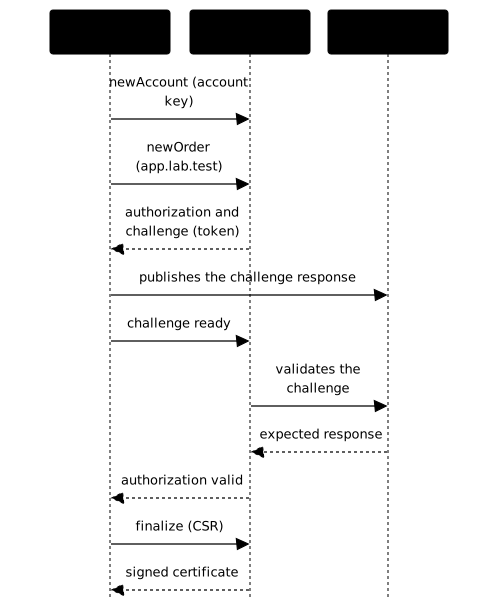
Each step has a specific role:
| Step | What happens | What it guarantees |
|---|---|---|
| Account | The client generates an account key pair and registers it (--accept-tos, contact email) | Later requests are signed by this account |
| Order | The client lists the requested names | The authority knows what to validate |
| Authorization and challenge | The authority offers a test with a unique token | The proof cannot be replayed |
| Validation | The authority queries the server itself | Only the party controlling the name succeeds |
| Finalization | The client sends a CSR (Certificate Signing Request) containing the future certificate's public key | The certificate's private key never leaves the client |
| Issuance | The authority signs and the client downloads the certificate | A complete chain is ready to serve |
The certificate's private key is generated on the client side. The authority never sees it; it only signs the public key in the CSR.
Which challenge should you choose: HTTP-01, TLS-ALPN-01 or DNS-01?
HTTP-01 is the default when port 80 is reachable from the Internet;
TLS-ALPN-01 works when only port 443 is reachable; as of 2026-10-18, DNS-01
is the only challenge deployed in production by Let's Encrypt that issues a
wildcard certificate and the only one suitable for a machine that is not
publicly exposed. A wildcard certificate (*.example.org) is valid for
all subdomains at one level. The challenge tells the authority how to verify
control of the name, so choose it based on what your machine exposes.
A fourth challenge, dns-persist-01, is being standardized at the IETF. It
replaces the TXT record refreshed for every issuance with a durable
record, and its policy=wildcard option is intended for wildcards.
Let's Encrypt announced it on
2026-02-18, but the
official tracking
thread
states in its latest message (2026-06-25) that it is not deployed in
production while an issue in the draft remains open. Do not plan around it
without checking that thread again.
| Challenge | Required proof | Port or resource | Wildcard | Machine not exposed |
|---|---|---|---|---|
| HTTP-01 | Serve a token at /.well-known/acme-challenge/<token> | 80 (5002 in the Pebble lab) | No | No |
| TLS-ALPN-01 (RFC 8737) | Present a validation certificate during a TLS handshake | 443 | No | No |
| DNS-01 | Publish a TXT record _acme-challenge.<name> | DNS, through its API | Yes | Yes |
Use these decision rules:
- Simplest option: HTTP-01. Port 80 must stay open, even if the whole site
uses HTTPS. Let's Encrypt follows redirects to ports 80 or 443. A
redirect to HTTPS only breaks the challenge if the destination does not
serve the token. The safest option is to serve
/.well-known/acme-challenge/directly, without a redirect. - Port 80 is blocked by a firewall or provider: TLS-ALPN-01 uses port 443. The challenge happens during the TLS handshake, using the ALPN extension that selects a protocol, provided your proxy can answer it.
- A wildcard or an internal server: use DNS-01, because the authority reads DNS instead of connecting to the machine. The trade-off is that the client needs access to your DNS provider's API, so protect its API token as a secret.
The authority validates from multiple network perspectives, not just one. Let's Encrypt has done this in production since February 2020 (multi-perspective validation, announcement), and Pebble reproduces it in its log. Geographic filtering or IP-based blocking at the firewall can therefore make validation fail.
For challenge configuration in Traefik, see Traefik and automatic HTTPS with ACME. For the Kubernetes equivalent, see cert-manager (in French).
Why test in staging, and what are rate limits?
Let's Encrypt provides a staging environment, separate from production, so you can practice without using production rate limits. Its certificates come from an authority browsers do not trust. Use them to test whether the challenge works, not to serve real visitors.
Let's Encrypt documents two ACME directories. Staging is at
https://acme-staging-v02.api.letsencrypt.org/directory; production is at
https://acme-v02.api.letsencrypt.org/directory. To switch between them,
change only the directory URL in your client.
Rate limits cap the number of certificates, orders or validation failures allowed within a period. They protect the authority from abuse, but can also block a script that loops on a configuration error. Their values can change: check the official Let's Encrypt Rate Limits page instead of relying on a number copied into an article. The rule is always the same: validate in staging, switch to production once the challenge works, and keep the certificate rather than requesting it again.
Why are certificates moving to 45 days, and what is ARI?
Let's Encrypt is shortening certificate lifetimes from 90 to 45 days in stages, making automated renewal essential. Let's Encrypt (ISRG) announced the schedule in its December 2, 2025 post "Decreasing Certificate Lifetimes to 45 Days", also published on isrg.org as "from 90 to 45":
| Date | Change |
|---|---|
| 2026-05-13 | The optional tlsserver profile issues 45-day certificates |
| 2027-02-10 | The default classic profile moves to 64 days |
| 2028-02-16 | The classic profile moves to 45 days |
A profile is a set of characteristics, including lifetime, selected
by the client when requesting a certificate. As of 2026-10-18, Let's Encrypt
offers three
(profiles page): classic (the
default, currently 90 days), tlsserver (45 days) and shortlived (160
hours, a little over 6 days). Pebble loads two profiles: default (90 days)
and shortlived (518400 seconds, exactly 6 days), which is useful
for observing renewal without waiting.
Why shorten the lifetime? A stolen or misissued certificate can be
revoked (the ACME directory exposes revokeCert, and lego has a
lego certificates revoke subcommand in v5). Revocation only helps if
clients check it, and support varies between software. A stolen certificate
may therefore remain trusted by some clients until it expires; a
shorter lifetime limits the duration of the incident.
Clients have two ways to check a certificate's status. OCSP (Online Certificate Status Protocol) makes them query the authority's server for each certificate. CRLs (Certificate Revocation Lists) are lists of revoked certificates published by the authority and downloaded by the client. Let's Encrypt announced that its OCSP responders would stop on 2025-08-06, in favor of CRLs, in its December 5, 2024 schedule.
The practical consequence matters most: with 45-day certificates, renewing by hand every six weeks is not sustainable, and a certificate renewed by a person will eventually expire in production. Let's Encrypt has also stopped sending expiration emails since 2025-06-04 (June 26, 2025 announcement). Monitor certificate dates yourself. The lesson Traefik observability shows how to measure and alert on them.
Renewal itself is evolving with ARI (ACME Renewal Information, RFC 9773). Instead of renewing on a fixed schedule, the client asks the authority when to renew. If the authority needs to revoke certificates in bulk or prefers a specific window, it can announce one. Without ARI, Let's Encrypt recommends in the same post renewing around two-thirds of the way through the certificate's lifetime, or around day 30 for a 45-day certificate. ARI support depends on the client, so check the documentation for the one you use.
How can you practice without a public domain using Pebble?
Pebble is Let's Encrypt's ACME test authority. It speaks the same protocol as production, but runs locally, validates what you tell it to validate and signs with an ephemeral chain. You can repeat an issuance as often as you like, without rate limits, a public domain or public exposure. Only downloading container images requires network access.
Pebble has three intentional behaviors worth knowing:
- It generates a new root and intermediate on every start. A certificate issued before a restart will no longer verify afterward.
- It rejects 5% of nonces (single-use numbers that protect each request)
to make clients handle
badNonce. An occasional failure is expected, and the client should retry. - Unless
PEBBLE_VA_NOSLEEP=1is set, Pebble adds a random delay before each validation (0 to 15 seconds according to its README) to simulate the latency of a real validation. This is why issuance time varies between runs.
Pebble reproduces ACME locally without issuing browser-trusted certificates or consuming production quotas. It relies on a test service to resolve the scenario's names. The lab provides the access details and required environment; they belong to that isolated setup and are not production settings.
Because Pebble creates a new chain of trust every time it starts, a certificate from an earlier session does not verify against the next session's root. This behavior lets you check that you are using the authority that actually signed the certificate.
Practice: issue a certificate against Pebble
The lab takes you through an ACME issuance from start to finish: start the test authority, obtain a certificate with an ACME client, find the challenge proof in the logs and verify the certificate with OpenSSL. It assesses the certificate and issuance trace, not whether a particular command appears in your configuration.
During the exercise, distinguish the evidence: the authority log shows that it validated the challenge and issued a certificate; certificate inspection confirms its name and issuer; chain verification confirms that it leads to the active test authority. Never use a demonstration root as a trust anchor for a production service.
What should you do when issuance fails?
An ACME failure almost always leaves a trace at the authority. Read Pebble's log (or Let's Encrypt's error) before changing anything. The table lists common symptoms. Some may occur in this lab; others guide production troubleshooting.
| Symptom | Likely cause | Fix |
|---|---|---|
badNonce | Pebble intentionally rejects 5% of nonces | Retry the command; a robust client retries automatically |
| Connection error while validating a challenge | The authority cannot reach the service that presents the proof | Check the listening address, port publication, network connectivity and firewall from the authority's point of view |
| The authority tries a challenge address that does not respond | The challenge service and authority use different address families, or the service is not listening on the expected address | Compare the destination and listening addresses, then check that they are reachable from the validation network |
| Unknown HTTP option | The option does not match the installed client version or subcommand | Check the installed version and the subcommand syntax in the client's help |
openssl verify fails (error 20 ... unable to get local issuer certificate) after a Pebble restart | A new root and intermediate are generated on every start; the old certificate still uses the old chain | Issue a new certificate against the active Pebble session, then verify its chain with that session's trust certificates |
Permission denied when reading certificate storage | The files belong to another account or their permissions are too restrictive | Check ownership and permissions, then access the files with the intended account |
mount ... not a directory when starting the ACME client | The data mount conflicts with a file or path already in use | Choose a data directory separate from the executable and check the types of the source and destination paths |
certificate signed by unknown authority when connecting to the test directory | The client does not trust the authority serving the directory | Check the test authority certificate, its mount and the trust setting expected by the client |
Pool overlaps with other one on this address space during Compose startup | Another Docker network or host interface already uses the requested subnet | Find the conflict among existing networks and interfaces, choose an unused subnet and update all dependent network settings together |
In production, check four causes first: port 80 or 443 is closed; a
redirect captures /.well-known/acme-challenge/ and sends it somewhere
that does not serve the token; a DNS record points to a different
machine; or a CAA record restricts issuance.
A CAA record (Certification Authority Authorization, RFC 8659) is a
DNS record listing the authorities allowed to issue for a domain. It
is optional: if no CAA record exists, any authority may issue. A CAA
record on a parent domain also applies to subdomains that have no record
of their own. Let's Encrypt checks it before each issuance and refuses
when the CAA record does not name it. The reported error can mention CAA
even when a DNS resolver fails (SERVFAIL, a server-side DNS failure, or a
timeout), even if no CAA record was published
(CAA documentation). This case was not
replayed in this lab.
CAA can also harden issuance: publishing
example.org CAA 0 issue "letsencrypt.org" prevents any other authority
from issuing for the domain. Two parameters (RFC 8657) further restrict
issuance: accounturi requires your ACME account, identified by the
account URL assigned by the authority rather than by its email address, and
validationmethods limits the accepted challenges.
Key points
- ACME automates name validation and issuance: account, order, authorization, challenge and finalization.
- The authority validates the proof from multiple network perspectives; the certificate's private key never leaves the client.
- HTTP-01 (port 80) is the default, TLS-ALPN-01 (port 443) works when port 80 is closed, and in Let's Encrypt production DNS-01 is currently the only challenge for wildcards and machines that are not publicly exposed.
- Practice in staging and check rate limits on the official Let's Encrypt page.
- Let's Encrypt certificates are moving to 45 days. Automate renewal; ARI (RFC 9773) lets the authority indicate the right time.
- Revocation (OCSP and CRLs) works inconsistently, and Let's Encrypt no longer sends expiration emails: monitor dates yourself.
- A CAA record can block issuance or restrict it to an authority, account and challenge.
- Pebble issues test certificates with a new chain on every start;
openssl verifychecks against the current root and intermediate.
Knowledge check
The quiz covers the ACME issuance process, challenges, certificate lifetimes and verification.
Knowledge check
Check what you have learned with this interactive quiz
How it works
- The timer starts when you click Start
- Multiple choice, true/false and short answer questions
- You can move between questions
- Detailed results are shown at the end
Starts the quiz and the timer
Review
(0/0)Score by domain
A domain groups several guides and gets several questions, so its score is more reliable than a per-topic score, which often rests on a single question.
Summary
Strengths
No topic passed at 80% on at least two questions yet.
Weak areas
No topic below the pass mark.
Recommended next
Hints before you try again?
Continue the course: Make an application work behind an entry point
A new full quiz with random questions
Work again only on the questions you missed