
A well-set load limit refuses abuse and lets legitimate users through; a badly set one does the opposite. This lesson teaches the four families of Nginx limits, the rate (limit_req), the simultaneous connections (limit_conn), the request size (client_max_body_size) and the timeouts granted to a client, then the point that decides everything: the key that groups callers. It is aimed at someone who already publishes an API behind Nginx. It does not cover the protection of the administration area and of routes, which is the subject of the lesson Protect and observe Nginx.
What you will learn
The lesson goes from the simple limit to its main pitfall, the grouping key.
- Set a rate limit with a zone, a burst (the number of excess requests that Nginx tolerates) and a readable refusal code.
- Limit simultaneous connections and say what the counter really counts.
- Bound the body size and the timeouts granted to a client.
- Choose a grouping key that the caller cannot forge.
- Prove that a refusal results from a reproducible overrun.
Prerequisites
The lesson assumes you know how to publish an application behind Nginx and read an HTTP status code.
- Publishing an application with
proxy_pass: Publish an application with Nginx. - HTTP vocabulary (method, header, status code): Read HTTP before configuring a proxy.
- Validating and reloading a configuration: Install Nginx.
- An account with
sudoon a Debian 13 machine.
What should you limit, and how do you choose values?
A limit is chosen from measured legitimate traffic, never from a figure found online: too low, it becomes an outage you inflict on yourself. Four families of limits exist in Nginx, and each answers a different threat.
| Family | Main directives | What it contains |
|---|---|---|
| Request rate | limit_req_zone, limit_req | A client that sends too many requests per second |
| Simultaneous connections | limit_conn_zone, limit_conn | A client that opens too many connections at once |
| Size | client_max_body_size | An oversized request body |
| Timeouts | client_body_timeout, client_header_timeout | A client that sends very slowly |
The table reads in columns: the last one says what each family protects against. They combine: a slow client that keeps a thousand connections open may exceed no rate, yet it exhausts the connections.
Before setting a value, measure. The access logs give the number of requests per client and per second in normal use; the chosen value sits above the observed legitimate peak, with a margin. Nginx even allows testing without refusing: the limit_req_dry_run on; directive (available since version 1.17.1) counts overruns in the zone without limiting anyone: you set the limit in observation mode, then apply it for real once the value is judged safe.
How do you limit the rate with limit_req?
limit_req_zone declares a memory zone, a key and a rate; limit_req applies the zone to a location. The zone is the space shared between workers where Nginx keeps the state of each key. The rate is expressed in requests per second (r/s) or per minute (r/m), and the key decides who is counted together. The lesson Protect and observe Nginx shows the minimal case; here, we size the limit and choose its key.
http {    limit_req_zone $binary_remote_addr zone=api_public:10m rate=5r/s;    limit_req_zone $binary_remote_addr zone=api_admin:10m rate=1r/s;
    server {        listen 80;        server_name api.lab.test;
        location /public {            limit_req zone=api_public burst=10 nodelay;            limit_req_status 429;            proxy_pass http://127.0.0.1:18098;        }
        location /admin {            limit_req zone=api_admin burst=3 nodelay;            limit_req_status 429;            proxy_pass http://127.0.0.1:18098;        }    }}
Two points can be read in this example. Each route has its own zone: the /admin counter shares nothing with the /public one, so hammering one does not close the other. The values differ too: an administration route receives less legitimate traffic and deserves a stricter limit.
The burst (burst) is the queue that Nginx accepts above the rate. Without it, Nginx refuses any request that arrives before the rate interval has elapsed: at 5 r/s, a second request within 200 ms is refused, which is unreasonable for a page that loads several resources at once. With burst=10, up to ten excess requests are admitted. Without nodelay, they are delayed to respect the rate; with nodelay, they go through immediately and take places in the queue, which free up at the pace of the rate.
The refusal code matters as much as the value. By default, limit_req answers 503, which reads as "service unavailable": a well-behaved client believes in an outage and retries harder. limit_req_status 429; returns 429 (Too Many Requests), the code intended to ask the client to slow down. A neighboring directive sets the severity written to the log, limit_req_log_level.
That leaves the zone size. The $binary_remote_addr variable is the client address in compact form, 4 bytes in IPv4 and 16 in IPv6, which keeps the key small. According to the Nginx documentation, the state of one key takes 64 bytes on a 32-bit platform and 128 bytes on 64-bit: one megabyte holds about sixteen thousand states of 64 bytes, or about eight thousand states of 128 bytes, the case of a current machine. With 10m, the zone therefore holds in the order of eighty thousand addresses on 64-bit. If it fills up, Nginx removes the oldest states; if it still has no room, it refuses the request: an undersized zone refuses legitimate traffic.
How do you limit simultaneous connections with limit_conn?
limit_conn caps the number of connections open at the same time for a key, whereas limit_req caps a rate. The two do not measure the same thing: a client that downloads heavy files in parallel sends few requests per second, but occupies many connections for a long time.
http {    limit_conn_zone $binary_remote_addr zone=connexions:10m;
    server {        location /telechargements/ {            limit_conn connexions 4;            limit_conn_status 429;            limit_rate 2m;        }    }}
Here, an address cannot exceed four simultaneous connections to /telechargements/, and limit_rate 2m caps the rate of each connection at two megabytes per second. A client's bandwidth ceiling is therefore the product of the two: four times two megabytes, that is eight per second.
The scope of the counter is that of the zone: a zone is shared by all the location blocks that name it, and separates the keys. Only connections whose request header has been entirely read and which are being processed are counted; in HTTP/2 and HTTP/3, each simultaneous request counts as one connection. As with limit_req, the default refusal code is 503 and limit_conn_status 429; changes it.
Which key should you choose to group callers?
The key is the choice that decides whether the limit protects or harms: grouping by IP address penalizes all users behind a NAT, and grouping by a header that the caller chooses limits no one. A NAT (Network Address Translation) makes many users share a single public address, for example all the workstations of a company. A per-address limit there refuses everyone because of one user's abuse.
The opposite reflex is worse. If the key comes from a header that the caller writes, for example X-Forwarded-For, it only has to change its value on every request to never be counted twice. The following diagram summarizes the trade-off: first follow the question of the trust granted to the direct caller, then that of the shared address.
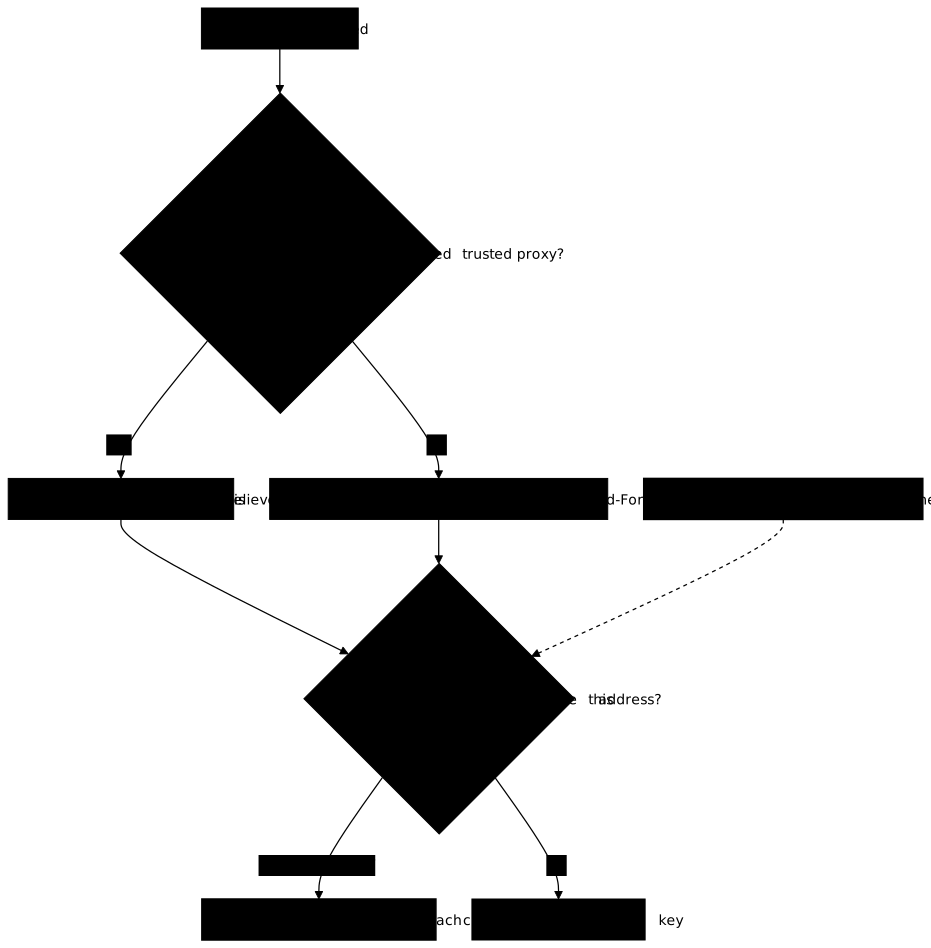
The first point is handled with the realip module. set_real_ip_from lists the addresses whose forwarded header Nginx believes; any other caller is treated as direct. Declaring set_real_ip_from 0.0.0.0/0; amounts to believing anyone: the header becomes forgeable, and every per-address limit is bypassed.
set_real_ip_from 127.0.0.1;real_ip_header X-Forwarded-For;With these two lines, only an upstream proxy that connects from 127.0.0.1 has its X-Forwarded-For believed; for any other caller, $remote_addr remains the connection address, which the caller cannot falsify. The lesson Protect and observe Nginx points out the same pitfall for its own limit (behind a relay, $binary_remote_addr designates the relay) and covers access control for the administration area; the realip setting that solves it is decided here.
The second point, the NAT, is handled with an identifier specific to each client, for example an API key. An API key header is only reliable if it is verified: otherwise the caller invents a new key on every request. The technique is to keep as a key only the known values, and to fall back on the address for all the others.
map $http_x_cle_api $cle_limite {    default        $binary_remote_addr;    partenaire-1   partenaire-1;    partenaire-2   partenaire-2;}
limit_req_zone $cle_limite zone=api_public:10m rate=5r/s;
An unknown key therefore gets no advantage: it is counted by address, like an anonymous visitor. A known key is counted on its own, and does not penalize the other users who share the same address. The limit is verified from both sides: a caller who forges its address does not escape the limit, and another key does not inherit the penalty.
How do you bound the body size and a client's timeouts?
client_max_body_size caps the size of a request body and returns 413 (request entity too large) beyond it; the default value is 1 MB. It is declared at the http, server or location level, so more strictly on a route that only receives small forms than on a file upload route. Setting client_max_body_size 0; removes the limit: that is a choice to justify, not a convenience.
server {    client_max_body_size 1m;    client_body_timeout   10s;    client_header_timeout 10s;
    location /depot/ {        client_max_body_size 50m;        proxy_pass http://127.0.0.1:18098;    }}
The timeouts complement the size, but they do not measure the same thing. client_header_timeout runs over the reception of the entire header: if the client has not finished it in time, the request is cut with 408 (request timeout), even if it sends one byte from time to time. client_body_timeout runs only between two successive reads of the body: it cuts a client that goes silent, not a client that sends slowly but without a pause. Both default to 60 seconds.
This difference dictates the sizing. A client that trickles out its header occupies a connection indefinitely if nothing bounds it: this is the so-called "slow" attack, which no rate limit catches since the rate is negligible, and it is client_header_timeout that cuts it. For the body, a 50 MB upload from a poorly covered mobile exceeds ten seconds without being abusive: a client_body_timeout of 10 seconds lets it through as long as each chunk arrives within that delay. The downside is that a body trickled at a steady pace is not cut by this timeout: limit_conn then bounds the number of connections that this client can occupy. Choose both values from legitimate behavior, like the others.
What happens when the limit is reached?
At saturation, users see either a refusal or a delay, and the choice of burst with or without nodelay decides which. Three situations occur, and the value of a limit is judged by what each one makes a normal user live through.
- Under the rate: everything goes through, without delay.
- Within the burst: with
nodelay, requests go through right away; without it, they are delayed and latency increases. - Beyond the burst: the refusal,
429if you configuredlimit_req_status.
A limit also serves availability: by refusing an abusive client early, it protects the backend, which keeps capacity for the others. But a limit that is too low turns a legitimate spike, a launch or a page that loads twenty resources, into a visible error. Replay the measurement of normal traffic after any change of value.
It remains to prove that a 429 is real. The reliable test is a reproducible burst sent by a client, which counts the codes obtained: an overrun must produce 429s, and normal traffic none. For an API, a 429 response can come with a Retry-After header, which Nginx does not add itself and which you set with add_header Retry-After 1 always; if your clients read it; without always, add_header ignores error responses such as 429.
for i in $(seq 1 60); do curl -s -o /dev/null -w '%{http_code}\n' "http://${IP_EDGE}/public"done | sort | uniq -cThe command sends sixty requests in a row to the address of the Nginx machine (IP_EDGE, to be filled in) and prints, for each status code, the number of responses. An active limit is recognized by the presence of 429; a 503 code in its place means limit_req_status is not set. Repeat the loop by adding -H "X-Forwarded-For: 203.0.113.$i" to curl, so that the header changes on every turn: if the 429s disappear, Nginx believes an address that the caller chooses.
Practice: limit abuse while keeping legitimate clients
The lab publishes an API behind Nginx with limits already set, and set wrongly: a rate that is too low, a single zone for all the routes, and a set_real_ip_from that believes any caller. A policy, written in a file on the machine, gives the rate and burst per route, the body size and the refusal code. You apply it with a key that cannot be forged.
Validation sends real bursts: fifteen legitimate requests in a row must go through, an abuse must receive a 429, an X-Forwarded-For that changes on every request does not escape the limit, another API key is not penalized, and hammering /admin does not close /public. It therefore covers limit_req, the refusal code and the grouping key. It measures neither limit_conn, nor client_max_body_size, nor the timeouts: these three topics are taught above from the Nginx documentation, and nothing in this lab proves that your values are suitable.
Key points
- Limits are set from measured legitimate traffic: a limit that is too low is an outage you inflict on yourself.
limit_req_zonedeclares zone, key and rate,limit_reqapplies it; one zone per route prevents a penalty from spreading.burstadmits a burst above the rate: withnodelayit goes through right away, without it it is delayed.limit_req_status 429makes a refusal readable: the default503reads as an outage and invites retrying harder.limit_conncaps simultaneous connections, not the rate;client_max_body_sizereturns413(1 MB by default,0removes the limit).client_header_timeoutbounds the reception of the entire header;client_body_timeoutonly bounds the wait between two reads of the body, never its total duration.- Grouping by address penalizes all users behind a NAT; grouping by a header chosen by the caller limits no one.
set_real_ip_frommust only list the trusted upstream proxy:0.0.0.0/0makesX-Forwarded-Forforgeable.- A limit is proved by a reproducible burst that counts the codes, from both sides: abuse refused, legitimate client preserved.
Knowledge check
Check that you have grasped the essentials of this guide. The questions cover only what has just been explained here.
Knowledge check
Check what you have learned with this interactive quiz
How it works
- The timer starts when you click Start
- Multiple choice, true/false and short answer questions
- You can move between questions
- Detailed results are shown at the end
Starts the quiz and the timer
Review
(0/0)Score by domain
A domain groups several guides and gets several questions, so its score is more reliable than a per-topic score, which often rests on a single question.
Summary
Strengths
No topic passed at 80% on at least two questions yet.
Weak areas
No topic below the pass mark.
Recommended next
Hints before you try again?
Continue the course: Nginx: publish WebSocket, SSE and gRPC without interruption
A new full quiz with random questions
Work again only on the questions you missed