
Nginx chooses a server from the port and the host name of the request, then a location from its path, and these two choices follow fixed rules that do not depend on the visual order of the blocks. This lesson is for someone who can install Nginx and read its contexts, and who wants to stop guessing which block answers. You will learn to predict the answer before sending the request, to close the door on unknown names with a default server, and to write redirects that keep the host and do not loop.
What you will learn
The lesson follows the order in which Nginx decides: the server, then the location, then the redirect if any.
- Predict the
serverselected fromlistenandserver_name. - Reject unknown host names with a default server that serves nothing.
- Predict the
locationselected among exact, prefix, preferential prefix and regex. - Distinguish an internal rewrite from an external redirect.
- Write a redirect that keeps the host without looping.
- Control the order of included files with
nginx -T.
Prerequisites
The lesson assumes you know how to write a site (a .conf file in /etc/nginx/conf.d/, which the publisher's package on Debian 13 loads through include /etc/nginx/conf.d/*.conf;), validate it with nginx -t and then reload Nginx: writing the file is enough to enable it, with no link or intermediate directory.
- Contexts,
nginx -tandreload: Install Nginx: master, workers and contexts. - The role of the
Hostheader and of SNI in the path of a request: Publish a web service. - 301 and 302 redirects seen from the client side: Read HTTP before configuring a proxy.
How does Nginx choose the server that answers?
Nginx first looks for the server blocks that listen on the address and port of the connection (listen), then compares the Host header of the request to their server_name. The listen filters, the server_name decides between candidates. If no name matches, the request goes to the default server of that address and port pair.
When several server_name values match, Nginx applies this priority order:
| Rank | Form of the server_name | Example |
|---|---|---|
| 1 | Exact name | boutique.lab.test |
| 2 | Wildcard at the start, the longest | *.lab.test |
| 3 | Wildcard at the end, the longest | boutique.* |
| 4 | First regex that matches, in file order | ~^b[a-z]+\.lab\.test$ |
| 5 | The default server | see below |
Without a declared default_server, the default server is the first server read for that listen. That is the main trap of this lesson: if the first block in the file is an administration page, any unknown name (a scanner probe, a forgotten DNS record, a forged request) lands on the administration. A server that answers by default is an open door, not a convenience.
How do you close the door on unknown names?
You explicitly declare a default server that serves nothing: listen 80 default_server; followed by a refusal. This block catches any name that no other server_name claims and answers with an error, so that a site is never reachable by a name you have not authorized.
server { listen 80 default_server; server_name _; return 404;}The name _ has no special power: it is a convention for a name that will never match a real domain. The default role comes from default_server, not from the name. The refusal is a real HTTP response (404, 403 or 421, the latter meaning "Misdirected Request"). Nginx's special value 444 closes the connection without answering anything: it is effective against scanners, but the client receives no code, which complicates diagnosis: curl then prints 000 instead of an HTTP code. The lab of this lesson therefore requires a real HTTP code for an unknown name: a return 444, although valid in production, would fail its test, since curl reads 000 and not a code.
The same default exists in HTTPS, where the certificate is chosen before Host is read, from the SNI (Server Name Indication, the host name the client announces in the TLS handshake). To also refuse TLS handshakes to an unknown name, the default server of listen 443 ssl can carry ssl_reject_handshake on; (available since Nginx 1.19.4), which avoids even presenting a certificate for a name you do not serve.
Check the effect with curl, forcing the Host header to simulate a name, without touching DNS. Replace the address with that of your server:
curl -s -o /dev/null -w '%{http_code}\n' -H 'Host: inconnu.exemple.test' http://127.0.0.1/The command must print the refusal code you chose (000 if you picked 444). If it prints 200, a site answers an unknown name that nobody authorized: the default server is missing or serves content.
How does Nginx choose the location?
Within the selected server, Nginx chooses the location in three steps: the exact one, then the best prefix, then the regexes, and the order of writing only matters to decide between regexes. This is a classic source of prediction errors: you read the file from top to bottom whereas Nginx does not.
There are five forms of location. Remember their modifier:
| Form | Meaning | Matching |
|---|---|---|
location = /x | Path exactly equal to /x | exact |
location /x | Prefix: any path that starts with /x | by prefix |
location ^~ /x | Preferential prefix: if it wins, regexes are not tried | by prefix |
location ~ regex | Regular expression, case-sensitive | regex |
location ~* regex | Regular expression, case-insensitive | regex |
The algorithm reads on the following diagram, from top to bottom. The first choice is the server; then an exact location beats everything; otherwise Nginx keeps the longest prefix, and if it carries ^~ it wins immediately; otherwise the regexes are tried in file order and the first one that matches wins; with no matching regex, the retained prefix wins.
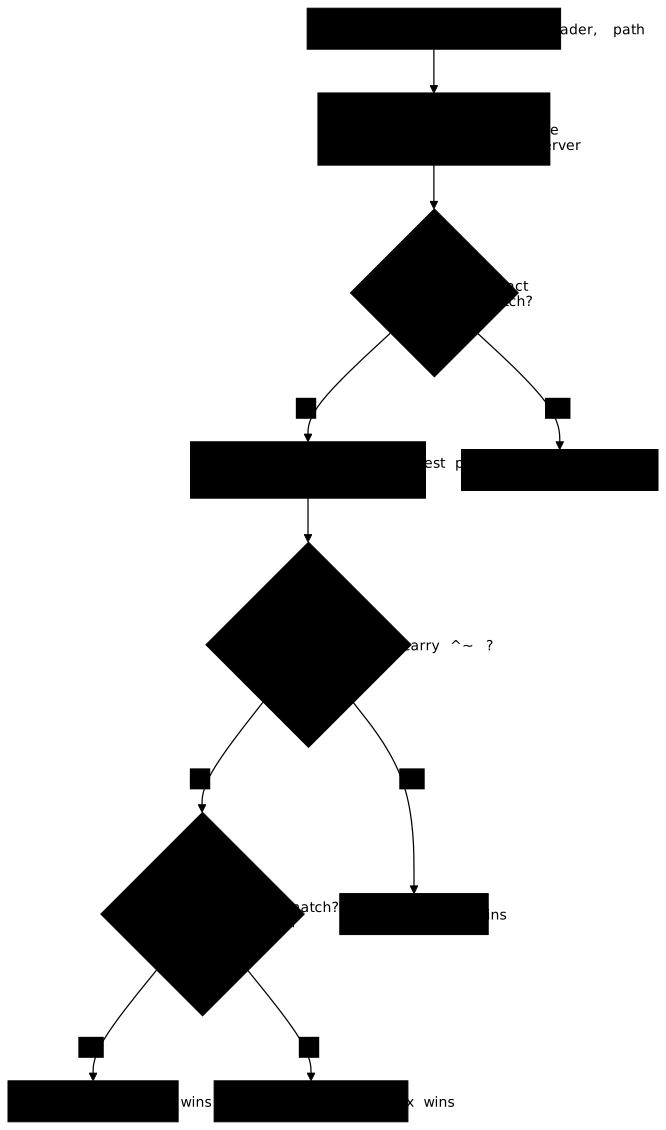
Here is an example configuration, deliberately different from the lab's. Each location answers with its own name, which lets you see which one was chosen, without consulting the logs:
server {    listen 80;    server_name boutique.lab.test;
    location = /panier               { return 200 "exact-panier\n"; }    location /produits               { return 200 "prefixe-produits\n"; }    location /produits/images/       { return 200 "prefixe-images\n"; }    location ^~ /medias/             { return 200 "prefere-medias\n"; }    location ~ \.(png|jpg)$          { return 200 "regex-images\n"; }    location /                       { return 200 "racine\n"; }}
Now trace six URLs before sending them, by applying the algorithm. The table gives the reasoning; the goal is for you to reach the same prediction without reading it.
| URL | Reasoning | Predicted handler |
|---|---|---|
/panier | Exact: it beats everything | exact-panier |
/panier/ | The trailing / makes the exact one fail; only / matches | racine |
/produits/liste | Best prefix /produits, no regex matches | prefixe-produits |
/produits/images/logo.png | Best prefix /produits/images/, without ^~: the .png regex takes over | regex-images |
/medias/logo.png | Best prefix /medias/ with ^~: regexes are ignored | prefere-medias |
/contact | Only the prefix / matches | racine |
Then compare with the real response using curl -s -H 'Host: boutique.lab.test' http://127.0.0.1/produits/images/logo.png. The fourth case is the one that surprises: the prefix is more precise, but a regex takes over because that prefix is not preferential. When you want a prefix to protect its files from regexes, you declare it with ^~. A correct prediction on a faulty configuration proves nothing, and a correct configuration you cannot predict proves nothing either: that is what the lab measures.
What does Nginx do with the URL before comparing it to the locations?
Nginx compares the location blocks to the normalized path, without the query string. Before choosing, it decodes the %XX sequences, resolves the . and .. segments and, by default, merges repeated slashes (merge_slashes on). Finally it ignores everything after the ?: /produits?page=2 is compared as /produits.
Two consequences can be measured. First, /produits//liste and /produits/%6Ciste are compared as /produits/liste: a filtering rule written on the raw text of the URL is easily bypassed, whereas a rule written on the normalized path is not. Second, the $uri variable holds the normalized path and $request_uri the raw URL with its query string. For a selection or security rule, you use $uri; to copy the URL as the client sent it into a redirect, you use $request_uri.
How does a map avoid a chain of conditions?
The map directive associates an input value with an output variable, in a table read once, and replaces a pile of if. It is declared in the http context, outside any server, and is evaluated only when the variable is used. It is the right tool for a list of old addresses and their replacements.
map $uri $nouvelle_adresse {    default            "";    /ancien/tarifs     /tarifs;    /ancien/contact    /contact;}
server {    listen 80;    server_name boutique.lab.test;
    if ($nouvelle_adresse) {        return 301 $scheme://$host$nouvelle_adresse;    }}
The default value covers any input absent from the table: here an empty string, which if reads as false. The if contains only a return, which is its safe use: combined with other directives in a location, it has a surprising behavior that Nginx's documentation advises against, and that is one more reason to prefer map.
Internal rewrite or external redirect: which should you choose?
An external redirect sends a 3xx code to the client, which makes a new request to the new address; an internal rewrite changes the path inside Nginx, without the client knowing. The first changes the URL shown by the browser, the second does not.
| External redirect | Internal rewrite | |
|---|---|---|
| Directive | return 301 URL; | rewrite regex replacement last; |
| The client sees | A 3xx code and a new URL | A 200 response under the original URL |
| Number of requests | Two | One |
| Use | Content has moved | A public path covers an internal organization |
Prefer return to rewrite for a simple redirect: the rule is readable and there is no regex to reread. In rewrite, the last flag restarts the choice of the location with the rewritten path, which explains why a rewrite can loop. The risk common to both forms is the loop. An external redirect that targets an address covered by the location it starts from calls itself again:
# ❌ loop: /boutique/accueil starts with /boutique and falls back herelocation /boutique { return 301 /boutique/accueil;}The browser ends up displaying "too many redirects"; curl stops at the limit you give it. An internal rewrite that loops is stopped by Nginx after ten passes, with a 500 error and a message "rewrite or internal redirection cycle" in the error log. For the same need, an exact location (location = /boutique) avoids the loop, since it does not capture /boutique/accueil.
The second flaw is losing the host. A redirect that writes a name or an address hard-coded sends the client to another site, for example 127.0.0.1 or the backend's name. Write $scheme://$host to keep the authority of the request. To measure the number of hops and the final destination, ask curl to follow redirects with a limit:
curl -s -o /dev/null -L --max-redirs 5 \ -w '%{num_redirects} hop(s), final URL: %{url_effective}\n' \ -H 'Host: boutique.lab.test' http://127.0.0.1/ancien/tarifsA single hop to the expected address, on the right host, is the correct result. Two hops or more signal a chain to simplify, and a count that reaches the fixed limit (here 5) betrays a loop.
In what order does Nginx read the included files?
The reading order is not the one you see in your editor: an include with a wildcard replaces the line with several files, in an order that Nginx's documentation does not guarantee. It may look like alphabetical order, but it depends on how the system lists the directory: do not infer it from file names. For the "first server" of a listen, this is therefore the first one read after the include lines are expanded.
Two dangers follow. The conf.d/*.conf wildcard loads all the files of the directory whose name ends in .conf: a backup named boutique.conf.bak is not read, but a copy named boutique-ancien.conf is, and it redefines the same server_name. Nginx emits a "conflicting server name" warning (of the form conflicting server name "boutique.lab.test" on 0.0.0.0:80, ignored): it is a simple warning, nginx -t succeeds anyway, and the duplicate declaration is ignored, which the reader does not notice if nobody reads the test output. Then, adding or renaming a file, for example with a 00- or zz- prefix, can change the rank of the server in the reading order. To settle it, do not guess: sudo nginx -T prints the complete configuration in the exact reading order, each file preceded by its path.
sudo nginx -T | grep -nE '^# configuration file|server_name|default_server'This command sums up in a few lines which file declares which name and which default_server. It is the first reflex when a request does not arrive where you expected.
Practice
The lab gives you a configuration that works but whose rules overlap: a prefix captures what a regex was meant to handle, a redirect loops, and no server is declared as default. You repair the selection, close the door on unknown names, fix the redirect, then write your predictions in a file. The validation queries the server with real requests: it checks the handler actually chosen for each URL of a matrix, the refusal of an unknown name, the number of hops of the redirect and the preservation of the host, then compares your prediction with what the server does. Predicting correctly on a wrong configuration does not pass.
Key points
- Nginx chooses the server by
listen, thenserver_name: exact, wildcard at the start, wildcard at the end, regex, then default. - Without
default_server, the first server read receives any unknown name: declare a default that serves nothing and answers with a refusal. - The location is chosen in three steps: exact
=, best prefix (which wins alone with^~), then the first regex in file order. - A more precise prefix does not protect from the regex: only
^~prevents a regex from taking over. - Nginx compares the normalized path without the query string;
$uriis normalized,$request_uriis raw. mapreplaces a pile of conditions with a table read once.- An external redirect (
return 301) costs two requests and changes the URL; an internal rewrite costs only one. In both cases, do not target an address covered by the startinglocation. nginx -Tgives the real reading order of the files: it is what settles it, not the editor.
Knowledge check
Check that you have grasped the essentials of this guide. The questions cover only what has just been explained here.
Knowledge check
Check what you have learned with this interactive quiz
How it works
- The timer starts when you click Start
- Multiple choice, true/false and short answer questions
- You can move between questions
- Detailed results are shown at the end
Starts the quiz and the timer
Review
(0/0)Score by domain
A domain groups several guides and gets several questions, so its score is more reliable than a per-topic score, which often rests on a single question.
Summary
Strengths
No topic passed at 80% on at least two questions yet.
Weak areas
No topic below the pass mark.
Recommended next
Hints before you try again?
Continue the course: Nginx: serve files and a static application
A new full quiz with random questions
Work again only on the questions you missed