
To renew a certificate under HAProxy without an outage, you obtain each certificate from an external ACME client, assemble key and chain (what the lesson calls the material) into a PEM, then load it through the admin socket: set ssl cert drops the material, commit ssl cert checks it before putting it into service.
This lesson is for someone who already knows how to write an HAProxy frontend and backend. It teaches the full cycle around lego, an ACME client independent of HAProxy: the challenge path, one certificate per name served by SNI, the renewal script and the way to prove its effect.
What you will learn
The lesson follows the cycle in the order it is built, from port 80 to recovery after a restart.
- Route the HTTP-01 challenge to the ACME client's challenge server.
- Obtain one certificate per name and assemble the PEM that HAProxy expects.
- Serve two names by SNI and measure the selection with a counter-test.
- Load a certificate live and observe that broken material is refused.
- Write a renewal script that leaks no key.
Prerequisites
This lesson assumes you master HAProxy's basic configuration and know what an ACME challenge is. The facts were established on HAProxy 3.4.7 and lego 5.5.2, the lab's versions.
- The
global,defaults,frontendandbackendsections, and validation withhaproxy -c: Install HAProxy and read its configuration sections. - The evaluation order of rules and ACLs: Route by names and paths with ACLs and maps.
- The ACME protocol, its challenges and ARI: Automatic certificates.
- The admin socket and
socat: Change HAProxy's state live.
Does this lesson cover HAProxy's built-in ACME client?
No: it deals with an external ACME client, not with HAProxy's acme section. The lesson Publish HTTPS with HAProxy 3.4 describes the built-in client, which obtains and renews certificates itself but remains experimental: it requires expose-experimental-directives. It also presents crt-store, the choice of certificate by SNI and the reload. This page does not repeat them.
Its scope is different. The program that talks to the authority (the certificate authority that issues certificates) is lego, outside HAProxy and independent of its version; HAProxy only serves the files it is handed. Three subjects belong to this page: the cycle of a certificate (challenge, issuance, assembly, loading, recovery), the selection by SNI with one certificate per name and a crt-list, and the verified loading through the socket. The principle of an external client is that of Nginx TLS; only the loading is specific to HAProxy.
How does the HTTP-01 challenge reach the ACME client?
The HTTP-01 challenge plays out in clear on port 80, before the certificate exists: a rule must send /.well-known/acme-challenge/ to the client's challenge server, without going through the redirect to HTTPS. The lego client opens its challenge server on 127.0.0.1:5002. The authority queries port 80; without a route, the request reaches the application, which does not know the token, and issuance fails. In the lab, the port is already published; what is missing is the route, an ACL and a dedicated backend.
frontend public    bind :80    acl defi path_beg /.well-known/acme-challenge/    use_backend acme if defi    default_backend applicatif
backend acme    server defi 127.0.0.1:5002
The trap appears with the redirect. HAProxy plays all the http-request rules before looking at a single use_backend: an http-request redirect scheme https therefore applies to the challenge, even if the use_backend line is written above. The redirect carries the condition unless defi. The symptom is misleading: the client reports a 308 or a TLS error on a port 443 that does not exist yet, and you blame the authority.
In what order should you build the configuration?
You build in three steps: the HTTP frontend with the challenge route, then the certificates, and only then the HTTPS frontend. HAProxy refuses to start on a crt-list (the list of certificates to serve) whose files do not exist, and the service then goes down entirely, port 80 included. Yet it is port 80 that serves the challenge: writing the final configuration right away creates a perfect deadlock, no certificate without a challenge, no challenge without a startup.
Between each step, validate with haproxy -c -f /etc/haproxy/haproxy.cfg, then apply with a reload. After the first step, a curl on the challenge path must reach the client's challenge server, not the application.
Why one certificate per name rather than a single one with two SANs?
A single certificate carrying both names as SANs would pass strict validation on both sides and make the selection by SNI impossible to measure: HAProxy would present the same file whatever name is requested. The SAN (Subject Alternative Name) is the list of names a certificate covers. The SNI (Server Name Indication) is the name the client announces at the start of the connection, and that HAProxy compares with this list to choose the certificate to present.
The acceptance criteria therefore ask for one certificate per name, alpha.pub.lab.test and beta.pub.lab.test, that is one call to lego per name: a single call with two -d options would produce a single certificate with two names, which the acceptance criteria refuse. The calls are sequential, because the challenge server only listens on one port. The HTTPS frontend references them through a crt-list, a file that lists one certificate per line.
frontend securise bind :443 ssl crt-list /etc/haproxy/certs/liste.crt default_backend applicatif/etc/haproxy/certs/alpha.pub.lab.test.pem/etc/haproxy/certs/beta.pub.lab.test.pemThe list says which files are served: a file forgotten in a directory does not go into service on its own, which does happen with crt pointed at a directory. The lab's counter-test then presents the certificate of one name and has it validated against the other: this must fail.
What format does HAProxy want its material in, and who can read it?
HAProxy expects a single PEM file per certificate, which concatenates the private key and the chain; lego writes separate files, so the assembly is up to you, and this is where the permissions are decided. The client drops <name>.key and <name>.crt under acme/certificates/. The .crt already contains the chain: the authority issues through an intermediate and lego attaches it by default, so adding a second issuer file would duplicate a link.
umask 077cat acme/certificates/alpha.pub.lab.test.key \ acme/certificates/alpha.pub.lab.test.crt \ > /etc/haproxy/certs/alpha.pub.lab.test.pemA PEM reduced to the leaf makes verification fail on "unable to get local issuer certificate", a message that blames the root when the chain is missing; a browser often hides the defect by completing the chain itself, which openssl does not do. As for permissions, the validation requires that any file carrying a private key be unreadable by others. The ACME account key, stored by lego under its working directory, is worth as much: whoever holds it requests certificates in the account's name. Close that directory to root, and set the PEMs to 0640 root:root; HAProxy reads them as root before dropping its privileges.
How do you load a certificate without a restart, with a check before service?
The admin socket loads a certificate in two steps, set ssl cert then commit ssl cert: HAProxy validates the material at the commit, and if it is broken it refuses and keeps the previous certificate. This is the difference between a verified loading and a plain loading. A systemctl restart also loads the new material, but it cuts the connections in progress and leaves the service down if the material is bad.
The diagram below shows a full round for one name. Follow it from top to bottom: the script launches lego, the authority comes to fetch the token on port 80, which HAProxy routes to the challenge server, then the script assembles the PEM and loads it with two commands.
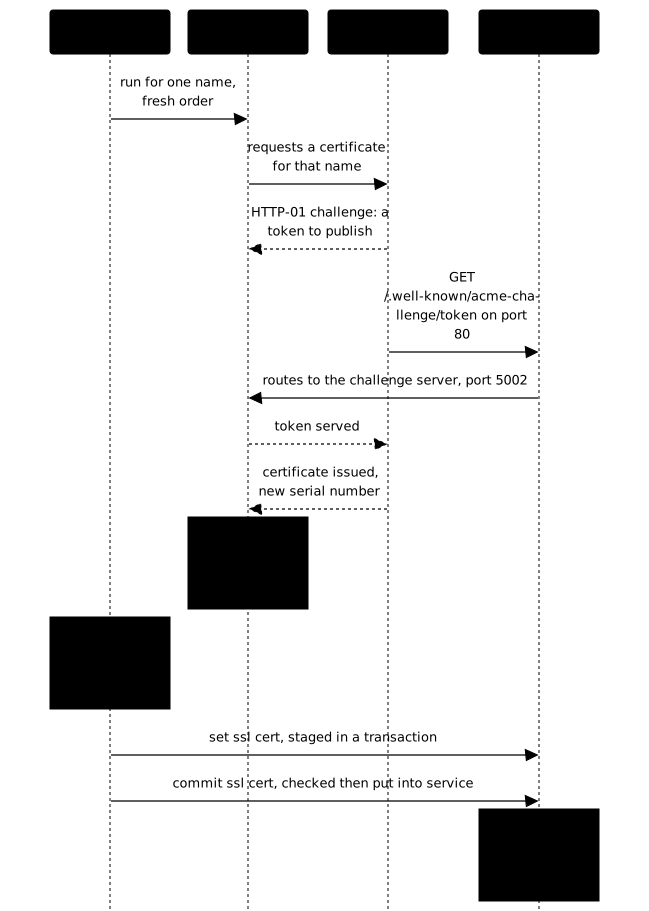
The drop goes through the standard input of socat, never through an argument: a command line is visible in ps to everyone, for as long as it lasts. The << syntax of the socket takes a block ended by an empty line.
{    printf 'set ssl cert %s <<\n' "$pem"    cat "$temporaire"    printf '\n\n'} | socat -t5 stdio /run/haproxy/admin.sock
echo "commit ssl cert $pem" | socat -t5 stdio /run/haproxy/admin.sock
Three gestures remain. Read the socket's response and look in it for error or unable to, as the lab's solution does. Send abort ssl cert with the path to cancel a refused transaction. Finally, rewrite the file on disk with the accepted material; without this, the in-memory certificate and the one on disk diverge, and a restart silently rolls back.
Why does the authority sometimes refuse the renewal?
Because lego cites the previous certificate in the renewal order (this is ARI, RFC 9773), and the authority refuses if the requesting account is not the one that obtained that certificate. This lab failed on this error during a replay on 26 October 2026: 403 unauthorized :: requester account did not request the certificate being replaced by this order. The message blames the certificate when the cause is the account.
ARI (ACME Renewal Information) lets the client ask the authority when to renew, and attaches to the order a replaces field that designates the replaced certificate. A different account is then enough to get the order refused, and it appears as soon as the client's accounts directory is recreated. In the lab, the cause is at the other end: the test authority keeps its accounts in memory, so that after its restart the account kept locally no longer matches anything on its side. The two halves of the pair must survive together.
The solution avoids the refusal with --ari-disable: a new order replaces nothing, it does not have to cite what it replaces. The script also keeps the e-mail and the directory (the dir URL that lists the authority's endpoints) identical on every call. Two other flags come from lab measurements with lego v5.5.2:
--renew-force: in lego 5,rundoes not request a new certificate when it finds one, it behaves likerenew. The client said so: "Skip renewal: The certificate expires at 15:30:11Z, the renewal can be performed in 1m15s". It then skips the renewal while returning a success.--no-random-sleep: lego spreads renewals with a random delay, which exceeds the life of a five-minute certificate.
These choices hold for a test authority. In production, you do not force and you keep the delay: renew only bothers the authority when the expiry approaches, and forcing on every run would exhaust its rate limits. Another peculiarity of lego 5: the command comes first, its options after. --server placed before run makes the client exit with "flag provided but not defined" without contacting the authority.
How do you write the renewal script without leaking a key?
The renouveler script redoes the cycle for each name and never prints what it writes: no set -x, no PEM as an argument, no key in the output. The validation runs it, then reads the logs. A key in a log is a published key: the log is collected, archived, copied into an incident report, and rotation does not catch up with it.
#!/usr/bin/env bashset -euo pipefailumask 077trap 'echo "echec a la ligne $LINENO : $BASH_COMMAND" >&2' ERR
TRAVAIL=/opt/pub-haproxy-tls-stable
for nom in alpha.pub.lab.test beta.pub.lab.test; do    "$TRAVAIL/lego" run --server https://pebble:14000/dir \        --email ops@pub.lab.test --accept-tos \        --renew-force --no-random-sleep --ari-disable \        --http --http.address :5002 -d "$nom" \        > "$TRAVAIL/dernier-ordre-$nom.log" 2>&1    # Next: assemble the PEM, set ssl cert, commit ssl cert, install.done
The trap ... ERR names the failing line: under set -e, the first command that fails ends the script with an exit code of 1 and no message. Lego's output goes to a file, the end of which the script must print before exiting on failure. To observe that the order produced new material, compare the .crt serial number before and after. Finally, two roots exist: the client trusts pebble.minica.pem to talk to the API, and pebble-root.pem is used to verify the issued certificates. Mixing them up reads as a network failure when it is a refusal of trust.
How do you prove the cycle holds?
You prove it by what the service presents, not by what the disk contains: an openssl s_client handshake with the name as SNI, read before and after the script. The file on disk and the served certificate can differ by a single forgotten loading; only the second counts for a visitor.
echo | openssl s_client -connect 127.0.0.1:443 \ -servername alpha.pub.lab.test 2>/dev/null \ | openssl x509 -noout -serial -enddateThe lab's validation covers four checks, and only those.
- Identity. Each name validates strictly, chain and host name, with the authority's root and without disabling verification, then reaches the application. The counter-test must fail. Critical check.
- Cycle. The validation runs
renouvelerand requires the served serial number to change for both names. It then pushes a deliberately invalid certificate through the socket and requires it to be refused, the previous one remaining served and valid. - Secrets. Any file carrying a private key under the working directory or
/etc/haproxy/certsis unreadable by others, and no key appears in/var/logor in the system journal. Critical check. - Recovery. It reloads HAProxy, replays the identity, reboots the machine, then replays the identity and the renewal. Critical check, last of the series: a cycle that depended on a directory under
/runor on a variable of your session shows up there, and nowhere before.
Practice
The lab starts from an application published in HTTP only: no certificate, no bind ssl, no route for the challenge. A test authority issuing five-minute certificates, the lego client wrapped in an executable and its root are provided, and /opt/pub-haproxy-tls-stable/recette.txt describes names, paths and socket. You serve the two names over HTTPS, each with its certificate, and you deliver the renouveler script. The validation runs it, compares the serial numbers, pushes invalid material, looks for keys in the logs, then reloads and restarts before replaying everything.
Key points
A proven certificate cycle is built in order and proven on the service.
- The ACME client is external; the built-in ACME, experimental, has its own lesson.
- The challenge route comes before any redirect, with
unless defi. - You build HTTP, certificates, then HTTPS: a
crt-listwith missing files prevents HAProxy from starting. - One certificate per name makes the SNI measurable; the counter-test must fail.
- The loading is verified:
set ssl cert,commit ssl cert, and a refusal keeps the certificate in service. - A "requester account" refusal comes from ARI and a different account.
- No key in a log: no
set -x, no PEM as an argument.
Knowledge check
These questions check that you can say who presents which certificate according to the requested name, and what a verified loading protects. A renewal cycle is judged by what it does when it fails, not only when it succeeds.
Knowledge check
Check what you have learned with this interactive quiz
How it works
- The timer starts when you click Start
- Multiple choice, true/false and short answer questions
- You can move between questions
- Detailed results are shown at the end
Starts the quiz and the timer
Review
(0/0)Score by domain
A domain groups several guides and gets several questions, so its score is more reliable than a per-topic score, which often rests on a single question.
Summary
Strengths
No topic passed at 80% on at least two questions yet.
Weak areas
No topic below the pass mark.
Recommended next
Hints before you try again?
Continue the course: Publish HTTPS with HAProxy 3.4: crt-store, SNI and built-in ACME certificates
A new full quiz with random questions
Work again only on the questions you missed