
A Traefik routing rule describes which requests a router answers, and when two rules match the same request, Traefik keeps the one with the highest priority, not the most precise one. This lesson is for anyone who already publishes a service behind Traefik and wants to write safe rules. A router is the object that recognizes a request and hands it to a service; its priority is the number that ranks two routers. The lesson teaches you to choose what a rule tests (host name, path, header, method), to predict which one wins when they overlap, and to prove it with requests. The measurements quoted come from Traefik 3.7.15, the lab version.
What you will learn
The lesson follows the reasoning behind a rule: write it, predict how it is arbitrated, then check it.
- Write a rule that combines host name, path, header and method.
- Tell an exact path from a prefix, and predict how prefixes overflow.
- Predict which router wins between two rules that overlap.
- Restrict a sensitive application to its host name.
- Qualify a service or middleware reference with its provider.
- Prove with a request matrix that a change breaks nothing.
Prerequisites
This lesson starts from Traefik's vocabulary and does not redescribe service discovery or middlewares.
- The model from Traefik: entrypoints, routers, services and middlewares, for the words the lesson reuses.
- Publishing containers with Traefik with Docker and declaring a route in a file with the file provider: the lesson assumes you know both.
- Knowing how to read a YAML file and send a request with
curl.
The Docker and file lessons teach how Traefik discovers a service. This one teaches what comes next: how a rule selects its requests, whichever provider declared it.
What can a routing rule test?
A rule is an expression that Traefik evaluates for every request received: if it is true, the router may take the request. Let us restate the words. A router is the object that recognizes a request and hands it to a service, that is, the list of servers (the backends) that answer it. The rule is the router's condition. Each elementary test it contains is called a matcher, such as Host or PathPrefix.
Here are the matchers this lesson uses, all in the v3 syntax described in the concepts lesson. The examples in the last column were tried on Traefik 3.7.15.
| Matcher | What it tests | Example |
|---|---|---|
Host(`…`) | the requested host name (Host header) | Host(`m.lab.test`) |
Path(`…`) | the path, exactly | Path(`/v2`) |
PathPrefix(`…`) | the start of the path | PathPrefix(`/api`) |
Header(`…`, `…`) | a request header and its value | Header(`X-Env`, `staging`) |
Method(`…`) | the HTTP method | Method(`POST`) |
Query(`…`, `…`) | a query string parameter | Query(`debug`, `1`) |
The host name is the one the client writes in the Host header of its request, and it is the client that sets it. This remark matters further down: curl -H 'Host: m.lab.test' http://127.0.0.1/ is enough to impersonate any name, without touching DNS.
Matchers combine with && (AND), || (OR) and ! (NOT), and parentheses group them. The rule Host(`n.lab.test`) && !PathPrefix(`/prive`) takes everything aimed at n.lab.test except what starts with /prive: measured, /ok reaches the backend and /prive gets a 404. Values are written between backticks, as in the concepts lesson.
Where does a PathPrefix really stop?
The PathPrefix(`/api`) matcher compares characters, not path segments: it also takes /apiary. People often think a prefix designates a "folder", like /api/ and everything below it. Traefik applies the most literal definition: does the request path start with these characters?
The measurement confirms it. With the rule Host(`m.lab.test`) && PathPrefix(`/api`), the requests /api/x and /apiary both reach the backend. With Path(`/v2`), which requires equality, /v2 passes and /v2/x gets a 404.
| Rule | Requested path | Measured result |
|---|---|---|
PathPrefix(`/api`) | /api/x | 200, router kept |
PathPrefix(`/api`) | /apiary | 200, router kept (unexpected) |
Path(`/v2`) | /v2 | 200, router kept |
Path(`/v2`) | /v2/x | 404, no router |
This overflow is not a Traefik defect, it is a rule you must write with the right matcher. To take only /api and what lies under /api/, the logical combination is Path(`/api`) || PathPrefix(`/api/`). Choose Path when the path is unique (a /health probe), PathPrefix when a whole subtree must follow, and add the trailing slash of the prefix when the boundary matters.
Above all, remember the method: for every PathPrefix, write a neighboring path that must not pass and try it. It is the only way to see an overflow before a user finds it.
How does Traefik choose between two routers that both match?
When several routers match a request, Traefik sorts them by descending priority and keeps the first one; the others receive nothing, without the slightest message. The priority is a number attached to each router. If you do not write it, Traefik uses the length of the rule in characters, as the concepts lesson explains.
The following diagram shows the path of a request. Look at the central block: the priority sort only looks at that number, never at the precision of the rule.
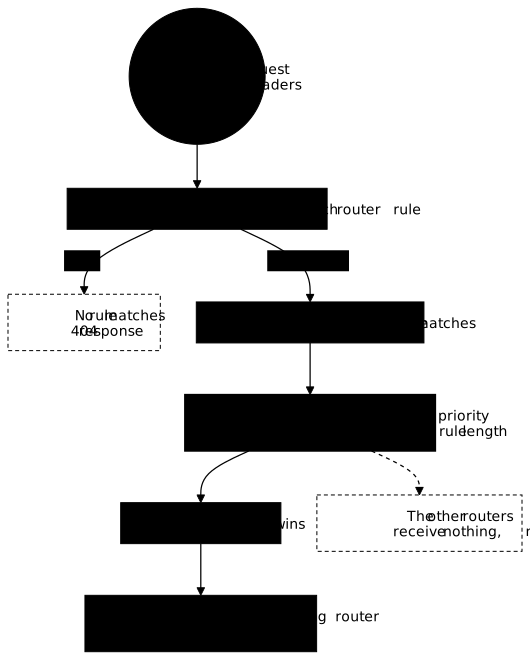
Take two routers aimed at the same host name. The first is generic, the second reserves a sub-path.
# FRAGMENT of dynamic configuration (not standalone)http: routers: boutique: rule: Host(`boutique.lab.test`) entryPoints: [web] service: boutique boutique-api: rule: Host(`boutique.lab.test`) && PathPrefix(`/api`) entryPoints: [web] service: apiThe first rule is 25 characters long, the second 47. Without priority, boutique-api therefore has priority 47 and wins for /api, while boutique receives the rest. The order is the right one, but by arithmetic accident: a longer rule goes first. The measurement on Traefik 3.7.15 shows it with Traefik's API, which displays a priority of 24 for Host(`routage.lab.test`) and of 45 for the same rule followed by && PathPrefix(`/v2`). These numbers differ from the 25 and 47 above because the host name measured is one character shorter: the priority follows the exact length of the rule as written, name included.
The trap appears when the two mechanisms cross. If the generic router carries priority: 100 and the specific router priority: 10, the generic one goes first. Measured: a /v2 request then went to the generic router's backend, with a perfectly normal 200, hence no alert to flag the error.
Should you write an explicit priority?
Write priority when the order you want does not follow from the length of the rules, and only then. This is a judgment of good practice and not a Traefik rule: an explicit priority is a number that nobody rereads, and it must stay consistent with all the other routers on the same entry point.
The case that requires it is the one from the concepts lesson: a short, exact rule that must go before a longer regular expression. Outside that case, letting the length sort things avoids adding an arbitrary number to maintain, provided you check the result. A rule Host(`a`) && PathPrefix(`/b`) is naturally longer than Host(`a`) alone, so it has higher priority.
Two habits avoid most collisions.
- One method per group of routers. Either all the routers that overlap let the length sort them, or all carry an explicit priority. Mixing the two compares a length to a hand-picked number, and the resulting order becomes hard to read.
- A gap you can read. If you set priorities, order them in steps (10, 50, 100) and note in a comment why that router goes first, otherwise the next reader will not dare touch it.
After every change of priority, do not just reread the file: send the requests that must reach each router, as in the verification section below.
How do you stop a sensitive application from answering under every name?
A router whose rule contains no Host answers under every host name the client chooses to write. An administration panel published with the single rule PathPrefix(`/admin`) is reachable through /admin on any name that reaches Traefik.
Measured with such a rule: a request with a randomly chosen host name on /admin received a 200 from the administration backend. Once the rule was completed with a Host for the intended name, the same request gets a 404, and only the one that carries the intended name reaches the application.
This 404 is the normal outcome when no router matches: Traefik answers by itself, without consulting any backend. It is useful to know when interpreting a test, because it does not say "forbidden", it says "no rule concerns me".
Keep two limits in mind. First, restricting the host name is not authenticating: since the client writes the Host header, anyone who knows the intended name can write it. The restriction reduces the surface exposed by mistake, it does not replace access control. Second, real protection of a panel goes through middlewares and limited network exposure, which Traefik middlewares and protecting the entry point cover.
How do you reference a service or middleware from another provider?
A service or middleware name without a suffix is looked up in the provider of the router that cites it; to target another provider, you write name@provider. A provider is the source that declares objects to Traefik: a file, Docker labels. Traefik suffixes each object with its provider: @file for a file, @docker for containers. The concepts lesson details this suffix; here it serves to remove an ambiguity.
Imagine a middleware limite declared in a file, and a service catalogue published by the labels of a container. A router in the file that cites service: catalogue looks for catalogue@file. Two situations arise, and they do not produce the same error.
- An object with the same name exists in the file. Traefik takes it, without complaining. Measured with a service
cibledeclared in the file and another published by Docker: the route answered502 Bad Gateway(the file's service pointed to an unreachable address), and the middleware applied added the file's header, not the container's. The route seems to work, with the wrong objects. - No object with that name exists in the file. The router is marked
disabledand answers404. The log writes anERRline likethe service "inconnu@file" does not exist.
The remedy is to write the suffix of the object you target, for example service: catalogue@docker and middlewares: [limite@file]. It amounts to naming who is responsible for the object: it is a separation of responsibilities between what the file describes and what the containers publish.
The two providers complement each other: the file sets stable rules, Docker publishes services that come and go. To read how each one declares its objects, see the Docker and file lessons.
How do you check that a rule does what you think?
A rule is checked by requests that must pass and requests that must fail, never by rereading the file alone. Since the host name is set on the client side, curl -H 'Host: …' is enough to simulate any name without configuring DNS.
curl -s -o /dev/null -w '%{http_code}\n' -H 'Host: m.lab.test' http://127.0.0.1/apiaryThis command sends a request to Traefik with the name m.lab.test and prints only the HTTP code. Then check which backend answered: the backends used by the lab are whoami servers, whose response contains a Hostname: line that names the machine that answered. That line says which service the request reached, which a 200 code alone does not.
To build a useful proof, draw up a matrix: one row per (host name, path) pair, with the expected backend. The important rows are the negative cases.
| Host name | Path | Expected |
|---|---|---|
| the intended name | the root | the default backend |
| the intended name | the reserved path and a sub-path | the path's backend |
| a randomly chosen name | the sensitive path | a 404 |
| the intended name | a neighboring path that must not pass | the default backend or a 404 |
Traefik also offers a direct checkpoint: its API lists each router with its rule, its computed priority, its state (enabled or disabled) and, for a disabled router, the cause of the error. Start Traefik with --api.insecure=true: the option opens the API on the entrypoint named traefik, which listens by default on port 8080. The request curl localhost:8080/api/http/routers then returns these fields in JSON, which was measured on 3.7.15 through a test port published by the lab. This option exposes the dashboard without authentication: it suits a local test bench, never an exposed entry point, as protecting the entry point reminds you.
When a request does not go where you expected, do not change several things at once. First look at the state and the priority of the routers aimed at that name, then at the rule that won; the lesson Troubleshooting a Traefik entry point details how to read 404, 502 and 504.
Can adding a route break another one?
Adding an unrelated router breaks neither the existing routes nor the Traefik process, but a router that overlaps an existing route can hijack it. With the file provider, Traefik watches its directory and reloads the configuration on the fly, after a delay of at least 2 seconds by default (providersThrottleDuration), as the file provider lesson shows.
Measured on 3.7.15: adding a second file declaring a router on a new host name left the responses of the two existing routes unchanged, made the new route reachable, and the start time of the Traefik container stayed the same. Nothing was restarted, and nothing broke.
The risk lies in the sort seen above. A new rule that also matches requests already served enters the sort: if it is longer or has higher priority, it goes first, with no error. A new host name is harmless; a broad PathPrefix on a name already in use is not.
A good practice, which is a matter of judgment: after every addition, replay the complete matrix and not just the row for the new route. The old rows that had to stay stable are the ones that detect a hijack.
Hands-on: resolve routing collisions
The lab sets up a Traefik whose routes are misconfigured: a priority that prevents a more specific route from being reached, an administration application that answers under every name, and unqualified service and middleware references to the Docker provider. You fix the routes file, then prove that adding an unrelated route disturbs nothing.
The validation sends real requests to port 80 of the machine and reads the response code, the backend that answers and a header. It checks four things: the root and the reserved path each reach their backend, the catalog answers with the header coming from Docker, the administration application is reachable only under its intended name, and a router added at runtime leaves the other routes intact without restarting Traefik. The lab scenario gives the mission, not the solution.
Key points
A routing rule is judged by its effects on requests, not by reading it.
- A rule combines matchers (
Host,Path,PathPrefix,Header,Method,Query) with&&,||and!. - The
PathPrefix(`/api`)matcher also takes/apiary: usePathfor the exact path, a trailing slash for the boundary. - Between two routers that match, the highest priority wins; without
priority, it is the length of the rule, not its precision. - A router without
Hostanswers under every name; restricting the name reduces exposure but does not authenticate. - A name without a suffix is looked up in the router's provider: write
name@providerto target another provider. - Prove with a request matrix, negative cases included, and replay it after every added route.
Knowledge check
The quiz covers reading a rule, arbitration between routers, restriction by host name and qualification of references.
Knowledge check
Check what you have learned with this interactive quiz
How it works
- The timer starts when you click Start
- Multiple choice, true/false and short answer questions
- You can move between questions
- Detailed results are shown at the end
Starts the quiz and the timer
Review
(0/0)Score by domain
A domain groups several guides and gets several questions, so its score is more reliable than a per-topic score, which often rests on a single question.
Summary
Strengths
No topic passed at 80% on at least two questions yet.
Weak areas
No topic below the pass mark.
Recommended next
Hints before you try again?
Continue the course: Traefik and automatic HTTPS: ACME resolver, redirects and TLS options
A new full quiz with random questions
Work again only on the questions you missed