ngrok exposes a service running on your machine at a public URL on the Internet, through an outbound tunnel, without opening a single port or touching the firewall. It is a very quick way to show a demo or to test webhooks (the automatic calls that a third-party service, such as GitHub or Stripe, sends to a URL of your choice when an event occurs). For the same reason, it is also a tool that attacker groups hijack for exfiltration and persistence: a double-edged tool. This guide shows the legitimate use, tested end to end, the real exploits carried out with ngrok, and above all how to detect its abuse. For developers, administrators and security teams.
This lesson closes the module on publishing without an inbound port, with the most limited option: a temporary exposure for development (receiving a webhook, showing a demo), never a long-lived publication. To publish a service over time, the self-hosted option is Pangolin and the managed option is cloudflared. Choosing the family of tools is discussed in the Reverse proxy page.
What you will learn
- Understand how an outbound tunnel bypasses the firewall by design.
- Install the ngrok agent and expose a local service, with a real demonstration.
- Expose HTTP and TCP, and declare your tunnels in a configuration file.
- Decide when ngrok is suitable (development) and when it is not (production).
- Recognize the real attacks carried out with ngrok and why it appeals to attackers.
- Detect its use on a network: network, process and file indicators.
Prerequisites
- a local service to expose (a web application, an SSH server, it does not matter);
- an ngrok account: unlike the historical versions, the agent refuses to start without authentication;
- access to a Linux, macOS or Windows terminal.
How ngrok works
ngrok is made of two parts: a worldwide cloud service hosted by the vendor, and a lightweight agent that you run next to the service to expose. The agent accepts no inbound connection. It opens a persistent outbound TLS connection to the ngrok cloud, and it is through this already established channel that public traffic comes back down to your machine.
The following diagram unrolls the sequence. Message ① is the ngrok agent opening the outbound connection; a visitor then reaches a public URL served by the ngrok cloud (②), which pushes the request into the agent's connection (③), and the agent forwards it to your local service (④). Your IP stays private, no port is opened, and the firewall only sees a perfectly ordinary outbound HTTPS connection.
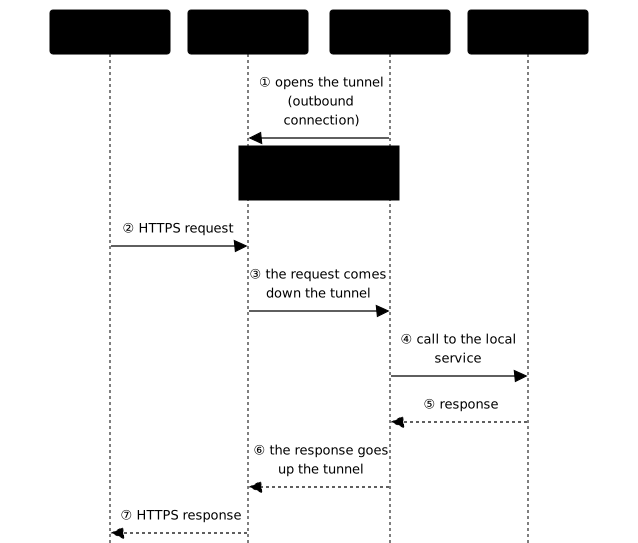
This is precisely what makes ngrok both practical and dangerous: an outbound connection on port 443 looks like any other web traffic, and most firewalls let it through without a murmur.
Install ngrok
On Debian and Ubuntu, ngrok publishes a signed APT repository. We use it rather than a binary downloaded by hand, to benefit from updates and signature verification.
sudo install -m 0755 -d /etc/apt/keyringssudo curl -fsSL https://ngrok-agent.s3.amazonaws.com/ngrok.asc \ -o /etc/apt/keyrings/ngrok.ascecho "deb [signed-by=/etc/apt/keyrings/ngrok.asc] https://ngrok-agent.s3.amazonaws.com bookworm main" \ | sudo tee /etc/apt/sources.list.d/ngrok.listsudo apt update && sudo apt install ngrokThis form differs from the installation command that ngrok shows on its Linux
download page (checked on 2026-10-25), which stores the key in
/etc/apt/trusted.gpg.d/: a key placed there is accepted for
any repository on the machine, whereas signed-by= restricts it to the
ngrok repository alone (same approach as for Docker in the
Pangolin page). The key is in armored text
format (.asc): a test with apt 2.8.3 on Ubuntu 24.04 accepted it as is in
signed-by=. On an older apt, this behavior remains to be
checked.
The word bookworm may be surprising on an Ubuntu: it is the distribution name
that ngrok gives in its command, and it designates a directory of the ngrok
repository, not the release of your machine. The repository publishes the same
package under several names of this kind (buster, bullseye, bookworm), and a
test of apt update with this line did find the ngrok package on Ubuntu 24.04.
If ngrok changes its line, the download page prevails.
Check the installed version:
ngrok version# ngrok version 3.39.9The output in this guide was captured with version 3.39.9: yours may be more recent, without changing the principle.
Authenticate
A tunnel without an account is impossible. The proof, if you try to expose a service without having registered a token:
ngrok http 8080# ERR_NGROK_4018# This ngrok session is not authenticated. ngrok requires an account# and a valid credential to start a session.Get your authtoken from the ngrok dashboard, then register it:
ngrok config add-authtoken <YOUR_TOKEN>The token is written to the agent's configuration file, located at ~/.config/ngrok/ngrok.yml on Linux. Never commit it to version control: it gives anyone who holds it the right to open tunnels on your account, hence a leak risk if the file ends up in a repository.
Expose a first service
Start a local service, here a simple Python web server on port 8080, which serves a minimal home page. In a first terminal:
mkdir -p ~/appli-locale && cd ~/appli-localeecho '<h1>Mon appli locale</h1>' > index.htmlpython3 -m http.server 8080 --bind 127.0.0.1The --bind 127.0.0.1 option keeps this server invisible from the network: only your machine reaches it. This is deliberate, because the ngrok tunnel starts from your machine and will be the only path of access from the Internet.
In a second terminal, open the tunnel:
ngrok http 8080The agent displays a console that stays in the foreground. The useful information is there, notably the Forwarding line that contains your public URL:
ngrok
Session Status                onlineVersion                       3.39.9Region                        Auto (lowest latency) (auto)Web Interface                 http://127.0.0.1:4040Forwarding                    https://imposing-escalator-gesture.ngrok-free.dev -> http://localhost:8080
This ngrok-free.dev URL is immediately reachable from the Internet. An incoming call goes through the tunnel and reaches your local service:
curl https://imposing-escalator-gesture.ngrok-free.dev/# <h1>Mon appli locale</h1>The Web Interface at http://127.0.0.1:4040 is a valuable tool: it inspects every request received in real time, which is ideal for debugging webhooks and replaying them. This is, by the way, the typical use of ngrok: receiving calls from Stripe, GitHub or a CRM during development, which cannot otherwise reach your localhost.
Why ngrok must not be used in production
ngrok suits a temporary exposure: a webhook to receive during development, a demo to show a customer. For a long-lived publication, it accumulates limits that rule it out. On the free plan, the domain is auto-generated and does not belong to you, the volume is capped, and the agent is proprietary: your traffic goes through a third party that you do not control, with no availability guarantee. A forgotten tunnel stays open as long as the agent runs, and then acts as a front door to your workstation.
Three habits frame legitimate use:
- close the tunnel (
Ctrl+C) as soon as the test is done, rather than leaving it running; - never expose a development service with default credentials or a real database behind it;
- verify the signature of the webhooks received (GitHub's or Stripe's signature header), because the URL is public and anyone can send a request to it.
As soon as the need lasts more than a day, or touches real data, move to Pangolin, which keeps the control plane at home (what decides access, certificates and logs), or to cloudflared, which delegates it to Cloudflare with an identity layer. No open port does not mean no risk: that is the whole point of the "ngrok, a double-edged tool" section.
Expose other protocols
ngrok is not limited to HTTP. To expose a TCP service, for example an SSH server, use the tcp subcommand:
ngrok tcp 22ngrok then assigns a TCP address of the form tcp://X.tcp.ngrok.io:PORT that you pass to your SSH client, which exposes an administration service on the Internet. This is exactly the mechanism that attackers hijack to expose an internal remote desktop, as we are about to see.
To manage several tunnels without remembering command lines, declare them in the configuration file, in v3 format:
version: "3"agent: authtoken: <YOUR_TOKEN>endpoints: - name: web upstream: url: 8080 - name: ssh upstream: url: 22Then start a tunnel by its name, or all of them at once:
ngrok start webngrok start --allNote the endpoints key: the old tunnels key belongs to the v2 configuration, which is deprecated.
ngrok, a double-edged tool
Everything above makes ngrok an excellent development tool. The same properties make it a formidable offensive tool, and this is not a hypothesis: ngrok is cataloged as S0508 in the MITRE ATT&CK framework, associated with five techniques including T1572 Protocol Tunneling (in French) and T1567 Exfiltration Over Web Service.
Why attackers like it: after compromising a machine, they have no inbound port to open and no firewall rule to change. An outbound HTTPS tunnel blends into legitimate traffic, and ngrok's infrastructure hides their own server.
Documented cases are plentiful:
- The Akira ransomware, in a joint FBI/CISA advisory, establishes its command channel by tunneling through ngrok to bypass perimeter monitoring and exfiltrate data.
- The APT28 group (BlueDelta), documented by Recorded Future, used ngrok to relay a credential-theft campaign and bypass two-factor authentication.
- Sophos and Huntress, in their incident reports, describe attackers exposing internal RDP (
ngrok tcp 3389), sometimes with the binary renamed toconhost.exefor evasion, and persistence through a scheduled task or a registry key. - Phishing campaigns host their fake banking pages behind ngrok subdomains, precisely because the vendor's legitimate domain inspires trust and bypasses filters.
The point to remember: ngrok is not malware, it is a legitimate tool whose encrypted outbound channel is the asset that attackers exploit. In the attack chain (the kill chain), it serves the command and control (in French) (C2) phase, the channel through which the attacker drives the compromised machine, detailed in the site's threat model.
Detect ngrok on a network
On the defense side, several indicators betray the use of ngrok. None is sufficient alone, they must be combined.
Network indicators. The agent's control channel targets domains such as connect.ngrok-agent.com and tunnel.<region>.ngrok.com. The exposed tunnels use *.ngrok-free.app, *.ngrok-free.dev, *.ngrok.app and the historical *.ngrok.io. A blocking rule must cover all these extensions on the ngrok name. Filtering by IP is fragile: ngrok relies on AWS, whose addresses are shared and changing. Favor DNS and SNI (the domain name that the client announces in clear at the start of a TLS connection, which allows filtering without decrypting).
Workstation indicators. The ngrok process with a telltale command line (tcp 3389, --authtoken, start --all), and the ~/.config/ngrok/ngrok.yml configuration file. Beware of binary renaming, already observed as conhost.exe. A detection query on processes, for example in KQL (the query language of Microsoft Defender):
DeviceProcessEvents| where ProcessCommandLine has "ngrok" and (ProcessCommandLine has "tcp 3389" or ProcessCommandLine has "authtoken")Policy. In an enterprise information system, a user workstation generally has no legitimate reason to run ngrok. The defensible recommendation is to block it by default, through a DNS sinkhole (the name is resolved to a dead-end address) on the ngrok name with all extensions, complemented by an application rule blocking the unsigned binary, then to allow, on a documented exception, the teams that have a real need for it.
The alternatives
If you want to expose a service durably, or with a sovereignty constraint, a self-hosted solution gives you back control of the relay, and therefore of the logs and the domain name.
| Tool | Model | For what need |
|---|---|---|
| frp | Self-hosted (Go) | Full-featured: TCP, UDP, HTTP, multiplexing |
| rathole | Self-hosted (Rust) | Same spirit as frp, lighter and faster |
| bore | Self-hosted (Rust) | Minimalist, TCP only |
| ngrok | SaaS | Demos and webhooks in development, zero configuration |
On this site, two neighboring tools address the same need from another angle: the Cloudflare tunnel with cloudflared, the managed option, and Pangolin, a fully self-hosted tunneled reverse proxy with access control. For remote access to your infrastructure rather than a public exposure, turn to a VPN such as WireGuard (in French) or Tailscale (in French). And to expose a local service without any third party, a reverse SSH tunnel (ssh -R) to a server that you control does the same job with OpenSSH.
Pangolin, cloudflared or ngrok: what to remember at the end of the module?
The three tools open the same outbound tunnel, so a single criterion really tells them apart: who operates the public entry point. With Pangolin, it is you: the entry point is a server of yours, you keep certificates, logs and identity, and you pay in operations. With cloudflared, it is Cloudflare, which terminates TLS and therefore sees the traffic in clear: you delegate the work and you accept this trust. With ngrok, it is the vendor, but the tool only targets a temporary development exposure, closed once the test is done: a need that lasts is never solved with it. So ask yourself two questions in order: does the service have to last, then do you accept that a third party sees the traffic? A "no" to the first leads to ngrok, two "yes" lead to cloudflared, and a "yes" followed by a "no" leads to Pangolin.
Key points
- ngrok exposes a local service through an outbound tunnel, without opening a port: this is its strength and the risk it represents.
- The agent is proprietary and your traffic goes through the vendor's infrastructure.
- An account and an authtoken are mandatory: without them, the agent returns
ERR_NGROK_4018. - The base command is
ngrok http 8080; TCP goes throughngrok tcp, and multiple tunnels are declared asendpointsinngrok.ymlv3. - ngrok serves temporary exposure in development (webhooks, demos), never a long-lived publication: to last, choose Pangolin or cloudflared.
- The free plan adds an interstitial page and caps at 3 tunnels, 1 GB and 20,000 requests per month.
- ngrok is cataloged MITRE S0508: it serves exfiltration, C2 and persistence after compromise.
- To detect it, combine DNS/SNI (all
ngrokdomains), the process and the config file; block it by default in the enterprise.
Knowledge check
Check that the essentials of this guide are mastered. The questions cover only what has just been explained here.
Knowledge check
Check what you have learned with this interactive quiz
How it works
- The timer starts when you click Start
- Multiple choice, true/false and short answer questions
- You can move between questions
- Detailed results are shown at the end
Starts the quiz and the timer
Review
(0/0)Score by domain
A domain groups several guides and gets several questions, so its score is more reliable than a per-topic score, which often rests on a single question.
Summary
Strengths
No topic passed at 80% on at least two questions yet.
Weak areas
No topic below the pass mark.
Recommended next
Hints before you try again?
Continue the course: Publish a web service in the cloud: what changes
A new full quiz with random questions
Work again only on the questions you missed
FAQ: frequently asked questions about ngrok
localhost. Your IP stays private. It is the reference tool for testing webhooks during development.- 3 tunnels at most at the same time
- 1 GB of traffic per month
- 20,000 HTTP/S requests per month
- 1 auto-generated development domain that cannot be changed
- an interstitial page shown on the first visit to an HTTP link
# 1. Register your authtoken (only once)
ngrok config add-authtoken <YOUR_TOKEN>

# 2. Expose the local service (here on port 8080)
ngrok http 8080
Forwarding line with a public URL such as https://<subdomain>.ngrok-free.dev, immediately reachable from the Internet. The web interface at http://127.0.0.1:4040 inspects every request received, which is ideal for debugging webhooks.- Exfiltration of data and command and control (Akira ransomware, FBI/CISA advisory)
- Exposure of internal RDP (
ngrok tcp 3389) for persistence (Sophos, Huntress reports) - Phishing relays behind trusted subdomains
- Network: the domains
connect.ngrok-agent.com,tunnel.<region>.ngrok.com, and the tunnels under*.ngrok-free.app,*.ngrok-free.dev,*.ngrok.app,*.ngrok.io. Filter on DNS and SNI, not on IP (ngrok uses AWS, shared addresses). - Process:
ngrokwith a telltale command line (tcp 3389,--authtoken). Beware of the renamed binary (observed asconhost.exe). - File:
~/.config/ngrok/ngrok.yml.
ngrok name with all extensions through a DNS sinkhole, and the unsigned binary through an application rule.- Self-hosted, full control: frp (widely used, TCP/UDP/HTTP), rathole (lighter and faster, in Rust), bore (minimalist, TCP only). You own the relay, so the logs and the domain.
- Free SaaS without a bandwidth cap: the Cloudflare tunnel (cloudflared), an open source agent.
- Self-hosted reverse proxy with IAM: Pangolin.
- Remote access rather than public exposure: a WireGuard VPN (in French) or Tailscale (in French).