What you will learn
This lesson lays down the vocabulary the following guides rely on: it defines the reverse proxy, tells it apart from the classic proxy and from the load balancer, then links each need to a tool. The three objectives below match the guide's success criteria.
- Define a reverse proxy and its role as a single entry point.
- Tell apart reverse proxy, proxy and load balancer.
- Choose the tool that fits your context.
What is a reverse proxy?
A reverse proxy is an intermediate server placed in front of your application servers: it receives the clients' requests, forwards them to the right backend, then returns the response. The client never talks directly to your servers, it only knows the proxy. Each of these servers placed behind it is called a backend. The proxy is the gatekeeper of your infrastructure: it centralizes TLS (the encryption of HTTPS connections), routing (choosing the backend from the address requested), load balancing (sharing requests among several backends) and security.
This guide gives the full definition, tells the reverse proxy apart from the classic proxy and from the load balancer, then helps you choose the tool (HAProxy, Traefik, Nginx, Caddy, Apache, or a tunneled reverse proxy, which publishes a service without opening a port) according to your context. Audience: beginners and intermediates who administer a web infrastructure.
The 3 immediate benefits:
- Your servers are hidden: users only know the proxy's address, never that of the backends.
- A single configuration point: TLS certificates, security rules and logs are centralized in the same place.
- High availability: if a server goes down, the proxy automatically redirects to the others.
Reverse proxy or proxy: do not confuse them
The word proxy alone generally means a forward proxy, which acts on behalf of the clients: it goes out of the network toward the Internet (web filtering, browsing cache, anonymization). The reverse proxy does the opposite, it acts on behalf of the servers and receives incoming traffic.
| Proxy (forward) | Reverse proxy | |
|---|---|---|
| Acts for | the clients (outbound) | the servers (inbound) |
| Hides | who accesses the Internet | which servers answer |
| Use cases | filtering, browsing cache | TLS, routing, load balancing, WAF |
A WAF (Web Application Firewall) is a filter that inspects HTTP requests to block malicious ones. Some reverse proxies include one.
Remember the simple rule: a forward proxy protects and hides the users, a reverse proxy protects and hides the servers.
The path of a request
When a user types https://app.example.com in their browser, the reverse proxy orchestrates the whole journey before the request reaches your application.
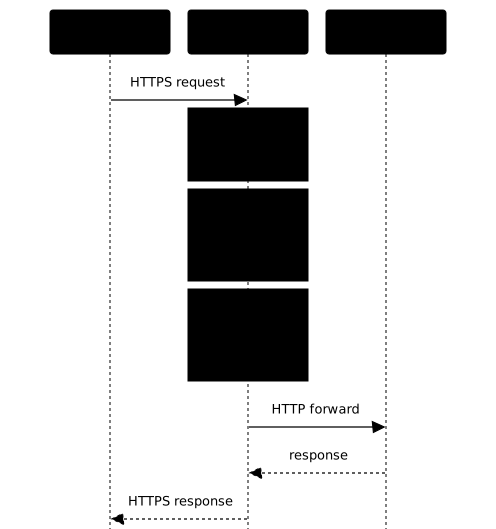
Step by step:
- The client calls
https://app.example.com. - The reverse proxy terminates TLS (decrypts the HTTPS connection).
- It chooses a backend according to its rules (load balancing + health checks).
- It forwards the request to the selected backend.
- The backend processes and returns the response.
- The proxy returns the response to the client.
Concrete example: routing by path
Imagine a site with three components. The reverse proxy reads the URL and sends each request to the right server:
| Request | Where it goes | Why |
|---|---|---|
GET /api/users | API backend (Node.js) | Business logic |
GET / | Frontend (React/Vue) | User interface |
GET /static/logo.png | File server or cache | Performance |
Without a reverse proxy, you would need three different domains or to pile everything onto a single server.
The 5 key functions
A reverse proxy is a gatekeeper that performs five actions, whatever the tool chosen:
-
Terminates HTTPS: it decrypts TLS connections. Your backends can run in plain HTTP, which is easier to manage.
-
Routes requests: according to the path (
/api), the domain (api.example.com) or a header, it sends to the right backend. -
Balances the load: it distributes requests among several servers (round-robin: each server in turn, or the one with the fewest connections, etc.).
-
Checks health: it regularly tests each backend. A server that stops answering is removed automatically.
-
Protects access: rate limiting (a limit on the number of requests per client), IP blocking, header validation. It is your first line of defense.
Reverse proxy or load balancer: what is the difference?
These two terms are often confused. A reverse proxy is an HTTP(S) entry point that does TLS, routing and security. A load balancer spreads traffic across several servers, at the transport (L4) or application (L7) level (the "L4 versus L7" box below details the difference).
| Concept | What it does | Examples |
|---|---|---|
| Reverse proxy | HTTP(S) entry point: TLS, routing, headers, security | Nginx, Traefik, Apache |
| Load balancer | Spreads traffic across servers (L4 or L7) | HAProxy, AWS ALB, F5 |
In practice, most tools do both. HAProxy is an excellent load balancer that also acts as a reverse proxy. Nginx is a web server, a reverse proxy and a load balancer. Traefik combines everything in a cloud-native context.
Families of tools
These tools do not belong to the same category. Understanding their family avoids believing they all do the same thing:
| Family | Tools | Specialty |
|---|---|---|
| L4/L7 load balancer | HAProxy | Load balancing, high availability, advanced checks |
| Cloud-native edge proxy | Traefik | Service discovery, dynamic config, containers |
| Web server + reverse proxy | Nginx (in French), Apache (in French), Caddy (in French) | Serve static content + proxy to backends |
| Tunneled / zero-trust reverse proxy | Pangolin, cloudflared, ngrok | Publish a service without opening a port (all three); identity verified at the edge (the visitor authenticates before reaching the service) with Pangolin and cloudflared only |
| WAF / filtering reverse proxy | BunkerWeb (in French) | Application firewall built into the proxy |
| Data-plane / service mesh | Envoy | L7 proxy at scale (via Istio) |
The WAF was defined above. The service mesh is a layer of proxies that links the services of a cluster together: the box below places it in relation to the Ingress.
The tunneled reverse proxy, a rising family
A more recent family of tools publishes a service without opening any inbound port on your firewall. A connector, installed in the private network, opens an outbound tunnel to a public entry point. An outbound connection crosses firewalls without any particular rule, and the visitors' traffic then comes back down through this tunnel. It is ideal for a homelab behind a router or a network without a public IP.
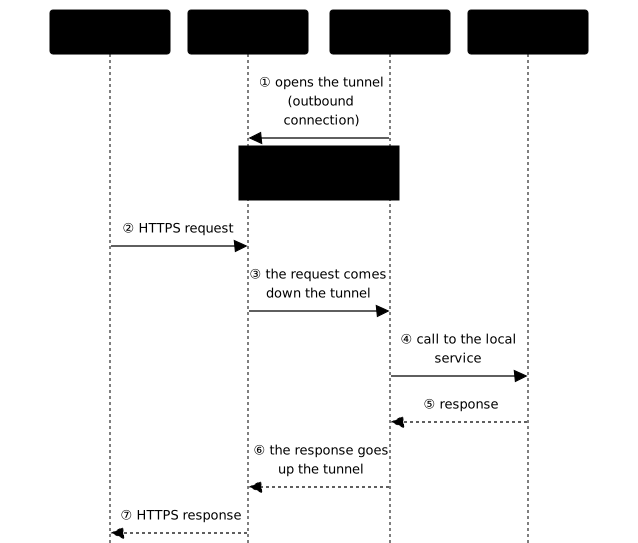
Three tools illustrate this family, and they differ mainly by who operates the public entry point and by the intended duration of use:
- Pangolin is the self-hosted and sovereign option: you operate the entry point yourself.
- cloudflared is the managed option: Cloudflare operates the entry point.
- ngrok is for a temporary exposure for development (a demonstration, a webhook to receive), not for a lasting publication.
These tools are double-edged: the same mechanism also serves attackers, and has to be watched. Each lesson of the module devoted to this family details the legitimate use and the detection of abuse.
Choosing in 5 questions
Answer in order: as soon as you have a "yes", you have your tool. The constraint that eliminates the most options, no open port, comes first:
| Question | If yes → |
|---|---|
| 1. Expose a service without opening a port (homelab)? | Pangolin or cloudflared; ngrok for a temporary trial |
| 2. Kubernetes or Docker with auto discovery? | Traefik, dynamic config through labels/annotations |
| 3. Critical L4/L7 load balancing + advanced health checks? | HAProxy, built for that, very stable |
| 4. Serve web content + cache + classic reverse proxy? | Nginx (in French), the standard, built-in cache |
| 5. Automatic HTTPS + minimalist configuration? | Caddy (in French), native Let's Encrypt |
Visual decision tree
Follow the tree from top to bottom and stop at the first branch that describes your situation: it gives the suitable tool. The most constraining cases, such as no public IP or Kubernetes, are placed first because they eliminate the most options.
Are you exposing a service without a public IP / without opening a port?├── Yes → Pangolin (self-hosted) or cloudflared (managed)└── No → next question │ └── Does your infrastructure use Kubernetes? ├── Yes → Traefik (IngressRoute) or Nginx Ingress └── No → next question │ └── Docker with frequent deployments? ├── Yes → Traefik (automatic discovery) └── No → next question │ └── Advanced L4/L7 load balancing? ├── Yes → HAProxy (health checks, runtime API) └── No → Nginx (web + cache) or Caddy (automatic HTTPS)Technical comparison
This table compares the operating models, not raw performance (sufficient for most workloads). The "TLS / ACME" row shows whether the tool obtains and renews its certificates by itself thanks to ACME, the protocol for automatically obtaining certificates used by Let's Encrypt:
| Criterion | HAProxy | Traefik | Nginx | Apache | Caddy |
|---|---|---|---|---|---|
| Model | LB + L4/L7 proxy | Cloud-native edge proxy | Web server + proxy | Web server | Modern web server |
| Configuration | File + runtime API | Dynamic (providers) | File | File | Caddyfile |
| Service discovery | No | Docker, K8s, Consul | No | No | No |
| TLS / ACME | To be integrated | Built in | To be integrated | To be integrated | Built in |
| Web cache | Not the goal | Limited (plugins) | Strong | Decent | Limited |
| L4 (TCP/UDP) | Excellent | Good | Good | Limited | Limited |
| When to choose it | Critical APIs, LB | Containers, K8s | Web + cache | Legacy, modules | Simplicity |
Two comparisons come up almost every time and boil down to this. Traefik versus Nginx: Traefik is better suited as soon as there are containers (discovery and dynamic config), Nginx remains preferable for serving web content and handling a high-performance cache. HAProxy versus Nginx: HAProxy is the most specialized load balancer (fine health checks, runtime API), Nginx is more versatile (web + proxy + cache).
Detailed use cases
Classic website (WordPress, CMS, PHP)
Need: serve content with a cache, manage Let's Encrypt, simple configuration. Solutions: Nginx (in French) (standard, built-in cache) or Caddy (in French) (automatic HTTPS, ideal for getting started).
REST API or critical application
Need: high availability, precise health checks, minimal latency, persistent sessions. Solution: HAProxy, built for that and having been the subject of a security audit commissioned by ANSSI.
Microservices with Docker
Need: automatic discovery of containers, configuration by labels, frequent deployments. Solution: Traefik, with its Docker configuration by labels.
Kubernetes
Need: Ingress Controller, native integration, namespace management. Solution: Traefik as Ingress Controller (Gateway API, IngressRoute) or Nginx Ingress.
Homelab or service without a public IP
Need: publish an application from a network behind a router, without opening a port. Solution: Pangolin self-hosted, or cloudflared managed; ngrok is enough for a temporary trial.
Pitfalls to avoid
1. Single Point of Failure. Your reverse proxy becomes critical. Plan a second proxy in failover (a standby proxy that takes over, for example with keepalived and the VRRP protocol, which switches a virtual IP address) or a cloud load balancer in front of your proxies.
2. Forgotten X-Forwarded headers. Your backends see the proxy's IP, not the client's. Configure X-Forwarded-For (real IP) and X-Forwarded-Proto (http/https scheme).
3. Badly tuned timeouts. A timeout that is too short causes 504 errors, one that is too long keeps connections open for nothing. As a starting point (a heuristic, not an absolute rule), the proxy's timeout must exceed the backend's maximum normal processing time, otherwise the proxy gives up before the response. Measure your slowest requests before setting the value.
4. Insufficient buffers. Large uploads fail if the buffers are too small. Watch for 413 and 502 errors.
5. Unvalidated Host header. Without an allowlist, an attacker can manipulate the Host header. Always validate the allowed hosts.
Understanding 502 and 504 errors
These two codes almost always come from the reverse proxy, not from the client. A 502 Bad Gateway means the backend returned an invalid response or closed the connection: crashed backend, wrong port, TLS badly negotiated. A 504 Gateway Timeout means the backend did not answer in time: processing too long or proxy timeout too short. The reflex: check that the backend answers directly, then adjust the timeouts and the buffers.
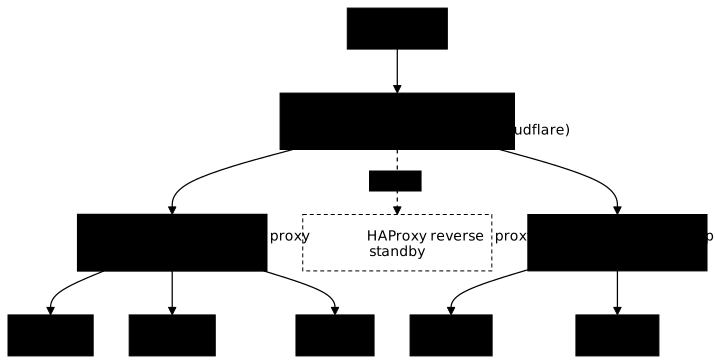
Typical architecture
Here is a classic production architecture combining a cloud load balancer, HAProxy in active/passive and Traefik for the Kubernetes part:
Go further with Traefik
Traefik is particularly suited to containers thanks to automatic discovery and its dynamic configuration. To use it, start with its configuration model, then discover publishing with Docker, TLS and ACME certificates and composing middlewares. Installation and the Kubernetes integration are separate tutorials, outside the main path of this course.
Practice
The "forgotten X-Forwarded headers" pitfall and the "terminates HTTPS" function become concrete when a second proxy is placed in front of the first. The lab has you follow a request through two chained reverse proxies to the application: you determine which link terminates TLS and which relays in clear, then you preserve the origin and identity of a legitimate client. The validation checks the TLS roles and the ports against the real traffic, rejects a spoof of X-Forwarded-For or of identity without privilege, and observes that the bypass is closed from the client.
Key points
-
A reverse proxy is the single entry point of your infrastructure: TLS, routing and security centralized.
-
Proxy and reverse proxy are opposites: the first acts for the clients, the second for the servers.
-
It does 5 things: terminates TLS, routes, balances, checks health, protects.
-
Choose according to your ecosystem: Traefik for containers, HAProxy for advanced balancing, Nginx for web and cache, Caddy for simplicity, Pangolin or cloudflared to publish without opening a port (ngrok for a temporary trial).
-
Plan the high availability of the proxy itself: it becomes your new single point of failure.
Knowledge check
Check that the essentials of this guide are mastered. The questions only cover what has just been explained here.
Knowledge check
Check what you have learned with this interactive quiz
How it works
- The timer starts when you click Start
- Multiple choice, true/false and short answer questions
- You can move between questions
- Detailed results are shown at the end
Starts the quiz and the timer
Review
(0/0)Score by domain
A domain groups several guides and gets several questions, so its score is more reliable than a per-topic score, which often rests on a single question.
Summary
Strengths
No topic passed at 80% on at least two questions yet.
Weak areas
No topic below the pass mark.
Recommended next
Hints before you try again?
Continue the course: Publish a web service: the path of a request to the backend
A new full quiz with random questions
Work again only on the questions you missed
FAQ: frequently asked questions
The FAQ answers the questions that come up most often about the definition of a reverse proxy, how it differs from a load balancer, how the tools compare, automatic HTTPS, and publishing a service without opening a port.
- terminates HTTPS (TLS) in one place;
- spreads the load across several backends;
- applies security rules (rate limiting, IP filtering, header validation);
- centralizes certificates and logs.
| Concept | What it does | Examples |
|---|---|---|
| Reverse proxy | HTTP(S) entry point: TLS, routing, headers, security | Nginx, Traefik, Apache |
| Load balancer | Spreads traffic across servers (L4 or L7) | HAProxy, AWS ALB, F5 |
| Criterion | Traefik | Nginx |
|---|---|---|
| Configuration | Dynamic (providers) | Static file |
| Service discovery | Docker, K8s, Consul | No |
| TLS and ACME | Built in | To be added (certbot) |
| Web cache | Limited | Strong |
- HAProxy is the more specialized load balancer: fine-grained health checks, a runtime API, and strong L4 and L7 support. It has been through a security audit commissioned by the French ANSSI. A good fit for critical APIs.
- Nginx is more versatile: web server, reverse proxy and a fast cache in one.
| Tool | Automatic HTTPS |
|---|---|
| Traefik | Native (certificate resolver) |
| Caddy | Native (by default) |
| Nginx and Apache | Through certbot |
| HAProxy | Through an external ACME integration |
- Traefik: containers, Docker, Kubernetes.
- HAProxy: critical load balancing, health checks.
- Nginx: web content, caching, classic reverse proxy.
- Caddy: simplicity, automatic HTTPS.
- Pangolin: the self-hosted, sovereign option.
- cloudflared: the option managed by Cloudflare.
- ngrok: temporary exposure for development (a demo, a webhook).