
Does your pipeline have 50 jobs and is it becoming unmanageable? Parent-child pipelines let you split a complex pipeline into independent sub-pipelines. The parent orchestrates, the children execute: a trigger job (trigger:) creates a child pipeline from a file such as frontend/.gitlab-ci.yml, and strategy: mirror makes the parent wait for the child to finish. This lesson is for anyone who already writes GitLab pipelines and sees their .gitlab-ci.yml growing.
Who is this guide for?
Parent-child pipelines answer four quite distinct situations, and you probably do not need all four. Follow the section that describes your problem rather than reading the page in order:
- a monorepo that gathers frontend, backend and API in a single repository (monorepo example);
- a pipeline that is too long, to be split into readable sub-pipelines (why split);
- pipelines to trigger in other repositories (another project);
- variables and artifacts to pass from the parent to the child (pass variables).
What you will learn
By the end of this module, you will be able to:
- Trigger a child pipeline:
trigger: includewith a local file - Control the wait:
strategy: mirror, anddependin existing configurations - Pass variables: explicit or through dotenv
- Share artifacts:
needs:pipeline:jobbetween parent and child - Trigger across projects:
trigger: projectto another repo - Organize a monorepo: one pipeline per component
Prerequisites
Before continuing, make sure you are comfortable with:
Why use parent-child pipelines?
A child pipeline is a full pipeline, with its own stages, its own jobs and its own identifier, triggered from another pipeline. This separation changes three things: the configuration file is split, the GitLab interface displays each component in isolation, and a failure stays confined to its scope. The price to pay is a real boundary between the two pipelines, which neither variables nor artifacts cross on their own.
The problem: a monolithic pipeline
Without splitting, your .gitlab-ci.yml looks like this:
# ❌ A 500-line file with EVERYTHING in itbuild_frontend: script: npm run buildbuild_backend: script: go buildbuild_api: script: python setup.pytest_frontend: script: npm testtest_backend: script: go testtest_api: script: pytestdeploy_frontend: # ... and it goes onConcrete problems:
- Maintenance: who is responsible for what? Everyone edits the same file.
- Readability: 50 jobs in a single file = a nightmare to debug.
- Performance: the backend has not changed? Too bad, we rebuild it anyway.
- Isolation: the frontend test fails? You cannot deploy the backend, even though it is fine.
The solution: split by component
The split follows the organization of the repository: one configuration file per application directory, maintained by the team that owns that code. The root file only contains the trigger jobs, which keeps it readable even when the project grows.
| Without parent-child | With parent-child |
|---|---|
A single giant .gitlab-ci.yml | Files separated by component |
| Hard to maintain | Clear responsibility (the frontend team manages frontend/.gitlab-ci.yml) |
| Everything always runs | Conditional execution per component |
| One failure blocks everything | Problems are isolated |
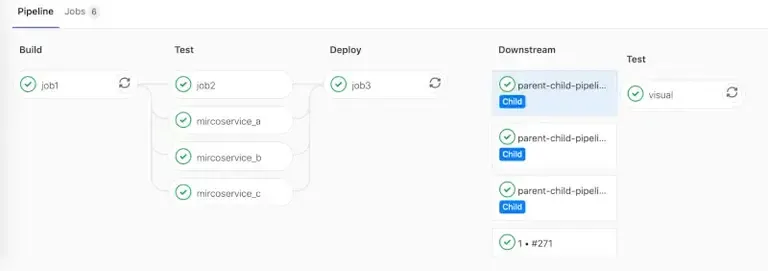
Basic configuration
The minimal setup fits in two files: a parent that triggers, a child that works. Neither requires any particular configuration on the GitLab side, everything happens in the YAML. The only new keyword to know is trigger:.
What is a "trigger"?
A trigger is a special job that does just one thing: launch another pipeline. It contains no script:, just a trigger: instruction that says "at this point, start this child pipeline".
Parent pipeline: only trigger jobs
The .gitlab-ci.yml file at the root of the project no longer contains any build or test task: it is limited to declaring which children to launch and when. A single stage is enough in the simplest case, since the trigger jobs run in parallel:
# .gitlab-ci.yml (project root)
stages:  - triggers         # A single stage: trigger the children
# Job that triggers the frontend pipelinetrigger_frontend:  stage: triggers  trigger:                              # Special keyword: this is not a normal job    include: frontend/.gitlab-ci.yml    # Path to the child's CI file    strategy: mirror                    # Waits for the child and takes its status
# Job that triggers the backend pipelinetrigger_backend:  stage: triggers  trigger:    include: backend/.gitlab-ci.yml    strategy: mirror
Let us break it down:
trigger:, this keyword turns the job into a "pipeline launcher". Noscript:, noimage:.include: frontend/.gitlab-ci.yml, the path of the child CI file, relative to the repo root.strategy: mirror, the parent waits for the child to finish and takes its status. Without it, it moves straight on to the next job.
Child pipeline: a normal pipeline
The child file is a classic .gitlab-ci.yml. It does not even know it is a "child", it runs normally:
stages:  - build  - test
build:  stage: build  image: node:20@sha256:8f693eaa7e0a8e71560c9a82b55fd54c2ae920a2ba5d2cde28bac7d1c01c9ba5  # Its own environment  script:    - npm ci    - npm run build  artifacts:    paths:      - dist/
test:  stage: test  image: node:20@sha256:8f693eaa7e0a8e71560c9a82b55fd54c2ae920a2ba5d2cde28bac7d1c01c9ba5  script:    - npm test
Advantage: the frontend team can edit this file without touching the rest. Each component has its own "mini-pipeline".
trigger options
Three options are enough to cover almost every need. include designates the child's file, strategy decides whether the parent waits for its result, forward controls the transmission of variables. The second is the one most often forgotten, with the most unfortunate consequences.
include: local file
The simplest form, the child is a file in the same repo:
trigger_job: trigger: include: path/to/child.yml # Relative path from the repo rootThe child's file can also not exist in the repository: a job writes it
during the run, publishes it as an artifact, and the trigger job designates
it with include: artifact:. This is the principle of dynamic pipelines,
covered in the lesson devoted to
them.
strategy: the most important parameter
By default, a trigger job goes to success as soon as the child
pipeline is created, without waiting for its result. The parent can therefore display
a green pipeline while the child fails:
Without strategy:Parent: trigger_frontend -> success (immediately)Child:                   -> build -> test -> failureResult: the parent is GREEN while the child failed
With strategy: mirror:Parent: trigger_frontend -> waiting...Child:                   -> build -> test -> failureResult: the parent fails too
strategy: mirror makes the trigger job wait and gives it
exactly the status of the child pipeline:
trigger_job: trigger: include: child.yml strategy: mirror # Waits for the end and takes the child's statusstrategy: depend vs strategy: mirror, what is the difference?
Both values make the parent wait. mirror arrived with
GitLab 18.2 and the documentation now recommends it: the trigger
job always carries the same status as the child. depend, older,
is still accepted and very common in existing configurations,
but the documentation marks it "Not recommended". Their difference shows in
the edge cases described by the GitLab documentation:
| Child situation | depend | mirror |
|---|---|---|
| Succeeds | Parent succeeds | Parent succeeds |
| Fails | Parent fails | Parent fails |
| Waits for a manual action | Parent shown as "running" | Same status as the child |
Failed job with allow_failure: true | Parent succeeds | Same status as the child |
In practice:
mirror: the value to write in any new configuration (GitLab 18.2 or newer)depend: to recognize in existing code, and to keep only on an instance older than 18.2
forward: automatically pass variables
By default (yaml_variables: true), the child already receives the YAML variables: those of the global variables: block and those of the trigger job. It does not receive the pipeline variables: those entered at manual launch, those of a schedule, nor the dotenv variables of the jobs listed in needs. forward: pipeline_variables: true passes them as well:
trigger_job: trigger: include: child.yml forward: yaml_variables: true # Variables defined in the parent YAML pipeline_variables: true # Manual launch, schedule, dotenv from needsWhen should you use forward:?
- The child needs to know a variable entered at manual launch or by a schedule
- You want to pass it the dotenv variables of the jobs listed in
needs
When should you use explicit variables:? (see next section)
- You want to control precisely what is passed
- You need to rename or transform variables
Pass variables to the child
Two methods coexist and answer different moments. The first declares the values in the trigger job, it suits when they are known at the time of writing the YAML. The second relies on a dotenv report, a file of key-value pairs produced by a previous job, to pass information computed during execution.
The problem: the child is isolated
A child pipeline runs in its own context. By default it only receives the parent's YAML variables (global variables: block and trigger job), and nothing that is computed during execution. If the parent knows the version to deploy (VERSION=1.2.3), how do you pass it?
Method 1: explicit variables (recommended)
Define the variables directly in the trigger job:
trigger_frontend: variables: ENVIRONMENT: "staging" # Fixed value VERSION: $CI_COMMIT_SHA # Dynamic value from the parent DEBUG: "true" # Configuration for the child trigger: include: frontend/.gitlab-ci.yml strategy: mirrorIn the child, these variables are available like any other variable:
deploy: script: - echo "Deploying version $VERSION to $ENVIRONMENT" - ./deploy.shMethod 2: variables from a dotenv file
Sometimes, the value to pass is only known after a job has run. For example: the version is computed dynamically, or an ID is generated.
Step 1: generate the dotenv file in a job of the parent
prepare: stage: build script: # Computes the version dynamically - VERSION=$(./scripts/compute-version.sh) # Writes to the dotenv file (format: KEY=value) - echo "VERSION=$VERSION" >> build.env - echo "BUILD_DATE=$(date +%Y-%m-%d)" >> build.env artifacts: reports: dotenv: build.env # GitLab loads these variables automaticallyStep 2: use these variables in the trigger
trigger_deploy: stage: deploy needs: ["prepare"] # Important: must wait for the job that creates the dotenv variables: VERSION: $VERSION # Comes from build.env BUILD_DATE: $BUILD_DATE trigger: include: deploy.yml strategy: mirrorPass artifacts to the child
Artifacts are the files that a job keeps for the following jobs. Passing them between a parent and its child requires a particular syntax, because the two pipelines carry different identifiers. The method boils down to two steps: the parent communicates its pipeline identifier, the child uses it to fetch the files.
The pitfall: needs does not cross pipelines
The usual needs declaration resolves job names in the current pipeline only: putting the name of a parent job there produces a configuration error, not a download.
Why? Parent and child are distinct pipelines, with their own IDs. The needs: ["job"] keyword looks for a job in the same pipeline.
The syntax that crosses pipelines: needs:pipeline:job
GitLab provides a special syntax to retrieve artifacts between pipelines.
Parent → Child (same project): needs:pipeline:job
The parent pipeline's identifier is only known at runtime: it therefore travels as an ordinary variable, which the child then reuses in its needs declaration.
Step 1: the parent produces an artifact AND passes its pipeline ID
# In the parentbuild_artifacts:  stage: build  script:    - echo "artifact from parent" > artifact.txt    - ./compile.sh  artifacts:    paths:      - artifact.txt      - dist/
trigger_child:  stage: deploy  trigger:    include: path/to/child-pipeline.yml    strategy: mirror  variables:    PARENT_PIPELINE_ID: $CI_PIPELINE_ID    # Passes the parent pipeline's ID
Step 2: the child retrieves the artifact by referencing the parent pipeline
# In the child (child-pipeline.yml)test_child: stage: test script: - ls -la # Checks that the artifact is there - cat artifact.txt # Uses the artifact needs: - pipeline: $PARENT_PIPELINE_ID # ID of the source pipeline job: build_artifacts # Name of the job that created the artifactHow it works:
$CI_PIPELINE_IDcontains the unique ID of the parent pipeline (e.g.123456)- We pass this ID to the child via
variables: - The child uses
needs:pipeline:to say "go and fetch the artifacts of that pipeline" - GitLab downloads the artifact of the
build_artifactsjob from pipeline123456
Multi-project: needs:project
To retrieve an artifact from another project (not just another pipeline), use needs:project:
# In project B's pipelinetest_downstream: stage: test script: - ls -la artifact.txt - ./use-artifact.sh needs: - project: my-group/upstream_project # Path of the source project job: build_artifacts # Job that produced the artifact ref: main # Branch of the source project artifacts: true # Download the artifactsTrigger a pipeline in another project
The trigger: keyword can also target a separate repository: this is called a multi-project pipeline rather than a child pipeline. The difference is not just vocabulary. The triggered pipeline runs in its own project, with its configuration, its runners and its variables, and the operation involves access permissions between the two repositories.
Use case
Your application is split across several repos:
my-company/frontend, the React applicationmy-company/backend, the Go APImy-company/deployment, the Kubernetes deployment scripts
When the frontend is built, you want to trigger the deployment in the deployment repo.
project syntax
The expected path is that of the repository, group included, as it appears in the project URL. The branch is mandatory as soon as the target is not the default branch, and it is the configuration file of that branch that will be executed.
trigger_deployment: trigger: project: my-company/deployment # Full path of the target project branch: main # Branch to trigger strategy: mirror # Waits for the endDifference with include::
include:→ file in the same repo → child pipelineproject:→ pipeline in another repo → multi-project pipeline
With variables
Pass context to the target pipeline:
deploy_production: variables: DEPLOY_ENV: "production" # Where to deploy APP_VERSION: $CI_COMMIT_TAG # Which version SOURCE_PROJECT: $CI_PROJECT_PATH # Where it comes from trigger: project: my-company/deployment branch: main strategy: mirrorMonorepo example
This example brings together everything above on a real case: a single repository containing two applications, of which you only want to rebuild the modified part. Each trigger job carries a rules: changes: condition on the directories of its component: an untouched component triggers no child pipeline. The condition is evaluated by GitLab at pipeline creation, from the files of the push, which is exactly the moment when it must be.
Structure:
monorepo/├── .gitlab-ci.yml # Parent├── frontend/│ ├── .gitlab-ci.yml # Frontend child│ └── src/├── backend/│ ├── .gitlab-ci.yml # Backend child│ └── src/└── shared/ └── utils/Parent (root)
The root file contains only two trigger jobs. Each lists the paths that concern it, including shared/, a change to which must rebuild both applications.
stages:  - build
# Trigger frontend if frontend/ or shared/ changedtrigger_frontend:  stage: build  trigger:    include: frontend/.gitlab-ci.yml    strategy: mirror  rules:    - changes:        - frontend/**/*        - shared/**/*
# Trigger backend if backend/ or shared/ changedtrigger_backend:  stage: build  trigger:    include: backend/.gitlab-ci.yml    strategy: mirror  rules:    - changes:        - backend/**/*        - shared/**/*
rules: changes: compares the push to the previous commit of the branch in
a branch pipeline, and to the target branch in a merge
request pipeline. On a new branch, or in a pipeline without a push (web,
scheduled), the condition is always true: everything is rebuilt, which
is the cautious behavior. To compare against a fixed branch, switch to
the long form: the list of paths under changes: paths:, and
compare_to: 'refs/heads/main' next to it.
Frontend child
Nothing distinguishes this file from a standalone pipeline: same stages, same cache, same artifacts. That is precisely the point of the split, the team that maintains it does not need to know the parent exists.
stages:  - install  - build  - test
install:  stage: install  script: npm ci  cache:    key: frontend-deps    paths:      - .npm/  variables:    npm_config_cache: '$CI_PROJECT_DIR/.npm'
build:  stage: build  script: npm run build  artifacts:    paths:      - dist/
test: stage: test script: npm testLimits and best practices
Splitting has technical bounds imposed by GitLab, which are better known before designing a pipeline tree. They naturally push towards flat hierarchies: a parent, children, and nothing deeper. The recommendations that follow derive from these constraints and from the readability you are after.
Limits
These values are those of a default GitLab instance; administrators of a self-hosted instance can adjust the hierarchy size, but not the depth.
| Limit | Value |
|---|---|
| Depth of child pipelines (parent → child → grandchild) | 2 levels max |
| Size of the downstream hierarchy | 1000 pipelines by default (configurable) |
Files combined by trigger: include | 3 files max |
Best practices
These five rules avoid the most costly problems: a misleading green status, a root file that becomes unreadable again and pipelines triggered for nothing. The first is the only one that is truly non-negotiable.
-
Always
strategy: mirrorunless you explicitly do not want to wait -
One CI file per component:
frontend/.gitlab-ci.yml,backend/.gitlab-ci.yml -
Conditions on triggers: only trigger what changed, with
rules: changes:and never a dotenv variable -
Explicit variables: document what you pass to the children
-
Name clearly:
trigger_frontend,trigger_backend, notjob1,job2
Common errors
Six symptoms come back systematically, and they all have a simple cause. One thing links them: the boundary between the two pipelines, which blocks what you thought was shared, or lets through a status you thought was verified. Find your symptom in the headings below.
1. The parent is green but the child failed
Symptom: the parent pipeline shows success, but looking at the details, the child is failed.
Cause: you forgot strategy:.
Solution:
trigger_job: trigger: include: child.yml strategy: mirror # Add this2. Variable not found in the child
Symptom: the child displays $VERSION literally instead of the value.
Cause: the variable is defined in another job of the parent, or produced by a dotenv report. Only the global variables and those of the trigger job are passed by default.
Solution: add it to the variables: of the trigger job:
trigger_job: variables: VERSION: $VERSION # Pass it explicitly trigger: include: child.yml strategy: mirror3. "maximum depth exceeded"
Symptom: GitLab refuses to create the pipeline.
Cause: you have parent → child → grandchild → great-grandchild... GitLab limits to 2 levels.
Solution: restructure to have at most parent → child → grandchild.
4. Child file not found
Symptom: file not found or invalid config.
Cause: the path in include: is incorrect.
Solution: the path is relative to the repo root, not to the parent file:
# ❌ If the parent is in ci/parent.ymltrigger:  include: ../frontend/.gitlab-ci.yml    # DOES NOT WORK
# Correct: always from the roottrigger:  include: frontend/.gitlab-ci.yml       # OK
5. Artifacts not available in the child
Symptom: needs: ["build"] fails with "job not found".
Cause: the classic needs does not cross pipelines.
Solution: use needs:pipeline:job (see section Pass artifacts).
6. needs:project fails with 403
Symptom: authorization error.
Cause: the source project does not allow the destination project.
Solution: configure the Job token scope allowlist on the source project side (Settings → CI/CD → Token access).
Hands-on lab
The lab "A pipeline that writes its own jobs" puts this guide into practice on a GitLab CE forge of your own, set up on a virtual machine with its runner and its registry, rather than on gitlab.com: no minute quota, no identity verification, and a project you can break as often as you need.
In an ordinary pipeline, every job is written in advance. Here, you
generate a child pipeline during the run, trigger it, and make the
parent wait for its result. The last two gestures are those of this page:
trigger: and strategy: mirror. The first one, having a job write the
child's file and then designating it with include: artifact:, is detailed in
the Dynamic pipelines
lesson: read it before starting the lab. Grading is taken on the child
GitLab actually ran, which the API serves apart from ordinary jobs.
The lab starts with dsoxlab run gl-16-un-pipeline-enfant, after dsoxlab provision prepares the virtual machine, its runner and its registry.
Installing DSOXLab and its prerequisites are described in the DSOXLab
documentation.
Key takeaways
trigger: includecreates a child pipeline from a local filestrategy: mirrormakes the parent wait and gives it the child's status;dependstays in existing configurationsvariables:of the trigger job passes variables to the child;forward: pipeline_variables: trueadds the pipeline variables- Artifacts: use
needs:pipeline:job(parent→child) orneeds:project(multi-project) trigger: projecttriggers a pipeline in another project- Limit: 2 levels of depth, 1000 downstream pipelines max
$CI_PIPELINE_SOURCEequalsparent_pipelinein a child pipeline
Test your knowledge
Ten questions on the points where people go wrong in production: the behavior of strategy, the flow of variables and the retrieval of artifacts between pipelines.
Knowledge check
Check what you have learned with this interactive quiz
How it works
- The timer starts when you click Start
- Multiple choice, true/false and short answer questions
- You can move between questions
- Detailed results are shown at the end
Starts the quiz and the timer
Review
(0/0)Score by domain
A domain groups several guides and gets several questions, so its score is more reliable than a per-topic score, which often rests on a single question.
Summary
Strengths
No topic passed at 80% on at least two questions yet.
Weak areas
No topic below the pass mark.
Recommended next
Hints before you try again?
Continue the course: Dynamic GitLab CI/CD pipelines
A new full quiz with random questions
Work again only on the questions you missed