
Does your pipeline need to create different jobs depending on the context? Dynamic pipelines let you generate the CI/CD configuration on the fly: one job writes the YAML, another runs it as a child pipeline. This lesson is for readers who already master parent-child pipelines and want to go beyond what a static configuration can describe.
This guide is for you if...
Dynamic generation answers four situations that no configuration written in advance covers cleanly. Each one points to the section that deals with it:
- the number of jobs varies: one job per customer, per service, per environment (multi-customer tests);
- the conditions become more complex than what
rulescan express (modified files); - the list of jobs comes from an external configuration, a file or an API (generating from a configuration);
- a monorepo must detect its modified services and build only those (modified files).
What you will learn
By the end of this module, you will be able to:
- Generate a pipeline YAML: a script that creates the config file
- Trigger with an artifact:
include: artifactfor the child - Detect changes: git diff to generate the necessary jobs
- Use an external config: YAML, JSON or API as a source
- Validate the generated YAML: avoid syntax errors
- Handle the empty case: what to do when no job is needed
Prerequisites
Before going on, make sure you are comfortable with:
How do dynamic pipelines work?
What is the difference from classic pipelines?
A classic pipeline is entirely written in advance in
.gitlab-ci.yml: GitLab reads the file and creates the jobs it describes. A
dynamic pipeline adds a step: a job generates a YAML file
during execution, then GitLab creates a child pipeline from that
file.
The 3-step flow
A dynamic pipeline relies on a strict separation between the job that
produces the configuration and the one that consumes it. The YAML file
travels from one to the other through the artifact mechanism, which explains
why the artifacts: declaration is mandatory on the generator. Keep
this split in mind: it structures every example on this page.
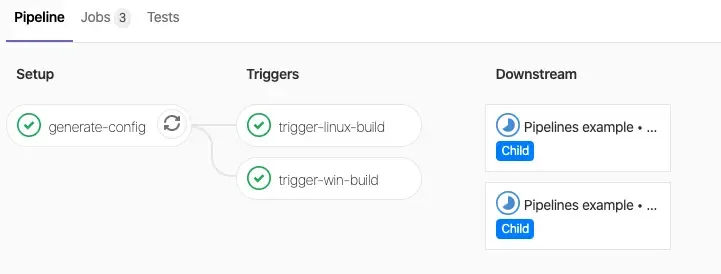
┌──────────────┐ ┌──────────────┐ ┌──────────────────┐│ generate │───▶│ child.yml │───▶│ child pipeline ││ (script) │ │ (artifact) │ │ (execution) │└──────────────┘ └──────────────┘ └──────────────────┘ ① GENERATES ② STORES ③ EXECUTESThe three steps read as follows:
- Generate: a job (shell, Python, etc.) analyzes the context and writes a valid YAML file
- Store: this file is saved as a job artifact
- Execute: a trigger job uses
include: artifact:to launch this pipeline as a child
Why is it powerful?
Dynamic generation is only worthwhile against a need that a static
configuration does not cover. Read this table by its last column: as soon as the
list of jobs depends on an external source (database, API, files
actually modified), the rules and parallel:matrix keywords reach
their limit, because they require everything to be known when the YAML is written.
| Need | Static solution (rules) | Dynamic solution |
|---|---|---|
| 3 fixed customers | Enough: parallel:matrix | Overkill |
| Customers read from a database | Impossible | Script that reads the database |
| Jobs depending on modified files | Limited: changes: | git diff + generation |
| 1 job per line of a file | Impossible | Script that parses the file |
Basic setup
Understanding the structure
A dynamic pipeline always needs two jobs, and this pair shows up in every
example on the page. The generator writes the YAML file and publishes it as
an artifact; the trigger job, which carries the trigger: keyword, asks
GitLab to create the child pipeline from that artifact.
Parent pipeline: a commented example
This first example generates a child pipeline with a single job. The content is
hard-coded to isolate the mechanics: a cat with a heredoc writes the
file, artifacts: keeps it, and include: artifact: points the trigger job
to it.
stages:  - generate    # Step 1: generate the YAML  - trigger     # Step 2: run the generated YAML
# Job that GENERATES the pipelinegenerate_pipeline:  stage: generate  image: alpine:3.18@sha256:de0eb0b3f2a47ba1eb89389859a9bd88b28e82f5826b6969ad604979713c2d4f  script:    - |                            # Multi-line script      cat > child-pipeline.yml << 'EOF'      stages:        - test
      test_job:        stage: test        script:          - echo "Generated job!"      EOF  artifacts:    paths:      - child-pipeline.yml        # CRUCIAL: save the generated file
# Job that RUNS the generated pipelinetrigger_child:  stage: trigger  trigger:                         # Special keyword: this is not a normal job    include:      - artifact: child-pipeline.yml    # The generated file        job: generate_pipeline           # The job that created it    strategy: mirror               # Waits for the child pipeline to finish
Four lines carry the whole mechanism, and they show up in every example on the page:
cat > child-pipeline.yml << 'EOF'creates a file with the content between the twoEOFartifacts: paths:saves the file so that it survives the jobinclude: artifact:differs frominclude: local:: you reference an artifact, not a repository filejob: generate_pipelineindicates which job produced the artifact
The last line of the trigger job, strategy: mirror, makes it
wait and gives it the status of the child pipeline. Without it, the
parent turns green as soon as the child is created. The mirror value has existed
since GitLab 18.2 and replaces depend, which the documentation no longer
recommends; the parent-child lesson
details the difference.
The lab that puts this mechanism into practice lives on that same parent-child
lesson: it has you generate the child file from a job, point to it with
include: artifact:, and then grades the child GitLab actually created. Read
both pages before starting it.
One indentation detail matters here. GitLab removes the common
indentation (six spaces) of the - | block before passing the script to the shell: the body
of the heredoc and the final EOF must therefore stay aligned with that indentation. A
line written in column 0 closes the YAML block, and the whole .gitlab-ci.yml
is rejected.
Use case: multi-customer tests
The problem
You have a SaaS application with several customers, each with its own configuration. You must test the application for each customer before deploying, and the list of customers changes over time.
parallel:matrix does not fit here, for three reasons:
- the list of customers can change (new customers, removed customers)
- the list comes from a config file or an API, not from the YAML
- you need conditional logic (some customers have special tests)
Solution: dynamic generation
The idea fits in one sentence: a script reads the list of customers and writes
one job per customer. The for loop appends a block to the file on each
iteration, and the unquoted heredoc lets the shell replace ${client}.
stages:  - generate  - test
generate:  stage: generate  image: alpine:3.18@sha256:de0eb0b3f2a47ba1eb89389859a9bd88b28e82f5826b6969ad604979713c2d4f  script:    - |      # List of customers (could come from a file, an API...)      CLIENTS="client1 client2 client3"
      # Create the YAML file      echo "stages:" > test-pipeline.yml      echo "  - test" >> test-pipeline.yml      echo "" >> test-pipeline.yml
      # Loop: one job per customer      for client in $CLIENTS; do        cat >> test-pipeline.yml << EOF      test_${client}:        stage: test        script:          - echo "Testing for ${client}"          - ./run-tests.sh --client ${client}        variables:          CLIENT_NAME: "${client}"
      EOF      done
      # Display the result (useful for debugging)      echo "=== Generated pipeline ==="      cat test-pipeline.yml  artifacts:    paths:      - test-pipeline.yml
run_tests:  stage: test  trigger:    include:      - artifact: test-pipeline.yml        job: generate    strategy: mirror
What the script generates
The test-pipeline.yml file published as an artifact is an ordinary pipeline,
which you could write by hand. It is what GitLab receives, and it is
what you should read first when the child pipeline does not do what you
expected:
stages:  - test
test_client1:  stage: test  script:    - echo "Testing for client1"    - ./run-tests.sh --client client1  variables:    CLIENT_NAME: "client1"
test_client2:  stage: test  script:    - echo "Testing for client2"    - ./run-tests.sh --client client2  variables:    CLIENT_NAME: "client2"
test_client3:  stage: test  script:    - echo "Testing for client3"    - ./run-tests.sh --client client3  variables:    CLIENT_NAME: "client3"
Result in GitLab: 3 jobs run in parallel, each testing a different
customer. If you add client4 to the list, a 4th job appears
automatically.
Generating from modified files
The use case: monorepo
A monorepo groups several services in a single repository. Rebuilding every service on each commit wastes runner time: the goal is to build only the modified services.
monorepo/├── frontend/│ └── Dockerfile├── backend/│ └── Dockerfile├── api/│ └── Dockerfile└── docs/ └── (no Dockerfile)If only frontend/ changes, neither backend/ nor api/ should be
rebuilt.
Why not rules: changes:? changes: works, but you have to
write one job per service and list its paths by hand. Every new
service forces you to edit the YAML. With dynamic generation, the script
discovers the modified services and writes only their jobs.
The HEAD~1 trap
The first reflex, git diff HEAD~1, only compares with the previous
commit. The result is wrong as soon as a push contains several commits,
and the command fails when the history is missing.
$CI_COMMIT_BEFORE_SHA contains the last commit of the branch before the
push. It equals 0000000000000000000000000000000000000000 on the first push
of a branch and in pipelines without a push (web, scheduled, merge request);
in a merge request, $CI_MERGE_REQUEST_DIFF_BASE_SHA gives the base of the
diff. Finally, the reference commit may be missing from the shallow
clone: by default GitLab only fetches the last 20 commits
(GIT_DEPTH). The script covers these cases, and falls back to "all directories"
when no reference is usable.
Complete solution
A single job detects the modified services and writes their pipeline. The decisive
point is the end of the script: when no service has to be built, it
writes a noop job ("do nothing") instead of leaving the file without
a job. The trigger job thus runs always, with no
rules: condition at all.
stages:  - generate  - build
# Step 1: detect the modified services and write their pipelinegenerate_pipeline:  stage: generate  image: alpine:3.18@sha256:de0eb0b3f2a47ba1eb89389859a9bd88b28e82f5826b6969ad604979713c2d4f  before_script:    - apk add --no-cache git        # Git is not installed in alpine  script:    - |      ZERO=0000000000000000000000000000000000000000      # Merge request: diff base; push: last commit before the push      BASE="${CI_MERGE_REQUEST_DIFF_BASE_SHA:-$CI_COMMIT_BEFORE_SHA}"      # No usable reference commit: all directories are candidates      if [ -z "$BASE" ] || [ "$BASE" = "$ZERO" ] \         || ! git cat-file -e "${BASE}^{commit}" 2>/dev/null; then        echo "No reference commit: all directories are candidates"        CHANGED=$(git ls-tree -d --name-only HEAD)      else        echo "Comparing $BASE -> $CI_COMMIT_SHA"        CHANGED=$(git diff --name-only "$BASE" "$CI_COMMIT_SHA" | cut -d'/' -f1 | sort -u)      fi
      echo "stages: [build]" > build-pipeline.yml      JOBS=0      for service in $CHANGED; do        if [ -f "${service}/Dockerfile" ]; then          echo "Job generated for ${service}"          JOBS=$((JOBS + 1))          cat >> build-pipeline.yml << EOF
      build_${service}:        stage: build        image: docker:24@sha256:9b17a9f25adf17b88d0a013b4f00160754adf4b07ccbe9986664a49886c2c98e        services:          - docker:24-dind@sha256:9b17a9f25adf17b88d0a013b4f00160754adf4b07ccbe9986664a49886c2c98e        script:          - cd ${service}          - docker build -t ${service}:\$CI_COMMIT_SHA .      EOF        else          echo "Skipped: ${service} (no Dockerfile)"        fi      done
      # No service to build: a neutral job keeps the child pipeline valid      if [ "$JOBS" -eq 0 ]; then        cat >> build-pipeline.yml << 'EOF'
      noop:        stage: build        script:          - echo "No service modified, nothing to build"      EOF      fi
      echo "=== Generated pipeline ==="      cat build-pipeline.yml  artifacts:    paths:      - build-pipeline.yml
# Step 2: run the generated pipeline, unconditionallytrigger_builds:  stage: build  needs: ["generate_pipeline"]  trigger:    include:      - artifact: build-pipeline.yml        job: generate_pipeline    strategy: mirror
The script unfolds in three phases:
generate_pipelinelists the modified directories since the base of the merge request or the commit before the push, or all directories when no reference is usable- it writes a
docker buildjob for each directory that has a Dockerfile, and anoopjob if it finds none trigger_buildsruns the generated pipeline, which always contains at least one job
This script was replayed in a test repository on five scenarios, with the
produced YAML re-read by a parser each time: one modified service gives the
single build_frontend job, a change to docs/ gives the noop job, a
merge request that touches api/ gives build_api, and a first push and a
reference commit missing from the clone give the three build jobs.
Generating from a configuration
The use case
Your team wants to define the deployment environments without touching the CI/CD. It edits a simple YAML file, and the pipeline adapts automatically: the configuration file becomes the single source of truth.
Configuration file
The file stays readable by someone who does not know GitLab CI: a name, a URL, and two options that decide the job's behavior.
environments: - name: staging url: https://staging.example.com auto_deploy: true # Automatic deployment - name: production url: https://example.com auto_deploy: false # Manual only approval_required: true # Approval requiredPython generator
A Python script reads this configuration with PyYAML and builds the pipeline as a dictionary, then serializes it. Building an object rather than concatenating text rules out a whole family of indentation errors.
#!/usr/bin/env python3import yaml
# Read the configurationwith open('config/environments.yml') as f:    config = yaml.safe_load(f)
# Build the pipelinepipeline = {    'stages': ['deploy'],}
for env in config['environments']:    job_name = f"deploy_{env['name']}"
    # Base job    job = {        'stage': 'deploy',        'script': [            f"./deploy.sh {env['name']}"        ],        'environment': {            'name': env['name'],            'url': env['url']        }    }
    # No automatic deployment: manual job    if not env.get('auto_deploy', True):        job['when'] = 'manual'
    # Approval required: the manual job becomes blocking    if env.get('approval_required'):        job['allow_failure'] = False
    pipeline[job_name] = job
# Write the generated pipelinewith open('deploy-pipeline.yml', 'w') as f:    yaml.dump(pipeline, f, default_flow_style=False)
print("Pipeline generated: deploy-pipeline.yml")
A when: manual job is non-blocking by default: the pipeline finishes
without waiting for it. allow_failure: false makes it blocking, and the pipeline
then stays pending until someone runs it, which materializes the
approval requested for production.
Parent pipeline
The parent pipeline stays deliberately minimal: it installs PyYAML, runs
the Python script, then triggers the child pipeline from the artifact
produced. All the business logic lives in the script, never in this YAML. This is
what lets a team that is not a CI/CD specialist change the
deployment behavior without ever touching .gitlab-ci.yml.
stages:  - generate  - deploy
generate_deploy:  stage: generate  image: python:3.11@sha256:c7220863385ee39fb6d822da81f4469d0cd33ff893d92ce94105e5c3f4b95fe2  script:    - pip install pyyaml==6.0.2    - python scripts/generate-deploy-pipeline.py    - cat deploy-pipeline.yml              # Debugging: see the result  artifacts:    paths:      - deploy-pipeline.yml
deploy:  stage: deploy  trigger:    include:      - artifact: deploy-pipeline.yml        job: generate_deploy    strategy: mirror
Result: the team adds an environment by editing
config/environments.yml, and the pipeline adapts without changing
.gitlab-ci.yml.
Generating with Ansible
When an infrastructure is already described in an Ansible inventory, you might as well generate the pipeline from that inventory rather than keep a second list. Ansible's Jinja2 template engine then does the generator's work.
Jinja2 template
The template describes the shape of a job, and the {% for %} loop repeats it for
each host of the Ansible inventory. The advantage over a shell script
shows as soon as the job gets complex: indentation and variables are
handled by the template engine, which avoids the YAML errors produced by
hand-written successive echo calls.
stages:  - test
{% for host in groups['all'] %}test_{{ host }}:  stage: test  script:    - pytest --host {{ host }}  variables:    TARGET_HOST: "{{ host }}"    TARGET_ADDRESS: "{{ hostvars[host]['ansible_host'] | default(host) }}"
{% endfor %}
Generation playbook
The playbook is limited to a single module, ansible.builtin.template, which renders the
.j2 file into a concrete YAML. The gather_facts: false parameter avoids the
pointless collection of system information, since generation only depends on the
inventory. This generated-pipeline.yml file is the one that will then be
published as an artifact.
---- name: Generate the child pipeline hosts: localhost gather_facts: false tasks: - name: Generate pipeline from template ansible.builtin.template: src: templates/test-pipeline.yml.j2 dest: ./generated-pipeline.yml mode: "0644"GitLab pipeline
On the GitLab side, the pattern is the same as in the previous examples: a
generate job runs the playbook and publishes the artifact, a run_tests job triggers
it. The only specific point is the image used, which must ship
Ansible; the ansible/ansible-runner image fills that role without any extra
installation.
generate:  stage: generate  # repository with no published version: only the digest pins the image  image: quay.io/ansible/ansible-runner@sha256:001a4bde411be863d54c1d293f3d2e7b0ff0e67ef5d7b2f9f7fb56b61694f4e8  # stable-2.12  script:    - ansible-playbook -i inventory generate-pipeline.yml  artifacts:    paths:      - generated-pipeline.yml
run_tests:  stage: test  trigger:    include:      - artifact: generated-pipeline.yml        job: generate    strategy: mirror
Best practices
A generated pipeline is harder to debug than one written by hand: the error shows up in the child pipeline, while its cause lies in the generator. The following four practices bring the cause closer to the symptom.
1. Always validate the generated YAML
A syntax error in the generated YAML makes the child pipeline fail, far from the script that produced it. Validate the file in the generator job, before publishing it: the error then appears in the right place.
generate: script: - ./generate.sh > pipeline.yml # Validate the YAML syntax - python -c "import yaml; yaml.safe_load(open('pipeline.yml'))" artifacts: paths: - pipeline.yml2. Always display the generated pipeline
When something does not work, the first question is "what was
generated?". A simple cat in the generator job log
answers it, without having to download the artifact.
generate: script: - ./generate.sh > pipeline.yml - echo "=== Generated pipeline ===" && cat pipeline.yml3. Handle the "no job to run" case
If your script generates no job (nothing changed), GitLab cannot
create the child pipeline, and the trigger job fails. The reliable
fix is to write a neutral job, noop, in place of the empty
file:
generate: script: - | if [ -z "$JOBS_TO_CREATE" ]; then # No jobs: minimal pipeline, always valid cat > pipeline.yml << 'EOF' noop: stage: test script: - echo "Nothing to do" EOF else ./generate.sh > pipeline.yml fi artifacts: paths: - pipeline.ymlConditioning the trigger job on a dotenv variable does not
work, even though the idea comes up often: rules: is evaluated at
pipeline creation, when the dotenv report does not exist yet. The trigger
job is then never created, even when there are jobs to
run. The following form is therefore to be avoided:
trigger: trigger: include: - artifact: pipeline.yml job: generate rules: - if: $HAS_JOBS == "true" # ❌ dotenv variable: always empty here4. Factor out the generated jobs
The more YAML the generator writes, the more likely it is to write a wrong one. Put the common part of the jobs in a versioned file of the repository, and generate only what varies. A child pipeline combines up to three configuration files: the trigger job can include this template next to the artifact.
trigger_builds: trigger: include: - local: ci/templates/build.yml # versioned .build template - artifact: build-pipeline.yml # generated jobs: extends: .build job: generate_pipeline strategy: mirrorEach generated job is then reduced to a few lines (extends: .build and its own
variables), which reduces the error surface by the same amount.
Common mistakes
The five mistakes below cover most of the failures met with dynamic pipelines. Each one reads in the order symptom, cause, solution, and most are diagnosed by reading the generated file.
1. "invalid YAML"
Symptom: The trigger fails with a syntax error.
Cause: The script generated invalid YAML (indentation, special characters...).
Solution:
- Add
cat pipeline.ymlto see the content - Validate with a parser:
python -c "import yaml; yaml.safe_load(open('pipeline.yml'))" - Beware of variables with
:or#(wrap them in quotes)
2. "artifact not found"
Symptom: The trigger does not find the file.
Cause: The generate job failed, or the file is not in artifacts: paths:.
Solution:
- Check that
generatewent green - Check that the file name matches exactly
- Check
artifacts: paths:in the generator job
3. Empty pipeline
Symptom: The trigger job fails, the child pipeline is not created.
Cause: The generated YAML contains no job.
Solution: Generate a default "noop" job (see Best practices).
4. The trigger job never appears
Symptom: The job that carries trigger: is absent from the pipeline, even when jobs were generated.
Cause: Its rules: test an artifact (exists:) or a dotenv variable. Both are evaluated at pipeline creation, before any job: the condition is always false.
Solution: Remove these rules:, always trigger the child pipeline and generate a noop job when there is nothing to do.
5. Empty diff on schedule/web
Symptom: git diff returns nothing on a manually triggered pipeline.
Cause: CI_COMMIT_BEFORE_SHA does not exist or equals 0000....
Solution: Provide a fallback, the one from the complete solution:
if [ "$CI_COMMIT_BEFORE_SHA" = "0000000000000000000000000000000000000000" ] || [ -z "$CI_COMMIT_BEFORE_SHA" ]; then # No previous commit: consider everything as modified CHANGED=$(git ls-tree -d --name-only HEAD)else CHANGED=$(git diff --name-only "$CI_COMMIT_BEFORE_SHA" "$CI_COMMIT_SHA" | cut -d'/' -f1 | sort -u)fiKey takeaways
- Generation: a job creates a YAML file
- Artifact: the file is saved
- Trigger:
include: artifact:runs the pipeline strategy: mirror: the parent waits for the end- Always validate the generated YAML
- Limits: 5 MB max for the generated YAML, up to 3 configuration files combined per child pipeline
- Empty case: generate a
noopjob;rules:sees neither artifacts (exists) nor dotenv variables HEAD~1trap: compareCI_COMMIT_SHAwithCI_MERGE_REQUEST_DIFF_BASE_SHA(merge request) or withCI_COMMIT_BEFORE_SHA(push)
Test your knowledge
Knowledge check
Check what you have learned with this interactive quiz
How it works
- The timer starts when you click Start
- Multiple choice, true/false and short answer questions
- You can move between questions
- Detailed results are shown at the end
Starts the quiz and the timer
Review
(0/0)Score by domain
A domain groups several guides and gets several questions, so its score is more reliable than a per-topic score, which often rests on a single question.
Summary
Strengths
No topic passed at 80% on at least two questions yet.
Weak areas
No topic below the pass mark.
Recommended next
Hints before you try again?
Continue the course: Multi-project GitLab CI/CD pipelines (trigger downstream)
A new full quiz with random questions
Work again only on the questions you missed