
Your jobs run on runners, but does your npm install take 3 minutes every time? The problem: dependencies are downloaded again in every job. The solution: the cache to reuse dependencies, and artifacts to pass files between jobs. This guide shows you how to optimize your pipelines.
What you will learn
By the end of this module, you will be able to:
- Tell artifacts and cache apart: two complementary mechanisms
- Configure artifacts: pass files between jobs (dist/, coverage/)
- Configure the cache: reuse .npm/, .cache/pip across pipelines
- Choose the right cache key: invalidate automatically when dependencies change
- Optimize performance: stop downloading dependencies again in every job
- Troubleshoot: diagnose cache and artifact problems
Prerequisites
Before continuing, make sure you are comfortable with:
Artifacts vs cache: what is the difference?
Both mechanisms carry files from one job to another, but they do not give the same guarantees. An artifact is stored on GitLab and will be there until it expires: it is a contract. A cache is an opportunistic optimization: GitLab may purge it, the runner may fail to find it, and your pipeline must work without it. This difference in reliability decides what you put in each one, and gives the golden rule: cache for dependencies, artifacts for build results.
| Aspect | Artifacts | Cache |
|---|---|---|
| Purpose | Pass files between jobs | Reuse across pipelines |
| Scope | Jobs of the same pipeline | All pipelines (if the cache is shared) |
| Lifetime | Configurable (default varies by instance) | Until the key is invalidated |
| Reliability | Guaranteed until expiration (stored on GitLab) | Best-effort (may be purged) |
| Downloadable | Yes, in the interface | No |
| Example | dist/, coverage/ | .npm/, .cache/pip |
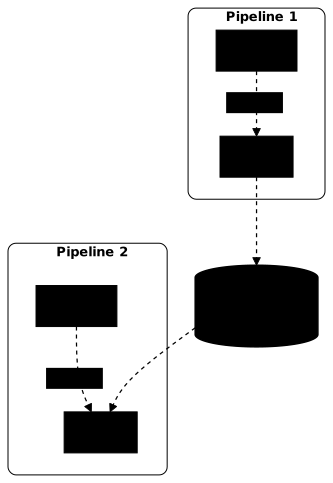
The diagram shows the two paths: artifacts go down from one job to the next inside a single pipeline, while the cache moves from one pipeline to the next.
Artifacts: passing files between jobs
Artifacts let you keep files from a job and pass them to the following jobs. At the end of the job, GitLab compresses the declared paths and uploads them; when each job of a later stage starts, it downloads them again automatically, with nothing to declare on the consumer side. This implicit transfer is what surprises people most: the test job below never mentions dist/, and still receives it.
Basic configuration
The build job declares dist/ as its output, and the test job finds it in its working directory. expire_in sets the retention time on the GitLab side; it has no effect on availability during the current pipeline.
build:  stage: build  script:    - npm ci    - npm run build  artifacts:    paths:      - dist/    expire_in: 1 week
test:  stage: test  script:    - npm test dist/    # dist/ is automatically available
Artifact options
Here are the five options that are really useful day to day. Remember when: always above all: by default, a failing job uploads nothing, including the test reports and logs that would explain the failure.
artifacts: paths: - dist/ - coverage/ exclude: - "**/*.map" # Exclude source maps expire_in: 1 week # Retention time when: always # Even if the job fails name: "build-$CI_COMMIT_SHA" # Name of the zip filewhen values:
| Value | Behavior |
|---|---|
on_success | Only if the job succeeds (default) |
on_failure | Only if the job fails |
always | In every case |
Downloading artifacts
Artifacts can be downloaded from the GitLab interface:
- Build > Jobs → click a job
- Download artifacts button (on the right)
- Or in Build > Artifacts to see all artifacts
Test reports
GitLab understands some report formats and displays them in the interface:
test: script: - npm test -- --coverage --reporters=jest-junit artifacts: when: always # Upload the report even if a test fails reports: junit: junit.xml # Test results coverage_report: coverage_format: cobertura path: coverage/cobertura.xmlThis shows failed tests in the Tests tab of the pipeline and directly in the merge request. The principle is the same in every language: the test tool writes a JUnit XML file, and reports: junit: hands it to GitLab. With pytest, the option --junitxml=report.xml produces it. A file declared under paths: alone is downloadable, but GitLab never reads it: the Tests tab stays empty. And without when: always, a failing test, which is exactly when you want to read the report, uploads nothing.
The coverage_report report also adds, in the changes tab (the diff) of the merge request, a line-by-line coverage annotation: tested and untested lines are flagged there. This feature is available from the Free tier of GitLab.
Cache: reusing across pipelines
The cache keeps files between pipelines to avoid downloading dependencies again. The runner extracts it before the script and archives it again afterwards, which has a cost: on a node_modules/ with tens of thousands of files, archiving can cancel the gain. Two settings make all the difference, the key that decides reuse and the policy that decides rewriting.
Basic configuration
Without an explicit key, GitLab uses the default key, shared by all jobs and all branches of the project. It is the simplest starting point, and also the one that produces collisions as soon as two branches have different dependencies.
This example caches .npm/ (the archives npm downloads) rather than node_modules/: the Node.js example further down explains why. The NPM_CONFIG_CACHE variable forces npm to write there, because the runner can only archive what lives in the project directory.
variables:  NPM_CONFIG_CACHE: "$CI_PROJECT_DIR/.npm"
build:  cache:    paths:      - .npm/  script:    - npm ci --prefer-offline    - npm run build
Cache key
The cache key determines when the cache is reused or recreated:
cache: key: $CI_COMMIT_REF_SLUG # One key per branch paths: - .npm/Common keys:
| Key | Behavior |
|---|---|
default | Global cache, shared by everything |
$CI_COMMIT_REF_SLUG | One cache per branch |
$CI_JOB_NAME | One cache per job |
| File hash (see below) | Invalidated when the file changes |
File-based key
To invalidate the cache when dependencies change:
cache: key: files: - package-lock.json # New key if the lock file changes paths: - .npm/If package-lock.json changes, the cache is recreated automatically.
Cache policy
The cache policy controls whether the job reads, writes, or does both. This setting costs one line: in a classic pipeline, a single job installs the dependencies and all the others just read them. Leaving them the default pull-push policy makes them archive and upload an identical cache on every run, for nothing.
# Job that reads AND writes the cache (default)install:  cache:    policy: pull-push    paths:      - .npm/  script:    - npm ci --prefer-offline
# Job that only reads (avoids rewriting)test: cache: policy: pull paths: - .npm/ script: - npm ci --prefer-offline - npm test| Policy | Read | Write | Use case |
|---|---|---|---|
pull-push | Yes | Yes | Job that installs (default) |
pull | Yes | No | Jobs that only use it |
push | No | Yes | Regenerate the cache |
Each job declares its own paths: here, and this is a rule to remember as soon
as default: comes into play: a cache: block written in a job replaces
the one from default: entirely, it is not merged. A job with policy: pull
must therefore repeat its key and its paths, otherwise it reads
nothing. The Industrialisation section shows how to avoid this repetition
with extends,
which merges the keys of a block instead of replacing it.
Examples by language
Each ecosystem puts its cache somewhere else, and the trap is always the same: caching the install directory instead of the download directory. The four configurations below are complete and transposable; they first redirect the tool's cache into $CI_PROJECT_DIR (the only location the runner knows how to archive), then apply a key based on the lock file.
npm ci deletes and recreates node_modules/ on every run. The gain comes from the npm cache (downloaded tarballs), not from node_modules/:
stages: [install, build, test]
variables:  NPM_CONFIG_CACHE: "$CI_PROJECT_DIR/.npm"
default:  cache:    key:      files:        - package-lock.json    paths:      - .npm/              # Tarball cache, not node_modules    policy: pull-push
install:  stage: install  script:    - npm ci --prefer-offline   # Uses the local cache when possible                                # Inherits the cache from default: reads and writes
build:  stage: build  script:    - npm ci --prefer-offline    - npm run build  cache:                        # Replaces default entirely: repeat everything    key:      files:        - package-lock.json    paths:      - .npm/    policy: pull  artifacts:    paths:      - dist/
test:  stage: test  script:    - npm ci --prefer-offline    - npm test  cache:    key:      files:        - package-lock.json    paths:      - .npm/    policy: pull
Caching a whole venv can break (different image, Python version, native dependencies). More robust: pip cache (downloads) + venv artifact (same pipeline):
stages: [install, test]
variables:  PIP_CACHE_DIR: "$CI_PROJECT_DIR/.cache/pip"
default:  cache:    key:      files:        - requirements.txt    paths:      - .cache/pip/       # Cache of pip downloads    policy: pull-push
install:  stage: install  script:    - python -m venv .venv    - . .venv/bin/activate    - pip install -r requirements.txt  artifacts:    paths:      - .venv/            # Artifact for the following jobs    expire_in: 1 day
test:  stage: test  script:    - . .venv/bin/activate    - pytest  # The venv comes from the artifacts; the pip cache is inherited from default
By default, Maven downloads into ~/.m2/repository, outside the project directory and therefore out of the cache's reach. MAVEN_OPTS redirects it, and it is the indispensable line:
default:  cache:    key:      files:        - pom.xml    paths:      - .m2/repository/
variables:  MAVEN_OPTS: "-Dmaven.repo.local=$CI_PROJECT_DIR/.m2/repository"
build:  stage: build  script:    - mvn clean package -DskipTests  artifacts:    paths:      - target/*.jar
test:  stage: test  script:    - mvn test
Cache both the module cache (dependencies) and the build cache (compilation) for a maximum gain:
variables:  GOPATH: "$CI_PROJECT_DIR/.go"  GOMODCACHE: "$CI_PROJECT_DIR/.go/pkg/mod"  GOCACHE: "$CI_PROJECT_DIR/.cache/go-build"
default:  cache:    key:      files:        - go.sum    paths:      - .go/pkg/mod/       # Downloaded modules      - .cache/go-build/   # Compilation results    policy: pull-push
build:  stage: build  script:    - go build -o app ./...  artifacts:    paths:      - app
test:  stage: test  script:    - go test ./...  cache:                 # Replaces default entirely: repeat key and paths    key:      files:        - go.sum    paths:      - .go/pkg/mod/      - .cache/go-build/    policy: pull
Optimization strategies
These four settings are applied independently of each other and add up. Apply them in the order given: the first fixes a classic design mistake, the next three reduce the time spent transferring the cache. Measure before and after on a real pipeline; the duration of the Checking cache and Creating cache steps appears in the logs of each job.
1. Cache the downloads, not the build
Putting dist/ in the cache carries it over from one pipeline to the next: you risk testing a stale build without noticing. Build results are artifacts, never cache.
# ✅ Good: cache of the downloadscache:  paths:    - .npm/          # or .cache/pip, .m2/repository
# ❌ Bad: dist/ must be an artifact, not cachecache:  paths:    - .npm/    - dist/
2. Use policy: pull for jobs that do not modify the cache
A test job adds no dependency: rewriting the cache (re-archiving, then uploading) on every run is wasted time on every pipeline.
test: cache: key: files: - package-lock.json paths: - .npm/ policy: pull # Read-only: no re-archiving or upload3. Key based on the lock file
As long as the lock file does not change, the key stays identical and the cache is reused. As soon as a dependency changes, the key changes and the cache is rebuilt, with no manual purge or intervention from you.
cache: key: files: - package-lock.json # Auto-invalidates if dependencies change4. A dedicated install job
The .pre stage runs before all the other stages of the pipeline. Isolating the installation there gives a single point of cache writing, which makes the policy: pull of the other jobs safe.
install:  stage: .pre              # Special stage, before all the others  script:    - npm ci --prefer-offline  cache:    key:      files:        - package-lock.json    paths:      - .npm/    policy: pull-push
# The other jobs repeat the same key and paths, with policy: pull
Troubleshooting
Two rows of this table describe normal behavior, not a failure: a cache invalidated after a lock file change and a Cache not found on the first run are exactly what you expect. The real problems lie elsewhere, in an unstable key or in the absence of a shared backend on the runner side.
| Problem | Likely cause | Solution |
|---|---|---|
| Cache never used | Different key on every run | Check the cache key |
A job with policy: pull reads nothing | Its cache: replaces the one from default: and no longer has key or paths | Repeat key and paths in the job |
| Stale cache | Lock file changed | Good thing! The cache is rebuilt |
| "Cache not found" | First run or cache purged | Normal, the cache will be recreated |
| Cache OK locally, KO with autoscaling | No distributed cache | Configure S3/GCS on the runner side |
| Artifacts not found | Job in a different stage failed | Check the dependencies between stages |
| Expired artifacts | expire_in too short | Increase the duration |
| Artifacts never deleted | Latest successful pipeline kept | Disable in Settings > CI/CD |
Hands-on lab
The lab "Cache the dependencies, keep the test report" replays this guide on a GitLab CE forge of your own (a GitLab Community Edition server that you host), installed on a virtual machine with its runner, rather than on gitlab.com. You therefore have no minute quota, no identity verification, and you can break the project as often as you need.
You start from a green pipeline, pipeline-craft, which is wasteful: its
three jobs each install the Python dependencies again, and the test results
vanish with the job. You add a cache keyed on the dependency file and publish
the JUnit report, with the gestures seen in the sections above: the pip cache,
the file-based key, reports: junit: and when: always.
Grading is taken on the state the forge shows, never on the commands you
typed: the pipeline is still green, the test report is read by GitLab
rather than merely downloadable (an empty Tests tab fails), and the cache
was actually restored (the Successfully extracted cache line, the only one
that proves it). A cache is created on the first run and restored only on the
next one, so you run the pipeline twice and compare the durations.
The lab is driven by DSOXLab, the command-line tool that runs and grades
the labs of the site. It starts with dsoxlab run gl-04-artifacts-et-cache,
after dsoxlab provision prepares the machine. Installing DSOXLab is
described in the DSOXLab documentation.
Key takeaways
- Artifacts = files between jobs (same pipeline), Cache = files between pipelines
- Cache for downloads (
.npm/,.cache/pip), artifacts for results (dist/,.venv/) - Key based on the lock file to invalidate automatically when dependencies change
policy: pullfor jobs that do not modify the cache (faster)- Distributed cache required for autoscaling/Kubernetes (S3, GCS, Azure Blob)
- The cache is best-effort, your pipeline must work without it
- A job's
cache:block replaces the one fromdefault:: repeatkeyandpaths
Knowledge check
Test your knowledge of GitLab CI/CD artifacts and cache.
Knowledge check
Check what you have learned with this interactive quiz
How it works
- The timer starts when you click Start
- Multiple choice, true/false and short answer questions
- You can move between questions
- Detailed results are shown at the end
Starts the quiz and the timer
Review
(0/0)Score by domain
A domain groups several guides and gets several questions, so its score is more reliable than a per-topic score, which often rests on a single question.
Summary
Strengths
No topic passed at 80% on at least two questions yet.
Weak areas
No topic below the pass mark.
Recommended next
Hints before you try again?
Continue the course: GitLab CI/CD variables and secrets
A new full quiz with random questions
Work again only on the questions you missed