
GitLab CI/CD automates the repetitive tasks of your project: compiling the code, running the tests, checking quality, deploying the application. You describe these tasks in a configuration file, .gitlab-ci.yml, and GitLab does the rest on every git push.
What you will learn
By the end of this module, you will be able to:
- Understand what GitLab CI/CD is: the automation tool built into GitLab
- Know the 4 key concepts: pipeline, stage, job, runner
- Identify the
.gitlab-ci.ymlfile: where to put it, what it contains - View a pipeline: navigate the GitLab interface
- Read the logs of a job: understand what happened
What is GitLab CI/CD?
CI stands for Continuous Integration: on every commit, the code is automatically built and tested. If something breaks, you know immediately.
CD stands for Continuous Delivery/Deployment: validated code is automatically prepared (or deployed) to an environment.
GitLab CI/CD is built directly into GitLab. No need to install Jenkins, CircleCI or any other external tool. Everything is configured in your repository.
Why use it?
Picture your current workflow without CI/CD:
- You code a feature
- You run the tests... manually (or you forget)
- You send the code to the server... via FTP or SSH
- A bug in production? You don't know which commit introduced it
Now, with GitLab CI/CD:
- You code a feature
- You do a
git push - Automatically: build, tests, code analysis, deployment
- If something fails, you get an alert with the details
| Without CI/CD | With GitLab CI/CD |
|---|---|
| Forgotten tests | Tests on every commit |
| Risky manual deployment | Automated deployment |
| "It works on my machine" | Reproducible environment |
| Feedback after hours | Feedback within minutes |
How does it work?
The principle is simple:
-
You create a
.gitlab-ci.ymlfileThis file, placed at the root of your project, describes the tasks to automate.
-
You push your code
git pushsends your code to GitLab. -
GitLab reads the file and creates a pipeline
A pipeline is the set of tasks to run for this commit.
-
The tasks run on runners
Machines (provided by GitLab or your own) run the commands.
-
You see the result
Green = all good. Red = something failed. The logs detail what happened.
What are the 4 concepts to remember?
GitLab CI/CD rests on 4 fundamental notions. Once you understand them, everything else becomes logical.
1. The pipeline
A pipeline is the whole automated workflow. It is the "big picture" that starts when you push code.
- A pipeline is created on every
git push - It can be triggered by other events (merge request, schedule, manual button)
- It has a status: running, passed, failed, canceled
2. The stages
Stages are the big steps of the pipeline. They run in order, one after the other.
stages: - build # Step 1: compile the code - test # Step 2: run the tests (after build) - deploy # Step 3: deploy (after test)Important rule: if a stage fails, the following stages do not run. Logical: what is the point of deploying code that does not compile?
3. The jobs
A job is a unit task inside a stage. It is the basic building block, the place where you write your commands.
unit-tests:  stage: test  script:    - npm test
integration-tests:  stage: test  script:    - npm run test:integration
Key point: the jobs of a same stage run in parallel. In the example, the unit tests and the integration tests run simultaneously.
4. The runners
A runner is the machine that actually runs the jobs. Without a runner, your pipeline stays waiting.
| Type | Description | For whom? |
|---|---|---|
| Shared runners | Provided by GitLab.com, shared between all users | Beginners, standard projects |
| Project runners | Installed by you, dedicated to your project | Specific needs, performance |
For now, you will use GitLab's shared runners. They are available right away, with no configuration.
How does it all fit together?

Reading the diagram:
- The pipeline contains 3 stages that chain from left to right
- The "test" stage contains 2 jobs (test + lint) that run in parallel
- If the "build" stage fails, the "test" and "deploy" stages do not run
- The runners run each job in an isolated environment
What does the .gitlab-ci.yml file look like?
All the configuration lives in a file named .gitlab-ci.yml placed at the root of your Git repository.
A minimal example
# Define the stages (in order)stages:  - build  - test
# First job: compilebuild:  stage: build  script:    - echo "Compiling the code..."    - echo "Done!"
# Second job: testtest: stage: test script: - echo "Running the tests..." - echo "All tests pass!"Explanations:
stages:defines the order of the steps- Each job has a name (
build,test) stage:tells which step the job belongs toscript:holds the commands to run
What does a complete job look like?
my-job: stage: test # Stage the job belongs to image: node:24-alpine@sha256:a0b9bf06e4e6193cf7a0f58816cc935ff8c2a908f81e6f1a95432d679c54fbfd # Docker image used (environment) before_script: # Commands BEFORE the main script - npm install script: # Main commands (REQUIRED) - npm test after_script: # Commands AFTER (even on failure) - echo "Cleaning up..." artifacts: # Files to keep after the job paths: - coverage/Only script: is required. Everything else is optional.
Which predefined variables are useful?
GitLab makes variables available in every job. The most common ones:
| Variable | Description | Example |
|---|---|---|
CI_COMMIT_BRANCH | Branch name | main, feature/login |
CI_COMMIT_SHORT_SHA | Short commit hash | a1b2c3d4 |
CI_PROJECT_NAME | Project name | my-app |
CI_PIPELINE_SOURCE | What triggered the pipeline | push, merge_request_event |
build: script: - echo "Building commit $CI_COMMIT_SHORT_SHA on branch $CI_COMMIT_BRANCH"How do you view your pipelines?
In GitLab, click Build > Pipelines in the sidebar to see:
- The list of all your pipelines
- The visual graph of stages and jobs
- The status of each job (green/red/orange)
- The detailed logs of each job
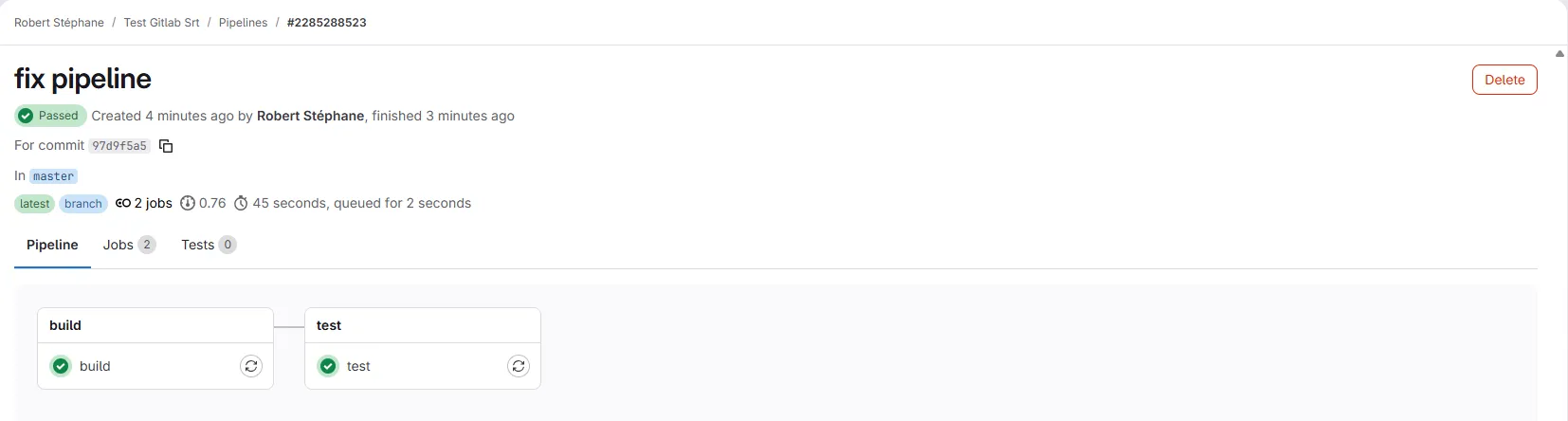
The graph shows the stages (columns) and the jobs (boxes). Here, the build stage finished successfully (green), then the test stage is running. The jobs of a same stage run in parallel.
Click a job to see its logs in real time while it runs:
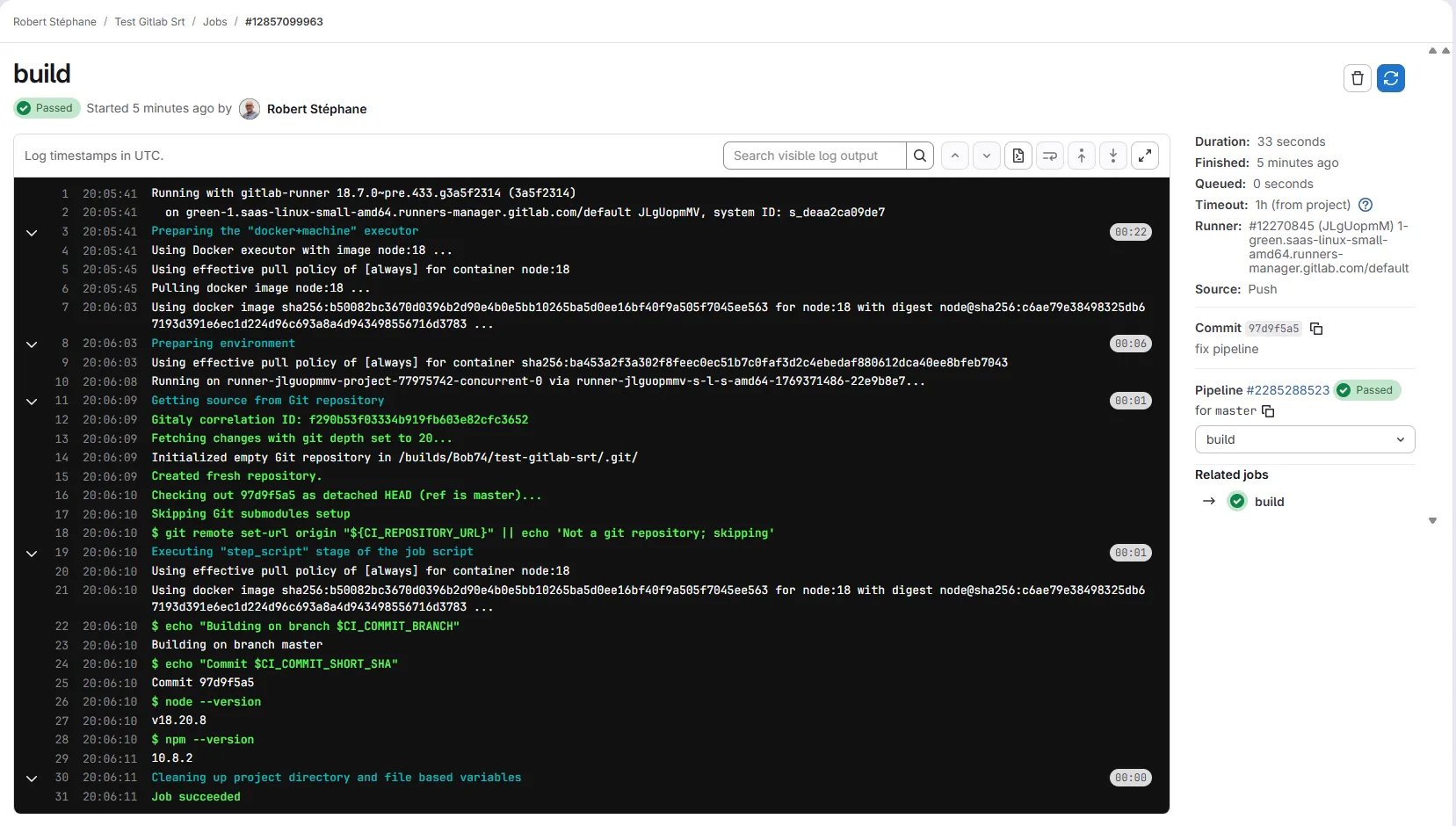
The logs show every command that ran and its output. Notice the CI variables ($CI_COMMIT_BRANCH, $CI_COMMIT_SHORT_SHA) resolved to their actual values.
Key takeaways
| Concept | Definition |
|---|---|
| Pipeline | Complete workflow triggered by an event |
| Stage | Step of the pipeline (run in order) |
| Job | Unit task with commands (parallel within a stage) |
| Runner | Machine that runs the jobs |
.gitlab-ci.yml | Configuration file at the root |
Knowledge check
Test your knowledge of the fundamentals of GitLab CI/CD pipelines.
Knowledge check
Check what you have learned with this interactive quiz
How it works
- The timer starts when you click Start
- Multiple choice, true/false and short answer questions
- You can move between questions
- Detailed results are shown at the end
Starts the quiz and the timer
Review
(0/0)Score by domain
A domain groups several guides and gets several questions, so its score is more reliable than a per-topic score, which often rests on a single question.
Summary
Strengths
No topic passed at 80% on at least two questions yet.
Weak areas
No topic below the pass mark.
Recommended next
Hints before you try again?
Continue the course: Writing a .gitlab-ci.yml file
A new full quiz with random questions
Work again only on the questions you missed