
You now know how to write a .gitlab-ci.yml file with stages, jobs and scripts. But who actually runs these jobs? The runners, agents that pick up your jobs and run the commands. This guide explains how they work and how to optimize them.
What you will learn
By the end of this module, you will be able to:
- Understand the role of a runner: the agent that runs your jobs
- Tell shared, group and project runners apart: choose the right type for your needs
- Use tags: target a specific runner for a job
- Choose an executor: Docker, Shell or Kubernetes depending on your context
- Diagnose a "pending" job: identify why a job does not start
- Optimize performance: reduce execution times
Prerequisites
Before continuing, make sure you are comfortable with:
What is a runner?
A runner is an agent that:
- Fetches pending jobs from GitLab
- Runs the job's commands
- Sends the results back (logs, artifacts, status)

What types of runners exist?
| Type | Scope | Use case |
|---|---|---|
| Shared runners | All GitLab.com projects | Standard projects, no setup |
| Group runners | Projects of a group | Teams with common needs |
| Project runners | A single project | Security, performance, specific needs |
Shared runners
GitLab.com provides shared runners, free of charge (with quotas). They are:
- Preconfigured with Docker
- Available immediately
- Limited in minutes per month (depending on your plan)
To use them, there is nothing to configure: your jobs run on them automatically.
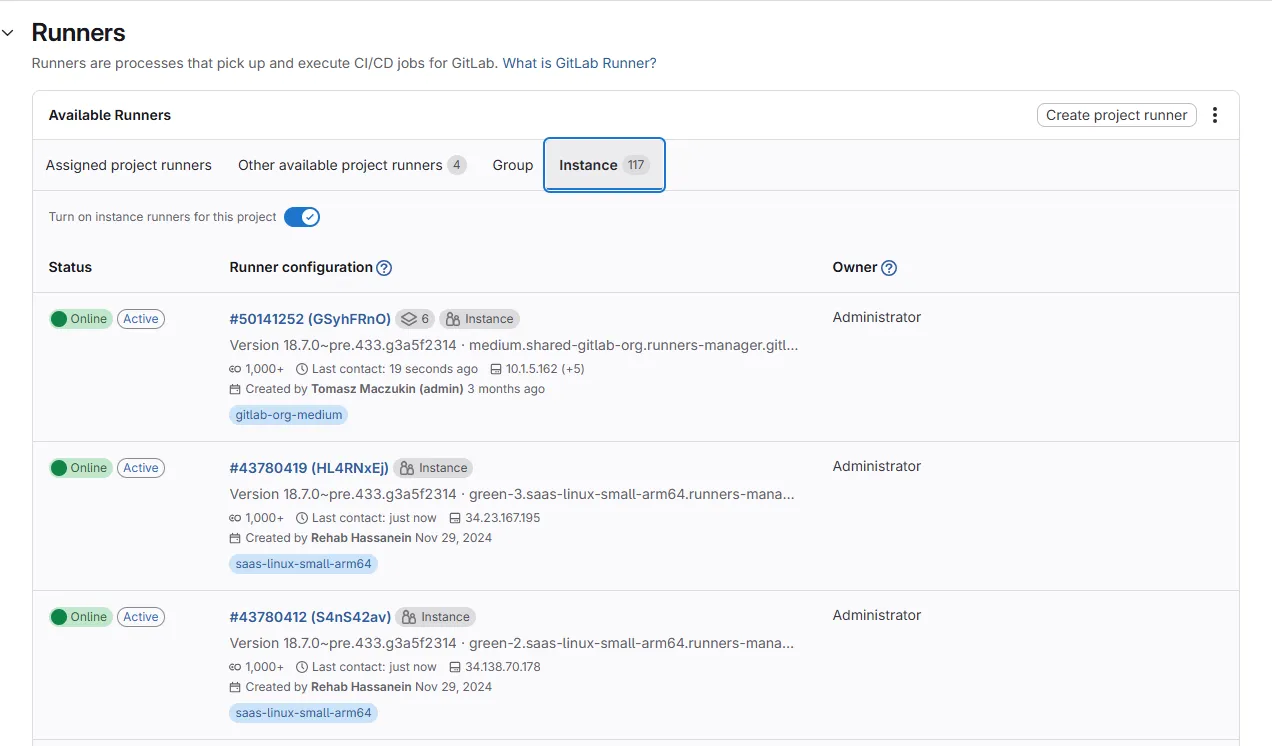
In Settings > CI/CD > Runners, you see the runners available to your project: their status (online/offline), their tags, and whether they are shared or dedicated.
Group runners
Group runners are shared among all the projects of a GitLab group. They are a good compromise between shared runners (too generic) and project runners (too isolated).
Use cases:
- Teams with several projects sharing the same needs (common tech stack)
- Centralized governance: a group admin manages the runners for all projects
- Control of tags and access at the team level
To create a group runner: Group > Settings > CI/CD > Runners > New group runner. The group's projects use it automatically (unless disabled at the project level).
Project runners (self-hosted)
Install your own runner for:
- Performance: dedicated machine, no queue
- Security: jobs that access internal resources
- Specialization: GPU, ARM, specific tools
- Cost: avoid minute quotas
How do you follow job execution?
When a pipeline runs, you can follow its progress in Build > Pipelines:
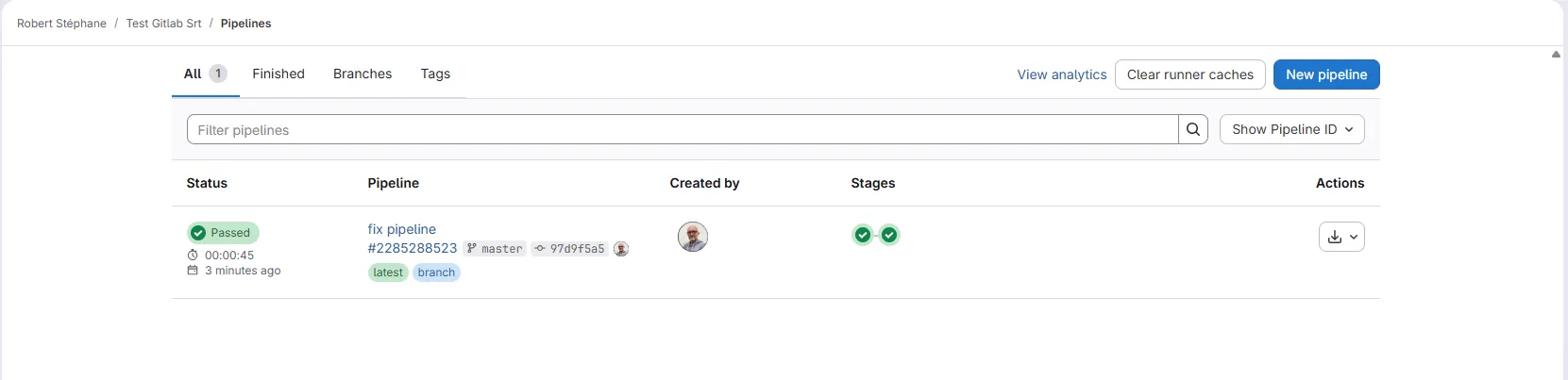
Each row represents a pipeline with its status, its branch and its trigger. Click a pipeline to see the detail of the stages and jobs:
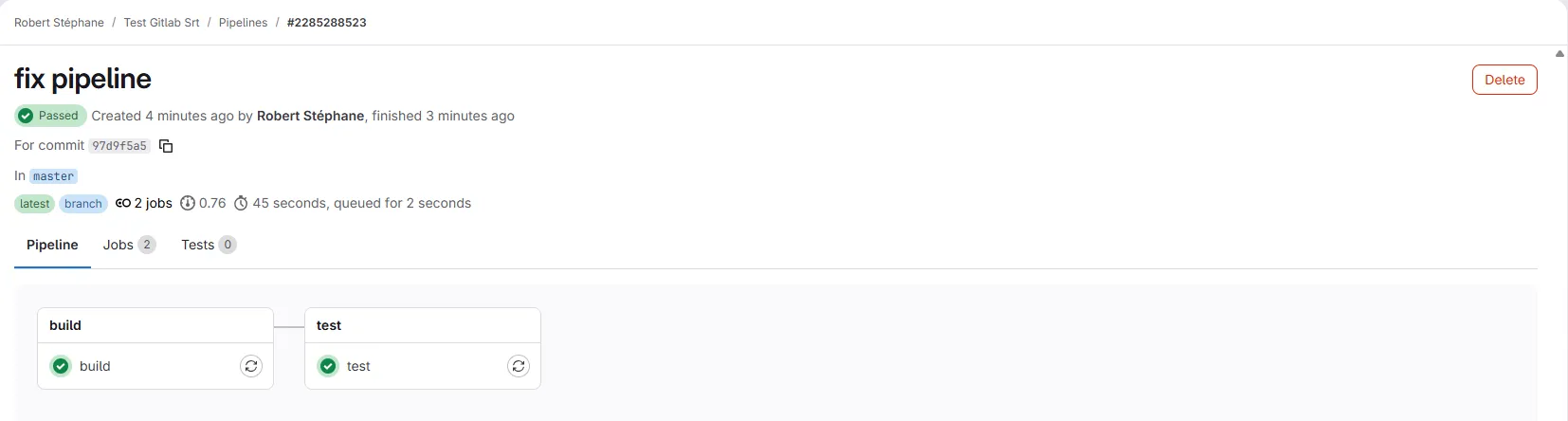
This graph shows the stages (columns) and the jobs (boxes). The jobs of a same stage run in parallel. Click a job to see its logs in real time:
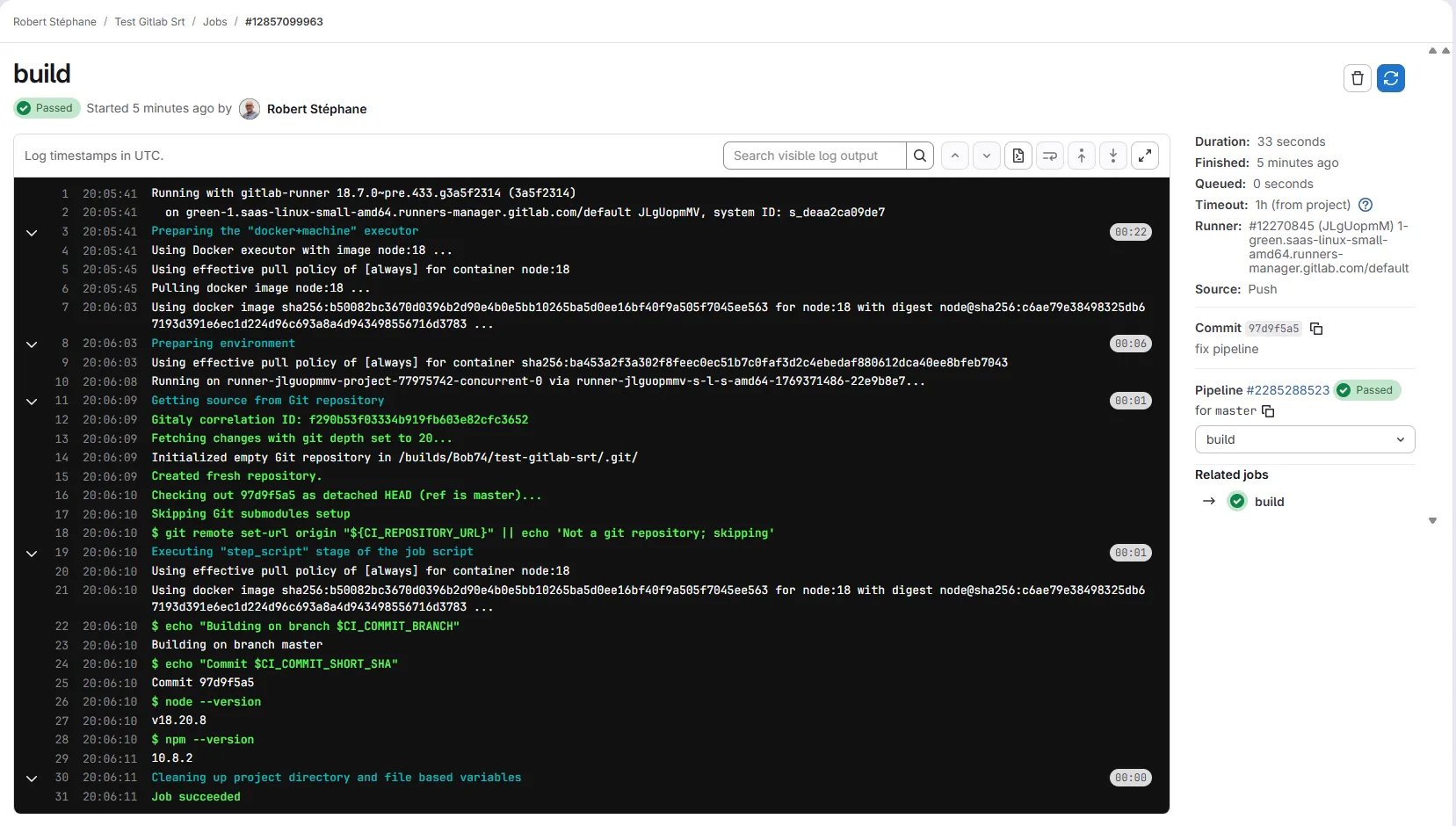
The logs show each command executed and its output. You see the CI variables (such as $CI_COMMIT_BRANCH) resolved with their actual values.
Executors
The executor defines how the runner runs the jobs:
| Executor | Description | Use case |
|---|---|---|
| Docker | Each job in an isolated container | Standard, isolation, reproducibility |
| Docker+Machine | Creates VMs on demand (autoscaling) | Variable load, cloud |
| Shell | Runs directly on the machine | Hardware access, simplicity |
| Kubernetes | Ephemeral Kubernetes pods | Existing K8s cluster |
| SSH | Connects to a remote machine | Deployment to existing servers |
Docker executor
The most common. Each job runs in a Docker container.
job: image: node:24-alpine@sha256:a0b9bf06e4e6193cf7a0f58816cc935ff8c2a908f81e6f1a95432d679c54fbfd # Docker image used script: - npm install - npm testAdvantages:
- Complete isolation between jobs
- Reproducible environment
- Wide choice of available images
Drawbacks:
- Image pull time
- No direct hardware access
Shell executor
Runs the commands directly on the runner's machine.
job: tags: - shell # Targets a runner with the shell executor script: - ./build.shAdvantages:
- Direct hardware access (GPU, USB...)
- No Docker overhead
- Preinstalled tools available
Drawbacks:
- No isolation between jobs
- Dependencies must be installed on the machine
How do tags work?
Tags let you target a specific runner. A job with tags only runs on a runner that has all of those tags.
build:  tags:    - docker    - linux  script:    - make build
build-arm:  tags:    - docker    - arm64  script:    - make build
On the runner side, tags are defined at registration:
gitlab-runner register \ --tag-list "docker,linux,amd64"How do you install a runner?
-
Download the binary and check its checksum
Pin the version rather than downloading
latest, which changes without notice. The runner version should match your GitLab version (here 19.5.1, the version this course is measured on). GitLab publishes arelease.sha256file next to each version, andsha256sum -ccompares the download with it:Terminal window RUNNER_VERSION="19.5.1" # align with your GitLab versionbase="https://gitlab-runner-downloads.s3.amazonaws.com/v${RUNNER_VERSION}"curl -fsSLO "${base}/binaries/gitlab-runner-linux-amd64"curl -fsSL "${base}/release.sha256" \| grep 'binaries/gitlab-runner-linux-amd64$' \| sed 's#binaries/##' \| sha256sum -c -The check must print
gitlab-runner-linux-amd64: OK. Any other output means the file is corrupted or altered: delete it and start again. Then install it, withsudobecause/usr/local/binbelongs to root:Terminal window sudo install -m 0755 gitlab-runner-linux-amd64 /usr/local/bin/gitlab-runnergitlab-runner --version -
Create a dedicated user
Terminal window sudo useradd --comment 'GitLab Runner' --create-home gitlab-runner --shell /bin/bash -
Install and start the service
Terminal window sudo gitlab-runner install --user=gitlab-runner --working-directory=/home/gitlab-runnersudo gitlab-runner start -
Create the runner in GitLab
In Settings > CI/CD > Runners, click New project runner. Set the tags and options, then GitLab generates a runner authentication token (prefix
glrt-). -
Register the runner
Use the
glrt-...token with the--tokenoption:Terminal window sudo gitlab-runner register \--url "https://gitlab.com/" \--token "glrt-XXXXXXXXXXXXXXXX" \--name "my-docker-runner" \--executor "docker" \--docker-image "alpine:3.24.1@sha256:28bd5fe8b56d1bd048e5babf5b10710ebe0bae67db86916198a6eec434943f8b" \--tag-list "docker,linux"--docker-imageis the default image of jobs that do not declare their ownimage:. As in a.gitlab-ci.yml, it is pinned by its digest (@sha256:...), so every job starts from the exact same content.
Align the runner version with your GitLab version (e.g. GitLab 19.5 → Runner 19.5). The image is pinned by its digest, so the tag cannot silently point to other content:
docker run -d \ --name gitlab-runner \ --restart always \ -v /srv/gitlab-runner/config:/etc/gitlab-runner \ -v /var/run/docker.sock:/var/run/docker.sock \ "gitlab/gitlab-runner:v19.5.1@sha256:8e049fb719162488893a9eccc48f3a05259d02f2386dfbb20f3e379a50575afd"Then register with the glrt-... token:
docker exec -it gitlab-runner gitlab-runner register \ --url "https://gitlab.com/" \ --token "glrt-XXXXXXXXXXXXXXXX"Use the official Helm chart. The runnerToken must be a runner authentication token (glrt-...) created through the GitLab UI:
helm repo add gitlab https://charts.gitlab.iohelm install gitlab-runner gitlab/gitlab-runner \ --set gitlabUrl=https://gitlab.com \ --set runnerToken="glrt-XXXXXXXXXXXXXXXX" \ --set rbac.create=trueFor production, use a Kubernetes Secret rather than passing the token in clear text:
kubectl create secret generic gitlab-runner-secret \  --from-literal=runner-token="glrt-XXXXXXXXXXXXXXXX"
helm install gitlab-runner gitlab/gitlab-runner \  --set gitlabUrl=https://gitlab.com \  --set runners.secret=gitlab-runner-secret \  --set rbac.create=true
How do you configure the runner?
The configuration file is /etc/gitlab-runner/config.toml:
concurrent = 4        # Max simultaneous jobs on this runnercheck_interval = 3    # GitLab polling interval (in seconds)
[[runners]]  name = "my-runner"  url = "https://gitlab.com/"  token = "glrt-xxxx"  executor = "docker"
  [runners.docker]    image = "alpine:3.24.1@sha256:28bd5fe8b56d1bd048e5babf5b10710ebe0bae67db86916198a6eec434943f8b"    privileged = false    volumes = ["/cache"]    pull_policy = ["always", "if-not-present"]  # Fallback if the registry is unavailable
Important parameters:
| Parameter | Description |
|---|---|
concurrent | Number of simultaneous jobs on this runner |
check_interval | Interval between polls to GitLab (spread across the runners in the file) |
pull_policy | Pull strategy: always, if-not-present, never (or a list for fallback) |
privileged | Privileged mode (required for Docker-in-Docker, security risk) |
volumes | Volumes mounted in the containers |
How do you diagnose a pending job?
Is your job stuck on "pending"? Here are the possible causes:
| Symptom | Likely cause | Solution |
|---|---|---|
| "Waiting for a runner" | No runner available | Check that the runners are active |
| "This job is stuck" | Tags do not match | Check the tags of the job and of the runner |
| Pending for a long time | All runners busy | Increase concurrent or add runners |
| Pending then fail | Runner offline | Check the gitlab-runner service |
Diagnosis:
# Check the runner statusgitlab-runner status
# See the registered runnersgitlab-runner list
# Test the connection to GitLabgitlab-runner verify
In GitLab: Settings > CI/CD > Runners shows the available runners and their status (see the screenshot above).
Why are my jobs slow?
| Cause | Impact | Solution |
|---|---|---|
| Image pull on every job | +30s to +2min | pull_policy: if-not-present |
npm install on every job | +1 to 5min | Use the cache |
| Overloaded shared runners | Queue | Dedicated runner |
| Heavy image | Download time | Lighter or custom image |
What are the best practices?
- Use meaningful tags:
docker-linux,gpu,prod-deploy - Limit production runners: dedicated tags, restricted access
- Configure
concurrentcorrectly: according to the machine's resources - Use
pull_policy: if-not-presenton a private runner: avoids unnecessary pulls (keepalwayson shared runners, see the caution above) - Monitor your runners: dashboards, alerts if offline
Hands-on lab
The lab "The right image for each job" replays this guide on a GitLab CE forge of your own, set up on a virtual machine with its runner and its registry, rather than on the shared runners of gitlab.com: no minute quota, no identity verification, and a project you can break as often as you need.
Three jobs share the same heavy Python image, and the one that builds the
image runs docker build from it, which cannot work. You pick an image
that matches what each job does, and give the build job a Docker
daemon (building an image is detailed in
GitLab registries).
Grading is taken on the job logs, never on the file.
The lab starts with dsoxlab run gl-03-images-et-runners, after dsoxlab provision prepares the virtual machine, its runner and its registry.
Installing DSOXLab and its prerequisites are described in the DSOXLab
documentation.
Key takeaways
- Runner = agent that runs the jobs on a machine
- Shared runners are free (with quotas), project runners give full control
- Docker executor recommended for isolation and reproducibility
- Tags = target a specific runner (
tags: [docker, gpu]) - Pending job = check tags, active runners, and
concurrent - Performance = cache, pull_policy, dedicated runners
Knowledge check
Test your knowledge of GitLab CI/CD runners.
Knowledge check
Check what you have learned with this interactive quiz
How it works
- The timer starts when you click Start
- Multiple choice, true/false and short answer questions
- You can move between questions
- Detailed results are shown at the end
Starts the quiz and the timer
Review
(0/0)Score by domain
A domain groups several guides and gets several questions, so its score is more reliable than a per-topic score, which often rests on a single question.
Summary
Strengths
No topic passed at 80% on at least two questions yet.
Weak areas
No topic below the pass mark.
Recommended next
Hints before you try again?
Continue the course: GitLab CI/CD artifacts and cache
A new full quiz with random questions
Work again only on the questions you missed