
Did your job fail with a cryptic message in the logs? This guide teaches you to read GitLab CI/CD logs efficiently and to quickly identify the cause of errors.
What you will learn
By the end of this guide, you will be able to:
- Find the cause of a failure: spot the
ERRORline and the last command run in a log - Tell the phases of a job apart:
before_script,script,after_script, cache and artifacts - Diagnose common errors: command or file not found, permission denied, failing tests, non-zero exit code
- Enable verbose mode with
CI_DEBUG_TRACE, knowing the risk of leaking secrets - Add your own traces and download or search the full logs
How are the logs structured?
A GitLab CI/CD job runs in several phases:
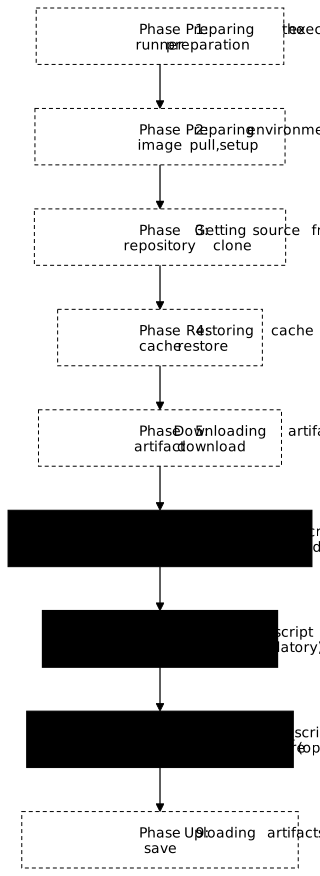
Each section is collapsible in the interface. Click a section to see its content.
How do you read the logs quickly?
-
Open the failed job
Build > Jobs → click the red job
-
Go to the end of the logs
Scroll down or click the "Scroll to bottom" button
-
Find the last command that ran
Just before
Job failedis the command that failed. -
Read the error message
Go up a few lines to see the complete error message.
What are the common errors and their solutions?
1. Command not found
$ npm run buildbash: npm: command not foundCause: The tool is not installed in the Docker image.
Solutions:
- Use an image that contains the tool:
image: node:24 - Install it in
before_script:apt-get install -y nodejs npm
2. File not found
$ cat config.jsoncat: config.json: No such file or directoryCause: The file does not exist or the path is wrong.
Solutions:
- Check the path (absolute vs relative)
- Add
ls -labeforehand to list the files - Check that the artifacts are indeed downloaded
3. Permission denied
$ ./deploy.shbash: ./deploy.sh: Permission deniedCause: The script is not executable.
Solution:
before_script: - chmod +x deploy.sh4. Failed tests
FAIL src/utils.test.js✕ should return correct value (5 ms)
Test Suites: 1 failedCause: The code does not pass the tests.
Solution: Fix the code or the tests!
5. Non-zero exit code
$ some_commandERROR: Something went wrongJob failed: exit code 1Cause: The command returned an error code.
Diagnosis: Read the ERROR message above.
Debug mode: CI_DEBUG_TRACE
To see all the commands executed along with their values:
variables:  CI_DEBUG_TRACE: "true"
job: script: - echo $MY_SECRET # Will print the value!Enable it temporarily (without modifying the file):
- Build > Pipelines > Run pipeline
- Add the variable
CI_DEBUG_TRACE=true - Run the pipeline
How do you add your own debug logs?
build:  script:    # Print environment variables    - echo "Branch: $CI_COMMIT_BRANCH"    - echo "Source: $CI_PIPELINE_SOURCE"
    # List files    - ls -la    - pwd
    # Print the content of a file    - cat package.json
    # Your command    - npm run build
How do you continue despite an error?
By default, the runner stops the job at the first command that fails (exit code ≠ 0). To continue despite an error:
job: script: - command_that_may_fail || true # Continues even on error - another_commandTo mark a job as "non-blocking" for the pipeline:
job: allow_failure: true script: - risky_commandHow do you download the complete logs?
To analyze offline or to share:
- On the job page, use the Download button (to the right of the logs)
- Or through the API:
# Replace with the URL of your GitLab instance# The token must have the read_api scope on the projectcurl --header "PRIVATE-TOKEN: $TOKEN" \ "https://gitlab.example.com/api/v4/projects/$PROJECT_ID/jobs/$JOB_ID/trace" \ > job.logWhat runs after a failure?
Even if the job fails or is canceled, after_script runs. Use it to collect information:
job: script: - npm test after_script: # Runs even if npm test fails or if the job is canceled - echo "Job status: $CI_JOB_STATUS" # success, failed, or canceled - echo "Collecting debug info..." - cat npm-debug.log || true - ls -la node_modules/ || trueHow do you search the logs?
In the GitLab interface:
Ctrl+F(orCmd+F) to search the page- Search for:
error,failed,not found,denied
On the command line after downloading:
# Find the errorsgrep -i "error\|failed\|denied" job.log
# With context (5 lines before/after)grep -i -B5 -A5 "error" job.log
Runner logs vs job logs
This page covers the job logs (visible in the GitLab interface). If the job does not start or if you suspect an executor/cache problem, look at the runner logs:
# Logs of the gitlab-runner servicejournalctl -u gitlab-runner -n 200
# If Docker executordocker logs gitlab-runner
# If Kubernetes executorkubectl logs -n gitlab-runner <pod-name>
Hands-on lab
The lab "Read a failure and fix it" replays this guide on a GitLab CE forge of your own, set up on a virtual machine with its runner and its registry, rather than on gitlab.com: no minute quota, no identity verification, and a project you can break as often as you need.
You diagnose a red pipeline from GitLab's own messages: first a configuration error that stops any job from running, then two code errors only a job log reveals. Grading is taken on the three fixes, read from the API. The two families of defect are not read in the same place, and that is the whole exercise: this page teaches you to read the log of a job, but a pipeline refused because of its configuration has no job, hence no log to read, and the pipeline page does not always give the cause. It is the CI Lint that names it, presented in Validate a .gitlab-ci.yml file.
The lab starts with dsoxlab run gl-02-lire-un-echec, after dsoxlab provision prepares the virtual machine, its runner and its registry.
Installing DSOXLab and its prerequisites are described in the DSOXLab
documentation.
Key takeaways
- Scroll to the bottom of the logs to see the final error
exit code 1= the command failed, read above it- Collapsible sections: click to open/close
CI_DEBUG_TRACE: truefor verbose mode (warning: it exposes secrets!)after_scriptruns even after a failure or a cancellationallow_failure: true= the pipeline continues, but the job still fails- Pipes with
|: beware ofpipefail, which can make the line fail
Test your knowledge
Knowledge check
Check what you have learned with this interactive quiz
How it works
- The timer starts when you click Start
- Multiple choice, true/false and short answer questions
- You can move between questions
- Detailed results are shown at the end
Starts the quiz and the timer
Review
(0/0)Score by domain
A domain groups several guides and gets several questions, so its score is more reliable than a per-topic score, which often rests on a single question.
Summary
Strengths
No topic passed at 80% on at least two questions yet.
Weak areas
No topic below the pass mark.
Recommended next
Hints before you try again?
Continue the course: GitLab CI/CD runners
A new full quiz with random questions
Work again only on the questions you missed