
Do you need to test on Node 22, 24 and 26 without copy-pasting the same job three times? With parallel:matrix, a single job defines the logic, and GitLab automatically generates one instance per combination of variables. No more duplication, no more risk of forgetting one.
parallel vs parallel:matrix. Two keywords, two uses:
parallel: N= N identical copies of the job (useful to split tests)parallel:matrix= copies differentiated by variables (Node 22, 24, 26...)
This guide covers parallel:matrix. For parallel: N alone, see the official documentation.
Who is this guide for?
This guide is read by the section that matches your need. For multi-version tests (Node.js 22, 24, 26, or Python 3.13 to 3.15), see the multi-version use case. For multi-OS tests in parallel on Linux, macOS and Windows, read the multi-OS matrix. For complex combinations (version, OS and database), go to multidimensional matrices. Finally, to choose between a matrix and dynamic pipelines, the section matrix vs dynamic pipelines compares the two.
What you will learn
By the end of this module, you will be able to:
- Configure
parallel:matrix: syntax and options - Test multiple versions: Node.js, Python, Go in parallel
- Split tests into suites: a matrix that varies the image and the suite, and what happens to the coverage
- Test multiple OSes: Linux, macOS, Windows with tags
- Create multidimensional matrices: version × OS × database
- Combine with
needs: dependencies between matrix jobs - Choose matrix vs dynamic: when to use each approach
Prerequisites
Before continuing, make sure you are comfortable with:
How does parallel:matrix work?
The problem: code duplication
Without parallel:matrix, to test three versions of Node.js, you would have to write:
# ❌ Without matrix: 3 almost identical jobstest_node22:  image: node:22  script: npm test
test_node24:  image: node:24  script: npm test
test_node26:  image: node:26  script: npm test
Three jobs with the same script, only the image changes. If you change the script, you have to remember to do it three times. If you add a fourth version, you create a fourth job. It is fragile and tedious.
The solution: a matrix of variables
parallel:matrix solves this problem by creating several instances of the same job with different variable values. It is the equivalent of a for loop over your jobs: "for each version in [22, 24, 26], run this job".
The diagram shows this unfolding: a single job template at the top, and
below it the three jobs that GitLab generates, each with its own
variable value (NODE_VERSION).
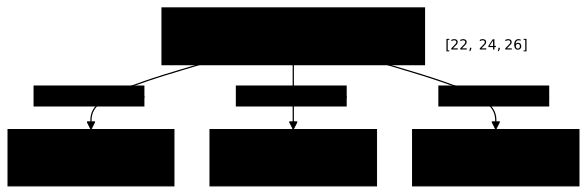
Concretely, GitLab takes your "template" job and duplicates it as many times as there are values in your matrix, injecting the matching variable into each copy.
Basic configuration
Minimal syntax
Here is the structure of a job with parallel:matrix. Each line has a precise role:
stages:  - test
test:  stage: test  image: node:$NODE_VERSION          # (1) The variable will be replaced  parallel:                           # (2) Enables parallel mode    matrix:                           # (3) Defines a matrix of values      - NODE_VERSION: ["22", "24", "26"]  # (4) List of values to test  script:    - node --version                  # Prints the version (useful for debugging)    - npm ci                          # Installs the dependencies    - npm test                        # Runs the tests
Let us break down each element:
-
image: node:$NODE_VERSION, the$indicates a variable. GitLab replaces it with22,24or26depending on the job instance. -
parallel:, this keyword enables parallel execution. Without it, you only have one job. -
matrix:, tells GitLab you want to generate jobs from a combination of variables (and not just N identical copies). -
NODE_VERSION: ["22", "24", "26"], the list of values. Each element generates a distinct job.
What GitLab generates
From this single job, GitLab creates 3 distinct jobs that run in parallel:
| Job created | Injected variable | Docker image used |
|---|---|---|
test: [22] | NODE_VERSION=22 | node:22 |
test: [24] | NODE_VERSION=24 | node:24 |
test: [26] | NODE_VERSION=26 | node:26 |
The three jobs start at the same time (if runners are available), which divides the execution time by three.
Predefined variables
GitLab automatically injects variables into each matrix job. These variables are useful for debugging, logs, or adapting the behavior according to the position in the matrix.
| Variable | What it is for | Value for the test: [24] job |
|---|---|---|
CI_NODE_INDEX | Knowing which job this is (1st, 2nd, 3rd...) | 2 |
CI_NODE_TOTAL | Knowing the total number of generated jobs | 3 |
NODE_VERSION | Your matrix variable | 24 |
Concrete example: display the progress in the logs.
test: parallel: matrix: - NODE_VERSION: ["22", "24", "26"] script: - echo "Job $CI_NODE_INDEX / $CI_NODE_TOTAL" # Prints "Job 2 / 3" - echo "Testing Node.js $NODE_VERSION" # Prints "Testing Node.js 24" - npm testUse case: multi-version tests
The most common use case of parallel:matrix is compatibility validation: you want to guarantee that your code works on several versions of a runtime (Node.js, Python, Go...) without maintaining one job per version.
Node.js tests
For a Node.js application, test the maintained LTS lines and the Current line. In October 2026, the official Node.js schedule lists 22 in maintenance LTS, 24 in active LTS and 26 as Current, which becomes LTS on October 28, 2026. The Docker image is parameterized dynamically with $NODE_VERSION, and GitLab generates one JUnit report per version so you can view the results in the interface.
test_nodejs: stage: test image: node:$NODE_VERSION-alpine parallel: matrix: - NODE_VERSION: ["22", "24", "26"] script: - npm ci - npm test -- --reporter=junit --outputFile=junit-$NODE_VERSION.xml artifacts: reports: junit: junit-$NODE_VERSION.xml # One unique file per versionWith this configuration, if Node 26 introduces a regression in a dependency, you detect it immediately without affecting the other versions.
Python tests
For Python, the matrix tests the supported minor versions. Note the use of before_script to install the dependencies: this block runs before each instance of the matrix.
test_python: stage: test image: python:$PYTHON_VERSION parallel: matrix: - PYTHON_VERSION: ["3.13", "3.14", "3.15"] before_script: - pip install -r requirements.txt script: - pytest --junitxml=report.xml artifacts: reports: junit: report.xmlEach Python version can behave differently (f-strings, match/case, typing). The matrix guarantees real compatibility, not assumed compatibility.
Splitting tests into several suites
A matrix does not have to vary the image: it can also split a long test suite. Add a second variable that designates the suite, and GitLab creates one job per version × suite pair. Here, two Python versions and two suites (core and api) give 4 jobs: pytest_matrix: [3.13-slim, core], pytest_matrix: [3.13-slim, api], and the two equivalents in 3.14-slim.
pytest_matrix: stage: test image: python:$PYTHON_VERSION parallel: matrix: - PYTHON_VERSION: ["3.13-slim", "3.14-slim"] SUITE: ["core", "api"] script: - pip install -r requirements.txt - pytest --cov=app tests/test_$SUITE.py # one test file per suite coverage: '/TOTAL.*\s+(\d+)%/'A matrix that varies nothing reruns the same work four times: it quadruples the cost of the pipeline without teaching you anything more. Check in the log of each job that the Using docker image line names different images, and that each suite runs different tests.
This split has a side effect: each instance tests only part of the code, so each one reports a partial coverage, and GitLab displays the average of the coverages of all the jobs in the pipeline. The displayed figure drops by construction, without any test having disappeared. Do not mistake it for a regression: it is the price of the split. The coverage: keyword and its regular expression are described in quality reports; it belongs to the job, so carry it over if you move or factor out this job.
Go tests
Go follows a predictable release cycle: one major version every six months, and each one stays supported until the two following ones are released (Go release policy). In October 2026, these are 1.26 and 1.27. The matrix covers these two versions; a release candidate of the next one (a tag like 1.28rc1) can be added during the weeks before its release.
test_go: stage: test image: golang:$GO_VERSION parallel: matrix: - GO_VERSION: ["1.26", "1.27"] script: - go test -v ./...Since the Go compiler is strict, this matrix quickly detects incompatibilities related to generics or new standard library APIs.
Multi-OS matrix
Some applications must work on several operating systems: a Go CLI, a build tool, an Electron application... Rather than testing manually on each OS, the matrix automates this validation.
The challenge: each OS needs a different runner
Unlike Node versions (where only the Docker image changes), testing on macOS or Windows requires a physical or virtual runner running that OS. You use tags to route each job to the right runner.
test_multiplatform: stage: test parallel: matrix: # Each entry defines the OS AND the tag of the matching runner - PLATFORM: linux RUNNER_TAG: linux - PLATFORM: macos RUNNER_TAG: macos - PLATFORM: windows RUNNER_TAG: windows tags: - $RUNNER_TAG # The job is assigned to the runner with this tag script: - echo "Testing on $PLATFORM" - ./run-tests.sh # The same script, run on each OSHow it works:
- GitLab generates 3 jobs:
test_multiplatform: [linux],test_multiplatform: [macos],test_multiplatform: [windows] - Each job has a different tag (
linux,macos,windows) - GitLab assigns each job to the runner that carries the matching tag
- The three tests run in parallel, each on its native OS
Multidimensional matrices
So far, our matrices had only a single variable (the Node version). But what if you want to test several dimensions at the same time? For example: Node 22 AND 24, with PostgreSQL AND MySQL?
This is where matrices become powerful: GitLab automatically generates all possible combinations.
Two dimensions: version × database
test: stage: test image: node:$NODE_VERSION services: - name: $DATABASE alias: db parallel: matrix: - NODE_VERSION: ["22", "24"] DATABASE: ["postgres:15", "postgres:16", "mysql:8"] script: - npm ci - npm testThis example generates 6 jobs (2 versions × 3 databases):
test: [22, postgres:15]test: [22, postgres:16]test: [22, mysql:8]test: [24, postgres:15]test: [24, postgres:16]test: [24, mysql:8]
Three dimensions: version × OS × architecture
build: stage: build parallel: matrix: - GOOS: [linux, darwin, windows] GOARCH: [amd64, arm64] GO_VERSION: ["1.27"] image: golang:$GO_VERSION script: - GOOS=$GOOS GOARCH=$GOARCH go build -o app-$GOOS-$GOARCH ./... artifacts: paths: - app-*Result: 6 binaries compiled in parallel.
Grouping configurations (non-combinatorial)
Sometimes you do not want all the combinations. You have specific configurations that go together, and mixing the variables would make no sense.
Concrete example: you deploy to three environments, each with its Kubernetes cluster and its number of replicas. It is not "staging × prod × 3 clusters" (9 combinations), it is "staging-eu, prod-eu, prod-us" (3 distinct configurations).
To do this, define each configuration on its own line in the matrix:
deploy: stage: deploy parallel: matrix: # Each line = one complete configuration - ENVIRONMENT: staging CLUSTER: staging-eu REPLICAS: "2" - ENVIRONMENT: production CLUSTER: prod-eu REPLICAS: "5" - ENVIRONMENT: production CLUSTER: prod-us REPLICAS: "3" script: - kubectl config use-context $CLUSTER - kubectl scale deployment app --replicas=$REPLICAS environment: name: $ENVIRONMENTHere, 3 jobs (not 9), because each entry defines a complete configuration.
How do you use needs with matrices?
The needs keyword (which you may know from the DAG guide) lets you define dependencies between jobs. With matrices, a question arises: if test generates 3 jobs, must the deploy job wait for all 3, or just one?
Waiting for all the jobs of a matrix
By default, needs: ["test"] waits for all the instances generated by the matrix. This is the most common behavior: you only deploy if all the tests pass.
test:  stage: test  parallel:    matrix:      - NODE_VERSION: ["22", "24", "26"]  script:    - npm test
deploy:  stage: deploy  needs: ["test"]  # Waits for the 3 jobs: test:[22], test:[24], test:[26]  script:    - ./deploy.sh
Behavior: deploy only starts when test: [22], test: [24] AND test: [26] are all green.
Waiting for a specific matrix job
Sometimes you do not want to wait for all the combinations. For example, you build for 6 platforms (3 OSes × 2 architectures), but deploying to a Linux server only needs the linux/amd64 binary.
This is where needs:parallel:matrix comes in: it lets you target one precise combination instead of the whole matrix.
build:  stage: build  parallel:    matrix:      - PLATFORM: [linux, macos, windows]        ARCH: [amd64, arm64]  script:    - ./build.sh              # Compiles for $PLATFORM / $ARCH
# Deploy AS SOON AS the linux/amd64 build is ready# (without waiting for macos, windows, arm64...)deploy_linux:  stage: deploy  needs:    - job: build              # The name of the source job      parallel:        matrix:          - PLATFORM: linux   # Targets this precise combination            ARCH: amd64  script:    - ./deploy.sh linux-amd64
Advantage: deploy_linux starts as soon as build: [linux, amd64] is done, even if the macOS or arm64 builds are still running.
Filtering with matrix expressions
GitLab supports expressions to target several combinations of a matrix in needs:parallel:matrix:
build:  parallel:    matrix:      - OS: [linux, macos, windows]        ARCH: [amd64, arm64]
# Wait for all the Linux builds (amd64 and arm64)package_linux:  needs:    - job: build      parallel:        matrix:          - OS: linux            ARCH: [amd64, arm64]  # Matches both Linux combinations
This syntax avoids listing each combination individually.
How do you combine matrix with rules?
You may want to adapt the matrix behavior to the context. For example:
- On a merge request: test only the LTS version (fast, immediate feedback)
- On the main branch: test all versions (full validation before release)
Method 1: exclude combinations with when: never
The matrix is unfolded first, then each job goes through rules. Use when: never to exclude some combinations:
test: stage: test image: node:$NODE_VERSION parallel: matrix: - NODE_VERSION: ["22", "24", "26"] rules: # In an MR: exclude everything except Node 24 - if: '$CI_PIPELINE_SOURCE == "merge_request_event" && $NODE_VERSION != "24"' when: never # Otherwise: run normally - when: on_success script: - npm testResult:
- MR → 1 job (
test: [24]) → fast feedback - main → 3 parallel jobs → full validation
matrix vs dynamic pipelines
GitLab offers two ways to generate several jobs from a single .gitlab-ci.yml file. How do you choose?
| Criterion | parallel:matrix | Dynamic pipeline |
|---|---|---|
| Complexity | Simple, declarative | More complex (YAML generation) |
| Flexibility | Same job, different variables | Totally different jobs |
| Debugging | Easy (everything is visible in the YAML) | Harder (YAML generated on the fly) |
| Combinations | Known in advance (static) | Detected at runtime (dynamic) |
| Typical use case | Multi-version tests, multi-OS builds | Monorepo, jobs depending on changed files |
| Limit | 200 combinations max per matrix | General pipeline limits of the instance |
When to choose matrix
Use parallel:matrix when your combinations are predictable and stable. You know in advance the versions to test, and the script stays identical, only the variables change.
Typical cases:
- Multi-version tests: Node 22/24/26, Python 3.13/3.14/3.15. Versions evolve slowly (every 6-12 months).
- Multi-platform build: Linux/macOS/Windows × amd64/arm64. The set of targets is fixed.
- Compatibility validation: test with PostgreSQL AND MySQL, not one or the other.
The common point: same logic, different contexts.
When to choose dynamic pipelines
Prefer dynamic pipelines (in French) when the jobs to run depend on the content of the commit or require generation logic.
Typical cases:
- Monorepo: detect which packages changed and test only those.
- Complex conditional jobs: generate a deploy job only if certain files are modified.
- Different scripts per context: the "build" job of a Go service has nothing to do with that of a React frontend.
The common point: variable logic, decision at runtime.
Best practices
1. Limit combinatorial explosion
Each variable multiplies the number of jobs. With 3 dimensions of 3 values each, you get 27 jobs, and you quickly approach the 200 limit. The solution: identify the truly critical combinations rather than testing exhaustively.
In the example below, we test all databases with the LTS version (Node 24), but we validate only one DB for the secondary versions. Result: 5 jobs instead of 27, with sufficient coverage.
# ❌ 3 × 3 × 3 = 27 jobs!test:  parallel:    matrix:      - NODE: [22, 24, 26]        DB: [postgres, mysql, sqlite]        CACHE: [redis, memcached, none]
# Test only the critical combinationstest:  parallel:    matrix:      - NODE: "24"        DB: [postgres, mysql, sqlite]      - NODE: [22, 26]        DB: postgres  # A single DB for the other versions
2. Name artifacts by combination
When a matrix job produces artifacts, name them with the matrix variables. Without that, files overlap or become impossible to identify in the GitLab interface.
The name attribute defines the name of the downloadable ZIP, and the variables are interpolated automatically.
build: parallel: matrix: - OS: [linux, windows] ARCH: [amd64, arm64] script: - ./build.sh artifacts: paths: - build/app-$OS-$ARCH* name: "build-$OS-$ARCH"3. Handle partial failures with allow_failure
By default, if one job of the matrix fails, the whole pipeline fails. This is often the desired behavior, but sometimes you want to continue despite a failure on an experimental version (e.g. a Current line of Node.js before it becomes LTS, like 26 until October 28, 2026).
Use allow_failure with specific exit codes to tell real failures from warnings.
test: parallel: matrix: - NODE_VERSION: ["22", "24", "26"] script: - npm test allow_failure: exit_codes: [42] # Specific code = warning, not blockingThis setting applies to the whole job, hence to the three instances: GitLab does not let you reserve it for Node 26. The script is what must return exit code 42 to signal a tolerated failure; any other failing exit code blocks the pipeline. To tolerate only the Current line, take it out of the matrix into a separate job.
4. Label jobs for debugging
In the GitLab interface, matrix jobs appear as test: [22], test: [24]... That is enough for simple matrices, but with several dimensions, it becomes unreadable (test: [22, postgres, redis]).
Add a descriptive variable and print it at the start of the script to ease diagnosis.
test: parallel: matrix: - NODE_VERSION: ["22", "24", "26"] variables: JOB_DESCRIPTION: "Node.js $NODE_VERSION tests" script: - echo "$JOB_DESCRIPTION" - npm testCommon errors
Here are the most common problems and how to solve them:
1. "This job could not be created"
Symptom: the pipeline fails immediately with this message.
Cause: your matrix generates more than 200 jobs, the limit set by GitLab (official documentation).
Example: the calculation is nb_val_1 × nb_val_2 × .... With 4 versions × 5 DBs × 3 OSes × 4 browsers, you get 240 jobs → failure.
Solution: reduce the combinations (see section Limit combinatorial explosion).
2. Job not found with needs:parallel:matrix
Symptom: "Job not found" or a broken dependency.
Cause: the order of the variables in needs:parallel:matrix does not match that of the source job.
Solution: rewrite the variables of the needs: in exactly the same order as in the source job, as the "Critical pitfall" box in the section "Waiting for a specific matrix job" shows.
3. Variables not interpolated in the image
Symptom: the job fails before the script, when pulling the image, on an incomplete or invalid name instead of node:22.
Cause: the variable does not exist at the moment the runner prepares the image. YAML quotes are not the cause: node:$NODE_VERSION, "node:$NODE_VERSION" and 'node:$NODE_VERSION' give the same string once the YAML is read, and GitLab interpolates it the same way. The GitLab documentation specifies that the image field is expanded by the runner: it knows the project and group variables, those of the .gitlab-ci.yml (including the matrix) and those of triggers, but not a variable defined in the script (export NODE_VERSION=22).
Solution: check that the variable name is identical, case included, in image: and in the matrix, and never count on an export in the script to choose the image:
# Three equivalent spellings (only one per job)image: node:$NODE_VERSION# image: "node:$NODE_VERSION"# image: 'node:$NODE_VERSION'# ❌ Typo: NODE_VERSIONS does not exist in the matriximage: node:$NODE_VERSIONS4. Empty matrix
Symptom: no job is generated.
Cause: you have an empty array [] or no value.
Solution: each variable must have at least one value:
# ❌ Empty array = no jobparallel:  matrix:    - NODE_VERSION: []  # Error!
# At least one valueparallel:  matrix:    - NODE_VERSION: ["24"]  # OK, 1 job
Job naming and UI ergonomics
GitLab automatically names matrix jobs following the pattern job: [val1, val2]. This naming appears in the interface and the logs, so it might as well be readable.
Tips for a clear display
| Avoid | Prefer | Why |
|---|---|---|
node:22-alpine | 22 | Short value, the image is rebuilt in image: |
postgres:15-alpine | postgres | The engine name is enough if the script chooses the configuration |
us-east-1 | us-e1 | Recognized abbreviation |
Concrete example:
# ❌ Unreadable in the UI: test: [node:22-alpine, postgres:15-alpine]test:  parallel:    matrix:      - IMAGE: ["node:22-alpine", "node:24-alpine"]        DB: ["postgres:15-alpine", "mysql:8"]
# Readable: test: [22, postgres]test:  image: node:$NODE-alpine     # the image is rebuilt from the alias  parallel:    matrix:      - NODE: ["22", "24"]        DB: ["postgres", "mysql"]  script:    - ./run-tests.sh "$DB"     # the script chooses its configuration
Use short values in the matrix, and build the real values (image name, URL) in image: or in the script. A service value that must be a full image name (name: $DATABASE in the multidimensional example) remains an exception: keep the full name then.
Hands-on lab
The lab "Test more than one combination at a time" replays this guide on a GitLab CE forge of your own, set up on a virtual machine with its runner and its registry, rather than on gitlab.com: no minute quota, no identity verification, and a project you can break as often as you need.
The tests run on one Python version, so nothing says whether the code still
works on the one that half of production uses. You build a matrix of Python
versions (section "Python tests"), you split the tests into two suites (section
"Splitting tests into several suites"), and you tie the build to all of its
combinations with needs:. The grade is based on the jobs GitLab
instantiated: at least three successful jobs, pulling different images,
without the displayed coverage disappearing.
The lab starts with dsoxlab run gl-15-une-matrice-de-tests, after dsoxlab provision prepares the virtual machine, its runner and its registry.
Installing DSOXLab and its prerequisites are described in the DSOXLab
documentation.
Key takeaways
parallel:matrixmultiplies a job with different variable values- Automatic naming:
job: [val1, val2] - Available variables:
CI_NODE_INDEX,CI_NODE_TOTAL, your variables - Combinatorics: all permutations are generated
needs: ["job"]waits for all the matrix instancesneeds:parallel:matrixto target a specific combination- Limit: 200 jobs maximum per matrix
- Splitting: a matrix that varies nothing reruns the same work; splitting tests into suites lowers the displayed coverage, which is the average of the jobs, without any regression
- Alternative: dynamic pipelines for more complex cases
Test your knowledge
Knowledge check
Check what you have learned with this interactive quiz
How it works
- The timer starts when you click Start
- Multiple choice, true/false and short answer questions
- You can move between questions
- Detailed results are shown at the end
Starts the quiz and the timer
Review
(0/0)Score by domain
A domain groups several guides and gets several questions, so its score is more reliable than a per-topic score, which often rests on a single question.
Summary
Strengths
No topic passed at 80% on at least two questions yet.
Weak areas
No topic below the pass mark.
Recommended next
Hints before you try again?
Continue the course: GitLab CI services and advanced cache
A new full quiz with random questions
Work again only on the questions you missed