
Do your pipelines wait for a whole stage to finish when only one job is needed? With needs: (DAG), a job starts as soon as its real dependencies are done, without waiting for the whole stage. The result: pipelines that are often noticeably faster (and above all more parallel).
What is a DAG?
DAG = Directed Acyclic Graph. Behind this technical term lies a simple idea:
- Directed: dependencies have a direction (A → B means "B waits for A")
- Acyclic: no loops (A cannot wait for B if B already waits for A)
It is like a family tree: your parents gave birth to you, not the other way around. Dependencies go in one direction only.
Who is this guide for?
This guide is read by the section that matches your need. If your
pipeline is too long because jobs wait needlessly, start with
the problem without a DAG. If your
dependencies are complex (a job depends on a single other job, not on a
whole stage), see the configuration with needs.
To visualize the graph of real dependencies in GitLab, read
visualize the DAG. To avoid circular dependencies and
other pitfalls, go to the common errors.
What you will learn
By the end of this module, you will be able to:
- Understand the problem: why stages slow down your pipelines
- Use
needs: define the real dependencies between jobs - Manage artifacts:
artifacts: true/falsewith needs - Visualize the DAG: read the dependency graph in GitLab
- Use
needs: []: start a job immediately - Avoid pitfalls: circular dependencies, missing jobs
- Recognize a stable cache key: one that survives from one commit to the next
Prerequisites
Before continuing, make sure you are comfortable with:
The problem without a DAG
Default behavior: stage by stage
By default, GitLab runs pipelines stage by stage:
stages:  - build  - test  - deploy
build:  stage: build  script: npm run build
lint:  stage: test  script: npm run lint
unit_tests:  stage: test  script: npm test
integration_tests:  stage: test  script: npm run test:integration
deploy:  stage: deploy  script: ./deploy.sh
Let us break down what happens:
- Build stage:
buildruns alone (2 minutes) - Test stage:
lint(30s),unit_tests(3 min),integration_tests(5 min) start in parallel - Forced wait: even if
lintfinishes in 30 seconds, the "test" stage lasts 5 minutes (the longest job) - Deploy stage:
deployfinally starts
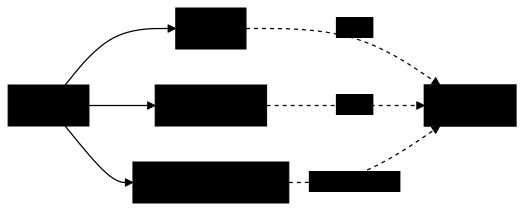
Problem: deploy waits for lint, unit_tests AND integration_tests to be all finished, even if deploy only needs unit_tests. If lint fails and you have to fix it, you waited 5 minutes for nothing.
In the diagram, the dashed arrows show what deploy waits for: the
three jobs of the test stage, including integration_tests, which it does
not actually need. This needless wait is what needs: removes.
Configuration with needs
The needs: keyword changes the game: instead of saying "wait for the whole previous stage", you say "wait for only these specific jobs".
Basic syntax
needs: takes a list of job names. The current job starts as soon as all the listed jobs are done, whatever their stage.
stages:  - build  - test  - deploy
build:  stage: build  script: npm run build  artifacts:    paths:      - dist/
lint:  stage: test  script: npm run lint  needs: []                    # No dependency, starts immediately
unit_tests:  stage: test  script: npm test  needs: ["build"]             # Waits only for build
integration_tests:  stage: test  script: npm run test:integration  needs: ["build"]
deploy:  stage: deploy  script: ./deploy.sh  needs: ["unit_tests"]        # Does not wait for lint or integration_tests
Let us analyze the changes:
| Job | needs | What changes |
|---|---|---|
lint | [] (empty) | Starts immediately, in parallel with build |
unit_tests | ["build"] | Waits only for build, not the whole stage |
integration_tests | ["build"] | Same, waits just for build |
deploy | ["unit_tests"] | Starts as soon as unit_tests finishes, without waiting for lint or integration_tests |
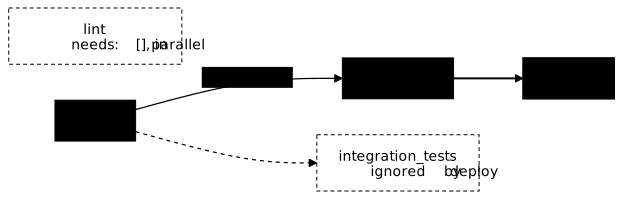
Result: the diagram keeps only the real dependencies. The main
path goes from build to deploy through unit_tests; lint and
integration_tests, greyed out, run in parallel without delaying
deploy.
The pipeline is faster because:
lintstarts immediately (no need to wait forbuild)deploydoes not wait forlintorintegration_tests- If
integration_teststakes 10 minutes butunit_testsonly 2,deploystarts after 2 minutes
needs options
needs offers several syntaxes depending on your needs. Let us start with the simplest.
Simple list
The most common syntax: a list of job names between brackets.
deploy: needs: ["build", "test"] # Waits for both build AND test to finishThe deploy job starts when both jobs are green. If one fails, deploy does not start (default behavior).
With artifact control
When you use needs, GitLab automatically downloads the artifacts of the referenced jobs (the files those jobs produced). But sometimes you want to wait for a job without fetching its files.
Concrete example: deploy waits for lint (to be sure the code is clean), but does not need the files produced by lint.
deploy: needs: - job: build artifacts: true # Downloads the dist/ folder produced by build - job: lint artifacts: false # Waits for lint, but downloads nothingWhy is it useful? Downloading artifacts takes time and bandwidth. If you do not need them, artifacts: false speeds up the start of the job.
needs: [], no dependency
This is the most powerful syntax for speeding up your pipelines. A job with needs: [] (empty list) starts immediately, without waiting for any other job.
lint: stage: test # Even though it is in the "test" stage... needs: [] # ...it starts immediately, in parallel with "build"! script: npm run lintWhy does it work? Linting analyzes the source code, not the compiled code. It does not need to wait for build to produce the dist/ folder. So why make it wait?
needs with optional
Sometimes, a job in your needs may not exist in some pipelines. For example, security_scan only runs on the main branch (via rules). On a feature branch, this job does not exist.
Without optional: GitLab refuses to create the pipeline ("job not found").
With optional: true: GitLab silently ignores the missing job.
security_scan:  stage: test  rules:    - if: $CI_COMMIT_BRANCH == "main"  # Only exists on main  script: ./scan.sh
deploy:  needs:    - job: build                        # Required, must exist    - job: security_scan      optional: true                     # Optional: fine if the job does not exist
Behavior:
- On
main:deploywaits forbuildANDsecurity_scan - On
feature-x:deploywaits only forbuild(becausesecurity_scandoes not exist)
Limits and special cases
The 50-job limit
By default, needs accepts a maximum of 50 jobs. Beyond that, GitLab refuses to create the pipeline. This limit exists to avoid overly complex pipelines that become hard to debug.
If you reach this limit, it is often a sign that your pipeline should be split into parent-child pipelines.
Interaction with parallel:
If you reference a job that uses parallel: (or parallel:matrix), your job waits for all the generated instances, not just one.
test:  parallel: 3              # Generates test 1/3, test 2/3, test 3/3  script: npm test
deploy:  needs: ["test"]          # Waits for the 3 test jobs
To target a specific instance, see the guide on matrices.
Dependencies within the same stage
needs can reference jobs from the same stage. This is useful when two jobs are in the same stage but one depends on the other.
build_lib:  stage: build  script: npm run build:lib
build_app:  stage: build  needs: ["build_lib"]     # Same stage, but waits for build_lib  script: npm run build:app
Do not mix needs and dependencies
dependencies is the old keyword for controlling artifacts. Do not use it in a job that already has needs: the behaviors can conflict.
Visualize the DAG
GitLab displays the dependency graph in the interface:
-
Go to Build > Pipelines
-
Click on a pipeline
-
Select the Needs tab (or look at the graph that shows the arrows)
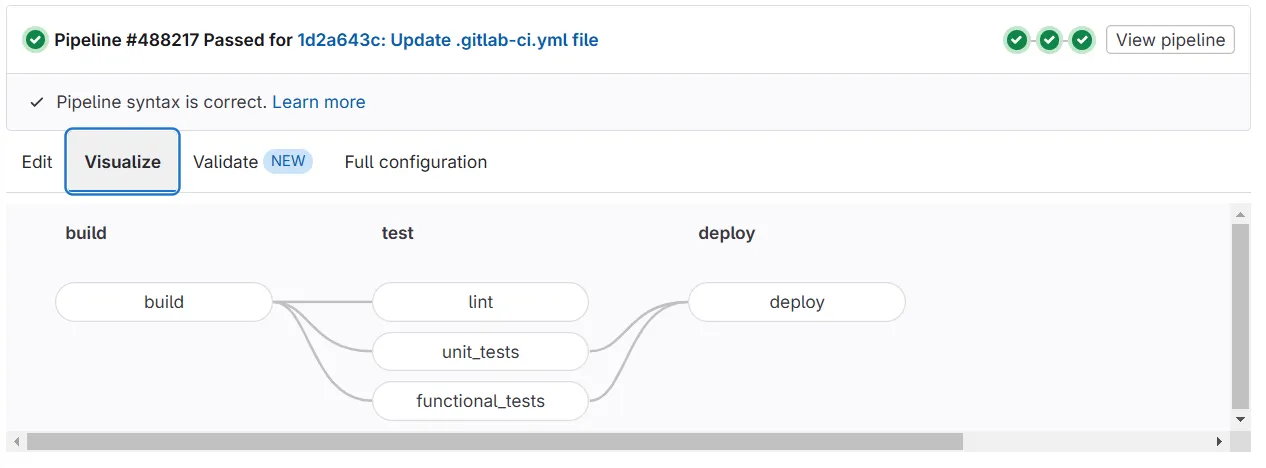
The graph shows the real dependencies between jobs, not the organization by stages.
Practical examples
Optimized Node.js pipeline
stages:  - prepare  - quality  - build  - test  - deploy
install:  stage: prepare  script: npm ci  cache:    key:      files:        - package-lock.json    paths:      - node_modules/  artifacts:    paths:      - node_modules/    expire_in: 1 hour
# Quality jobs: no dependency, start immediatelylint:  stage: quality  needs: []  script: npm run lint
format_check:  stage: quality  needs: []  script: npm run format:check
# Build: waits only for installbuild:  stage: build  needs: ["install"]  script: npm run build  artifacts:    paths:      - dist/
# Tests: in parallel, each waits only for what it needsunit_tests:  stage: test  needs: ["install"]  script: npm test
e2e_tests:  stage: test  needs: ["build"]           # Needs the build  script: npm run test:e2e
# Deploy: waits for the critical tests, not the lintdeploy_staging:  stage: deploy  needs: ["unit_tests", "build"]  script: ./deploy.sh staging
This pipeline saves time in two ways. The needs make lint and
format_check start immediately, and deploy_staging waits only for what it
depends on. The cache: block of install, for its part, relies on a key
derived from package-lock.json: it changes only when the dependencies
change, so the cache is found again from one commit to the next. A key that
changes on every commit, like $CI_COMMIT_SHA, would do the opposite: the jobs
of a single pipeline would share the cache, but the next pipeline would never
find it. To check it, compare the key announced by the Checking cache for ... line of the log in two successive pipelines; the lesson Artifacts and
cache details cache
keys.
Monorepo with independent services
stages:  - build  - test  - deploy
# Frontend and backend build in parallelbuild_frontend:  stage: build  script: npm run build:frontend  artifacts:    paths:      - frontend/dist/
build_backend:  stage: build  script: npm run build:backend  artifacts:    paths:      - backend/target/
# Independent teststest_frontend:  stage: test  needs: ["build_frontend"]  script: npm run test:frontend
test_backend:  stage: test  needs: ["build_backend"]  script: npm run test:backend
# Independent deploymentsdeploy_frontend:  stage: deploy  needs: ["test_frontend"]  script: ./deploy-frontend.sh
deploy_backend:  stage: deploy  needs: ["test_backend"]  script: ./deploy-backend.sh
The frontend and the backend are completely independent. If the backend is slow, the frontend still deploys.
Best practices
1. Ask yourself: "What does this job REALLY need?"
Before adding a job to needs, ask yourself: "If this job did not exist, could mine still run?" If so, do not add it.
Example: does deploy need to wait for lint? Probably not: lint checks code quality, but produces nothing that deploy needs.
2. Use needs: [] aggressively
Every job that can start immediately should have needs: []. It is the most powerful lever for speeding up your pipelines.
Simple rule: if the job needs no file produced by another job, set needs: [].
3. Disable useless artifacts
When you wait for a job for its status (not its files), use artifacts: false:
deploy: needs: - job: lint artifacts: false # We just want lint to have passed, not its files - job: build artifacts: true # We need the dist/ folder4. Visualize the graph regularly
After changing your needs, look at the graph in GitLab (the "Needs" tab of the pipeline). It shows the real dependencies and helps you spot mistakes.
5. Keep stages for organization
Even with a DAG, stages remain useful for visual organization. Group jobs by "category" (build, test, deploy) even if their execution no longer strictly follows that order.
Common errors
Here are the most common problems and how to solve them.
1. Circular dependency
Symptom: the pipeline refuses to be created with "circular dependency detected".
Cause: two jobs reference each other, creating an impossible loop.
# ❌ FORBIDDEN: A waits for B, but B waits for Ajob_a:  needs: ["job_b"]
job_b:  needs: ["job_a"]
Solution: rethink the architecture. Ask yourself: "Who really needs whom?" Often, one of the two needs is useless.
2. Too many dependencies
Symptom: "needs cannot have more than 50 entries".
Cause: you listed more than 50 jobs in a single needs.
Solution:
- Simplify: does this job really need 50 dependencies?
- Group: create an intermediate job that waits for several jobs, then depend on it
- Self-managed: the limit is configurable in the administrator settings
3. "Vanished" artifacts
Symptom: "file not found" even though the previous job did create them.
Cause: you added needs without including the job that produces the artifacts.
Reminder: with needs, you receive only the artifacts of the listed jobs. The "magic" behavior of the previous stages is disabled.
# ❌ Problem: deploy waits for lint, but does not have the artifacts of builddeploy:  needs: ["lint"]  script: ls dist/           # ERROR: dist/ does not exist!
# Solution: add build to needsdeploy:  needs: ["lint", "build"]  script: ls dist/           # OK: dist/ is downloaded from build
4. needs: [] but the job fails
Symptom: you set needs: [] to speed things up, but the job fails because files are missing.
Cause: the job actually needs artifacts from another job.
Solution: identify the missing files and add the job that produces them to needs.
# ❌ The job needs node_modules/, but waits for nobodytest:  needs: []  script: npm test           # ERROR: node_modules/ does not exist!
# Wait for the job that installs the dependenciestest:  needs: ["install"]  script: npm test           # OK: node_modules/ is available
Hands-on lab
The lab "A cache that is never found, and jobs that wait for nothing" puts this guide into practice on a GitLab CE forge of your own, set up on a virtual machine with its runner and its registry: no minute quota, no identity verification, and a project you can break as often as you need.
The pipeline works and wastes time in two ways. The first belongs to this
lesson: its jobs queue behind stages that do not concern them, which needs:
fixes. The second is its cache key, which changes on every commit, so the
cache only serves inside the pipeline that created it and never from one
commit to the next: the Node.js example above gives the principle. The grade
is based on an identical cache key from one pipeline to the next, read in the
logs after two runs, and on two jobs from different stages overlapping in
time, read in their timestamps. It does not measure the duration itself, which
varies with the load of the machine.
The lab starts with dsoxlab run gl-12-accelerer-le-pipeline, after dsoxlab provision prepares the virtual machine, its runner and its registry.
Installing DSOXLab and its prerequisites are described in the DSOXLab
documentation.
Key takeaways
needsdefines the real dependencies, not the stagesneeds: []= no dependency, starts immediately- Artifacts: with
needs, only those of the listed jobs are downloaded - Limit: max 50 jobs in
needsby default - No loops, dependencies must be acyclic
- Do not mix
needsanddependenciesin the same job - Visualize the graph in GitLab to validate
Test your knowledge
Knowledge check
Check what you have learned with this interactive quiz
How it works
- The timer starts when you click Start
- Multiple choice, true/false and short answer questions
- You can move between questions
- Detailed results are shown at the end
Starts the quiz and the timer
Review
(0/0)Score by domain
A domain groups several guides and gets several questions, so its score is more reliable than a per-topic score, which often rests on a single question.
Summary
Strengths
No topic passed at 80% on at least two questions yet.
Weak areas
No topic below the pass mark.
Recommended next
Hints before you try again?
Continue the course: GitLab CI/CD job matrices (parallel:matrix)
A new full quiz with random questions
Work again only on the questions you missed