Shadow AI covers every use of AI tools that the company has not approved and does not know about: a chat assistant fed with internal data, a browser extension, a meeting transcription tool, an AI-generated application put into service by a business team. This page is written for security leaders (CISOs), IT directors and managers, and stays readable without a technical background. It explains how to tell an experiment from an application in use, how to discover these uses, and how to choose between banning, supervising or hosting them.
What you will learn
- Define shadow AI and place it relative to shadow IT.
- Recognise the typical uses, beyond generated code alone.
- Classify a use as an experiment or an application in use.
- Discover undeclared uses with six complementary methods.
- Choose between banning, supervising and hosting, and measure the effects.
What is shadow AI?
Shadow AI is the use of AI tools by employees without the IT department or security having approved it, or even known about it. The expression comes from "shadow IT", the information systems that business teams build in the shadow of the IT department. Here, the tool is a generative AI service (a model that produces text, code or images from an instruction), or an application that this service helped produce.
The common point of all these cases is an information gap: the company does not know which tool is used, with which data, and who answers for it. The problem is therefore not the AI itself, but the fact that nobody decided on its use. An employee who pastes a client contract into a free assistant thinks they are saving an hour. In reality, they are sending a confidential document to a provider with which the company has no contract.
The Thoughtworks Technology Radar devotes a technique to this phenomenon under the name AI-accelerated shadow IT: AI makes building applications accessible to people who would never have developed on their own.
Shadow AI and shadow IT: what is the difference?
Shadow IT covers any digital system or service used without IT department approval, for example a shared spreadsheet that serves as a customer database or a personal online storage service. Shadow AI is a particular case of it, with three aggravating factors: the service receives free text, so potentially any data; it may keep this data for its own use according to its terms; and it produces entire applications that nobody has reviewed.
Citizen development is a neighbouring notion, but it describes a supervised practice. A citizen developer is an employee outside IT who builds an application for their own need, on a platform that the IT department has chosen and monitors. Shadow AI begins when that supervision is missing. The table puts the three notions side by side.
| Notion | What it is | Who knows about it |
|---|---|---|
| Shadow IT | Any service or system used without IT department approval | Only the users |
| Shadow AI | A particular case of shadow IT: AI tools, or applications produced with them | Only the users |
| Supervised citizen development | Applications built by business teams, on a platform that is chosen and supervised | The IT department, which sets the rules |
Read the table by its last column: what separates a tolerated use from an endured one is how much the IT department knows about it, not the technology used.
What are the typical uses of shadow AI?
Uses fall into four families, from the simplest to the one with the heaviest consequences. None requires technical skill.
- The chat assistant used with internal data: summarising a contract, rewording a customer letter, analysing a sales table.
- The AI-based browser extension: it reads the displayed page, sometimes the content of the web mailbox, to summarise or translate it.
- The meeting transcription tool, plugged into the video conference, which sends the recording to an external service.
- The AI-generated application, built by a business team with a coding assistant, then used by colleagues and connected to company data.
The fourth family weighs the most, because it does not stop when the conversation closes: it becomes a tool that colleagues depend on. The page Vibe coding explains how these applications are produced and why code review matters.
What risks does shadow AI pose to the company?
Five risks come up again and again, and each has a simple cause. A reader can go through them as a checklist.
The first is the leak of data and secrets in prompts. A prompt is the text sent to the model. It often contains a file extract, an error message, sometimes a password or an API key pasted so that "the AI understands". The topic of secret leaks is detailed in Secrets in code and Git history.
The second is GDPR compliance (the General Data Protection Regulation). As soon as a prompt contains personal data, four steps are required of the company:
- a legal basis for this processing, that is, a reason provided by law, such as consent or legitimate interest (Article 6);
- a contract with the provider when it acts as a processor, that is, when it processes the data on behalf of the company (Article 28);
- a framework for any transfer outside the European Union (Chapter V, Articles 44 to 50);
- a data protection impact assessment (DPIA) before starting the processing, when it is likely to result in a high risk for individuals (Article 35).
None of these steps has taken place if nobody declared the use.
The third is intellectual property: internal code or a strategic document sent to an external service may be kept according to its terms of use, and the status of the code produced by the AI depends on those same terms. The fourth concerns unmaintained applications: the author changes jobs, and nobody knows the application any more. The fifth concerns untracked dependencies: the libraries the application uses appear in no inventory, and nobody fixes their flaws. The post Your time saved must not become our technical debt details what the IT department expects before accepting the takeover of such an application. The page Risks of AI-generated applications takes these risks up on a textbook case, with the control that stops each one.
Experiment or application in use: how do you tell them apart?
An experiment is for trying things out, an application in use is for working. The boundary is judged on three observable criteria, not on the size of the tool: who uses it besides its author, what real data it receives, and what it can do or read in another system of the company.
A prototype that the author alone opens on their workstation, with fictitious data, remains an experiment: it needs few rules, for example a ban on putting real data into it. As soon as colleagues use it, it reads customer data or it connects to an internal tool, it becomes an application in use. It then needs a named owner, an inventory of dependencies, access controls, logs and a retirement procedure. The guide The basics of IAM (in French) explains how to give each person or application only the rights it needs.
A quick test: if the author left tomorrow, would the service stop, and would anyone notice? If so, the application is in use, even if nobody ever declared it.
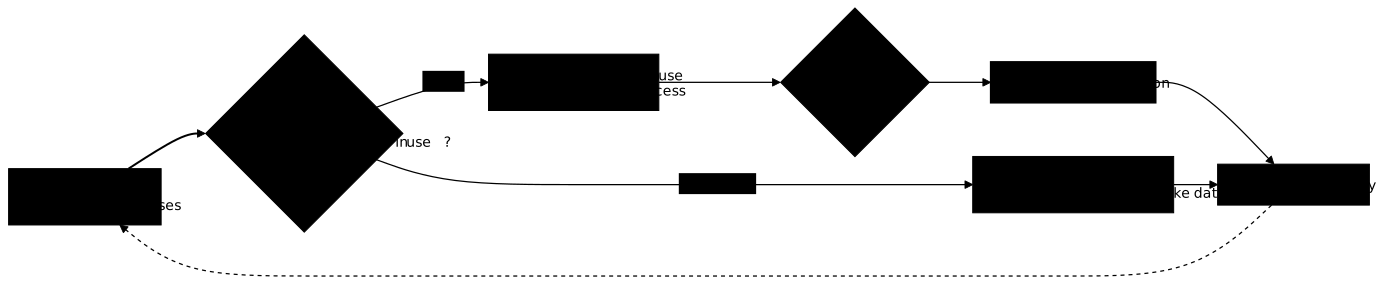
The diagram below shows shadow AI management as a cycle, not as a one-off operation. Follow the path of a discovered use: it is classified, then it receives either minimal rules or a decision (ban, supervise or host) that is then applied. The dotted return arrow is a reminder that new tools appear every month.
How do you detect shadow AI?
No single method sees everything: you combine technical sources and human sources. Technical sources spot the known services. Human sources reveal what the network does not see, such as a tool used from a personal phone. Six methods complement each other.
A proxy is the server through which outgoing web traffic passes: its logs show which AI service domains are contacted, and by how many workstations. A CASB (Cloud Access Security Broker) is a tool placed between users and cloud services, which identifies them and applies rules. A forge is the platform that hosts the company's code repositories. The table says, for each method, what it sees and what escapes it.
| Method | What it shows | What it does not see |
|---|---|---|
| Proxy and network logs | Connections to known AI services | Devices outside the company network |
| CASB | The cloud services in use and their risk level | Tools missing from its catalogue |
| Extension inventory | The extensions installed on managed workstations | Unmanaged workstations |
| Survey of the teams | The uses, the reasons, the real needs | What people dare not say |
| Expense reports and subscriptions | Services paid by card or reimbursed | Free offers |
| Forge and repositories | Applications and exposed secrets | What has no versioned code |
A SIEM, which centralises security logs (in French), is used to cross-check these sources.
The survey is often underused, even though it reveals what the logs do not show. It works if it is announced without sanctions: otherwise, uses hide even more. The review of subscriptions and expense reports spots paid services. On the forge side, you look for new repositories, assistant configuration files and secrets with a scanner, as described in Secrets scanning.
Should you ban generative AI in the company?
Banning does not remove the use, it makes it invisible. An employee who has found a time saving keeps it, from a phone or a personal account. To decide, compare three options by their effects, not by how firm they look.
| Option | What happens | Advantage | Risk |
|---|---|---|---|
| Ban | AI services are blocked, use is prohibited | Simple rule, reduced risk on controlled workstations | Use moves out of reach, no visibility, loss of the advantage |
| Supervise | Use is allowed under rules: authorised tools, forbidden data, declaration | Balance between speed and control | Needs training, follow-up and detection means |
| Host on a platform | The IT department provides an approved tool and a place to host the business teams' applications | Uses come out of the shadows, controls are built in | Setup cost, a platform to maintain |
Read the table from left to right: each option changes what the company sees. The three are not mutually exclusive. A common stance forbids certain data (a secret, health data, a sensitive contract), supervises general use, and hosts the useful applications on a platform maintained by the IT department.
A point of law applies in Europe. Since July 27, 2026, Article 4 of the European AI regulation (AI Act, Regulation (EU) 2024/1689), as amended by Regulation (EU) 2026/1744, requires providers of AI systems and deployers (the organisations that use them under their own responsibility, like your company) to take measures to support the AI literacy of their staff, without having to guarantee a specific level for each person. Whatever option is chosen, it is prudent to keep a record of the training given to the teams.
The decision itself (who decides, who accepts the risk, how to formalise it) belongs to the governance of the information system. This page gives the elements to prepare it. The lesson Governance details who decides and what evidence to require, and the SOCLE reference on AI (in French) lists the corresponding technical requirements.
Where to start: the first steps
You set a framework and you look before banning. Five steps, in this order, are enough to go from ignorance to a first level of control.
- Write a rule on data. A short page lists what never leaves for an external service: secrets, health data, contracts, proprietary code.
- Provide an approved tool. People use an unapproved tool because no other exists.
- Start the discovery. Survey the teams, then review the proxy logs over a few weeks and the subscriptions.
- Inventory with an owner. Each application in use gets a name, a person in charge and the list of its access rights. This list includes the secrets the application uses: the guide Inventory and classify your secrets shows how to list them.
- Plan a regular review. Tools change, so the list must be updated on a fixed date.
These steps require no purchase. Above all, they create a habit: declaring is easier than hiding, and the teams know whom to talk to. The page Why security fails in practice places shadow AI among the other causes of security failure.
Key takeaways
- Shadow AI is the use of AI tools that the company has not approved, from the chat assistant to the application generated by a business team.
- It is a particular case of shadow IT, made worse by free text sent outside and by applications that nobody has reviewed.
- Supervised citizen development is the accepted version of the same phenomenon: the IT department knows the platform and sets the rules.
- An application becomes an application in use as soon as colleagues use it, it reads real data or it connects to an internal system.
- Discovery combines proxy, CASB, extensions, survey, subscriptions and forge, because no single source sees everything.
- Banning makes the use invisible. Supervising and hosting make it visible and controllable.
- Start with a rule on data, an approved tool and a first discovery.
Knowledge check
These eight questions cover the definition of shadow AI, its difference from shadow IT, the means of detecting it and the choice between banning, supervising or hosting.
Knowledge check
Check what you have learned with this interactive quiz
How it works
- The timer starts when you click Start
- Multiple choice, true/false and short answer questions
- You can move between questions
- Detailed results are shown at the end
Starts the quiz and the timer
Review
(0/0)Score by domain
A domain groups several guides and gets several questions, so its score is more reliable than a per-topic score, which often rests on a single question.
Summary
Strengths
No topic passed at 80% on at least two questions yet.
Weak areas
No topic below the pass mark.
Recommended next
Hints before you try again?
Continue the course: Risks of AI-generated applications: one incident, five causes
A new full quiz with random questions
Work again only on the questions you missed