Before installing a package that a code agent has just proposed, run three
checks, in this order: the name exists in your registry, the project is
legitimate, and the line is pinned to an exact version and to the fingerprint of
the file. A package that fails any one of them is not installed. This lesson
teaches this gesture on Python dependencies, with pip. It is written for
developers and for people in a business role who produce code with AI, and the
reasoning applies to npm, Go or any other package manager.
What you will learn
- Check that a package name exists, without installing it.
- Judge whether a package that exists is legitimate.
- Pin a dependency to an exact version and to the fingerprint of its file.
- Install while refusing any file whose fingerprint differs.
- Refuse an invented package and record the reason.
Prerequisites
You can run a command in a Linux terminal, which the lesson
Open a terminal and understand the prompt
teaches, and read a small Python program, as the lesson
First steps in Python: first program, variables and types
shows. You need Python 3.11 or later. You can save changes in a Git
repository with git add and git commit, which the lesson
Saving changes: add, diff, commit teaches, and read a history with git log, which the lesson
Browsing the history: log, show, HEAD teaches. The "Technical foundations" module of the course brings
these lessons together; it is optional for anyone who already knows how to do
all this. You can read a requirements.txt file, that is, the list of packages
that a Python project installs with pip, and create a virtual environment: the
page Python virtual environments: isolate your projects
explains venv, pip and requirements.txt.
The notion of slopsquatting, the package invented by a model and then published by an attacker, is presented with its figures in the page Vibe coding and in the page Risks of AI-generated applications: this lesson teaches the gesture that opposes it, without repeating the finding.
Why check before installing?
Installing a package means running the code of a stranger with your
rights. A code assistant sometimes proposes a name that does not exist: it
sounds right, so nobody checks. If someone has published a package under that
name, the pip install command downloads it, and a package built from its
sources even runs code during the installation. The guide securing npm, PyPI
and Go dependencies
describes these attacks and their countermeasures in detail.
Take the purchasing portal, the running example of the course, from the side of
the buyer who has it generated. She asks for a purchase order as a PDF, and the
agent adds three lines to requirements.txt:
reportlabpypdf-bondecommanderequests>=2Nothing is installed yet. The gesture of this lesson is to decide, line by line, what can stay.
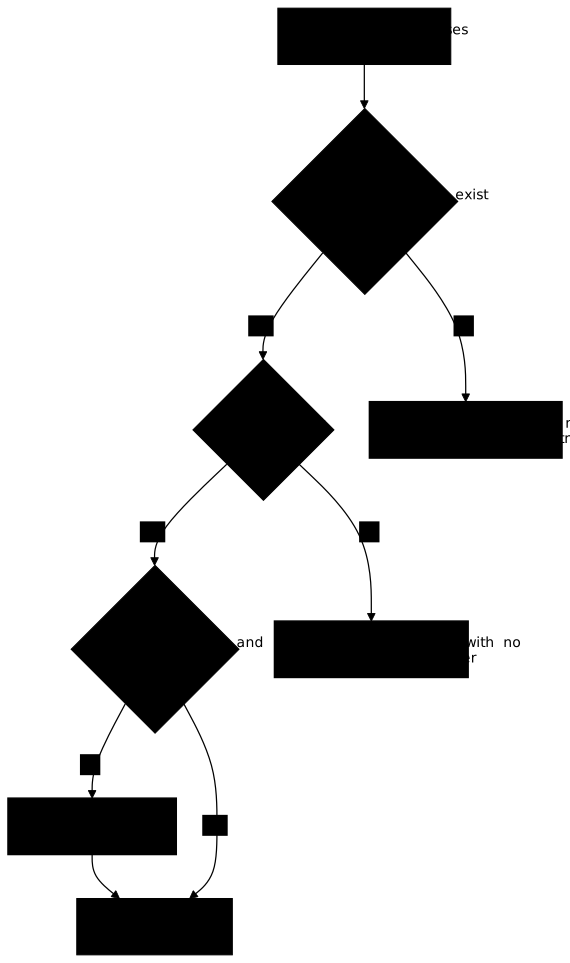
Read the diagram from top to bottom: there are two refusal exits and a single installation exit. The first two diamonds decide whether the package deserves trust. The third one does not judge it: it fixes what you checked, so that today's installation is tomorrow's.
How do you check that a package exists?
A name exists when the registry you use serves it. The registry is the index
where pip goes to look for packages: PyPI, the public Python registry, or a
company's internal registry. Check the name without installing it, because
installation is precisely what exposes you.
PyPI publishes a JSON API that answers with an HTTP code: 200 when the project
exists, 404 when it does not. The two commands below query a known package,
then a made-up name.
curl -s -o /dev/null -w "%{http_code}\n" https://pypi.org/pypi/requests/jsoncurl -s -o /dev/null -w "%{http_code}\n" https://pypi.org/pypi/zzq-portail-csv-export-9x/jsonIn these commands, -s turns off the progress display, -o /dev/null throws
away the body of the response and -w "%{http_code}\n" prints only the HTTP
code. On a fresh Debian, first install curl with sudo apt install curl.
The first command must print 200, the second 404. A 404 on a name proposed
by the agent means that PyPI does not know this name: the package is
invented, or it is not public. In both cases, refuse the line and ask the agent
what it wanted to achieve.
In a company that imposes an internal registry, the question is stricter: does the name exist in that registry? A package present on PyPI but absent from the internal registry has not been validated by the company. The single-index configuration is explained in the section "A single index for internal packages" of the dependency security guide.
A 200 on PyPI says nothing more. Slopsquatting consists precisely in
publishing the name that models invent: that name then exists, and the existence
test passes. This is why a second check is indispensable.
How do you know whether a package that exists is legitimate?
A package is legitimate when its history, its author and its source code corroborate each other, and a similar name has not fooled you. No single clue settles it: you read them together, in a few minutes, before adding the dependency.
The same PyPI API gives the date of the first publication, the number of
versions and the declared repository. This small script displays them for a
given name. Save it as legitimite.py.
import jsonimport sysimport urllib.request
nom = sys.argv[1]with urllib.request.urlopen(f"https://pypi.org/pypi/{nom}/json") as r:    d = json.load(r)
fichiers = [f for v in d["releases"].values() for f in v]print("nom       :", d["info"]["name"])print("version   :", d["info"]["version"])print("versions  :", len(d["releases"]))print("1re publi.:", min(f["upload_time_iso_8601"] for f in fichiers))print("liens     :", d["info"]["project_urls"])
Run it with python3 legitimite.py requests: sys.argv[1] is the first
argument typed after the name of the script, here requests. The line that
builds fichiers is a list comprehension: it goes through each version, then
each of its files, and puts them in a single list.
On requests, it displays the current version, the number of versions
published, a first publication in 2011 and a Source link to
https://github.com/psf/requests. The number of versions and the current
version change with every release: these values illustrate how to read the
output and are not thresholds. The documentation of the PyPI JSON API marks the
releases key as deprecated and warns that it may disappear: if the script
fails on this key, that is the first thing to look at.
Three clues deserve a refusal or an investigation:
- a package whose first publication dates from a few days ago, with one or two versions, although it claims to do a common job;
- a package with no link to a repository, or whose repository does not exist, cannot be reviewed;
- a name almost identical to that of a very well-known package is a case of
typosquatting, such as
reqeusts, where two letters are swapped, forrequests.
Then match the package against what you want to do: a package that promises to
read PDF files has no reason to ask for network access. For known
vulnerabilities, OSV-Scanner (in
French) and pip-audit query the public databases, and the
OpenSSF Scorecard score assesses
the practices of the repository. None of these tools proves that a package is
sound: they rule out the cases already known. The guide
package manager attacks
shows what a booby-trapped package can do as soon as it is installed.
For the three lines of the purchasing portal, the verdict fits in a table. The
"Decision" column says what the buyer does with each line before any
pip install.
| Line proposed | Exists? | Legitimate? | Decision |
|---|---|---|---|
reportlab | yes | long-established library, declared repository | keep, to be pinned |
pypdf-bondecommande | no, or published recently with no repository | no | refuse |
requests>=2 | yes | yes | refuse as it stands, bring it back pinned, record the refusal |
How do you pin a dependency by fingerprint?
Pinning means writing in the file what you checked: the exact version and the
fingerprint of the file. A version, requests==2.31.0, designates a number;
the fingerprint (the SHA-256 hash) designates the content. If someone replaces
the file under the same number, the fingerprint changes and pip refuses to
install it. The line requests>=2, on the contrary, lets pip choose the
version of the day, and tomorrow's result is not the one you reviewed.
A pinned line looks like this. The fingerprint below is the one PyPI publishes
for the file requests-2.31.0-py3-none-any.whl.
requests==2.31.0 \ --hash=sha256:58cd2187c01e70e6e26505bca751777aa9f2ee0b7f4300988b709f44e013003fThis version has known flaws: requests 2.31.0 is affected by
CVE-2024-35195, fixed in 2.32.0, and CVE-2024-47081, fixed in 2.32.4. It stays
here because the fingerprint above was verified: the example illustrates the
form of a line, not a choice of version. In your project, pin the current
version after checking it, and run pip-audit, presented in the section
"Auditing vulnerabilities with pip-audit"
of the dependency security guide, to rule out a version with known flaws.
A file reduced to this single line nevertheless fails at installation with the
--require-hashes option, described in the next section: requests installs
others, its transitive dependencies (the packages it installs in turn), and
each of them must appear in the file with its own fingerprint. With pip 25.1.1,
the error is In --require-hashes mode, all requirements must have their versions pinned with ==, followed by the name of the first transitive dependency met
(charset-normalizer). This is what the generation of the complete file,
described below, settles.
To get the fingerprint of a file, download it from the registry without
installing it, then use pip hash, which prints the line to copy. Run these
commands at the root of the project, in a virtual environment: on Debian 13,
the pip command does not exist until the python3-pip package is installed,
whereas venv provides one. The first command creates the .venv environment,
the next ones call its pip (version 25.1.1 on Debian 13).
python3 -m venv .venv.venv/bin/pip download --no-deps --only-binary :all: requests==2.31.0.venv/bin/pip hash requests-2.31.0-py3-none-any.whlrequests-2.31.0-py3-none-any.whl:--hash=sha256:58cd2187c01e70e6e26505bca751777aa9f2ee0b7f4300988b709f44e013003fNever copy a fingerprint proposed by the agent: it can invent one that
looks right. A fingerprint is computed on the file you obtained from the
registry, or read in the registry itself. As soon as there are several
dependencies, transitive ones included, generate the complete file with a tool:
pip-compile --generate-hashes from pip-tools, or
uv pip compile --generate-hashes, which the uv
guide (in French) presents. The section
"Pinning with a hash"
of the dependency security guide details this gesture, and the guide
reproducible dependencies
(in French) explains why an installation must give the same result from one
machine to another.
A fingerprint does not prove legitimacy. It proves that the file is the one you looked at. The order therefore matters: you check first, you pin next, and never the reverse.
How do you install while refusing any unexpected file?
The --require-hashes option of pip requires every line of the file to carry
an exact == version and a fingerprint, and no file whose fingerprint differs
to be installed. Transitive dependencies must also appear in the file, with
their fingerprint. If a line is not pinned, pip refuses the whole
installation, instead of installing what it can.
.venv/bin/pip install --require-hashes -r requirements.txtThe command uses the .venv environment created above; if you do not have it
yet, create it with python3 -m venv .venv.
If a line is not pinned or if a fingerprint is wrong, pip stops with an error
and installs nothing. This is the intended behaviour: a file that installs
without error is a file whose every line carries a verifiable fingerprint.
When the company provides a local registry, for example a directory of files,
add --no-index --find-links <directory> to forbid any public index: with a
public index, it is precisely the invented name that can get installed. An
installation that succeeds this way, with no network, proves that the file
depends only on what you validated. To also forbid a package from building code
at installation, add --only-binary :all:, explained in the section
"Avoiding code execution at installation"
of the same guide.
In such a directory, the file carries its normalised name: pip compares
names without regard to case or to the difference between -, _ and ., but
the file name is in lowercase and replaces each run of -, _ or . with a
single underscore. The distribution portail-money thus gives a file
portail_money-1.2.0-py3-none-any.whl.
How do you refuse an invented package?
Refusing an invented package takes three steps: do not install it, remove it
from the file, and record why. Do not install it "just to see":
installation is the gesture that exposes you, and a 404 is enough to decide.
Then ask the agent what it needed. A real need, for example generating a PDF, is almost always covered by a package you have already validated or by the standard library. Ask for it again by naming the constraint: "do not add any dependency that is not already in the internal registry". The refusal log names the package as proposed and the reason:
- paquet: pypdf-bondecommande decision: refuse raison: > Le nom n'existe pas dans le registre interne et renvoie 404 sur PyPI : nom inventé par l'agent. Besoin couvert par reportlab, déjà validé.This trace serves the next review and the team: you can find which name the agent proposed and why it did not get in.
Troubleshooting
The table starts from the pip error message and leads to the fix.
| Symptom | Likely cause | Fix |
|---|---|---|
pip answers that hashes are required but missing for some lines | A line has no --hash | Compute the fingerprint with pip hash, or generate the file with pip-compile --generate-hashes |
pip answers that all packages must be pinned with == | A line uses >= or no version | Replace it with the exact version you checked |
pip reports that packages do not match their hashes | The downloaded file is not the one whose fingerprint you computed | Do not work around it: check the source again, recompute, or refuse the package |
No matching distribution found with --no-index | The local registry does not serve this name or this version | The package is not validated: refuse it, or have it validated first |
| A transitive dependency lacks a fingerprint | Only the direct lines were pinned | Generate the complete file with a tool, transitive dependencies included |
Put it into practice
The lab takes up the purchasing portal and has you practise the gesture of this
lesson on a list of dependencies proposed by a simulated agent. It is
recommended: it is the proof of the gesture. It needs a terminal, Python 3.11 or
later, the venv module (the python3-venv package on Debian and Ubuntu) and
pip. Nothing goes out on the network: the registry is a local directory, and
the packages it contains are fictitious.
The agent proposes three dependencies. You check each one in the internal registry before any installation, refuse what cannot be accepted as it stands, a name that the registry does not serve or a dependency proposed without pinning, then bring it back pinned if the registry serves it. You record each refusal with its reason, and you deliver a list pinned to an exact version and to the fingerprint of each artifact. The validation checks that only the dependencies the registry serves remain, that every line is pinned, that the review records each refusal with its reason, including for a line proposed without pinning, and that the list installs offline, legitimate dependencies included.
Key takeaways
- Installing a package means running the code of a stranger: you check before, never after.
- A name is checked without installing, for example with the PyPI API
(
200or404), or in the internal registry the company imposes. - A name that exists is not legitimate for that reason alone: the package invented and then published by an attacker exists too.
- Legitimacy is read from several clues together: date of first publication, number of versions, declared repository, name close to a well-known package.
- A pinned line carries an exact
==version and a fingerprint--hash=sha256:…, computed on the file obtained from the registry. pip install --require-hashesrefuses anything that is not pinned, and--no-indexforbids the public index.- An invented package is refused without installing it, and the refusal is recorded with the name proposed and the reason.
Knowledge check
These eight questions cover checking that a package exists, examining its legitimacy, pinning by fingerprint and refusing an invented package.
Knowledge check
Check what you have learned with this interactive quiz
How it works
- The timer starts when you click Start
- Multiple choice, true/false and short answer questions
- You can move between questions
- Detailed results are shown at the end
Starts the quiz and the timer
Review
(0/0)Score by domain
A domain groups several guides and gets several questions, so its score is more reliable than a per-topic score, which often rests on a single question.
Summary
Strengths
No topic passed at 80% on at least two questions yet.
Weak areas
No topic below the pass mark.
Recommended next
Hints before you try again?
Continue the course: Application sheet: declare an application with a validated contract
A new full quiz with random questions
Work again only on the questions you missed