The application sheet is a small file, application.yaml, placed at the root
of an application's repository, that is, the folder where its code and its
history are kept. It declares who answers for the application, what data it
keeps, which company tools it uses and which class from C1 to C4 its author
requests. A decision-maker reads it like a form. An engineer validates it with
a JSON schema, which rejects an incomplete sheet.
This page shows the sheet of the purchasing portal and explains each field. You
then run the validation with the check-jsonschema tool. Finally, the page
says why the sheet stays a simple request, why neither it nor its schema may be
editable by the requester, then how to sign a decision and verify the
signature.
What you will learn
- Explain what an application sheet is for before hosting an application.
- Read the fields of a sheet and say who answers for the application.
- Write the sheet of the purchasing portal with its required fields.
- Validate a sheet with a JSON schema and read a rejection message.
- Say what the schema checks, and what it leaves to another control.
- Explain why an application cannot authorise itself.
- Sign a decision with
ssh-keygen, verify it, and read four verification failures.
Prerequisites
- The lesson Classify an application before hosting it, which defines the class from C1 to C4 and the four criteria the sheet reuses.
- The lesson Governing AI-generated applications, which says who decides according to the class and why the decision is kept separate from the request.
- No technical skill is needed to read the sheet. To replay the validation and the lab, you must know how to open a terminal (terminal and prompt) and run a Python script (see first steps in Python, in French). These two pages teach these gestures; skip them if you already master them.
pipx, the tool that installs a Python program in its own space (see the pipx guide, in French), to installcheck-jsonschema. Withoutpipx, a virtual environment andpipdo the same job.
What is an application sheet for?
The application sheet gives each application a written identity: an owner, declared data and known flows. An application built with AI is born fast, often in a business department such as purchasing. If nobody notes who answers for it and what it touches, it becomes an orphan the day its author changes jobs, as described in the lesson Risks of AI-generated applications.
The word "contract" is deliberate. The sheet commits the person who files it on what the application does. If the application reads something other than what is declared, the sheet is false, and the platform can notice by comparing the two, since every access to the information system (the IS) goes through the gateway described in the hosting architecture.
The sheet reuses the four criteria of the classification grid: data, flows to the IS, users and criticality. It adds what the grid does not ask for: a business owner and a technical owner, the purpose and the retention period of each piece of data, the dependencies whose outage stops the application, and an expiry date.
What does the sheet of the purchasing portal look like?
The sheet of the purchasing portal takes about thirty lines of YAML. YAML
is a text format where indentation shows what belongs to what; a field followed
by indented lines contains those lines. The purchasing portal (portail-achats
in the lab) is the example application of the course: a buyer built it with AI
to read the orders of the ERP, the company's management software.
id: portail-achatsnom: Purchasing portalgenere_par_ia: trueproprietaire_metier: identifiant: m.durand nom: Marie Durand, purchasing managerproprietaire_technique: identifiant: k.benali nom: Karim Benali, platform teamclasse_declaree: C3donnees: - categorie: personnelles description: Names and emails of supplier contacts finalite: Reach a supplier contact about an order conservation_jours: 365flux_si: - cible: erp-commandes mode: lecture operations: - list orders - read an orderutilisateurs: equipecriticite_metier: importantedependances_critiques: - erp-commandes - postgresqldate_creation: 2026-11-15expire_le: 2027-05-15The people in this example are made up. The field names and the values of the
fixed lists (personnelles, lecture, equipe, importante) are those of the
schema, so they stay as they are; only the free text is in English. To read
this sheet without knowing YAML, the table gives the question each field
answers.
| Field | Question it answers |
|---|---|
id, nom | Which application are we talking about? |
genere_par_ia | Did a model write part of the code? |
proprietaire_metier | Who answers for the need and the use? |
proprietaire_technique | Who answers for the operation and the fixes? |
classe_declaree | Which class does the requester claim? |
donnees | Which data, of what type, for what purpose, and for how long? |
flux_si | What does the application read or modify in the IS? |
utilisateurs, criticite_metier | Who uses it, and what do we lose if it stops? |
dependances_critiques | Which services, if they go down, stop the application? |
date_creation, expire_le | Until when does this declaration hold? |
A decision-maker can already draw two conclusions from this sheet. First, class C3 is consistent with the grid: the data is personal, the flow is a read of the ERP and stopping the application is important, that is three criteria at score 2. Second, a retention period is written, 365 days, instead of being left to oblivion.
Which fields are required, and why?
Every field of the sheet is required, because each one matches a decision that cannot be taken without it. A few need an explanation.
Both owners must be filled in, each with an identifier and a name. Without a business owner, nobody decides whether the application should continue; without a technical owner, nobody fixes it. An application whose author has left thus keeps two names to ask.
From class C3, the business owner cannot be the person who requested the application: the person who asks is not the person who answers for the need. The schema does not see it, because it does not know the requester. Another control, called the "policy check" and presented below, verifies it: it reads the requester in the registry of the policy repository.
Each entry of donnees carries a finalite (purpose) and a strictly positive
conservation_jours (retention in days). A piece of data without a retention
period stays indefinitely, and the owner never asked when to erase it.
Requiring the number forces that question.
The purpose says why the data is kept, and it is what allows the period to be judged. The GDPR (Article 5, paragraph 1, point (e)) forbids keeping personal data, in a form that identifies the person, longer than that purpose requires. You therefore cannot say whether 365 days is too long without knowing what the data is for.
The flux_si list is required even when the application does not touch the IS:
you then write an empty list (flux_si: []). A missing field says nothing;
an empty list says "no flow", which is a declaration.
The same reasoning holds for an application that keeps no data: the schema
accepts donnees: [], and the sheet says so, rather than inventing an entry of
category aucune with a retention period that has no meaning.
How do you validate the sheet with a JSON schema?
You validate the sheet by checking it against a JSON schema, a file that describes the required fields, their type and their allowed values. JSON Schema is a standard: the schema is itself written in JSON, and a tool compares a file with that schema. The page Validate a YAML file against a schema (in French) details the tool, and Write a JSON Schema (in French) details the language of the schema.
The schema of the sheet takes about sixty lines. It declares the list of
required fields, forbids any unknown field with "additionalProperties": false, and limits each value: a class among C1 to C4, an id of 3 to 40
characters in lowercase letters, digits and hyphens, a finalite of at least
10 characters, a conservation_jours that is an integer strictly greater than
zero.
{ "$schema": "https://json-schema.org/draft/2020-12/schema", "title": "Application sheet", "type": "object", "additionalProperties": false, "required": [ "id", "nom", "genere_par_ia", "proprietaire_metier", "proprietaire_technique", "classe_declaree", "donnees", "flux_si", "utilisateurs", "criticite_metier", "dependances_critiques", "date_creation", "expire_le" ], "properties": { "id": { "type": "string", "pattern": "^[a-z0-9-]{3,40}$" }, "nom": { "type": "string", "minLength": 1 }, "genere_par_ia": { "type": "boolean" }, "proprietaire_metier": { "$ref": "#/$defs/personne" }, "proprietaire_technique": { "$ref": "#/$defs/personne" }, "classe_declaree": { "enum": ["C1", "C2", "C3", "C4"] }, "donnees": { "type": "array", "items": { "type": "object", "additionalProperties": false, "required": ["categorie", "description", "finalite", "conservation_jours"], "properties": { "categorie": { "enum": ["internes", "personnelles", "sensibles"] }, "description": { "type": "string", "minLength": 1 }, "finalite": { "type": "string", "minLength": 10 }, "conservation_jours": { "type": "integer", "exclusiveMinimum": 0 } } } }, "flux_si": { "type": "array", "items": { "type": "object", "additionalProperties": false, "required": ["cible", "mode", "operations"], "properties": { "cible": { "type": "string", "minLength": 1 }, "mode": { "enum": ["lecture", "ecriture"] }, "operations": { "type": "array", "minItems": 1, "items": { "type": "string" } } } } }, "utilisateurs": { "enum": ["auteur_seul", "equipe", "toute_entreprise", "externes"] }, "criticite_metier": { "enum": ["aucune", "utile", "importante", "critique"] }, "dependances_critiques": { "type": "array", "items": { "type": "string" } }, "date_creation": { "type": "string", "format": "date" }, "expire_le": { "type": "string", "format": "date" } }, "$defs": { "personne": { "type": "object", "additionalProperties": false, "required": ["identifiant", "nom"], "properties": { "identifiant": { "type": "string", "minLength": 1 }, "nom": { "type": "string", "minLength": 1 } } } }}In this schema, $defs holds a reusable definition, here personne, and
$ref points to it: both owners thus obey the same rules without the
definition being copied.
This file is saved under the name application.schema.json, in the
politique/schemas/ folder, and the sheet in a candidat/ folder. The two
folders stand for two separate repositories: the candidate repository is the
requester's, the policy repository is the organisation's. The reason for this
separation is given below. The check-jsonschema tool, version 0.38.2, is
installed with pipx.
On Debian and Ubuntu, pipx is installed through the package manager. The
pipx ensurepath command adds its folder to the PATH, the list of folders
where the terminal looks for programs, and you must then open a new terminal
for it to take effect. The detail is in the
pipx section
(in French) of the page on virtual environments.
sudo apt install pipxpipx ensurepath# open a new terminal, then:pipx install check-jsonschema==0.38.2check-jsonschema --versioncheck-jsonschema --version must print check-jsonschema, version 0.38.2.
Before using it on a sheet, you can ask the tool to check that the schema
itself is a valid schema:
check-jsonschema --check-metaschema politique/schemas/application.schema.jsonThe expected output is ok -- validation done. You then validate the sheet of
the purchasing portal against this schema.
cd candidatcheck-jsonschema --schemafile ../politique/schemas/application.schema.json application.yamlecho "exit code: $?"For a compliant sheet, the command prints ok -- validation done and the exit
code is 0. A CI pipeline, that is the series of automatic checks run on every
change of the code, relies on this code: 0 lets the change through, any other
value blocks it.
How do you read a schema rejection?
A rejection names the faulty field and the rule that was broken. To see it,
you start from the sheet of the purchasing portal and introduce a single error
at a time. The tool prints each message in the form file::path: message and
returns exit code 1. In these outputs, the sheet is called application.yaml,
as in the example: with another file name, that name appears.
The messages were collected with check-jsonschema 0.38.2 on 2026-11-15. The
sentence for the rule comes from the Python library jsonschema, which the
tool uses: on your machine, another version of that library may word it
differently. So look for the path and the rule broken, rather than the text
word for word.
A rejection is printed preceded by the line Schema validation errors were encountered. Here is the complete output for a class C5:
Schema validation errors were encountered. application.yaml::$.classe_declaree: 'C5' is not one of ['C1', 'C2', 'C3', 'C4']The following table gives nine possible errors, with the message line they cause. It serves as a reading exercise: find the faulty field, then the rule.
| Error introduced in the sheet | Tool message |
|---|---|
The proprietaire_technique block is deleted | application.yaml::$: 'proprietaire_technique' is a required property |
The conservation_jours: 365 line is deleted | application.yaml::$.donnees[0]: 'conservation_jours' is a required property |
The finalite line is deleted | application.yaml::$.donnees[0]: 'finalite' is a required property |
The finalite line is cut down to finalite: short (fewer than 10 characters) | application.yaml::$.donnees[0].finalite: 'short' is too short |
A classe_retenue: C1 field is added | application.yaml::$: Additional properties are not allowed ('classe_retenue' was unexpected) |
The declared class is C5 | application.yaml::$.classe_declaree: 'C5' is not one of ['C1', 'C2', 'C3', 'C4'] |
The line becomes conservation_jours: 0 | application.yaml::$.donnees[0].conservation_jours: 0 is less than or equal to the minimum of 0 |
The line becomes id: ab (2 characters) | application.yaml::$.id: 'ab' does not match '^[a-z0-9-]{3,40}$' |
The line becomes date_creation: 2026-13-40 | application.yaml::$.date_creation: '2026-13-40' is not a 'date' |
An id of more than 40 characters, or written with capital letters or an
underscore, is rejected by the same rule, with a message of the same form.
To read a message, look first at the path on the left: $ stands for the root
of the file, and $.donnees[0] for the first entry of the list of data.
The case of the classe_retenue field deserves attention. A candidate who
writes a classe_retenue in their own sheet is rejected, because the sheet
contains only requests. That field belongs to another file, presented below.
What does the schema not check?
A schema checks the shape of a file, not the truth of what it declares, nor the calculations between fields. It guarantees that an owner is named, not that the named person exists. It guarantees that a class is one of the four values, not that it is the right one.
Two controls are therefore left to another tool. The first recalculates the class from the four criteria, according to the rule of the lesson Classify an application, and rejects the sheet if the declared class is lower than the calculated class. The second compares the expiry date with the maximum duration of the class, 6 months at most for a C3.
This comparison is made in two places, with two starting points. For the sheet,
expire_le is counted from date_creation: the sheet of the purchasing portal
carries an expiry of 2027-05-15, six months after its creation. A later expiry,
such as 2027-06-15, is rejected.
For the signed decision, expire_le is counted from date_decision, the date
of signing, and not from the creation of the sheet. The decision can be signed
days after the sheet: its expiry must stay within six months of its own date,
otherwise the platform gate rejects it.
Neither of these two controls can be expressed cleanly in a JSON schema, because they compare several fields or depend on a decision that is not in the sheet. The same policy check also verifies, from C3, that the business owner is not the requester, as said above.
Why can't an application authorise itself?
The sheet is written by the requester, so it can only be a request: the authorisation lives in a repository the requester cannot modify. If the decision or the schema were in the application's repository, its author could change them, and the control would control nothing.
The schema follows the same logic as the decision. A schema kept in the
candidate repository is weakened in one line: the author removes
proprietaire_technique from the required list, and their sheet, now
incomplete, passes validation. Kept in a policy repository, the schema is
imposed on the candidate without their being able to touch it. This is the
separation of duties described in
Separation of privileges
(in French), applied to files: the person who asks is not the person who sets
the rules.
The following diagram shows who writes what, and what each check reads: the policy check, which judges the sheet, and the platform gate, the automatic check that authorises or refuses a deployment.
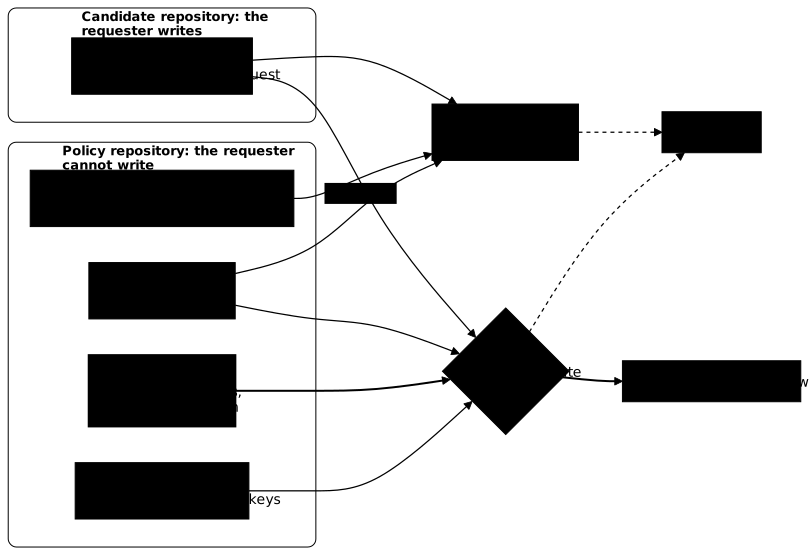
On the diagram, look at where the arrows come from. The policy check
(valider_fiche.py) reads the sheet, the schema and the registry of requests:
it is the one that verifies the shape of the sheet. The platform gate reads only
the fingerprint of the sheet, and receives from the policy repository the
registry, the decisions and the authorised keys. The thick arrow that reaches
the gate starts from the decisions folder: it is the decisions folder that
decides, the sheet only requests. The retained class, the one that dictates the
controls, is written there and nowhere else, which explains the rejection
of the classe_retenue field above.
Who signs the decision, and why not the requester?
The decision is a signed file, and who signs depends on the class. In C2, the technical owner signs a light decision in the policy repository, and cannot be the requester. From C3, an authorised risk owner signs, also distinct from the requester; C4 requires two. The lesson Governance details who decides at each class.
A digital signature relies on two keys. The private key, which only the signer
holds, produces the signature; the public key, which anyone can read, verifies
it. The signature proves who signed and that the file has not changed since.
The allowed_signers file lists the public keys of the accepted signers. The
OpenSSH tool signs a file with ssh-keygen -Y sign and verifies the signature
with ssh-keygen -Y verify, against allowed_signers.
The requester cannot authorise themselves, and that is not for lack of a key:
they may well hold an authorised one. Two rules prevent it. First, the gate
reads decisions only in the policy repository, never in the candidate
repository: a decision added to their own repository is not looked at. Second,
the policy repository keeps a registry of requests, politique/demandes.toml,
which names who asked. The gate reads the requester there and rejects any
decision signed by that same person, even if their key is in
allowed_signers.
The person who signs does not choose the class either. They take the one the
CISO sets, the person in charge of information security. The gate rejects any
classe_retenue lower than the class calculated from the sheet. Lowering a
class requires a written decision of the CISO, described in the lesson
Governance.
What does a decision contain?
Before signing, you need a file to sign: the decision. It is stored in
politique/decisions/, under the name <application-id>-<date>.yaml, and its
signature .yaml.sig is placed next to it. The gate rejects a decision that is
missing one of these nine fields: id, application, fiche_sha256,
classe_retenue, decision, demandeur, decideur, date_decision and
expire_le. Here is that of the purchasing portal, signed on 2026-11-15 by an
authorised risk owner:
id: portail-achats-2026-11-15application: portail-achatsfiche_sha256: <fingerprint of candidat/application.yaml>classe_retenue: C3decision: accepterisques_acceptes: []conditions: []demandeur: j.petitdecideur: identifiant: m.durand role: responsable_servicedate_decision: 2026-11-15expire_le: 2027-05-15The decision field is accepte, accepte_sous_conditions or refuse: only
the first two authorise. The risques_acceptes and conditions lists stay
empty here; the gate does not check them. The demandeur is the person who made
the request, the one named in politique/demandes.toml. In fiche_sha256, the
text between angle brackets is a placeholder: you replace it with a real
fingerprint, explained just below.
Here, the decision-maker is written m.durand, and not an email address,
because the gate compares identifiers written as text: the same identifier
must be written the same way in demandes.toml, in allowed_signers and in
decideur.identifiant. It is, by the way, decideur.identifiant that the -I
option of ssh-keygen looks up in allowed_signers. The demandeur field of
the decision protects nothing by itself, since the signer writes it
themselves: the gate relies on the demandes.toml registry, which the signer
cannot modify, and also compares it with the demandeur field of the decision.
The role of m.durand is responsable_service, the one that class C3
requires.
A decision covers only the exact version of the sheet it cites, through its
fiche_sha256 field. You compute this fingerprint with
sha256sum candidat/application.yaml and copy the 64 hexadecimal characters.
If the requester modifies the sheet after the agreement, for example to add a
write flow, the fingerprint changes and the decision no longer covers the
sheet: the gate rejects it. The requester therefore cannot authorise themselves
after the fact by widening what they were granted.
In summary, the gate rejects a decision when the signature is invalid or the
signer is absent from allowed_signers, when the decision-maker is the
requester (that of the decision as well as that of the registry), when their
role does not suit the class (responsable_service in C3; in C4, also
securite), when decision is refuse, when the class is unknown or lower
than the calculated class, when the fingerprint of the sheet differs, or when
the expiry exceeds the duration of the class or has passed.
How do you sign and verify a decision?
Here is the complete gesture: create the signer's key, declare its public key
in allowed_signers, then sign and verify. The commands were collected with
OpenSSH 10.0p2 on 2026-11-15. For the trial, save the decision above under the
name portail-achats-2026-11-15.yaml in a working folder, with a real
fingerprint, and run the commands from that folder.
The first command creates a demonstration key: cle for the private key,
cle.pub for the public key. It has no passphrase (-N ''), whereas a real
signer's key carries one. The second command writes the line of
allowed_signers: the identity m.durand, the namespaces option, then the
type and the text of the public key, which cut extracts from cle.pub
leaving out its comment.
ssh-keygen -t ed25519 -f cle -C m.durand -N ''echo "m.durand namespaces=\"decision-applicative\" $(cut -d' ' -f1,2 cle.pub)" > allowed_signersThe resulting line has the form
m.durand namespaces="decision-applicative" ssh-ed25519 AAAA…. A namespace is a
label that ties a signature to a precise use, here decision-applicative. The
namespaces option limits the key to that label: it cannot validate a
signature made for another use. In the next two commands, -n gives the
namespace of the signature and -I the identity to look up in
allowed_signers. The signature uses cle, the signer's private key.
ssh-keygen -Y sign -f cle -n decision-applicative portail-achats-2026-11-15.yamlssh-keygen -Y verify -f allowed_signers -I m.durand -n decision-applicative -s portail-achats-2026-11-15.yaml.sig < portail-achats-2026-11-15.yamlThe first command writes portail-achats-2026-11-15.yaml.sig. The second
prints, for a valid signature, a line of the form
Good "decision-applicative" signature for m.durand with ED25519 key SHA256:…,
which recalls the key type and fingerprint, and returns code 0. To see the gate
refuse, you can provoke four failures. In each one, the command returns code
255, and the table gives the message that tells them apart:
| Case | ssh-keygen -Y verify message |
|---|---|
Wrong namespace with -n | Couldn't verify signature: namespace does not match |
| File modified after signing | Signature verification failed: incorrect signature |
Signature made with -n autre and verified with -n autre, while allowed_signers limits the key to decision-applicative | allowed_signers:1: key is not permitted for use in signature namespace "autre" |
Identity absent from allowed_signers, or different key | Could not verify signature. alone |
The first three cases also add Could not verify signature.. The last case does
not say what is missing: the message does not tell an absent identity from a
different key, so check both.
What does the organisation impose on the creator's workstation?
What the organisation imposes on the workstations of the people who create applications with a code agent (permissions, authorised MCP servers, managed settings) belongs to another guide: Securing Claude Code (in French), in its section on the company policy.
Which symptoms reveal a badly set sheet?
Common problems are recognised by their symptom: a forgotten field, a purpose that is too short, a class declared too low, a schema stored in the wrong place, an expiry that is too long, a business owner who is the requester. The table links each symptom to its probable cause and to the fix.
| Symptom | Probable cause | Fix |
|---|---|---|
is a required property on an owner | A field was forgotten or left as a comment | Fill in the identifier and the name of a real person |
'short' is too short on finalite | The purpose is a single word instead of saying why the data is kept | Write a sentence of at least 10 characters that says what the data is for |
| The sheet passes, but the platform rejects it | The declared class is lower than the calculated class | Reread the four criteria, taking the higher score when in doubt |
| The schema accepts a sheet that should fail | The schema is in the application's repository and was modified | Put it back in the policy repository and check its history |
The policy check rejects the sheet: expire_le is more than six months after date_creation | The expiry of the sheet was chosen for comfort | Bring it down to the maximum duration of the class, counted from date_creation |
The gate rejects a decision whose expire_le is too far away | The duration of the decision is counted from date_decision, not from the sheet | Set expire_le at most to the duration of the class after date_decision |
| The policy check rejects the sheet: the business owner is the requester | The sheet names the requester as business owner, which the policy forbids from C3 | Name someone other than the requester as business owner |
| The gate rejects a decision that is nevertheless signed | The sheet has changed since the signature, the fiche_sha256 fingerprint no longer matches | Have a new decision signed for the modified sheet |
Put it into practice
The lab has you take the sheet of the purchasing portal, written by a code
agent so that it "can be deployed", then sign the decision as an approver in the
policy repository. It checks that the sheet passes the schema of the policy
repository, that the owners are named and that the business owner is not the
requester, that each piece of data carries its purpose and its retention
period, and that only a signed decision of the policy repository authorises the
purchasing portal: the same decision placed in the candidate repository
authorises nothing. The lab validates with its own script, valider_fiche.py,
rather than with check-jsonschema, and it does not replay the four signature
verification failures seen above. The lab gives you its own folder: its owners,
the retention periods of the data protection officer (DPO), the data and the
flows differ from the example of this page, and its script prints its messages
in a different form from check-jsonschema. It needs a terminal, Python 3.11
or later and OpenSSH (ssh-keygen).
Key takeaways
- The application sheet is a written identity (an owner, declared data and
flows): a decision-maker reads it, an engineer validates it with a JSON schema
and
check-jsonschema. - Two owners, business and technical, are required, and for each piece of data a
finaliteand a positiveconservation_jours; from C3, the business owner is not the requester. - A schema rejection gives a path and a rule broken; the exact sentence varies with the version of the library.
- A schema checks the shape, not the truth: the calculation of the class and the expiry are left to another control.
- The declared class is a request; the retained class and the schema live in the policy repository, otherwise the author modifies them.
- An application never authorises itself: the decision is signed by the technical owner in C2, by an authorised risk owner from C3 (two in C4), and never by the requester.
- A decision cites the fingerprint of the sheet (
fiche_sha256): modifying the sheet after the agreement invalidates the decision. - An
ssh-keygensignature is verified againstallowed_signers; a wrong namespace, a modified file or a key that is not permitted make it fail with code 255.
Knowledge check
These eight questions cover the role of the sheet, its required fields (including the purpose of each piece of data), validation by schema, the split between request and decision, and the signing of a decision.
Knowledge check
Check what you have learned with this interactive quiz
How it works
- The timer starts when you click Start
- Multiple choice, true/false and short answer questions
- You can move between questions
- Detailed results are shown at the end
Starts the quiz and the timer
Review
(0/0)Score by domain
A domain groups several guides and gets several questions, so its score is more reliable than a per-topic score, which often rests on a single question.
Summary
Strengths
No topic passed at 80% on at least two questions yet.
Weak areas
No topic below the pass mark.
Recommended next
Hints before you try again?
Continue the course: Secure Claude Code: what are you defending against?
A new full quiz with random questions
Work again only on the questions you missed