A code agent produces what you ask it to make true, and it takes the shortest path to get there. If the only instruction is "make the tests pass", deleting a failing test is a valid path. This lesson gives the loop that prevents it: write a verifiable specification, split it into small slices, have the tests written before the code, then refuse any diff that deletes or weakens a test. It is written for developers and for people in a business role who produce code with AI. It does not depend on any particular assistant: a code agent such as Claude Code (in French), an editor assistant or an online generator will do, as long as you can read the diff before accepting it.
What you will learn
- Write a requirement with an acceptance criterion tied to a named test.
- Split a request into slices you can review in a few minutes.
- Have the test written before the code and review it before starting the generation.
- Spot a diff that deletes, skips or weakens a test.
- Refuse that diff and record the reason so its author can find it again.
Prerequisites
You can read a git diff and make a commit. The lesson
Saving changes: add, diff, commit teaches git add, git commit and git diff, and the lesson
Browsing the history: log, show, HEAD teaches git log and git show. You have already seen a test
written with
pytest (in French): the
examples are in Python, but the reasoning applies to any language. You can
create a virtual environment and install a package in it with pip, which the
page
Python virtual environments: venv, pip and requirements.txt
(in French) explains. You can read and write a small Python program, as the
lesson
First steps in Python: program, variables and types
(in French) shows, and you can run a command in a Linux terminal, which the
lesson Open a terminal and understand the prompt
teaches. The "Technical foundations" module of the course brings these lessons
together; it is optional for anyone who already knows how to do all this. To
type the commands of the lesson, you also need Python 3.11 or later and
pytest installed.
Why is a green test suite not enough?
A green test suite says that nothing failed, not that every test ran. An agent that has to "make the tests pass" has three ways to do it: fix the code, change the test so that it accepts the current result, or remove the test. The last two also give a green suite, and they are faster than the first.
Vibe coding in the strict sense does not
look at the diff, so it sees none of this. AI-assisted development does look
at it, but the eye must know what to look for. Take the purchasing portal, the
running example of the course, from the side of the buyer who generated it. She
asks the agent: "a blocked supplier must no longer be able to receive an
order". The agent changes the code, an existing test fails, and the diff it
proposes also contains a @pytest.mark.skip line added on that test. The suite
passes. The rule is still violated, and nobody knows it any more.
The loop below does not rely on trust in the agent. It puts the decision at a place the agent does not control: the specification and the tests, written and reviewed before the generation.
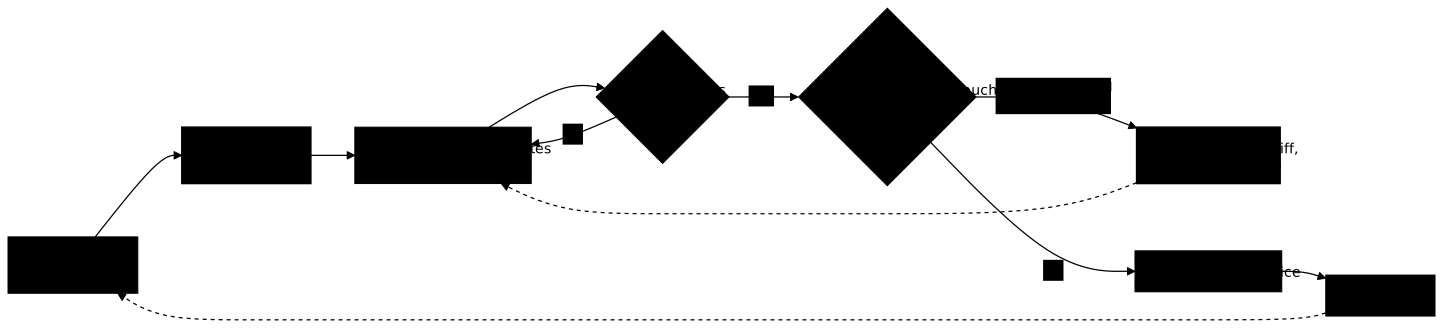
Look at the two diamonds: that is where the method does its work. The first one ("do the tests pass?") is the one everybody looks at. The second one ("does the diff touch the tests?") is the one that gets forgotten, and it is the one that stops the agent that cheats. The test written first, at the start of the line, is what makes the second diamond possible: you can compare what the agent proposes with what you had decided. The section "How do you spot a diff that removes or weakens a test?" gives three checks to answer that question.
How do you write a verifiable specification?
A specification is verifiable when each requirement has an acceptance criterion tied to one precise test. Without a criterion, nobody can say whether the code meets the requirement, neither the agent nor you. The format has three elements: the requirement in one sentence, the criterion that says how it is observed, and the identifier of the test that proves it.
Here is a requirement of the purchasing portal, written in a SPEC.md file at
the root of the project. The test identifier is the one pytest prints, in the
form path::name.
- **R4** : an order addressed to a supplier with status `bloque` is  refused. An order addressed to a supplier with status `actif` is accepted.
- AC-4 [R4] : creating an order for a `bloque` supplier raises an  error `FournisseurBloque`.  Test : `tests/test_commandes.py::test_fournisseur_bloque_refuse`- AC-5 [R4] : creating an order for an `actif` supplier succeeds.  Test : `tests/test_commandes.py::test_fournisseur_actif_accepte`
The requirement describes the behaviour, not how to code it. The two criteria cover the case that must fail and the one that must succeed: a test that only checks the refusal would let through an implementation that refuses everything. The content of the criterion also stays as close as possible to what can be observed ("raises an error", "totals 224.80"), not to an adjective ("handles correctly"). An adjective cannot be tested.
This specification has another use: it is the first text you give to the agent. The guide basic prompting with Claude Code (in French) explains how to phrase a request; the specification is its core, and it stays valid if you change assistant.
How do you split the work into slices?
A slice is the smallest change that makes a requirement true, and whose diff can be read in a few minutes. The practical rule: one requirement, one or two tests, one diff. Asking "add all the supplier management" produces a diff of several hundred lines that nobody really reads, and the risk comes back through the door above: you accept because it is too long to read.
For the purchasing portal, the request "block suppliers" splits as follows, each line being a slice that you accept or refuse on its own:
- R4, a blocked supplier receives no order;
- R5, a supplier can be blocked and unblocked by a manager;
- R6, the block is visible in the list of suppliers.
A slice ends with a commit. If the agent did two things in the same diff, refuse the whole diff and ask for the slice alone again: a mixed diff hides what it really changes. The guide building a complete project driven by Claude Code (in French) takes up this split as "vertical slices" on a whole project.
Why have the tests written before the code?
When the test exists before the code, it expresses what you decided, and the agent can no longer adapt it to what it produced. If the agent writes test and code in the same motion, the test describes what the code does, not what it should do: it always passes, and it protects nothing.
The gesture has four steps for each slice:
- Ask the agent to write only the test of the criterion, without touching the code.
- Review that test. Check that it really verifies what the criterion says: the error case, the expected value, not only the absence of an exception.
- Run it: it must fail, and fail for the right reason. With pytest,
pytest tests/test_commandes.py::test_fournisseur_bloque_refusemust show a failing test, because the behaviour does not exist yet. A test that passes before the code exists tests nothing. - Then ask the agent to write the code that makes it pass, without modifying the test.
The test written by the agent is therefore not the problem, the test nobody reviewed is. The guide testing strategies explains why writing the test first forces you to specify what the code must do, and the page advanced tests in Python (in French) shows how to write tests that really detect defects.
How do you spot a diff that removes or weakens a test?
Three checks let you recognise a diff that touches the tests. Run them before
accepting the slice. Before starting the agent, note two reference points:
the number of tests collected, with pytest --collect-only -q | tail -1, and
the starting commit. Without them, you cannot say afterwards whether a test has
disappeared. In this command, the | sends the output of pytest to tail -1,
which keeps only the last line, the one that gives the total.
The commands below compare the working folder with the last commit using
git diff HEAD, which covers staged changes (git add) as well as the others.
git diff without an argument only shows changes not yet staged: it sees
nothing of what the agent staged. If the agent committed the slice,
git diff HEAD shows nothing any more: replace HEAD with HEAD~1 (or with
the starting commit if the agent made several commits), or read
git show --stat. HEAD designates the last commit, and HEAD~1 the commit
just before it: once the slice is committed, comparing with HEAD~1 shows what
the agent's commit changed.
The first check is to look at which files the diff modifies.
git diff HEAD --statThe output lists the modified files and the number of lines. Look in it for any
path under tests/, but also conftest.py, pytest.ini, pyproject.toml or
the continuous integration configuration file: an option such as --deselect, a
reduced testpaths or an added -k remove tests from the suite without
deleting a single one. If the slice concerns the code of a requirement, none of
these files should appear. If one does, read it first.
The second check is to look for the removed lines and the words that neutralise a test in the part of the diff that concerns the tests.
git diff HEAD -U0 -- tests/ | grep -E '^[-+].*(skip|xfail|assert|raises)'The | sends the output of git diff to grep. The pattern
'^[-+].*(skip|xfail|assert|raises)' keeps the lines added (+) or removed
(-) that contain one of these four words.
A - line carrying an assert is a deleted verification. A + line carrying
skip or xfail disables a test. A - line that held a precise value,
replaced by a looser assert (assert total == Decimal("224.80") turned into
assert total), is a weakening: the test passes for almost any result. This
pattern does not see a test renamed so that it is no longer collected, nor a
change that contains none of these words: the third check spots the renamed or
skipped test.
The third check is to count the tests that ran, not just read the word
"passed". The -rs and -rx options ask pytest to add, at the end of the run,
a "short test summary info" section that lists the skipped tests and the tests
expected to fail. The exact wording of the lines varies from one pytest version
to another: the outputs below give the form, taken with pytest 9.2.0 and Git
2.47.3, to be checked on your version.
pytest -rsxFor a test skipped by @pytest.mark.skip(reason="flaky"), the section contains
a line of the form SKIPPED [1] tests/test_commandes.py:14: flaky. It gives
the file, the line and the reason, and the number in brackets counts the tests
skipped for that same location and that same reason. An s also appears in the
line of dots. The suite is not red, but a test did not run.
Then compare the number of tests collected with the one noted before the agent,
using pytest --collect-only -q | tail -1 (the same command as above: the |
passes the output to tail -1, which keeps the last line). The line has the
form 2 tests collected followed by the duration. When -k or --deselect
sets tests aside, it becomes of the form 1/2 tests collected (1 deselected).
If the number of tests kept goes down while you removed nothing, a test has
disappeared.
This third check does not see a weakened test: it is still collected and it
passes, so neither -rsx nor the number of tests changes. Only reading the diff
of tests/, the second check, finds it: a looser assert shows in the - and
+ lines. When a slice touches a file of tests/, read that diff in full.
A modified test is not always a weakened test: a requirement that changes justifies a change of test. The rule is that this modification comes from you, before the generation, never from the agent while it generates. To review a diff with method, the page reviewing an automation (in French) teaches how to do it without reading every line, and the guide plan mode, diff and validations (in French) shows how to force the agent to propose a plan and wait for your agreement before writing.
What should you do when you refuse a diff?
Refusing a diff takes two steps: do not apply it, and write down the reason so that it serves the agent, your team and the next review. A useful reason says precisely what is refused: the file, the test, the line.
- tranche: R4, fournisseur bloqué decision: refusee raison: > Le diff ajoute @pytest.mark.skip sur tests/test_commandes.py::test_fournisseur_bloque_refuse (ligne 14). Le critère AC-4 n'est plus vérifié. Redemander la tranche sans toucher aux tests.A reason such as "bad diff" is useless: the agent and you will find it in
three weeks without being able to replay it. The refusal is then rephrased to
the agent with the same precision: "do not modify tests/, fix commandes.py
so that test_fournisseur_bloque_refuse passes". If the agent persists, it is a
signal: stop the session and reframe, as the guide common mistakes and
reframing
(in French) explains.
What are the limits of this method?
This loop reduces one precise risk, code that does not do what you decided, but it does not remove it, and it leaves other risks open.
A test is worth only what the specification it translates is worth. If the requirement forgets a case, for example a supplier with an unknown status, the suite stays green and the defect gets through. Tests do not detect a security flaw that nobody described either: a missing access control makes no test fail that you did not write. This loop describes what you do. Detecting these defects automatically, with a code scanner for example, is another subject.
Finally, the method rests on your discipline: nothing technically prevents the agent from modifying a test if you do not forbid it. Writing the rule in the project instructions helps, enforcing it with an automatic check is safer, and that is another subject. Meanwhile, the three checks above let you hold the line by hand.
Troubleshooting
The table starts from what you observe after a slice and leads to the check to run.
| Symptom | Likely cause | Fix |
|---|---|---|
| The test written first passes straight away | It does not verify the expected behaviour, or the code already existed | Re-read the assertion; add the error case; make the test fail again before generating |
| The diff is several hundred lines long | The slice is too big | Refuse and ask again for one requirement at a time |
The suite is green but pytest -rsx lists skipped tests | A test received skip or xfail | Refuse the diff, record the line, ask for the code to be fixed |
| The number of tests collected went down | A test, a file or a configuration option was removed | git diff HEAD --stat (HEAD~1 if the agent committed) then read conftest.py and pytest.ini |
| The number of tests did not change, but a test passes for too many results | An assert was weakened, in a staged or committed change | git diff HEAD -U0 -- tests/ (HEAD~1 if committed) and read the - and + lines |
| The agent rewrites the test at every attempt | The instructions do not forbid it | Say explicitly not to modify tests/; otherwise stop the session |
Put it into practice
The lab takes up the purchasing portal, the running example of the course, and
has you practise the gestures of this lesson on an orders module. It is
recommended: it is the proof of the gesture. You need a terminal, Python 3.11 or
later, pytest installed, and patch or git to apply a change.
A simulated agent proposes two changes to the orders module. You run the suite before touching anything, read each patch, apply the one that respects the specification and refuse the other one by recording the reason in the review log. You then write an acceptance criterion tied to a test for the new requirement. The validation reruns the whole suite: the accepted change must pass, every original test must still run and succeed, the totals must stay exact, the refusal must appear in the log with its reason, and the test of the criterion must fail as soon as the requirement is broken.
The files of the lab carry English names (orders.py, SPEC.md), not those of
the purchasing portal in the lesson (commandes.py): the method is the same.
Key takeaways
- A code agent optimises what you measure: a green suite can also be obtained by deleting, skipping or weakening a test.
- Each requirement carries an acceptance criterion tied to a named test.
- A slice is the smallest change that makes a requirement true, and its diff can be read in a few minutes.
- The test is written and reviewed before the code, and it must fail for the right reason before the generation.
- Before starting the agent, note the number of tests collected. Before
accepting, check the modified files (
git diff HEAD --stat, withHEAD~1if the agent committed), the lines removed intests/and the number of tests that really ran. A weakened test only shows in the diff oftests/. - Refusing a diff is recorded with the file, the test and the line concerned.
- The method replaces neither a complete specification nor a security review: a forgotten case remains an untested case.
Knowledge check
These eight questions cover the verifiable specification, the split into slices, the test written first and the refusal of a diff that weakens a test.
Knowledge check
Check what you have learned with this interactive quiz
How it works
- The timer starts when you click Start
- Multiple choice, true/false and short answer questions
- You can move between questions
- Detailed results are shown at the end
Starts the quiz and the timer
Review
(0/0)Score by domain
A domain groups several guides and gets several questions, so its score is more reliable than a per-topic score, which often rests on a single question.
Summary
Strengths
No topic passed at 80% on at least two questions yet.
Weak areas
No topic below the pass mark.
Recommended next
Hints before you try again?
Continue the course: Check a dependency proposed by an AI before installing it
A new full quiz with random questions
Work again only on the questions you missed