A secret is a piece of information that proves an identity or opens access, and whose leak causes damage: a password, an API key, a token, a private key or a certificate. It differs from plain configuration, such as a port number or an address, which can be public without risk. One sentence settles the question: if disclosing this data puts you in danger, it is a secret, and it is not stored like the rest. This page defines the notion with no technical prerequisite, for people who are discovering the subject.
What you will learn
The word secret appears everywhere in technical documentation, often without a definition. This lesson opens the module by setting the vocabulary that all the following lessons reuse. Concretely, you will be able to:
- Define what a secret is and recognise one at a glance.
- Tell apart a secret from plain configuration, the most frequent confusion.
- Understand why a stolen secret gives direct access, and where secrets leak in practice.
- Apply the rule that settles it, to classify any piece of data.
- Connect this notion to the secret lifecycle and to the SOCLE threat model for secrets (in French), which show how a secret is born, lives and is protected.
What is a secret?
A secret is a confidential piece of information used to prove an identity or to unlock access to a system. It is the data you present to say "it is really me, let me in". As long as only you know it, access is protected. As soon as a third party knows it, they can impersonate you.
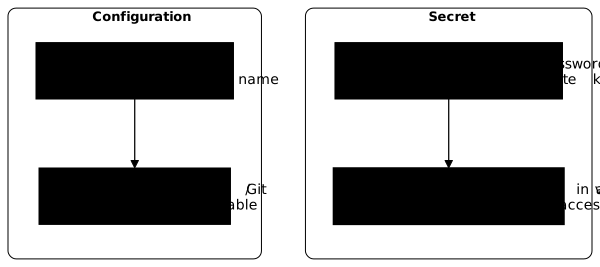
The difficulty for a beginner is to separate a secret from plain configuration. A configuration is a setting that tells a piece of software how to behave or where to find something: a port number (the number of the network door a service listens on), a URL (the address of a service on the network), a database name, a time zone. These settings can be written in clear text, shared within the team and versioned (kept in the history of the code) without any risk.
A secret is of a different nature. Here are the main families to know:
- A password: the string of characters that unlocks an account.
- An API key: a unique token (a string of characters) that a program presents to a service to be authorised, without typing a password.
- A token: a temporary pass issued after login, which counts as proof of identity as long as it is valid.
- A private key: the secret half of a cryptographic key pair, used for example to connect to a server over SSH (a secure remote access protocol).
- A certificate with its associated key: a document that attests the identity of a site or a service, and whose private part must never leave.
The distinguishing criterion is simple: a configuration describes where and how to connect, a secret is what proves you are entitled to. The address of a database server, its port and the schema name are configuration: disclosing them opens no access. The matching password is a secret: whoever holds it gets in. The confusion is frequent because both take the same form, a line of text in a file, and often sit side by side in the same .env file.
What is the rule that settles it?
Faced with a piece of data you do not know how to handle, one question is enough: if this information leaks, does it cause damage? If the answer is yes, it is a secret. If the answer is no, it is ordinary configuration. This single rule saves you from hesitating and from arguing case by case.
Let us test it on two examples. The port 5432 on which a PostgreSQL database listens is public by nature: an attacker who knows it can do nothing with it without credentials. No damage, so not a secret. By contrast, the password of that same database opens all the customer data to whoever holds it. Leak equals damage, so it is a secret. The rule settled both cases without ambiguity.
Why are secrets a target?
A stolen secret requires no extra effort from the attacker: it gives direct access. Unlike a software flaw that must be discovered and exploited, a secret is a ready-to-use key. Whoever picks it up logs in as a legitimate user, with no alert and no noise. That is why secrets are among the first things attackers look for during an attack.
The leverage effect makes it worse. A single API key can give access to a mailbox, a payment service or a whole hosting infrastructure. A single administration token sometimes opens an entire system. Stealing a secret often means obtaining far more than a simple account: it means taking control.
You still need to know where secrets leak, because they rarely escape through the front door. The most common leak points are:
- The source code: a secret hard-coded (written directly in a program file) instead of being supplied from outside.
- The Git history: a secret removed from the code today stays visible in the past versions kept by Git, the tool that archives the history of the code.
- The logs (the files where a piece of software records what it does): a secret displayed by mistake in an error message or a debug trace.
- The container images: a secret slipped into a Docker image (the package that bundles an application ready to run) and distributed with it.
Each of these leak points has a dedicated guide, because the countermeasures differ. To understand why pasting a secret in the code is a deep trap, the lesson why static secrets are a problem goes into detail. For the specific case of Git, see secrets in code and Git history. For logs and images, see secrets in logs and images.
How do you put it into practice?
Recognising a secret is only the first step. Two practical reflexes then matter. The first is to keep an inventory: list which secrets exist, where they are and who can use them. You only protect well what you know about, and a forgotten secret is an unprotected secret. The second is to put them in a vault.
A secrets vault (secrets manager) is a specialised piece of software that stores secrets in encrypted form, controls who accesses them and keeps a trace of every read. Instead of scattering passwords across files, you centralise them in this vault, and applications come to fetch them when needed. It is the foundation of any serious secrets management.
The inventory gesture has its own lesson: inventory and classify your secrets. Finding those that have already leaked is the job of detecting exposed secrets. For a concrete and very widespread vault, the HashiCorp Vault guide (in French) shows the tool in action. Limiting the rights granted to each secret is the job of the principle of least privilege.
What mistakes come up most often?
A few mistakes come back again and again among beginners, and even among experienced teams when they hurry. Knowing them in advance helps you avoid them, and each one is taken up again later in the module.
The most classic one is the "temporary" hard-coded secret. You paste a password straight into the code "just to test", promising to remove it later. That later almost never comes. The secret goes into the Git history, spreads to colleagues, and sometimes ends up published without anyone noticing. A temporary secret in the code is a permanently compromised secret: better never to write it there.
The second trap concerns environment variables. An environment variable is a value supplied to a program at startup, often used to pass a secret without writing it in the code. It is a good practice in itself, but it has a blind spot: these variables are frequently printed in the logs during a crash or a debugging session. The secret you thought was safe ends up in clear text in a log file, readable by everyone who can access it.
The third trap is to believe that a secret erased from the code is erased everywhere. Removing a key from a file deletes it neither from the Git history, nor from the logs, nor from the images already built. An exposed secret must always be considered compromised and replaced (renewed, a step also called rotation), not merely hidden.
Key points
-
A secret proves an identity or opens access: password, API key, token, private key, certificate.
-
Configuration is not a secret: a port or a URL can be public, a key never. The key to the house is not its address.
-
The rule that settles it: if the leak of the information causes damage, it is a secret, full stop.
-
A stolen secret gives direct access: no flaw to exploit, the attacker walks in as a legitimate user.
-
Secrets leak through the code, the Git history, the logs and the images: each leak point has its own countermeasure.
-
An exposed secret is compromised: hiding it is not enough, it must be replaced.
-
The site's reference framework requires both reflexes: the inventory of secrets and their storage in a vault belong to the requirement family of the SOCLE reference on secrets (in French), and the SOCLE threat model for secrets (in French) links them to the attacks they block.
Knowledge check
Check that the essentials of this lesson are in place. The questions only cover what has just been explained here.
Knowledge check
Check what you have learned with this interactive quiz
How it works
- The timer starts when you click Start
- Multiple choice, true/false and short answer questions
- You can move between questions
- Detailed results are shown at the end
Starts the quiz and the timer
Review
(0/0)Score by domain
A domain groups several guides and gets several questions, so its score is more reliable than a per-topic score, which often rests on a single question.
Summary
Strengths
No topic passed at 80% on at least two questions yet.
Weak areas
No topic below the pass mark.
Recommended next
Hints before you try again?
Continue the course: Why static secrets are a problem
A new full quiz with random questions
Work again only on the questions you missed