
Before accessing a secret in Vault, a client must prove its identity. Vault offers several authentication methods (plugins that verify an identity) depending on the context: human users, applications, CI/CD pipelines, cloud workloads. A successful login returns a token, a credential the client then presents on every request.
This guide covers the two most common methods:
- userpass: username/password authentication (for users)
- AppRole: authentication for applications and CI/CD
What you will learn
- Enable an authentication method and create a
userpassaccount - Configure an AppRole role with a
role_idand a single-usesecret_id - Integrate authentication into a CI/CD pipeline without exposing a long-lived secret
- Protect the distribution of the
secret_idwith response wrapping - Diagnose the most common authentication refusals
- SOCLE anchoring: this lesson implements SOCLE-SEC-STO-3 (in French), accesses scoped to the strict minimum and separated by environment, and SOCLE-SEC-ROT-2 (in French), short-lived identities rather than long-lived secrets
Prerequisites
This lesson is the third of the module, after storing secrets with KV v2. You need a Vault server that is installed and running, plus administrator access (the root token, the all-powerful credential issued at initialization, or an admin policy) to enable methods and create accounts.
Authenticating does not by itself grant any right on a secret: the login
produces a token, and it is the policy attached to that token that says
what it may read. A policy is a set of rules that allows or denies operations
on given paths (the addresses under which Vault exposes its data and its
functions). Policies are the subject of the next lesson. The names
dev-policy and webapp-policy used here are defined there; until then, read
them as plain labels.
How does userpass authentication work?
The userpass method is simple: username + password. It suits developers who access Vault through the CLI or the UI.
How do I enable userpass?
No authentication method is active at installation, except the token
method. Enabling userpass creates a new backend at the path
auth/userpass/: it is this path, not the name of the method, that you will
find in every command and in the policies. Remember it, because a
mistyped path gives the no handler for route error (HTTP 404 with a token,
measured on Vault 2.2.0; the code changes without a token, see the
troubleshooting section at the end of the page).
vault auth enable userpassOutput:
Success! Enabled userpass auth method at: userpass/How do I create a user?
Creating an account is a simple write under auth/userpass/users/, the
last segment of the path becoming the username. Two reflexes from now on:
never type the password in clear text in the shell history (prefer an
environment variable or interactive input), and always assign an explicit
policy, otherwise the account inherits only default and cannot read any
business secret.
vault write auth/userpass/users/alice \ password=@/path/to/alice-password \ policies="dev-policy"The @ prefix tells the CLI to read the value from a file: the password
therefore appears neither in the command nor in the shell history. Create
this file with 0600 permissions and delete it once the account is
created.
How does a user log in?
The user alice can now log in. The command contains no password=: the
CLI then asks for the password at the keyboard, without displaying it or
keeping it in the shell history.
vault login -method=userpass username=aliceOutput:
Success! You are now authenticated.
Key                    Value---                    -----token                  hvs.CAESICpTptPYxzwJISnFYQQRZzz7ftYL...token_accessor         ORgCVUVANPcCkzgF8oKs9ZRctoken_duration         768htoken_renewable        truetoken_policies         ["default" "dev-policy"]identity_policies      []policies               ["default" "dev-policy"]token_meta_username    alice
The returned token is automatically stored in ~/.vault-token for the
following commands. The token and accessor change at every login; the
768h duration (32 days) is what a userpass token gets by default,
measured on Vault 2.2.0.
How do I manage users?
These four commands cover the complete lifecycle of an account. One trap
deserves a mention: vault write replaces the fields you provide without
touching the others, so rewriting the policies does not change the password,
and the other way round. Also know that deleting a user does not revoke the
tokens already issued in their name; to cut access immediately, you must
revoke the tokens through their accessor or revoke the authentication path.
# List the usersvault list auth/userpass/users/
# Change the passwordvault write auth/userpass/users/alice password=@/path/to/new-password
# Change the policiesvault write auth/userpass/users/alice policies="dev-policy,staging-readonly"
# Delete a uservault delete auth/userpass/users/alice
How do I configure the token lifetime?
You can customize the lifetime and behavior of tokens. The token TTL (time-to-live) is how long a token stays valid before it expires; the maximum TTL caps it even when the token is renewed.
vault write auth/userpass/users/bob \ password=@/path/to/bob-password \ policies="dev-policy" \ token_ttl="8h" \ token_max_ttl="24h" \ token_bound_cidrs="10.0.0.0/8"| Parameter | Description |
|---|---|
token_ttl | Initial lifetime of the token |
token_max_ttl | Maximum lifetime (even after renewal) |
token_bound_cidrs | IP ranges allowed to use the token |
How does AppRole authentication work for applications and CI/CD?
AppRole is the recommended method for applications and pipelines. It uses two elements:
- role_id: the identity of the application (stable, like a username)
- secret_id: a credential designed to be ephemeral (like a temporary password), provided the role bounds it
Why AppRole?
The difference is not about how strong the password is, but about the
lifetime of the credential. A userpass password stays valid as long
as nobody changes it, so a leak in a build log remains exploitable months
later. A secret_id, on the other hand, can be bounded: secret_id_ttl
limits how long it stays valid and secret_id_num_uses restricts it to a
single use, which shrinks the exploitation window to almost nothing.
These bounds are not automatic, though. On a role created without setting
these parameters (measured on Vault 2.2.0), secret_id_ttl is 0s and
secret_id_num_uses is 0, which means no limit: the secret_id never
expires and stays reusable. The role has to set them, as the example in
the section on creating a role does.
| Userpass | AppRole |
|---|---|
| Stable password | secret_id bounded by the role (lifetime, single use) |
| Hard to automate | Designed for automation |
| Password with no expiry and no use limit | Limits on number of uses, TTL, CIDR |
How do I enable AppRole?
As with userpass, the method is mounted on its own path,
auth/approle/. A mount is exactly that: a location where a method (or a
secrets engine) is attached. It can coexist without conflict with the other
methods already enabled: Vault allows several authentication backends in
parallel, each issuing its own tokens with its own policies.
vault auth enable approleHow do I create a role?
An AppRole role describes an application, not a person: it fixes in
advance the policies granted and the duration limits. Parameters
prefixed with secret_id_ govern the credential, those prefixed with
token_ govern the token obtained after login. The policies field
accepted below is a historical alias of token_policies, which Vault returns
under both names on a vault read auth/approle/role/my-webapp.
vault write auth/approle/role/my-webapp \ secret_id_ttl=10m \ token_num_uses=10 \ token_ttl=20m \ token_max_ttl=30m \ secret_id_num_uses=1 \ policies="webapp-policy"| Parameter | Description | Recommended value |
|---|---|---|
secret_id_ttl | Validity period of the secret_id | 10-30 minutes |
secret_id_num_uses | Number of uses of the secret_id | 1 (single use) |
token_ttl | Lifetime of the token obtained | According to application need |
token_num_uses | Number of uses of the token | 0 (unlimited) or as needed |
How do I get the credentials?
The role gives out its two credentials separately: the role_id once,
the secret_id on every deployment.
Fetch the role_id
The role_id is stable and can be stored in the application's configuration:
vault read auth/approle/role/my-webapp/role-idOutput:
Key Value--- -----role_id d922482a-36c8-45fa-df77-c793b2980f51Generate a secret_id
The secret_id is designed to be ephemeral: you generate it at each deployment:
vault write -f auth/approle/role/my-webapp/secret-idOutput:
Key Value--- -----secret_id aab71b03-aeeb-6965-dd97-73d5f9e30f38secret_id_accessor 67eabeab-e4b4-12f3-8fde-4ab79b5c7027secret_id_num_uses 1secret_id_ttl 10mHow do I log in with AppRole?
The application uses role_id + secret_id to obtain a token:
vault write auth/approle/login \ role_id="d922482a-36c8-45fa-df77-c793b2980f51" \ secret_id="aab71b03-aeeb-6965-dd97-73d5f9e30f38"Output:
Key Value--- -----token hvs.CAESIG...token_accessor ABC123...token_duration 20mtoken_renewable truetoken_policies ["default" "webapp-policy"]What is the recommended CI/CD workflow?
Here is how to integrate AppRole into a CI/CD pipeline:
-
Pre-deployment: an administrator generates the secret_id and hands it to the pipeline (CI/CD secret variable)
-
Pipeline: fetches the role_id (stored in config) and the secret_id (secret variable)
-
Login: the pipeline runs
vault write auth/approle/loginto obtain a token -
Secret access: the pipeline uses the token to read the secrets it needs
-
End: the token expires automatically
The read path follows the -mount= form taught in the
KV v2 lesson, which separates the mount
point from the relative path. The script below puts steps 3 and 4 into
practice. Three precautions are deliberate: set -euo pipefail stops the job
as soon as a command fails rather than carry on with an empty token,
-field=token avoids printing the full Vault response in the logs, and the
token is never written to disk. Also remember to turn off the runner's command
echo (set +x) if your CI enables it by default.
#!/bin/bashset -euo pipefail
# Environment variables (injected by the CI/CD)# VAULT_ADDR, VAULT_ROLE_ID, VAULT_SECRET_ID
# Get the tokenVAULT_TOKEN=$(vault write -field=token auth/approle/login \    role_id="$VAULT_ROLE_ID" \    secret_id="$VAULT_SECRET_ID")
export VAULT_TOKEN
# Read the secretsDB_PASSWORD=$(vault kv get -mount=secret -field=password apps/webapp/database)
# Use the secret: passed through the environment, it appears neither in the# command line visible to ps, nor in the shell historyexport PGPASSWORD="$DB_PASSWORD"psql -h db.internal -U webapp -d webapp -c 'SELECT 1'
echo "Deploying with DB access..."
How does a wrapped secret_id make AppRole safer?
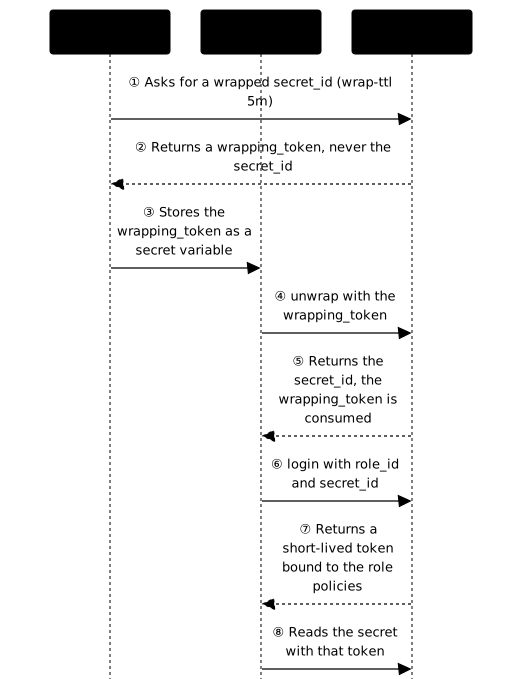
The previous workflow assumes that someone hands the secret_id to the pipeline. To prevent it from travelling in clear text, use response wrapping: Vault places the response in a single-use vault and returns only a short-lived wrapping_token, which serves one time only to retrieve the real value.
# Generate a wrapped secret_id (valid 5 minutes)vault write -wrap-ttl=5m -f auth/approle/role/my-webapp/secret-idOutput:
Key Value--- -----wrapping_token: hvs.CAESIOe9fg2saB1v44rzYlQfct_IGzpgk2n7ZvUUI--jao_mwrapping_accessor: IRSMBlNVmDshiL3JV3DXck9Wwrapping_token_ttl: 5mwrapping_token_creation_time: 2026-03-16 14:30:00.413673165 +0000 UTCwrapping_token_creation_path: auth/approle/role/my-webapp/secret-idwrapped_accessor: 1ead00ec-0101-5042-7c51-71d6fa953ab4The secret_id appears nowhere in this output: that is the whole point.
Note also that the keys end here with a colon, unlike the other Vault
responses, because this block describes the envelope and not the data
itself. These formats were replayed on Vault 2.2.0; the identifiers and
the date change at every call.
The CI/CD receives a wrapping_token instead of the secret_id. It must "unwrap" it:
VAULT_TOKEN="<wrapping_token>" vault unwrapThe next diagram follows the complete path. Look first at how the
administrator never sees the secret_id itself (steps ① and ②), then at
how the pipeline receives it by exchanging the wrapping_token (steps ④ and
⑤) before logging in with the role_id (steps ⑥ and ⑦).
Userpass, AppRole or token: which method should I choose?
These three methods are not mutually exclusive, they cover different populations on the same Vault cluster. The row to look at first is Renewal: it determines what an attacker can do with a credential recovered from a log or an environment variable. The Token column here means the direct use of a token issued by hand, handy for one-off troubleshooting but whose renewal cannot be automated.
| Aspect | Userpass | AppRole | Token |
|---|---|---|---|
| Target | Humans | Applications | Simple automation |
| Ease | Very simple | Medium | Simple |
| Security | Medium | High | Low |
| Renewal | Manual | Automatable | Manual |
| CI/CD | Not recommended | Recommended | Acceptable short-term |
Troubleshooting
Vault's error messages are deliberately vague so as not to tell an
attacker what exists on the server side: invalid username or password is
returned for a nonexistent account as well as for a wrong password. So
always start by checking the method's path with vault auth list, before
suspecting the credential itself.
The same principle applies to AppRole, with a practical consequence: a
nonexistent role_id, a wrong secret_id, an expired secret_id and an
already consumed secret_id all return exactly the same message, with the
same HTTP code. The client therefore cannot tell these four causes apart
from the error; it is the vault administrator who diagnoses, using the
commands in the last column. Messages observed on Vault 2.2.0.
The HTTP code for a missing route, however, depends on the call. Measured
on Vault 2.2.0 by calling the API directly: with a valid X-Vault-Token
header, which is what the CLI sends when VAULT_TOKEN is set, Vault answers
404 and no handler for route; without that header, it answers 403
Forbidden (the text of that 403 was not recorded). Since an application login
normally sends no token, a 403 received without a token can therefore hide
a method that is not enabled or a mistyped path, and not only a permissions
problem.
| Symptom | Likely cause | Solution |
|---|---|---|
invalid username or password (HTTP 400) | Nonexistent account or wrong password: Vault does not say which | Check username/password, then vault auth list for the path |
invalid role or secret ID (HTTP 400) | Nonexistent role_id, wrong, expired or already consumed secret_id: Vault does not say which | vault read auth/approle/role/<name> to confirm the role exists, then vault read auth/approle/role/<name>/role-id, then generate a new secret_id |
no handler for route "auth/..." (HTTP 404 with a token; 403 without a token) | Auth method not enabled, or mistyped path | vault auth list, then vault auth enable <method> if it is missing |
Key points
- userpass: simple, for human users (CLI, UI)
- AppRole: secure, for applications and CI/CD
- role_id = stable identity, secret_id = ephemeral credential
- In production:
secret_id_num_uses=1for single use and a shortsecret_id_ttl, because by default a secret_id never expires - Response wrapping: extra protection for pipelines
- Each user/application = specific policies (least privilege)
- Evidence expected for SOCLE-SEC-STO-3 and SOCLE-SEC-ROT-2: accesses scoped to the strict minimum and separated by environment, and short-lived identities (TTL and single use of the
secret_id) rather than long-lived secrets
Knowledge check
Check that the essentials of this lesson are in place. The questions only cover what has just been explained here.
Knowledge check
Check what you have learned with this interactive quiz
How it works
- The timer starts when you click Start
- Multiple choice, true/false and short answer questions
- You can move between questions
- Detailed results are shown at the end
Starts the quiz and the timer
Review
(0/0)Score by domain
A domain groups several guides and gets several questions, so its score is more reliable than a per-topic score, which often rests on a single question.
Summary
Strengths
No topic passed at 80% on at least two questions yet.
Weak areas
No topic below the pass mark.
Recommended next
Hints before you try again?
Continue the course: Vault: policies and access control (ACL)
A new full quiz with random questions
Work again only on the questions you missed