
A Vault policy is a file that says which paths a token can reach and
with which capabilities (read, write, delete, list). A token is the
credential Vault hands out after a successful login. Everything that no policy
allows is refused: this is the default deny. This lesson teaches you to
write a policy in HCL, to load it, to attach it to an identity, then to
predict what Vault does with it when several rules target the same path. It
finally defines dev-policy and webapp-policy, which the
authentication lesson has
already attached to alice and to the my-webapp role.
What you will learn
- Write an HCL policy:
pathblocks, capabilities,*and+wildcards - Target the real KV v2 paths (
data,metadata) rather than the ones typed on the keyboard - Predict which rule Vault retains when several match, and know when
denyreally acts - Load, attach and test a policy without ever guessing the result
- Split policies by role and by environment, with the strict minimum
- SOCLE anchoring: this lesson implements SOCLE-SEC-STO-3 (in French), access scoped to the strict minimum and separated by environment, and SOCLE-SEC-STO-6 (in French), access denied by default
Prerequisites
This lesson belongs to the Vault module (in French). You need a Vault server installed and started, an administrator access (root token or an administration policy) to write policies, and two takeaways from the previous lessons: knowing how to obtain a token through userpass or AppRole, and knowing the KV v2 engine and its paths. Without them, you would write rules that nothing triggers.
What does a policy look like?
A policy is written in HCL (HashiCorp Configuration Language) or in JSON: a
series of path blocks, each carrying a list of capabilities. The path is
not a file system path, it is the URL of Vault's HTTP API without its /v1/
prefix. Allowing a path therefore amounts to allowing a precise API call. Here
is dev-policy, the policy of developer alice: full rights on dev,
read-only on the shared secrets, and nothing else.
# dev-policy.hcl: developer# Full access to the dev environmentpath "secret/data/dev/*" {  capabilities = ["create", "read", "update", "delete", "list"]}
# Dev metadata: read, without deleting the historypath "secret/metadata/dev/*" {  capabilities = ["list", "read"]}
# Read-only on the shared secretspath "secret/data/shared/*" {  capabilities = ["read", "list"]}
# Neither staging nor prod: nothing is written, so everything is denied
The breakdown fits in four lines. path "secret/data/dev/*" designates
everything that starts with this prefix, the * being a wildcard (also
called a glob). capabilities lists the actions allowed on this path. The
blocks are independent: none assumes another. And the default deny
applies to everything else: prod appears nowhere, so prod is forbidden,
without any deny rule being needed.
Which capabilities exist?
A capability is an action allowed on a path. Six map onto an HTTP verb.
sudo unlocks the so-called protected paths (sys/auth, sys/seal, some
PKI operations), which require a root token or the sudo capability in the
policy. deny refuses a path, but only within the retained rule: the
section on evaluation gives its exact scope, which is not the one you imagine.
Do not confuse the two ways of not allowing something: leaving a capability
out simply does not grant it (the default deny does the rest), while deny
is an explicit refusal that overrides every other capability of the same
rule.
| Capability | What it allows | HTTP verbs |
|---|---|---|
create | Create a new entry (add an API key) | POST/PUT |
read | Read an entry (retrieve a database password) | GET |
update | Modify an existing entry (change the password) | POST/PUT |
delete | Delete an entry (remove a revoked key) | DELETE |
list | List the names, without reading the contents | LIST |
patch | Partial modification, if the endpoint supports it | PATCH |
sudo | Access protected paths (root-protected) | - |
deny | Refuse the path within the retained rule | - |
Which paths should you target with KV v2?
With the KV v2 engine, the path you type is not the one the policy must
allow. vault kv get secret/myapp actually queries secret/data/myapp: the
versioning inserts a technical segment (data, metadata, destroy)
between the mount (the path where the engine is mounted, here secret/)
and the secret name. Forgetting this segment produces unexplained
permission denied errors on KV v2, and it is the first thing to check.
| Path | Usage |
|---|---|
secret/data/* | Read/write the secrets |
secret/metadata/* | Metadata, versions, key listing |
secret/delete/* | Soft deletion of versions |
secret/undelete/* | Restoring versions |
secret/destroy/* | Permanent deletion |
What do * and + mean in a path?
Two characters let you write a generic pattern, and they do not have the
same scope. The glob * swallows the whole rest of the path and is
written only at the end of a pattern: secret/*/config is not valid, * is
not a regular expression. The + consumes a single segment only and can be
placed in the middle: it is the tool of horizontal partitioning, which
opens one level of the tree without opening what lies below.
| Pattern | Matches | Does not match |
|---|---|---|
secret/data/dev/* | secret/data/dev/a, secret/data/dev/a/b/c | secret/data/dev |
secret/data/apps/+ | secret/data/apps/a, secret/data/apps/b | secret/data/apps/a/b |
secret/data/+/config | secret/data/prod/config | secret/data/a/b/config |
Two details of this table regularly trip people up. secret/data/dev/* does
not cover secret/data/dev itself: the exact path of the folder is declared
separately if you want to reach it. And secret/data/+/config works
although the wildcard is not at the end of the path, because + is not a
suffix glob. Confusing the two produces either a permission that is too
broad, or a rule that never matches.
How does Vault choose the rule that applies?
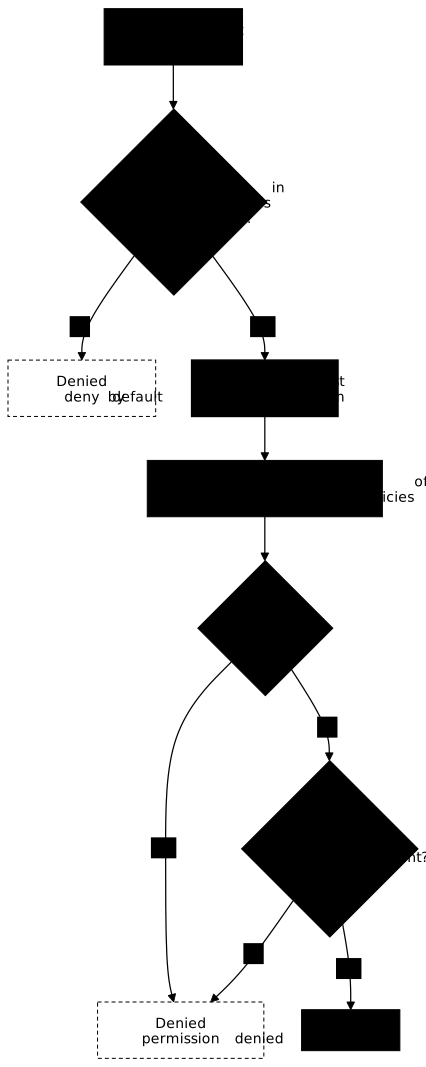
When several rules can match the same path, Vault does not add them all up. Two cases are distinguished, according to the "Priority matching" section of the policies documentation. If several policies declare exactly the same pattern, Vault takes the union of their capabilities. If the patterns differ, Vault retains only the rule of highest priority: the rights of the other patterns are not combined with the retained rule.
How is the priority of a pattern computed?
Vault ranks the patterns that match the requested path and retains only the first one. Five criteria apply in a cascade, from the most discriminating to the least. The guiding idea: the more precise a pattern is, the more it wins, and an early wildcard strongly lowers its rank.
- The first wildcard (
+or*) appears earlier: lower priority - The pattern ends with
*: lower priority - More
+segments: lower priority - A shorter pattern: lower priority
- As a last resort: lexicographic order
The following diagram follows the path of a request. First notice that the step
"retain the most specific pattern" comes before the search for a deny,
then that this deny is looked for only among the capabilities of that
pattern. The "most specific" of the diagram summarises the cascade of five
criteria above.
Does a more specific deny win over a broad rule?
Yes, and it is the classic setup: a broad rule opens reading everywhere, a
deny exception targets production. It works because the exception's
pattern is more specific than the general pattern. The deny does not win
because it is written second, but because its wildcard comes further in the
path, so its pattern ranks better.
# General rule: read on every secret/*path "secret/*" {  capabilities = ["read"]}
# Specific rule: deny on prodpath "secret/data/prod/*" {  capabilities = ["deny"]}
For the path secret/data/prod/app, both patterns match, but
secret/data/prod/* has its first wildcard further along: it is retained,
its deny applies, access is denied. For secret/data/dev/app, only
secret/* matches: read is enough.
Why does a broad deny not block a more precise access?
Because deny acts inside the retained rule, never above the others. A
deny on secret/* does not override a read granted on
secret/data/app/*: this second pattern is more specific, it is the one Vault
retains, and the broad pattern's deny is not even consulted. This result was
measured on 2026-10-19 on a disposable Vault 2.2.0 development server
(vault server -dev): with these two patterns on the same token,
vault token capabilities returns read and the read succeeds.
The documentation says two things that fit together. On one hand, deny
always takes precedence regardless of any other defined capabilities; on the
other, Vault takes only the highest-priority match. The deny therefore
wins within the retained rule, not over the other rules that touch the path.
The following example uses an exact path, with no wildcard, which the
ranking places higher still.
# Policy A: a broad deny, meant to block everything under secret/path "secret/*" {  capabilities = ["deny"]}
# Policy B: a precise accesspath "secret/data/app/x" {  capabilities = ["read"]}
With these two policies on the same token, reading secret/data/app/x is
allowed, and it is counter-intuitive. The widespread idea of a "deny that
always wins" is only true inside the retained rule; beyond it, it is a
trap. For a deny to really block a path, it must appear on the
retained pattern for that path, that is to say one as specific as the
authorisations it targets.
What happens when the same pattern appears in two policies?
The capabilities add up, and a deny present in one of them then becomes
part of the union: it wins, even over sudo, because the documentation
states that deny takes precedence over any other capability defined for the
retained rule. This is the easiest case to predict: the patterns being
identical, no ranking comes into play, and one policy's deny always
neutralises another policy's read. A deny on a more specific pattern, seen
above, has the same effect by another route.
# Policy Apath "secret/data/shared/*" {  capabilities = ["read"]}
# Policy Bpath "secret/data/shared/*" {  capabilities = ["list"]}
A token that carries A and B gets read and list on this pattern. If
a third policy declared ["deny"] for the same pattern, the token would have
no access left on this path.
Why does a mixed-case role name make a deny stop protecting?
Since Vault 2.2.0, a deny written with capital letters in the name of
an authentication method role no longer refuses anything: Vault lowercases
the role name of the request before comparing it, so the mixed-case rule matches
no path anymore. It does not even take part in the arbitration, and the broader
allow rules apply: the refusal becomes an authorization. The official
changelog speaks of rules that "will fail open (become allow-all) after upgrade
until rewritten with lowercase names".
The case was measured on 2026-10-19 on Vault 2.2.0 and 2.0.3, with an
AppRole role named MyRole and two policies granting read and list on
auth/approle/role/*. They differ by a single deny, on the role-id. Each
row of the table is a real HTTP request on that path.
| Version | deny written as | Request on MyRole | Request on myrole |
|---|---|---|---|
| 2.2.0 | MyRole | 200, granted | 200 |
| 2.2.0 | myrole | 403 | 403 |
| 2.0.3 | MyRole | 403 | 200 |
| 2.0.3 | myrole | 200 | 403 |
Read the first two rows: on 2.2.0, only the lowercase rule refuses, and it
refuses both spellings. The only remedy is to write role names and every
rule that targets them in lowercase, then recheck each existing deny after
an upgrade to 2.2.0. The measured scope is limited to role names of
authentication methods, and only AppRole was tested. A deny on a KV v2
path in mixed case (secret/data/Prod/Secret) stays effective on 2.2.0. The
changelog announces the same behavior for AWS, Azure, GCP and Kubernetes, which
this lesson has not verified.
What do the built-in policies contain?
Vault creates two policies at initialisation, before any rule of yours. They
frame the two extremes of the model: unlimited access on one side, a
minimal base on the other. Knowing them avoids two frequent mistakes:
administering durably with the root token, and believing that an
authenticated token has no permission while default already gives it some.
The root policy gives total access and cannot be modified. Reserve the
root token for initialisation and emergencies: create administrators with
dedicated policies, then revoke the root token. The default policy is
attached to most tokens and provides a minimal base: look up its own token,
use the cubbyhole (a private storage space that belongs to each token), and
renew. Its exact content can be adapted on your instance, it is not an
immutable constant.
How do you create and load a policy?
A policy exists in Vault only once it has been loaded under its name:
writing an .hcl file on disk has no effect until vault policy write has been
run. The choice between file and standard input is not cosmetic: the file is
versioned in Git and replayed in CI, which makes every grant of rights
explicit and traceable.
File method
This is the method to favour as soon as a policy exceeds three rules. The
HCL file becomes the reference artefact reviewed in code review, and
vault policy write simply pushes it. The command completely overwrites the
policy with the same name: there is no merge, the supplied file is
authoritative.
-
Create the HCL file of
dev-policy, identical to the one in the previous section.Terminal window cat > dev-policy.hcl << 'EOF'# dev-policy.hcl: developer# Full access to the dev environmentpath "secret/data/dev/*" {capabilities = ["create", "read", "update", "delete", "list"]}# Dev metadata: read, without deleting the historypath "secret/metadata/dev/*" {capabilities = ["list", "read"]}# Read-only on the shared secretspath "secret/data/shared/*" {capabilities = ["read", "list"]}EOF -
Load the policy into Vault
Terminal window vault policy write dev-policy dev-policy.hclOutput:
Success! Uploaded policy: dev-policy -
Check
Terminal window vault policy read dev-policy
Same gesture for webapp-policy, the policy of the my-webapp
application: read-only on its own secrets, the ones the
KV v2 lesson stores under
apps/webapp/. The file has a single block, because an application should do
nothing more than read its configuration.
cat > webapp-policy.hcl << 'EOF'# webapp-policy.hcl: my-webapp applicationpath "secret/data/apps/webapp/*" {  capabilities = ["read"]}EOF
vault policy write webapp-policy webapp-policy.hclInline method
The dash - in place of the file name tells Vault to read the policy on the
standard input. Handy for a quick test or a bootstrap script, but
nothing is kept on disk: the only trace remains in Vault, and you lose the
revision history. Reserve this form for short, disposable policies, like
staging-readonly below, already cited by the authentication lesson.
vault policy write staging-readonly - << 'EOF'path "secret/data/staging/*" { capabilities = ["read", "list"]}EOFA policy name is free, with one limit introduced by Vault 2.2.0: a name
containing a . or .. segment is refused at assignment.
vault token create -policy=. returns 400 invalid policy name "." in policies: policy name cannot contain '.' path segments, and -policy=..
returns invalid policy name ".." in policies: policy name cannot contain '..' path segments: the segment quoted at the end of the message follows the tested
name. A name with a single dot, such as my.policy, is still accepted at
write and at assignment (Vault only warns Policy "my.policy" does not exist
if the policy has not been written, which is not a refusal). Before 2.2.0
(measured on 2.0.3), all these assignments went through.
How do you list, read and delete a policy?
Policies live in the sys/policies/acl backend and are handled as named
objects. Beware of deletion: vault policy delete removes the policy from
the store, but the tokens already issued that reference it keep existing.
They simply lose the matching permissions, which shows up as sudden
permission denied errors on running workloads.
# List all policiesvault policy list
# Read a policyvault policy read dev-policy
# Delete a policyvault policy delete dev-policy
How do you attach a policy to an identity?
A policy that is loaded but attached to nobody protects nothing. The attachment is made at the level of the authentication method: at login time, it builds a token carrying the configured list of policies. It is this list of names that is fixed at issuance: modifying a user's policies does not change the tokens they already hold, they must log in again.
To a userpass user
The policies field of the userpass entry is replaced in full on every
write: always give the complete list, otherwise you unintentionally remove
the policies missing from the command. The tokens already handed to alice
keep the old list until they expire.
vault write auth/userpass/users/alice policies="dev-policy,staging-readonly"To an AppRole role
For a pipeline or an application, the policy is attached to the AppRole
role, not to a person. The duration parameters (TTL, time to live) matter
as much as the policy: a secret_id_ttl of 10 minutes limits the window during
which an intercepted secret_id can still be exchanged for a token, and a
token_ttl of 20 minutes bounds how long that token can be used.
vault write auth/approle/role/my-webapp \ policies="webapp-policy" \ secret_id_ttl=10m \ token_ttl=20mTo a token
Creating a token directly bypasses any authentication method: it is an administrator operation, useful to test a policy or to troubleshoot. A child token can never receive more permissions than its parent, which prevents an escalation from an already restricted token.
vault token create -policy="dev-policy" -policy="staging-readonly"How do you test a policy?
A policy is hard to proofread: priority matching and KV v2's implicit paths make the result difficult to predict by eye. The three methods below check Vault's real behaviour rather than your intention. Always test both sides: what must succeed, and above all what must fail.
Method 1: create a token and test
This is the most faithful test: you put yourself exactly in the shoes of the policy holder. Export the token in a dedicated shell so as not to overwrite your administrator session, then deliberately provoke a refusal. A policy that has never returned a 403 in your trials has not been tested.
# Create a token with the policyvault token create -policy="dev-policy" -field=tokenThen test with this token:
export VAULT_TOKEN="<token>"
# Must succeed (dev/*)vault kv put secret/dev/myapp password="test"
# Must fail (no permission)vault kv put secret/prod/myapp password="test"
Expected output for the failure:
Error writing data to secret/data/prod/myapp: Error making API request.Code: 403. Errors:* 1 error occurred: * permission deniedMethod 2: vault token capabilities
This command queries Vault's own evaluation engine and returns the
effective capabilities after priority matching. It answers the real
question, "what can this token do on this path", without writing anything or
consuming a secret. It is the diagnostic tool to use first in front of a
permission denied. It has a known limit: on mixed-case role names of an
authentication method (Vault 2.2.0), it can display deny for an access that is
really granted. See the section on the deny of a mixed-case role name, and
then confirm with a real request.
# With the current tokenvault token capabilities secret/data/dev/myapp
# With a specific tokenvault token capabilities <token> secret/data/dev/myapp
Output:
create, delete, list, read, updateMethod 3: -output-policy
Rather than guessing the exact path Vault expects, let the CLI write it. With
-output-policy, the command is not executed: it prints the minimal HCL
block that would have to be granted for it to succeed, KV v2's data segment
included. It is the most reliable way to build a policy at the strict
minimum, rule after rule.
vault kv get -output-policy secret/apps/webappOutput:
path "secret/data/apps/webapp" { capabilities = ["read"]}How do you write a policy that adapts to the identity?
Vault can use the requester's identity in the path thanks to templated policies. A single rule then serves all users: at request time, Vault replaces the variable with a value specific to the token holder. Each person thus gets their own space without writing one policy per person.
# Each user accesses their own spacepath "secret/data/users/{{identity.entity.name}}/*" { capabilities = ["create", "read", "update", "delete", "list"]}User alice will be able to access secret/data/users/alice/* but not
secret/data/users/bob/*.
Which variables are available?
These variables are resolved at request time, from the entity linked to
the token. An identity entity is the record Vault keeps for one person or
one machine, and it groups the different aliases of that same person across
several authentication methods: alice in userpass and alice in OIDC can
point to the same entity, hence to the same space of secrets. The group
variables give the same mechanism at team scale.
| Variable | Description |
|---|---|
{{identity.entity.id}} | Unique ID of the entity |
{{identity.entity.name}} | Name of the entity |
{{identity.entity.aliases.<mount>.id}} | Alias ID for an authentication method |
{{identity.groups.ids.<group_id>.name}} | Name of a group by ID |
{{identity.groups.names.<group_name>.id}} | ID of a group by name |
What trap awaits a substituted value?
The pattern above is correct. What is refused is a + or * wildcard
present in the value rendered by the template. The documentation is
explicit: using wildcards in the rendered output of an identity template
produces a permission denied response. If an entity name, an alias or a
substituted metadata contains * or +, the rule is therefore refused. The
official example is a group metadata valued amer/+/us-west.
How do you restrict the parameters of a request?
A policy can also restrict which parameters a client sends to an
endpoint, in addition to the capability. Three keywords complement each
other: allowed_parameters (allow list), denied_parameters (deny list) and
required_parameters (mandatory presence). It is a finer control than the
path, useful when the same endpoint serves usages of different sensitivity.
allowed_parameters
This block turns the path into an allow list: any parameter absent from
the list makes the request fail, even if the create capability is granted. The
following example lets you write username and password in a KV v2 secret and
refuses any other field. The empty array [] means "any value" for that field;
putting values in it also restricts the accepted content.
path "secret/data/limited/*" {  capabilities = ["create", "update"]
  # Only these fields can be written  allowed_parameters = {    "data" = {      "username" = []      "password" = []    }  }}
denied_parameters
This is the opposite logic, a deny list: everything goes through except the named fields. This mode is more permissive and therefore more fragile, since a sensitive field you did not anticipate remains allowed. It is useful when a single field must be locked in an otherwise free structure, such as an administration token that applications must never rewrite.
path "secret/data/apps/*" {  capabilities = ["create", "update"]
  # Everything is allowed except these fields  denied_parameters = {    "data" = {      "admin_token" = []    }  }}
required_parameters
required_parameters imposes the presence of a field in the request, without
saying anything about its value. On a PKI endpoint, requiring common_name
prevents issuing a certificate without an explicit identity, a case where the
role would silently apply its default value. This safeguard forces the caller to
declare its intent rather than inherit a configuration.
path "pki/issue/my-role" {  capabilities = ["create", "update"]
# The common_name is mandatory required_parameters = ["common_name"]}What do the policies of a real project look like?
The policies below complete dev-policy and webapp-policy with the
profiles of a common installation. They illustrate a principle: least
privilege does not consist in reducing the number of paths, but in
separating the verbs. A pipeline that encrypts has no reason to be able to
decrypt, and a developer who writes in dev has nothing to do in prod.
How does the developer policy isolate prod?
dev-policy, written above, rests entirely on the default deny: prod and
staging do not appear in it, so they are refused without any explicit
deny rule. staging is opened read-only by another policy,
staging-readonly, which alice carries in addition. The asymmetry is
intended: full rights on dev, read on staging, nothing on prod, and no
deletion of the version history.
How is a build pipeline's policy limited?
A build pipeline generally only needs to encrypt. The update
capability on transit/encrypt/ci-key allows the call to the encryption
endpoint, without ever giving access to the key itself, which does not leave
Vault. This relies on the Transit
engine. A runner compromised during the build phase can therefore produce
ciphertext, but cannot read back the artefacts already encrypted.
# ci-build-policy.hcl - Build pipeline# Encryption only (no decryption)path "transit/encrypt/ci-key" {  capabilities = ["update"]}
# Read the non-sensitive configspath "secret/data/build/config" {  capabilities = ["read"]}
How is a deployment pipeline's policy limited?
The deployment pipeline carries the exact mirror of the previous one:
transit/decrypt but not transit/encrypt. It reads the deploy secrets and
requests its certificates through pki/issue/deploy-role. This separation of
verbs has a concrete effect on the threat model: an attacker who takes over
the deployment job cannot reinject encrypted data that would then be accepted
as legitimate upstream.
# ci-deploy-policy.hcl - Deployment pipeline# Read the deployment secretspath "secret/data/deploy/*" {  capabilities = ["read"]}
# Decryption (no encryption)path "transit/decrypt/ci-key" {  capabilities = ["update"]}
# Access to PKI certificatespath "pki/issue/deploy-role" {  capabilities = ["create", "update"]}
How do you write an administration policy without the root token?
This policy replaces the root token for day-to-day operation. It gives
control over policies, authentication methods and secrets engines. The sudo
capability on sys/auth/* is indispensable: these endpoints are protected
and would remain refused without it. The last rule, which opens all the
secrets, is a choice to make consciously: remove it if operating Vault must
not involve reading the secrets.
# admin-policy.hcl - Admin without being root
# Policy managementpath "sys/policies/acl/*" {  capabilities = ["create", "read", "update", "delete", "list"]}
# Auth method management (enable/disable)path "sys/auth/*" {  capabilities = ["create", "read", "update", "delete", "list", "sudo"]}
# Auth method configurationpath "auth/*" {  capabilities = ["create", "read", "update", "delete", "list"]}
# Secrets engine managementpath "sys/mounts/*" {  capabilities = ["create", "read", "update", "delete", "list"]}
# Access to all secretspath "secret/*" {  capabilities = ["create", "read", "update", "delete", "list"]}
This policy grants neither sys/seal nor sys/rekey, and the default deny
therefore keeps them closed. A received idea says these paths "require the
unseal keys": this is not the case. The documentation lists sys/seal among the
protected paths, which require a root token or the sudo capability in
the policy; the unseal keys are used for sys/unseal. Moreover, since
Vault 2.0.0, sys/rekey and sys/generate-root are authenticated by
default, the old behaviour being re-enabled through the
enable_unauthenticated_access configuration key.
How do you organise policies by team and by environment?
The number of policies climbs fast, and a giant policy per person becomes impossible to review. The solution consists in splitting along orthogonal axes, then attaching several policies to the same token. The HCL files are versioned in Git and deployed by CI. But the composition has a limit, which follows from the evaluation rule: it does not make an "intersection" of the rights, it makes a union on identical patterns and lets a single pattern win over different patterns.
By team
Splitting by team attaches the policy to an organisational responsibility: the backend team manages its application secrets, the security team the Transit and PKI engines. The advantage is the review: each file has an identified owner. The limit appears quickly: nothing in this split distinguishes production from development.
policies/├── team-backend.hcl├── team-frontend.hcl├── team-devops.hcl└── team-security.hclBy environment
Splitting by environment carries the axis that matters most in security: it is
what materialises the prod boundary. A single env-prod policy to
audit, a single one to restrict, and the question "who has access to
production" is answered by listing who carries it. This split alone does not,
however, partition the teams from each other inside the same environment.
policies/├── env-dev.hcl├── env-staging.hcl└── env-prod.hclHow do you combine the two axes without surprises?
Crossing the two axes gives the intended result: alice carries her team
policy and the policies of the environments she is cleared for. On the
same pattern, the capabilities add up. On different patterns that cover
the same path, only the retained pattern applies: if team-backend gives read
on secret/data/apps/backend/* and env-dev gives update on
secret/data/apps/*, a token carrying both does not accumulate these rights
on apps/backend/x, since the first pattern is the more specific (measured
on 2026-10-19 on a disposable Vault 2.2.0 development server: read on
apps/backend/x, update only elsewhere under apps/).
vault write auth/userpass/users/alice \ policies="team-backend,env-dev,env-staging"To avoid these silent overrides, write the policies of a single token on
paths that do not overlap, or repeat the exact same pattern when you want
to accumulate. Never adding env-prod to a developer profile is enough to hold
the boundary between environments.
Which good practices should you adopt?
Four rules prevent the drifts of policies that live for a long time. They take the default deny as a starting point: you add only what is necessary, and each addition is justified by a named usage.
- One policy per business role, not per person:
policy-dev-team,policy-ci-runner,policy-prod-readonly. Otherwise their number explodes and nobody knows who has access to what. - Least privilege: grant only the necessary capabilities and paths, and separate the verbs (build encrypts, deploy decrypts).
- Caution with wildcards in production: prefer
secret/data/prod/db-*tosecret/data/prod/*, because a*that is too broad exposes a critical secret that nobody planned to cover. - Test before deploying:
vault token capabilitieson the expected and forbidden paths.vault policy fmtdoes not validate, it reformats.
Troubleshooting
Vault almost always returns the same message, permission denied, whatever
the real cause. This terseness is deliberate: detailing the reason for the
refusal would inform an attacker about the tree of secrets. The table below
does the translation, and the last row explains the policy fixes that have "no
effect".
| Symptom | Probable cause | Solution |
|---|---|---|
permission denied | Missing policy or uncovered pattern | vault token capabilities <path> |
| Syntax error on loading | Malformed HCL (braces, quotes, brackets) | Re-read the file; vault policy fmt reformats without validating |
| Unexpected capabilities | Priority matching: another pattern is retained | Compare the wildcards of each pattern |
A deny on an auth role no longer blocks anything after 2.2.0 | Mixed-case role name in the rule | Rewrite in lowercase, verify with curl, not with vault token capabilities |
A broad deny blocks nothing | A more specific pattern grants the path | Put the deny on the retained pattern |
| Wildcard does not work | * not at the end of the pattern, or + confused with * | Review the syntax |
| KV v2 access denied | Path without /data/ | Add /data/ to the path |
| Template refused | A * or + in the substituted value | Check names, aliases and metadata |
| User policies modified with no effect | Token issued before the modification | Log in again to get a new token |
How do you see the policies of a token?
vault token lookup displays the list of policies engraved in the token at
its issuance, as well as its remaining TTL (time to live). Compare it with
the user's current configuration: a difference confirms that the token predates
your modification and that you must log in again rather than touch the
policy.
# Current tokenvault token lookup
# Specific tokenvault token lookup <token>
Key points
The nine points below condense the essentials of the lesson. The first four concern the evaluation engine and explain most unexpected permissions; the following ones come under syntax and design.
- Default deny: without an explicit policy, everything is refused
- Same pattern: the capabilities of all policies add up
- Different patterns: a single rule wins, rights do not combine
denyacts within the retained rule: a broaddenydoes not override a more precise access- KV v2:
secret/data/*,secret/metadata/*, never the typed path - Wildcards:
*at the end of a pattern only,+for one segment; no*or+in the value of a template - Role-name case: since Vault 2.2.0, a
denyon an auth role name written with capitals refuses nothing; write it in lowercase and verify with a real request, not withvault token capabilities - Least privilege: one policy per role, build and deploy separated, dev and prod separated
- Expected evidence for SOCLE-SEC-STO-3 and SOCLE-SEC-STO-6: versioned policies that scope each access to the strict minimum, separate the environments and leave everything else denied by default
Knowledge check
Check that the essentials of this lesson are in place. The questions only cover what has just been explained here.
Knowledge check
Check what you have learned with this interactive quiz
How it works
- The timer starts when you click Start
- Multiple choice, true/false and short answer questions
- You can move between questions
- Detailed results are shown at the end
Starts the quiz and the timer
Review
(0/0)Score by domain
A domain groups several guides and gets several questions, so its score is more reliable than a per-topic score, which often rests on a single question.
Summary
Strengths
No topic passed at 80% on at least two questions yet.
Weak areas
No topic below the pass mark.
Recommended next
Hints before you try again?
Continue the course: Vault Transit: encryption as a service
A new full quiz with random questions
Work again only on the questions you missed