
Vault is not just a safe for secrets. Its real strength is to act as an identity broker: a workload (a program running on a platform: a Kubernetes pod, a virtual machine, a CI job) proves who it is, Vault verifies that identity, then hands out temporary access to a target resource. This lesson shows how Vault plays that role, with a Kubernetes example and a CI/CD example, for readers who already know how to authenticate to Vault.
This pattern is at the heart of the zero trust approach: no permanent credentials, access based on a verified identity.
What you will learn
- Explain the identity broker pattern and what it changes compared with distributing secrets
- Follow the full flow: authentication, identity, then dynamic credential
- Choose the authentication methods that suit brokering (Kubernetes, cloud, OIDC/JWT)
- Apply the pattern to a Kubernetes pod and to a GitHub Actions workflow
- Weigh the cost of the pattern: dependency on Vault, latency, complexity
- SOCLE anchoring: this guide implements SOCLE-SEC-GEN-5 (in French) and SOCLE-SEC-ROT-2 (in French), short-lived, ephemeral identities (OIDC, Kubernetes) rather than long-lived secrets
Where this lesson sits among the others
Two lessons already cover the neighbouring ground, and this one does not repeat them. The lesson on workload identity explains the concept in general: what a workload identity is (a short-lived, verifiable proof of who a program is, issued by the platform it runs on rather than by a password), how attestation works (the platform checks facts about the workload before issuing the proof), and the SPIFFE, cloud federation and mesh options. The lesson on secret zero explains the first secret problem: to read its secrets, an application must first authenticate, so it seems to need a secret before it can fetch any secret.
Here we take the point of view of the broker: what Vault, as the party that receives the proof and issues the access, does with it. If the two terms above are new to you, read those lessons first.
The problem: permanent credentials in workloads
The most common way to give a pod access is to mount a Kubernetes Secret that contains a database password. That password does not change, it is the same for every replica, and it stays valid until someone renews it by hand. Understanding why this model always ends up causing trouble is the prerequisite for the pattern described in this page.
The classic model
The diagram below shows the usual chain: a secret created once, mounted in the pod, then presented as is to PostgreSQL. The credential is permanent and the pod holds it in clear text, which has three predictable consequences.
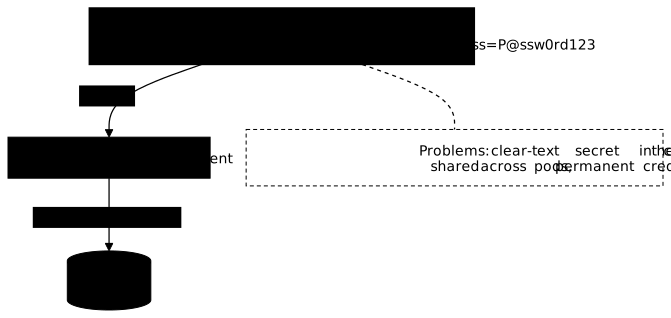
What happens sooner or later:
- The secret leaks (Git commit, log, debug output)
- One compromised pod = permanent access to the database
- The audit shows "app_user did X" but not which pod
Vault is more than a safe
The first idea people have of Vault is "a secure place to store secrets". That is true, but it is the least interesting part.
Vault's real value:
| Function | Description |
|---|---|
| Authentication | Verifies the identity of the requester |
| Authorisation | Checks what the requester is allowed to ask for |
| Issuance | Generates a temporary, unique credential |
| Audit | Records who asked for what, and when |
| Revocation | Invalidates the credential at any moment |
Vault turns a proven identity into temporary access.
What is the identity broker pattern?
The identity broker places Vault between the workload and the resource it wants to reach. The workload no longer talks to the database directly with a password: it first talks to Vault with its platform proof of identity, and Vault hands it in exchange a credential made for it, valid for a few minutes or a few hours.
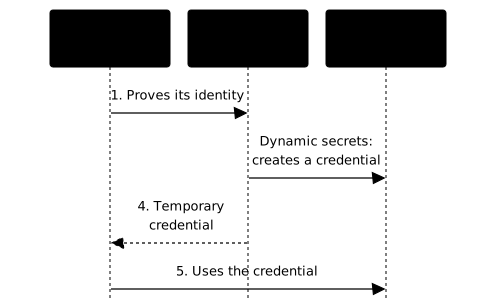
The workload never holds a permanent credential to the target. It holds a source identity (Kubernetes service account, IAM role, OIDC token) that lets it prove to Vault who it is.
What does Vault change when it acts as a broker?
The identity broker pattern differs fundamentally from the classic distribution of secrets:
- The workload does not receive a secret "by default": it obtains access because it proved who it is
- Vault becomes the translation point between the source identity (Kubernetes service account, cloud IAM, OIDC token) and the target access (database credentials, cloud keys, certificates)
- No pre-distributed secret: the source identity is enough to start the flow, Vault does the rest
Full flow: authentication, identity, dynamic access
The eight steps below describe a full cycle, from the arrival of the pod to the
automatic revocation of its credential. Two moments deserve your attention:
step 2, where Vault queries the Kubernetes API and therefore depends on its
availability, and step 8, where revocation is carried out by Vault and not
by the application. The commands shown assume that Kubernetes authentication
and a database secrets engine are already configured.
-
The workload authenticates
The Kubernetes pod presents its service account token to Vault:
Terminal window vault write auth/kubernetes/login \role="my-app" \jwt="$(cat /var/run/secrets/kubernetes.io/serviceaccount/token)" -
Vault verifies the identity
Vault contacts the Kubernetes API to validate the token, the service account and the namespace:
- Is the token valid?
- Does the service account match the configured Vault role?
- Is the namespace allowed?
-
Vault links the authentication to its Identity layer
If valid, Vault links the authentication to its Identity layer through aliases, and can use metadata to apply policies or trace the access:
- Service account name
- Namespace
- Kubernetes annotations (if configured)
-
Vault issues a Vault token
The workload receives a Vault token with the policies attached to the role.
-
The workload asks for a dynamic credential
Terminal window vault read database/creds/app-readonly -
Vault generates and returns it
- Creates a unique PostgreSQL user
- Returns the username/password with a lease (the period of validity after which Vault revokes the credential)
-
The workload uses the credential
It connects to PostgreSQL with these temporary credentials.
-
At expiry
Vault revokes the credential (deletes the PostgreSQL user).
Which authentication methods suit brokering?
Vault offers many authentication methods, but not all of them suit
brokering. The ones that work share one point: they rely on an identity that
the platform itself issues to the workload, without anyone having to drop
a secret beforehand. The three families below cover almost every case. By
contrast, AppRole, where the application presents a role_id and a
secret_id, requires distributing that secret_id, which brings back the
initial problem (the lesson on
secret zero shows how to limit that
risk when AppRole is unavoidable).
Kubernetes auth
Ideal for: pods in a Kubernetes cluster.
The pod proves its identity through its service account token. Vault contacts the Kubernetes API to validate it.
# Configure Kubernetes auth in Vaultvault auth enable kubernetes
vault write auth/kubernetes/config \    kubernetes_host="https://kubernetes.default.svc" \    kubernetes_ca_cert=@/var/run/secrets/kubernetes.io/serviceaccount/ca.crt
vault write auth/kubernetes/role/my-app \    bound_service_account_names="my-app-sa" \    bound_service_account_namespaces="production" \    policies="app-policy" \    ttl="1h"
For granularity, a Vault role can be bound to one specific service
account, to one specific namespace, or to several if needed. The more
precise the binding, the clearer the audit. The bound_* parameters are
the conditions the proof must meet for the login to succeed, and ttl sets the
lifetime of the Vault token issued.
Cloud auth (AWS, GCP, Azure)
Ideal for: VMs, serverless functions, cloud workloads.
The workload proves its identity through its IAM role (AWS), service account (GCP) or managed identity (Azure).
# AWS IAM authvault auth enable aws
vault write auth/aws/role/ec2-role \ auth_type="iam" \ bound_iam_principal_arn="arn:aws:iam::123456789012:role/my-ec2-role" \ policies="app-policy" \ ttl="1h"Advantage: no secret to distribute to the workload, which uses its native cloud identity.
OIDC / JWT
Ideal for: CI/CD (GitHub Actions, GitLab CI), human authentication.
The workload presents a JWT (a signed token) issued by an OIDC provider. Vault verifies the signature and the claims, the statements the token makes about its bearer (repository, branch, user). Three terms matter here: the issuer is the provider that signed the token, the audience is the party the token is meant for, and the bound claims are the claim values the Vault role requires before it accepts the login.
vault auth enable jwt
vault write auth/jwt/config \    oidc_discovery_url="https://token.actions.githubusercontent.com" \    bound_issuer="https://token.actions.githubusercontent.com"
vault write auth/jwt/role/github-deploy - <<EOF{  "role_type": "jwt",  "bound_audiences": ["https://github.com/my-org"],  "bound_claims": {"repository": "my-org/my-repo"},  "user_claim": "actor",  "policies": ["deploy-policy"],  "ttl": "15m"}EOF
A silent trap on bound_claims. This parameter is a map (keys and
values), and vault write cannot receive it as text. Measured on a Vault 2.2.0
development server: bound_claims='{...}' is rejected ("expected a map, got
'string'"), which you notice. The dotted notation bound_claims.repository=...,
on the other hand, is accepted without error and ignored: vault read then
shows bound_claims <nil>, and the role accepts any token carrying the right
audience. That is why the role is sent as JSON on standard input, as above.
Always read the role back with vault read auth/jwt/role/github-deploy: if
bound_claims is empty, the constraint does not exist.
Example: Kubernetes pod to PostgreSQL credentials
This example assembles the pieces seen above on a full case: on the Vault side the configuration of the role and the policy, on the cluster side the pod annotation. The point to remember is the join between the two: it is the name of the service account that links the pod to the Vault role, and nothing else.
Scenario
An order-service pod in the production namespace needs read access to
PostgreSQL.
Vault configuration
These four commands run once, with an administrator token. The default_ttl
of the database role sets the lifetime of the generated credentials, and
max_ttl the limit beyond which no further renewal is possible: after that
delay, the workload must ask for a new credential.
# 1. Kubernetes auth configured (see above)
# 2. Database secrets configuredvault write database/roles/order-readonly \    db_name="production-postgres" \    creation_statements="..." \    default_ttl="1h" \    max_ttl="4h"
# 3. Policyvault policy write order-service - <<EOFpath "database/creds/order-readonly" {  capabilities = ["read"]}EOF
# 4. Kubernetes role bound to the policyvault write auth/kubernetes/role/order-service \    bound_service_account_names="order-service" \    bound_service_account_namespaces="production" \    policies="order-service" \    ttl="1h"
The database role and its creation_statements are covered, with the dynamic credentials they produce, in the lesson on
database secrets. The
policy syntax is the subject of the lesson on
policies.
In the pod
On the cluster side, the application needs no Vault code. The Vault Agent Injector adds an init container and a sidecar (an auxiliary container that runs next to the application, in the same pod) that authenticate, fetch the credential and write it to a shared file. Everything is driven by annotations, which makes the manifest readable but also silent when you make a typo: a misspelled annotation is simply ignored, with no message.
apiVersion: v1kind: Podmetadata: name: order-service annotations: vault.hashicorp.com/agent-inject: "true" vault.hashicorp.com/role: "order-service" vault.hashicorp.com/agent-inject-secret-db: "database/creds/order-readonly" vault.hashicorp.com/agent-inject-template-db: | {{- with secret "database/creds/order-readonly" -}} PGUSER={{ .Data.username }} PGPASSWORD={{ .Data.password }} {{- end }}spec: serviceAccountName: order-service containers: - name: app image: order-service:2.1.0 # `command` does not go through a shell: `source` and `&&` only make # sense inside `sh -c`, otherwise Kubernetes looks for an executable # named "source" and the container fails at startup. command: ["/bin/sh", "-c", "source /vault/secrets/db && exec ./start.sh"]Result:
- The pod starts with its service account
- Vault Agent authenticates through Kubernetes auth
- Vault generates unique PostgreSQL credentials
- The
/vault/secrets/dbfile contains the user and password - The app uses these credentials
- Vault Agent renews them automatically before expiry
Example: CI/CD to temporary AWS credentials
The same pattern applies outside Kubernetes, with an identity supplied this time by the forge. GitHub Actions can issue an OIDC token describing the repository, the branch and the running workflow; Vault verifies that information and hands out temporary AWS credentials. Result: no more AWS access key stored in the repository secrets.
Scenario
A GitHub Actions workflow must deploy to S3.
Vault configuration
credential_type: assumed_role tells Vault to call AWS STS to assume an
existing role, rather than creating a throwaway IAM user. The bound_claims of
the JWT role are the real security barrier: without the constraint on ref,
any branch of the repository, including that of an external pull request, would
obtain the same deployment rights.
# 1. JWT auth for GitHub Actions (see above)
# 2. AWS secrets configuredvault write aws/roles/github-deploy \    credential_type="assumed_role" \    role_arns="arn:aws:iam::123456789012:role/S3DeployRole" \    default_sts_ttl="15m" \    max_sts_ttl="1h"
# 3. Policyvault policy write github-deploy - <<EOFpath "aws/creds/github-deploy" {  capabilities = ["read"]}EOF
# 4. Bound JWT role: same name as above, so it REPLACES the first role#    (policy deploy-policy -> github-deploy, constraint added on the branch).#    It is rewritten in full: without role_type, Vault rejects the write#    ('allowed_redirect_uris' must be set if 'role_type' is 'oidc').vault write auth/jwt/role/github-deploy - <<EOF{  "role_type": "jwt",  "bound_audiences": ["https://github.com/my-org"],  "bound_claims": {"repository": "my-org/my-repo", "ref": "refs/heads/main"},  "user_claim": "actor",  "policies": ["github-deploy"],  "ttl": "15m"}EOF
One note on this role, checked on a Vault 2.2.0 development server. A
partial write on an existing role is rejected, because role_type defaults
to oidc when you omit it. That is why the role is rewritten in full, and as
JSON on standard input for the reason given above about bound_claims.
Always read the result back with vault read auth/jwt/role/github-deploy: the
bound_claims line must show repository and ref, not <nil>.
The AWS secrets engine is detailed in the lesson on AWS secrets.
In the workflow
The id-token: write permission is essential: without it, GitHub issues no
OIDC token and the Vault authentication fails before the first network call. It
is declared at the job level, the workflow starting from permissions: {} so as
to grant no rights by default to the other jobs.
permissions: {}
jobs:  deploy:    runs-on: ubuntu-latest    permissions:      id-token: write  # Required for OIDC      contents: read
    steps:      - uses: hashicorp/vault-action@892a26828f195e65540a40b4768ae4571f51ebfc  # v4.0.0        with:          url: https://vault.example.com          method: jwt          role: github-deploy          jwtGithubAudience: https://github.com/my-org          secrets: |            aws/creds/github-deploy access_key | AWS_ACCESS_KEY_ID ;            aws/creds/github-deploy secret_key | AWS_SECRET_ACCESS_KEY ;            aws/creds/github-deploy security_token | AWS_SESSION_TOKEN
- run: aws s3 sync ./dist s3://my-bucketResult:
- The workflow proves its identity through GitHub's OIDC token
- Vault verifies that it really is
my-org/my-repoonmain - Vault assumes an IAM role and returns STS credentials
- The workflow deploys to S3 with credentials valid for 15 minutes
How does this pattern compare with classic secret distribution?
The table sets the two approaches side by side, line by line. Read it by separating two things that are often confused: the management complexity of everyday work, which brokering greatly reduces, and the platform complexity, which it increases by adding Vault to your critical path. The last three lines are precisely about that shift.
| Aspect | Classic distribution | Identity brokering |
|---|---|---|
| Permanent secret to the target | Yes (in a Kubernetes Secret, env vars) | No |
| Renewal of credentials | Manual, needs coordination | Automatic through the TTL |
| Unique credential per workload | Rarely | Always |
| Audit | "app_user did X" | "pod order-abc123 did X" |
| Compromise | Permanent access | Access limited to the TTL |
| Initial complexity | Low | Medium to high |
| Renewal and management complexity | High (manual coordination) | Low (automated) |
| Platform complexity | Low | High (Vault to operate) |
What are the limits of the pattern?
The pattern moves the risk more than it removes it: you no longer have a permanent password lying around, but you have a service on which the startup of your applications depends. The three points below are the ones that come up in production, with the matching mitigations.
Dependency on Vault
The workload cannot start if Vault is unreachable. Mitigations:
- Vault in HA (high availability: several nodes, so one failure does not stop the service)
- Local cache (Vault Agent)
- TTLs long enough to survive a short outage
Latency
Each credential request adds a network call, hence some latency. Mitigations:
- Vault Agent with cache
- TTLs long enough to avoid too many renewals
- Connection pooling on the app side
Complexity
More complex than a static Kubernetes Secret. To be justified by:
- The number of services
- Security and audit requirements
- How often you want credentials renewed
Can policies be built from the identity?
Vault does not just verify the identity: it can also use it to build the permissions on the fly.
With templated policies, you can use the alias metadata to create dynamic ACLs:
# Mount accessor: vault auth list -format=json | jq -r '.["kubernetes/"].accessor'# (auth_kubernetes_ followed by 8 characters; replace 1a2b3c4d with yours)path "database/creds/{{identity.entity.aliases.auth_kubernetes_1a2b3c4d.metadata.service_account_namespace}}-*" { capabilities = ["read"]}The template accepts no wildcard in the alias key: it expects the
accessor of the auth mount, the unique identifier Vault assigns to each
enabled auth method (vault auth list shows it), written out in full.
auth_kubernetes_1a2b3c4d is an illustration value: replace it with the
accessor of your own mount, otherwise the policy matches nothing. Measured on
a Vault 2.2.0 development server with a userpass mount: an auth_userpass_*
template matches nothing and the path is denied, whereas the real accessor gives
read on the user's own path only. Each mount has its own accessor, so the
policy is specific to one mount.
Two caveats. The service_account_namespace key was not replayed here on a
Kubernetes cluster (the measurement above is on userpass): after a first
login, read the entity_id with vault token lookup, then read the entity with
vault read identity/entity/id/<entity_id> to see which alias metadata keys are
really present. And the template assumes database roles named after the
namespace, for example production-readonly for the production namespace.
Advantages:
- One policy for several namespaces
- Automatic isolation: each namespace only reaches its own credentials
- Fewer policies to maintain
Going further: Boundary
Vault excels as an identity broker for dynamic secrets: the workload receives the credentials and manages the connection itself.
If you want to go further towards interactive access without direct exposure of the credentials (SSH, RDP, databases), HashiCorp Boundary covers another level:
- Brokering: the client receives the credentials (what Vault does)
- Credential injection: an intermediate worker hides the credentials from the end client (what Boundary does)
Boundary complements Vault for privileged interactive access.
Key points
- Vault = identity broker: it turns a proven identity into temporary access to a target resource
- No permanent credential to the target: the workload keeps a proof of source identity (Kubernetes token, OIDC, IAM) but no secret to the final resource
- Identity layer: Vault links authentications to entities and aliases, which allows consolidation and dynamic policies
- Native authentication: Kubernetes service account, cloud IAM, OIDC, no secret to distribute to the workload
- Unique credential: each workload gets its own credentials
- Full audit: who (source identity) asked for what (secret) and when
- Short TTLs reduce the need for revocation: but do not fully replace the ability to revoke before expiry
- Platform trade-off: you gain in security and management, but Vault becomes a critical dependency to operate
bound_claimsas JSON on standard input: with the dotted notation, the constraint is silently ignored; always read the role back withvault read- Proof expected by SOCLE: an authentication role (Kubernetes or JWT/OIDC) whose
bound_claimsare set as JSON, and a workload that embeds no static secret, prove SOCLE-SEC-GEN-5 (in French) and SOCLE-SEC-ROT-2 (in French), the use of short-lived identities rather than long-lived secrets
Knowledge check
Check that the essentials of this lesson are in place. The questions only cover what has just been explained here.
Knowledge check
Check what you have learned with this interactive quiz
How it works
- The timer starts when you click Start
- Multiple choice, true/false and short answer questions
- You can move between questions
- Detailed results are shown at the end
Starts the quiz and the timer
Review
(0/0)Score by domain
A domain groups several guides and gets several questions, so its score is more reliable than a per-topic score, which often rests on a single question.
Summary
Strengths
No topic passed at 80% on at least two questions yet.
Weak areas
No topic below the pass mark.
Recommended next
Hints before you try again?
Continue the course: Secrets in code and Git history
A new full quiz with random questions
Work again only on the questions you missed