A secret committed to Git stays there, even after the file is deleted. A Docker image published with an embedded token can be exploited very quickly. Automated detection is an indispensable safety net to intercept these leaks before they become incidents. This guide compares the main detection tools, Gitleaks, TruffleHog, Trivy and detect-secrets, and proposes a combined strategy covering the developer workstation, CI/CD, container images and the filesystem.
This page is about choosing and combining tools. The step-by-step use of a single scanner is in the Gitleaks lesson, the governance side (blocking rules, ownership, exceptions) in secrets scanning in the pipeline, and what to do once a secret is found in responding to a compromised secret.
What you will learn
Secrets detection is the safety net that catches what escaped good practice. Concretely, you will be able to:
- Choose the right tool for each surface: Gitleaks, TruffleHog, Trivy, detect-secrets.
- Block a secret before the push with a pre-commit hook.
- Integrate detection into a CI/CD pipeline and on container images.
- Combine several tools for complete coverage (workstation, CI, images, history).
- Connect this detection to the SOCLE threat model (in French), which makes it a requirement (leak detection and response procedure).
Why detect early?
The longer an exposed secret goes undetected, the higher the risk of exploitation. A secret pushed to a public repository can be spotted by scanning bots within minutes: it is safer to treat it as compromised as soon as it is published.
| Moment of detection | Remediation cost | Residual risk |
|---|---|---|
| Before the commit (pre-commit) | Very low | Reduced, but can be bypassed |
| At the pull request (CI) | Low | Limited (branch) |
| After merge (periodic scan) | Medium | High (history) |
| After publication (image, release) | High | Critical |
No row is risk-free. A pre-commit hook can be skipped with git commit --no-verify, it does not see what is already in the history, and it depends on a local installation that nothing guarantees for every contributor. It lowers the risk, it does not remove it: the CI, which runs on the server rather than on the contributor's workstation, is the next safety net.
The goal is to move detection as far left as possible in the development cycle: pre-commit > CI > periodic scan, each level catching what the previous one missed.
Which detection tools exist?
Four tools cover most needs. Each has a distinct positioning. In the table, a false positive is an alert on something that is not a real secret, and entropy is a measure of how random a string looks, which tools use to spot keys.
| Criterion | Gitleaks | TruffleHog | Trivy | detect-secrets |
|---|---|---|---|---|
| Type | Regex patterns + entropy | Patterns + active verification | Multi-target scanner | Patterns + baseline |
| Git (history) | Yes | Yes | No | Yes |
| Filesystem | Yes | Yes | Yes | Yes |
| Docker images | No | Yes | Yes | No |
| Active verification | No | Yes (API calls) | No | No |
| False positives | Moderate | Low (thanks to verification) | Moderate | Manageable (baseline) |
| Speed | Fast | Medium | Fast | Fast |
| Native pre-commit | Yes | Yes | No | Yes |
| Licence | MIT | AGPL-3.0 | Apache 2.0 | Apache 2.0 |
For the installation details and advanced configuration of each tool:
- Gitleaks lesson, installation, custom rules
- TruffleHog guide (in French), active verification, GitHub/GitLab scan
- Trivy lesson, scanning images, files and dependencies
How do you detect secrets at pre-commit?
A pre-commit hook is a small program that Git runs just before it records a commit. Here it blocks the commit if a secret is detected in the staged files (the files you added with git add). It is the first line of defence.
With Gitleaks
-
Install Gitleaks
Terminal window # Linux (binary)curl -sSfL https://github.com/gitleaks/gitleaks/releases/download/v8.30.1/gitleaks_8.30.1_linux_x64.tar.gz | tar xzsudo mv gitleaks /usr/local/bin/# macOSbrew install gitleaksCheck the installation:
Terminal window gitleaks version -
Configure the pre-commit hook
With the pre-commit framework, add the following to
.pre-commit-config.yaml:repos:- repo: https://github.com/gitleaks/gitleaksrev: v8.30.1hooks:- id: gitleaksThen install the hook:
Terminal window pre-commit install -
Test the hook
Create a test file containing a fake secret:
Terminal window echo 'GITHUB_TOKEN="ghp_0123456789abcdefghijklmnopqrstuvwxyz"' > test-secret.txtgit add test-secret.txtgit commit -m "test"The commit must be blocked, with the
github-patrule in the message.The test pattern is not interchangeable. An AWS
AKIA…key paired with its public example value does not trigger on gitleaks 8.30.1: the rule requires an entropy that documentation strings do not reach. A learner who tests with it sees the commit go through and believes the hook is broken. The patterns that trigger for sure are aghp_token and a PEM private key block.Terminal window # Clean up after the testgit reset HEAD test-secret.txtrm test-secret.txt
With detect-secrets
The detect-secrets approach relies on a baseline: a .secrets.baseline file that lists the known secrets (to ignore or track them).
# Create the initial baselinedetect-secrets scan > .secrets.baseline
# Install the pre-commit hookcat >> .pre-commit-config.yaml << 'EOF'  - repo: https://github.com/Yelp/detect-secrets    rev: v1.5.0    hooks:      - id: detect-secrets        args: ['--baseline', '.secrets.baseline']EOF
pre-commit installHow do you detect secrets in CI/CD?
The CI scan intercepts the secrets that escaped pre-commit. It runs on every pull request or push.
name: Secret Scanon:  pull_request:  push:    branches: [main]
permissions: {}
jobs:  gitleaks:    runs-on: ubuntu-latest    permissions:      contents: read    steps:      - uses: actions/checkout@3d3c42e5aac5ba805825da76410c181273ba90b1 # v7.0.1        with:          fetch-depth: 0          persist-credentials: false
- uses: gitleaks/gitleaks-action@e0c47f4f8be36e29cdc102c57e68cb5cbf0e8d1e # v3.0.0 env: GITHUB_TOKEN: ${{ secrets.GITHUB_TOKEN }}secret_scan: stage: test image: name: ghcr.io/gitleaks/gitleaks:v8.30.1@sha256:c00b6bd0aeb3071cbcb79009cb16a60dd9e0a7c60e2be9ab65d25e6bc8abbb7f entrypoint: [""] script: - gitleaks detect --source . --verbose --log-opts="$CI_MERGE_REQUEST_DIFF_BASE_SHA..$CI_COMMIT_SHA" rules: - if: $CI_PIPELINE_SOURCE == "merge_request_event" - if: $CI_COMMIT_BRANCH == $CI_DEFAULT_BRANCHAdding TruffleHog for active verification
TruffleHog can check whether a detected secret is still valid by testing the matching APIs. It is an ideal complement to Gitleaks in CI.
# Add this job to your GitHub Actions pipelinetrufflehog:  runs-on: ubuntu-latest  permissions:    contents: read  steps:    - uses: actions/checkout@3d3c42e5aac5ba805825da76410c181273ba90b1 # v7.0.1      with:        fetch-depth: 0        persist-credentials: false
- name: TruffleHog scan run: | docker run --rm -v "$PWD:/repo" \ trufflesecurity/trufflehog:3.99.2@sha256:47a84bc18a0d04a165498bbbd3bacfd84176661cbc91f8e0f85467f6a771e99a \ git file:///repo --only-verified --failHow do you scan a filesystem or an image?
Scanning a directory
Some secrets never reach Git: .env files excluded by .gitignore, local configurations, exports. A filesystem scan looks at the files on disk instead of the Git history.
# With Gitleaksgitleaks detect --source /path/to/project --no-git --verbose
# With TruffleHogtrufflehog filesystem /path/to/project --only-verified
# With Trivytrivy fs --scanners secret /path/to/project
Scanning a Docker image
Docker images can contain secrets embedded in their layers (the stacked file changes that make up an image). Of the four tools, Trivy and TruffleHog (trufflehog docker --image) can scan an image directly; Gitleaks and detect-secrets cannot. This guide picks Trivy for this surface.
trivy image --scanners secret my-image:1.4.0Trivy inspects each layer of the image and reports the secrets found with their exact location.
# Sample outputmy-image:1.4.0 (secrets)============================Total: 1 (HIGH: 1)
┌──────────┬──────────────────┬──────────┬───────────────────────────┐│ Category │ Description│ Severity │ Match │├──────────┼──────────────────┼──────────┼───────────────────────────┤│ AWS │ AWS Access Key ID│ HIGH │ AKIA**************** │└──────────┴──────────────────┴──────────┴───────────────────────────┘To avoid embedding secrets in images in the first place, see the guide Secret leaks: logs, Docker, variables.
What is active verification of secrets?
Active verification consists in testing whether a detected secret is still valid. Only TruffleHog offers this feature natively.
| Provider | Verification method |
|---|---|
| AWS | sts:GetCallerIdentity call |
| GitHub | API call with the token |
| Slack | auth.test call |
| Google Cloud | OAuth tokeninfo call |
| Stripe | Charges API call |
Active verification reduces false positives: an invalid secret is no longer an emergency, it is a hygiene point.
# Scan only the secrets verified as activetrufflehog git file:///path/to/repo --only-verified
# Scan and also include the unverified onestrufflehog git file:///path/to/repo --results=verified,unknown
To go deeper into active verification: TruffleHog guide (in French).
How do you handle false positives?
An excessive false-positive rate leads developers to ignore alerts. Two techniques keep it under control, then one rule tells you when to use which.
Excluding known patterns
With Gitleaks, create a .gitleaks.toml file at the root of the repository:
[allowlist]description = "Known false positives"paths = [ '''tests/fixtures/.*''', '''docs/examples/.*''',]regexes = [ '''EXAMPLE_.*''', '''AKIAIOSFODNN7EXAMPLE''',]Using the detect-secrets baseline
# Audit the baseline: mark each secret as a true or false positivedetect-secrets audit .secrets.baselineThe interactive audit goes through each entry and asks for confirmation. The false positives you mark no longer trigger an alert.
General rule
The table sums up which action fits which situation, so that the choice does not depend on mood.
| Action | When |
|---|---|
| Exclude via allowlist | Recurring and verified pattern (test keys, mocks) |
| Baseline + audit | Project with a lot of history |
| Fix the code | Real secret, even if inactive |
Which combined strategy should you adopt?
Each tool has its strengths and limits. The following strategy combines three tools to take advantage of each and cover every surface.
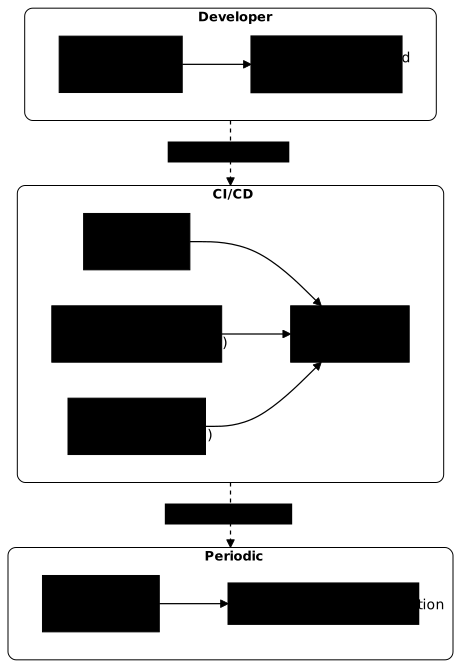
| Surface | Tool | Moment |
|---|---|---|
| Developer workstation | Gitleaks (pre-commit) | Before every commit |
| Pull request | Gitleaks + TruffleHog (CI) | On every PR |
| Full history | TruffleHog (--only-verified) | Weekly scan |
| Docker images | Trivy (--scanners secret) | On every build |
| Filesystem | Trivy or Gitleaks (--no-git) | One-off audit |
The diagram shows how these layers catch each other's misses: what pre-commit lets through is stopped by CI, and what CI does not see comes out in the periodic scan.
-
Install Gitleaks at pre-commit on all repositories
This is the simplest measure to deploy. A secret blocked before the commit never enters the history and needs no rotation, provided the hook is really installed.
-
Add Gitleaks in CI on every pull request
A developer may not have the hook enabled. CI is the safety net.
-
Add TruffleHog in CI for active verification
Complements Gitleaks by identifying the secrets that are still valid. TruffleHog also offers a pre-commit hook, but Gitleaks, which is faster according to the comparison table, suits the developer workstation better: a slow hook ends up bypassed.
-
Scan Docker images with Trivy before publication
Add
trivy image --scanners secretto the build pipeline, before thedocker push. -
Schedule a weekly scan of the full history
Terminal window trufflehog git file:///path/to/repo --only-verified --json > secrets-report.jsonUse the report to prioritise rotations.
Key points
- Pre-commit detection is the first line of defence: it keeps the secret out of the Git history, but it can be bypassed (
--no-verify) and does not replace CI. - Gitleaks excels at pre-commit and in CI thanks to its speed and customisable rules.
- TruffleHog stands out for its active verification: it tests whether the secret is still valid.
- For Docker images, Trivy and TruffleHog scan the image directly; Gitleaks and detect-secrets do not.
- detect-secrets suits projects with a heavy history thanks to its baseline system.
- Each tool has its strengths and limits: combine pre-commit, CI and image scanning.
- Better to tolerate a few false positives than to hide a true one: never silence an alert without checking it.
- A detected secret, even inactive, must be removed from the source code and renewed (rotation).
Knowledge check
Check that the essentials of this lesson are in place. The questions only cover what has just been explained here.
Knowledge check
Check what you have learned with this interactive quiz
How it works
- The timer starts when you click Start
- Multiple choice, true/false and short answer questions
- You can move between questions
- Detailed results are shown at the end
Starts the quiz and the timer
Review
(0/0)Score by domain
A domain groups several guides and gets several questions, so its score is more reliable than a per-topic score, which often rests on a single question.
Summary
Strengths
No topic passed at 80% on at least two questions yet.
Weak areas
No topic below the pass mark.
Recommended next
Hints before you try again?
Continue the course: Secret leaks: logs, Docker, variables
A new full quiz with random questions
Work again only on the questions you missed