Proxmox VE (Virtual Environment) is an open source virtualization platform based on Debian, which drives two kinds of machines from a single web interface: VMs (virtual machines, through QEMU/KVM) and containers (through LXC). This lesson gives you the platform's vocabulary and a decision criterion: by the end, you can choose VM or container for a given need, and say what that choice costs. It opens the basics module: the following lessons install Proxmox, tour the interface, create a VM then a container, and detail storage and networking. Stable version in 2026: Proxmox VE 9.2 (Debian 13 "Trixie", see the what's new in Proxmox VE 9.0 and 9.1 post, in French). For migration from VMware, see Migrating from VMware ESXi to Proxmox VE (in French).
No Proxmox experience is required. You do need to know what a virtual machine is, though: otherwise, first read What is a VM? (in French) and the difference between a type 1 and a type 2 hypervisor (in French). A basic knowledge of Linux (terminal, notion of a kernel) helps.
What you will learn
- name the layers of a Proxmox node (host, QEMU/KVM, LXC, guest) and tell the management plane from the data plane;
- follow a VM creation request from the interface down to the QEMU process;
- explain why a container shares the kernel of the host, and what that changes for isolation;
- choose an architecture for three typical needs and justify its limits;
- stop confusing cluster, replication, snapshot and backup.
What are the layers of a Proxmox node?
A Proxmox node is a server on which Proxmox VE is installed: a complete Debian, with its commands and its constraints, to which the virtualization tools are added. Four words structure everything else: the host (the node's Debian, which owns the hardware), QEMU/KVM (the technology that runs VMs), LXC (the one that runs containers) and the guest (whatever runs inside a VM or a container). A single node is enough: it hosts several machines on its own, with storage, networking, snapshots and backups.
| Term | What it is |
|---|---|
| Host | The node's Debian system, which holds the kernel, the CPU, the RAM and the disks |
| QEMU/KVM | KVM is the host kernel module (a component loaded into the kernel) that uses the processor's hardware virtualization; QEMU is the process that simulates the rest of the machine (disk, network card, firmware, that is BIOS or UEFI) |
| LXC | The isolation features of the host kernel (namespaces and cgroups, explained below) used to partition a container |
| Guest | The system running inside a VM (with its own kernel) or inside a container, written CT (which uses the host's kernel) |
| VM / CT | The two machine types Proxmox manages: the VM virtualizes a complete machine, the CT (container) partitions processes |
Two roles must also be kept apart. The management plane is everything used to drive: the web interface (port 8006), the API, the qm (VM) and pct (container) commands, the configuration stored in /etc/pve. The data plane is what does the work: the QEMU process that runs a VM, a container's processes, network packets and disk writes. Stopping the web interface does not stop the running VMs: only the management plane is affected.
What happens when you create a VM from the interface?
Creating a VM starts nothing: it writes a configuration. Starting is a second request, which turns that configuration into a QEMU process. The diagram follows both requests, from the administrator to the host kernel. Look at where the boundary between management and data lies: everything to the left of QEMU is driving, while QEMU and the kernel form the data plane.
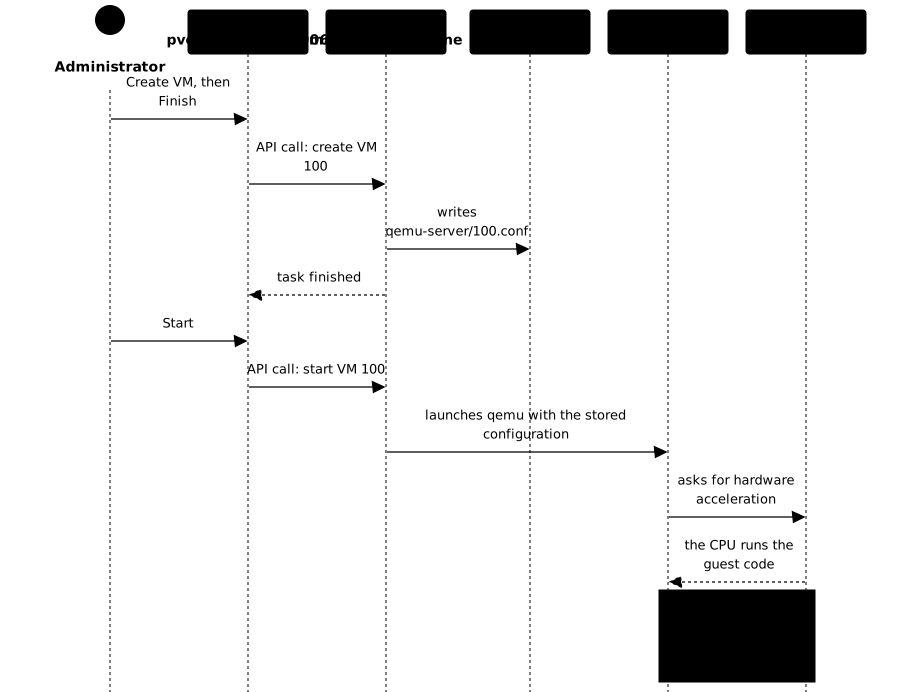
In practice, pveproxy receives your click and passes it to pvedaemon, which carries out the action with the required privileges. It writes the VM's configuration to /etc/pve/qemu-server/100.conf: a plain text file that you can read with cat. At start, pvedaemon launches a QEMU process from that file. Once running, QEMU talks to the KVM module of the kernel so that the processor executes the guest's code directly: this is what makes the VM fast. You can observe it on the node with ps aux | grep kvm: the VM is just a process of the host, with its complete command line. The step-by-step creation replays this path on a real node.
What is the difference between a VM and a container?
A VM virtualizes a complete machine and runs its own kernel, whereas an LXC container has no kernel of its own: it uses the host's Linux kernel and merely partitions its processes. This single difference explains everything else: weight, boot speed, choice of system and level of isolation. The diagram puts the two side by side: spot the host kernel at the top, and what sits between it and the service.
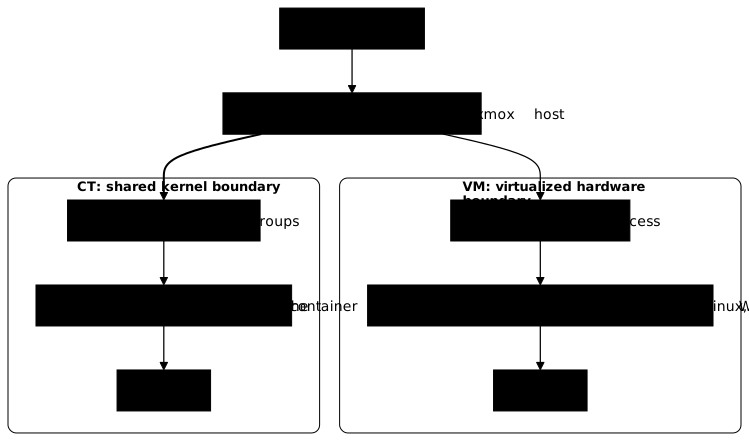
For a VM, the boundary with the host is hardware virtualization: the guest believes it has an entire machine, with its BIOS or UEFI, its drivers and its kernel. It can therefore be Windows, BSD or any Linux, whatever the host kernel version. The price: reserved RAM for the whole guest system, a longer boot and a small virtualization overhead.
For a container, the boundary is the host kernel itself, which isolates processes through namespaces (what the container sees) and cgroups (what it can consume). Nothing is emulated: the container starts without booting a kernel, uses only the memory of its processes and runs at near-native speed. The price: it can only run Linux applications compatible with the host kernel, and isolation depends on the strength of that shared kernel.
How do you compare the same service in a VM and in a CT?
Take one service, an internal DNS server on Debian, deployed twice. In the VM, you install a complete Debian (kernel, boot, systemd) and the service runs in it; in the CT, you start from a Debian template (a container image) and run the same service on the host kernel. The table compares what you observe.
| Criterion | Same service in a VM | Same service in a CT |
|---|---|---|
| Kernel | The guest's own | The host's |
| Boot | Full boot: firmware, kernel, then services | Processes are started, no kernel boot |
| Memory | Reserved for the whole guest, kernel included | Only that of the processes |
| Guest system | Linux, Windows, BSD | Linux only |
| Isolation | Hardware boundary | Shared kernel boundary |
| If the host kernel has a flaw | The guest kernel stays separate | All CTs are exposed |
| Kernel update | Each guest updates its own | Updating the host kernel concerns all CTs |
The point to remember is the asymmetry: the CT wins on weight and speed, the VM wins on freedom of choice and isolation. If the service must be isolated from an untrusted workload, or if it needs another kernel or another system, the question is settled before even looking at performance.
How do you choose: VM or container?
Two eliminatory questions, in this order, settle most cases. First: does the service need a system other than Linux, or a specific kernel (a particular kernel module, another version)? If so, it is a VM, no discussion. Second: is the workload untrusted or subject to a strong isolation requirement (different customers, third-party code, compliance)? If so, a VM again, because a CT's boundary is the shared kernel. If both answers are no, a CT is a good default for a trusted Linux service: it costs less in resources.
When in doubt, choose the VM: it is less economical but more forgiving, whereas a service installed in a CT by mistake has to be reinstalled in a VM the day a kernel or isolation requirement appears. Choosing a CT is an optimization made knowingly, not a reflex.
Exercise: three needs, three architectures
For each of the three needs, write down your choice (VM or CT), its main reason and one limit of that choice, then compare with the answer. This exercise draws on everything above: the shared kernel and the two eliminatory questions.
- Your team administers an internal DNS server and a reverse proxy, on official Debian images: this is a trusted Linux service.
- A business application only runs on Windows Server: this is a Windows need.
- A service runs code supplied by your customers, or must load its own kernel module: the workload requires a kernel boundary.
See the answer
For need 1, the right choice is a CT. The service is Linux, trusted, and has no kernel requirement: the CT is lighter and starts without booting a kernel. This choice has two limits. The CT uses the host kernel, which cannot be changed, and a flaw in that kernel affects all CTs. In addition, live migration (moving the machine without stopping it) is not practiced on a CT, which migrates by stopping and restarting. For application containers such as Docker's, the Proxmox documentation recommends running them inside a VM, which gives them strong isolation and live migration. If these limits make you hesitate, a VM is still a sound choice.
For need 2, the right choice is a VM. Windows needs its own kernel and virtualized hardware: a CT cannot run it. This choice has a cost: the VM uses more RAM and boots more slowly. Windows also requires drivers suited to virtualization, and installing the qemu-guest-agent (see QEMU Guest Agent) improves its management.
For need 3, the right choice is a VM too. Code you do not control, or a custom kernel module, requires a separate kernel: in a CT, a loaded module is loaded into the host kernel, which is out of the question. Even a VM is nonetheless not an absolute barrier, since a flaw in QEMU or KVM remains possible, and its isolation replaces neither updates nor network segmentation.
If you chose a CT for need 3, reread the "a CT is not a small VM" box: it is precisely the trap aimed at, since the kernel is shared and the requested boundary therefore does not exist.
Cluster, replication, snapshot, backup: which tool for which need?
These four words do not replace one another: each answers a different need, and confusing two leaves some data unprotected where you thought you had protection. A cluster links several nodes so they can be driven together; replication periodically copies disks from one node to another; a snapshot freezes a machine's state on the same storage; a backup creates an independent copy, exportable and restorable elsewhere. The table says, for each, what it protects and what it does not.
| Mechanism | Need covered | What it does not protect |
|---|---|---|
| Cluster | Manage several nodes as one, migrate machines | The data: it copies no disk |
| Replication | Have a recent copy of the disk on another node, for a fast restart | A deletion or a corruption, replicated along with the rest |
| Snapshot | Roll back before an update | Loss of the disk: the snapshot is on the same storage |
| Backup | Restore after a disaster, a deletion or a mistake | An immediate rollback: restoring takes time |
What does a cluster provide, and what does it not do?
A Proxmox cluster is a group of nodes that share a common configuration (in /etc/pve, replicated in real time) and reach agreement through a quorum, a majority vote that prevents two halves of the cluster from each deciding on their own. It provides a unified "Datacenter" view, migration of a machine from one node to another and, with high availability (HA), automatic restart of a machine on a healthy node. A single node is enough for a homelab; the cluster becomes useful as soon as machines must be moved or restarted without intervention.
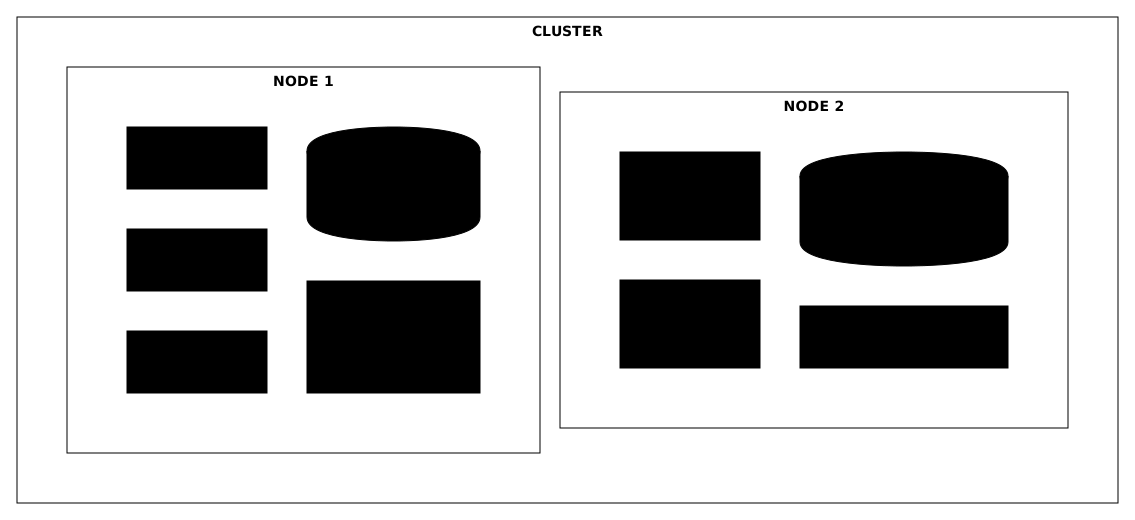
The diagram shows the idea to remember: each node keeps its own local storage and its own bridge. The cluster shares the configuration, not the disks.
The failure domain is whatever goes down together: a node, a switch, a power supply. The quorum requires a majority of votes: with two nodes, both votes are needed, so losing one node blocks the other, whereas with three nodes one can fail. Remember that a two-node cluster is not more available than a single node, unless you add an external arbiter.
What is the difference between a snapshot and a backup?
A snapshot is an instant return point, stored on the same storage as the machine. It is used to attempt an update with the ability to undo, for a few hours. A backup is a complete copy, on separate storage (ideally remote), which survives the loss of the node. If the disk dies, the snapshot dies with it. A snapshot kept too long can also degrade write performance, depending on the storage. Backups are then made with Proxmox Backup Server (in French), which adds deduplication.
Where do storage and networking fit in?
Storage is where the VM disks, the containers' filesystems, ISOs, templates and backups live. The choice of backend (the technology that organizes the data: directory, LVM-thin, ZFS, NFS, Ceph) mainly determines whether a machine can change node without copying its disk. The Local storage lesson teaches you how to choose.
Networking is provided by bridges (virtual switches, vmbr0 by default) to which the network cards of VMs and CTs plug in, with optional VLAN and NAT. The Proxmox networking lesson details these notions and how to avoid cutting yourself off from your own node. Always start with a single bridge, without VLANs.
Key takeaways
- A node is a complete Debian with KVM and LXC: the host owns the hardware, the guest runs in a VM or a CT.
- The management plane (interface, API,
qm,pct,/etc/pve) drives; the data plane (QEMU process, CT processes) does the work. A VM is just a QEMU process of the host. - A VM has its own kernel and a hardware boundary; a CT uses the host kernel: it is not a small VM.
- Windows, a specific kernel or an untrusted workload call for a VM; a trusted Linux service can go in a CT. When in doubt, the VM.
- A cluster shares the configuration and a quorum, not the disks: it replicates nothing by itself.
- Replication, snapshot and backup answer distinct needs; only a backup stored elsewhere covers deletion, corruption and the loss of the original storage at once.
- A single node, local storage and one bridge are enough to get started.
Knowledge check
Check that the essentials of this guide are mastered. The questions cover only what has just been explained here.
Knowledge check
Check what you have learned with this interactive quiz
How it works
- The timer starts when you click Start
- Multiple choice, true/false and short answer questions
- You can move between questions
- Detailed results are shown at the end
Starts the quiz and the timer
Review
(0/0)Score by domain
A domain groups several guides and gets several questions, so its score is more reliable than a per-topic score, which often rests on a single question.
Summary
Strengths
No topic passed at 80% on at least two questions yet.
Weak areas
No topic below the pass mark.
Recommended next
Hints before you try again?
Continue the course: Proxmox VE local storage: choosing and sizing your backends
A new full quiz with random questions
Work again only on the questions you missed