Where do you put an ISO, a VM disk and a backup? Three kinds of content, three ways of placing them, and a backend choice that decides which snapshots are possible, how much space is really consumed and what you lose when something fails. This lesson is for readers who have gone through the introduction to Proxmox VE and must decide where to put their data before creating the first VM. It compares Directory, LVM-thin and ZFS by what each one guarantees and by what you can measure on your own machine, never by a ranking.
What you will learn
- Tell disk, backend, storage ID and content types apart
- Read capacity at the four levels where it is measured: guest, thin pool, Proxmox storage, host
- Separate snapshot, consistent copy and independent backup
- Prepare a comparison of backends on your machine, varying only the backend, instead of trusting its name
- Propose the placement of four workloads and say what the plan does not protect
The Proxmox mental model: three layers
Proxmox does not store "VMs" but content on a backend, through a configured storage. Without this distinction you confuse disks, backends and storages, and every storage choice turns into a guessing game.
Layer 1: the physical disks
This is the raw hardware: /dev/sda, /dev/nvme0n1. Proxmox can do nothing with a bare disk: a backend must organize it first.
One choice is made early: the way the controller exposes the disks.
| Mode | What Proxmox sees | Consequence |
|---|---|---|
| HBA / JBOD | Each disk individually | ZFS possible, redundancy is handled by ZFS |
| Hardware RAID | A single virtual disk | Not recommended for ZFS, LVM-thin or Directory possible |
The Proxmox documentation is explicit: do not use ZFS on top of a hardware RAID controller that has its own cache, because ZFS must talk directly to the disks to guarantee integrity. A RAID controller can be reconfigured as an HBA or in IT mode (Initiator Target), a firmware mode that presents each disk as it is to the system, without a RAID volume.
Layer 2: the backend
The backend is the technology that organizes the data. It decides which features are available: snapshots, checksums, compression.
| Backend | How it stores a VM disk | What Proxmox documents |
|---|---|---|
| Directory | Files (raw, qcow2) in an ext4 or XFS file system | Snapshots only with the qcow2 format |
| LVM-thin | Block logical volumes in a thin pool | raw format, native snapshots and clones |
| ZFS | Zvols (block) for VMs, datasets for containers | Snapshots and clones, checksums, compression |
Proxmox also offers classic LVM (without thin), which this lesson does not detail. Its snapshots go through the snapshot-as-volume-chain storage option, a technology preview since Proxmox VE 9.0 that chains qcow2 volumes and only applies to disks created after it is enabled.
Layer 3: the Proxmox storage and its content types
A storage is a logical object, declared in /etc/pve/storage.cfg and visible under Datacenter → Storage. Its name, for example local-lvm, is its storage ID: this is what you choose when creating a VM, never a disk. It defines the backend used, the path or the pool, and the allowed content types: images (VM disks), rootdir (container disks), iso, vztmpl (container templates), backup, snippets.
A storage only appears in a menu if the matching content type is enabled on it. An ISO therefore cannot be uploaded to local-lvm, which only carries images and rootdir, and this is not a bug: it is the filter that separates the roles.
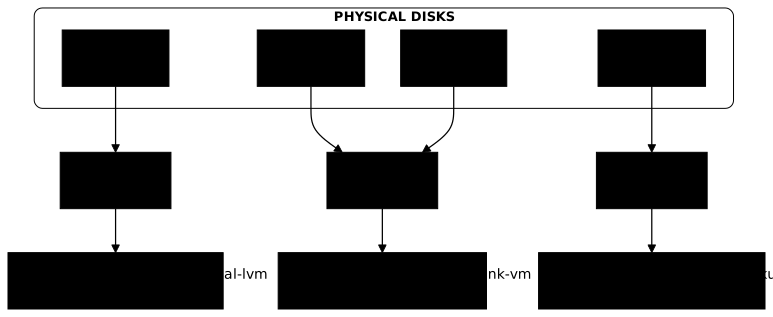
This architecture has three practical consequences. Three disks can form a single storage (a raidz). One disk can carry two, one for VMs and one for backups. And creating a VM amounts to choosing a storage, that is, a backend and content types, not a device.
Which capacity should you read: guest, pool, Proxmox storage or host?
A single VM has four capacity figures, all correct, none measuring the same thing. The df -h run inside the guest measures the VM's file system; the thin pool (the LVM-thin space reserve from which virtual disks draw their blocks, or the ZFS pool) measures the space actually written on the backend; pvesm status gives the Proxmox storage view; the host system (vgs, df -h) tells what is left on the volume group (the LVM grouping of physical disks) or on the physical disk.
Read the diagram from top to bottom: the VM sees the promised size of its disk, and only the pool level sees what is actually consumed. The dotted arrow shows the trap: when the pool is full, every VM gets I/O errors, even the one whose df shows 40% free.
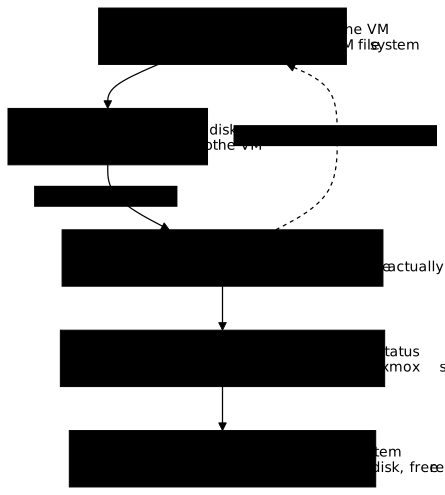
This is why a df inside the VM does not measure a thin pool. For Proxmox, a storage that fills up is dangerous: the storage documentation states that if a storage becomes full, all guests with volumes on it receive I/O errors, which can produce file system inconsistencies and corrupt data. The documented remedy is to limit over-allocation or to monitor the free space.
File or block: what does the shape of the disk change?
Backends store a VM disk in two ways. With Directory, the disk is a file (.qcow2, .raw) visible in a directory. With LVM-thin and ZFS (zvol), it is a block volume, which you do not see as a file.
| Criterion | File (Directory) | Block (LVM-thin, ZFS) |
|---|---|---|
| Inspection | ls, du, qemu-img info | lvs, zfs list |
| Copying outside Proxmox | A file can be copied, but not while the VM runs (see below) | A volume is read with its own tools (zfs send, dd) |
| Snapshots | qcow2 format only | Provided by the backend |
| Disk format | raw, qcow2, vmdk | raw |
The shape therefore decides what you can check by hand and which features are available, not a speed that the name alone would predict. The raw and qcow2 formats are explained in Virtual disks: RAW vs QCOW2 (in French).
Snapshot, consistent copy, backup: four different notions
A snapshot is not a backup, and copying the disk file of a running VM is not one either. Four notions are told apart by what they protect.
| Notion | What it is | What it protects | What it does not protect |
|---|---|---|---|
| Internal snapshot | Restore point stored in the same volume or file (qcow2, LVM-thin, ZFS) | A failed update, a rollback in a few seconds | Loss of the storage, deletion of the disk |
| External chain | Stacked volumes, each keeping only the differences (snapshot-as-volume-chain) | Same, on block storages without native snapshots | Same: everything lives on the same storage |
| Consistent copy | Image of the disk taken from a stopped VM, or from a frozen snapshot | A state that can be restored | Nothing against losing the medium if the copy stays on it |
| Independent backup | Consistent copy stored on another medium | Loss of the source storage, human error | Depending on the frequency: everything written after the last backup |
Why isn't copying the open disk of a VM enough?
This is the first mistake to understand. A running VM writes while you copy: the start of the file is read at one moment, the end a few minutes later. The resulting image never existed as such, and at best it equals a power cut, at worst a scrambled file system that fsck cannot repair.
Two routes give a usable copy. The first stops the VM (qm shutdown), then copies the disk: no more writes, so full consistency, at the cost of an interruption. The second copies a snapshot: Proxmox does it for you with vzdump, whose snapshot mode provides snapshot semantics on any type of storage, even without native snapshots. If the guest agent is active (agent: 1), vzdump calls guest-fsfreeze-freeze then guest-fsfreeze-thaw to freeze writes while the snapshot is taken; without the agent, the documentation warns of a small risk of inconsistency. Installing the agent is covered in the qemu-guest-agent guide.
Why doesn't a snapshot replace a backup?
The snapshot is for experimenting: "I update, and if it breaks I go back". But it lives on the same storage as the disk it protects. If the pool dies, if the volume is deleted or if ransomware encrypts the storage, the snapshot goes with it. The independent backup is recognized by a single question: if this storage disappears, do I still have this copy? Proxmox Backup Server (in French) is the dedicated answer in the Proxmox ecosystem.
A qcow2 snapshot on Directory adds a particularity: each snapshot lengthens a chain of references. The longer it is, the more complicated the management; delete snapshots that are no longer useful rather than piling them up.
Measure instead of ranking: how do you compare two backends?
The fastest backend cannot be deduced from its name. "ZFS is faster than LVM" or the reverse is a worthless sentence: latency depends on the disk (NVMe, SSD, spinning disk), the block size, the access pattern (sequential or random), the queue depth, the memory available for caching and the backend tuning. This lesson therefore publishes no ranking.
What you can compare is your machine, with your workload. An honest measurement first fixes what does not change, then varies one single thing: the backend.
| To fix and note | Why |
|---|---|
| The same physical disk and the same test file size | Another disk changes everything |
| The block size and the pattern (4 KiB random, 1 MiB sequential) | A database and a file copy do not stress the disk the same way |
| The duration and a volume larger than the RAM | A short test measures the cache, not the disk |
| The latency (average and worst case), not only the throughput | It is what a VM feels |
| The Proxmox VE version and the backend settings | The result only makes sense with its context |
The guide Analyse disk performance on Linux details fio and iostat to apply this method. An isolated figure, without disk, block size or duration, compares to nothing.
The same logic applies to compression. ZFS offers it natively, but the saving depends entirely on the data: logs compress a lot, videos or already compressed archives hardly at all. Rather than believing a percentage read elsewhere, read the actual ratio of your pool with zfs get compressratio.
Which guarantees does each backend provide?
You choose a backend for what it guarantees and for the constraints it imposes, that is, facts you can verify, not for a rank.
| Guarantee | Directory (ext4/XFS) | LVM-thin | ZFS |
|---|---|---|---|
| Silent corruption detection | No | No | Yes (checksum of every block) |
| Automatic repair | No | No | Yes, with mirror or raidz |
| Snapshots | With qcow2 | Native | Native |
| Thin provisioning | With qcow2 | Yes | Yes, sparse option of the storage |
| Native compression | No | No | Yes |
| Hardware constraint | None | None | Disks in HBA, 8 GB of RAM minimum (Proxmox documentation) |
| Possible content types | All | images, rootdir | images, rootdir |
Read the last row as a placement rule: an LVM thin pool or a ZFS pool does not receive ISOs or backups as files, unlike Directory.
Directory (ext4/XFS): a directory you can see
Directory exposes an ordinary file system. VM disks are files, and ls, du, mount -o loop work as on any Linux. It accepts all content types and has no hardware prerequisite. It does not detect silent corruption: you trust the disk. Its snapshots go through qcow2 only.
It naturally suits ISOs, container templates and backups, content that consists of files and can be read without Proxmox.
LVM-thin: block volumes allocated on demand
LVM-thin reserves blocks at write time. This technique, thin provisioning, lets you promise more space than exists: ten 100 GB disks on a 500 GB pool work as long as the space actually written stays below 500 GB, like a hotel that accepts 150 bookings for 100 rooms. Snapshots are native, but LVM-thin offers no checksum: silent corruption is not detected.
A thin pool has two compartments to monitor: data (your blocks) and metadata (the index that says where they are). Both fill up independently, and a pool whose metadata is full freezes even with free space left in data. The guide LVM thin provisioning details creation, automatic extension and monitoring.
The notion of reserve completes the picture: the space of the volume group that is not allocated to the pool. The pool can be grown with this reserve in an emergency; a fully allocated volume group leaves no margin. The reserve is read at the host level (vgs, VFree column), the last of the four views in the diagram.
ZFS: integrity against resources
ZFS combines checksums, snapshots, compression, zfs send/recv and redundancy (a mirror copies each block onto at least two disks; a raidz spreads data and parity across several disks, in the manner of a RAID 5), at the price of more concepts (pools, vdevs, datasets, scrub) and of memory. It never modifies data in place (copy-on-write): it writes elsewhere and then updates the pointers, which allows instant snapshots and corruption detection, but has a cost on some write patterns, which you measure rather than assert.
The thin provisioning of a ZFS storage depends on the storage's sparse option: a sparse volume is a volume whose reservation differs from its size. Without it, ZFS reserves the full size of the volume by default: no over-allocation, hence a simpler but less economical capacity plan.
How much memory does the ARC take on your machine?
The ARC (Adaptive Replacement Cache) is the ZFS read cache, in RAM. The cap value depends on the version and on how Proxmox VE was installed, and a figure learned elsewhere may be wrong on your machine.
According to the Proxmox VE documentation (ZFS on Linux page), since Proxmox VE 8.1 the installer limits the ARC to 10% of the host memory, capped at 16 GiB, by writing the value into /etc/modprobe.d/zfs.conf. Before 8.1, no limit was set and the OpenZFS default applied: 50% of memory before ZFS 2.3.0; afterwards, the larger of memory minus 1 GiB and 5/8 of memory. An installation upgraded from a version older than 8.1, or a Proxmox VE installed on top of Debian, therefore does not necessarily have a cap.
Rather than remembering a figure, read the value in force:
# Cap set in the module (0: the limit is derived from installed memory, following the module default)cat /sys/module/zfs/parameters/zfs_arc_max
# Value written by the installer or by hand (the file may not exist)cat /etc/modprobe.d/zfs.conf
# Effective cap (c_max) and current size (size) of the ARC, in bytesgrep -E '^(c_max|size) ' /proc/spl/kstat/zfs/arcstats
# Readable summaryarc_summary
The c_max field of arcstats is the value actually applied. To set an 8 GiB cap permanently, the documentation gives options zfs zfs_arc_max=8589934592 in /etc/modprobe.d/zfs.conf, followed by an initramfs regeneration. If your zfs_arc_max is lower than or equal to zfs_arc_min (one thirty-second of memory by default), it is ignored until zfs_arc_min is lowered too.
As a sizing guideline, the documentation gives 2 GiB base plus 1 GiB per TiB of storage, noting that an ARC that is too small hurts I/O. On an 8 GiB host, 10% leaves about 0.8 GiB of ARC, below this guideline: raise the limit if the host mostly serves ZFS storage. On a host without a cap, the ARC can on the other hand take a large share of the RAM at the expense of the VMs.
Which incidents should you expect, depending on the backend?
Each backend has its characteristic failures. Knowing them before the first VM avoids learning in production.
LVM-thin: full pool and full metadata
The failure happens when the VMs write more than the real space of the thin pool. Writes fail, VMs freeze or crash, and you must act urgently. If it is the metadata that is full, the result is the same while data seems to have headroom.
To prevent it, monitor data_percent and metadata_percent with lvs -o lv_name,data_percent,metadata_percent. Set yourself an alert threshold and an action threshold: Proxmox imposes none, so it is up to you to adjust them to the speed at which your VMs write, leaving time to act before saturation.
Once the pool is full or close to it, recovery consists of growing the pool using the volume group's reserve, or deleting useless snapshots or a non-critical VM.
ZFS: memory pressure, degraded pool and badly added vdev
Memory pressure shows up as a very slow system, a free -h showing little available RAM and swap in use. You prevent it by reading c_max (see above) and setting a suitable cap.
A degraded pool happens when a disk fails: in single, data is lost; in mirror, the pool keeps running with reduced performance; in raidz or raidz2, it tolerates one or two failures. You replace the disk and run a resilver (the rebuild of data onto the new disk), after setting up alerts on the pool state and running regular scrubs (a full read of the pool that verifies the checksums) to detect errors early.
A badly added vdev is the third trap. A vdev is a building block of the pool (a single disk, a mirror or a raidz): a single vdev added to a pool of mirrors creates a weak point but can be removed with zpool remove, which evacuates the data to the other vdevs. As soon as the pool contains a raidz vdev, an added vdev is permanent: only recreating the pool removes it. These rules are those of OpenZFS as shipped by Proxmox VE 9 (zpool-remove manual page). Plan the design before creating the pool.
Directory: saturation and stacked qcow2 snapshots
A file system that fills up answers "no space left on device" and degrades. Monitor it with df -h, leave some margin, and delete obsolete qcow2 snapshots.
Annotated demonstration: three inventories, three placements
Three read commands are enough to know where to place what. The values below are illustrative, built for the lesson, not measured on a machine: replay the commands on yours.
The first inventory, pvesm status, lists the Proxmox storages with their type and the capacity as seen by Proxmox:
Name Type Status Total (KiB) Used (KiB) Available (KiB) %archives dir active 3844000000 412000000 3236000000 10.72%local dir active 98497780 10253816 83194136 10.41%local-lvm lvmthin active 365830144 93251584 272578560 25.49%tank-vm zfspool active 942931968 310378496 632553472 32.92%The second, cat /etc/pve/storage.cfg, says what each storage is allowed to contain:
dir: local        path /var/lib/vz        content iso,vztmpl,backup
lvmthin: local-lvm        thinpool data        vgname pve        content rootdir,images
zfspool: tank-vm        pool tank/vmdata        content images,rootdir        sparse
dir: archives        path /mnt/archives        content backup,iso
The third, lvs -o lv_name,lv_size,data_percent,metadata_percent, shows the capacity actually consumed in the thin pool:
LV LSize Data% Meta% data <349.00g 25.49 1.92 vm-101-disk-0 200.00g 25.00 vm-102-disk-0 300.00g 13.00Here is how to read them together. The two VM disks total 500 GB promised on a 349 GB pool: the pool is over-allocated, which the LSize column shows but which df inside the VMs will never show. It actually consumes only 25.49%, about 89 GB, and pvesm status finds this figure again on the local-lvm line. This is the reading to keep: the promised size (LSize), the consumption (Data%, Meta%) and the Proxmox view (pvesm status) are three distinct measurements.
Why are three kinds of content not placed the same way? An ISO is a file you can download again: losing it is harmless, and it must be readable as a file, so on a Directory storage with iso in its content types (local or archives). A VM disk is written continuously, needs fast snapshots and stable latency: it goes on a block storage with images (local-lvm or tank-vm), whose real capacity you monitor. A backup must survive the loss of the production storage: it goes on a separate storage, here archives, with backup. Putting the backup on the same physical disk as the VM would make the original and its copy disappear in the same incident.
How should you organize your disks: separate production and archives?
Separate the storages that carry production (images, rootdir) from those that carry archives (backup, iso, vztmpl). Backups are large and their size is unpredictable: if one fills the VM storage, the VMs get I/O errors. A dedicated storage confines the incident.
The trade-offs change with the number of disks.
- A single disk: LVM-thin for its snapshots, or single-disk ZFS for the checksum without redundancy. In both cases, the backup must go elsewhere (NAS, external disk, another site)
- Two identical disks: a ZFS mirror brings integrity and redundancy, if the machine has the required RAM; otherwise, one production disk and one archive disk
- Three disks or more: raidz (one parity disk) or raidz2 (two), or separation by role, a mirror for the VMs and a Directory disk for the backups
Redundancy (mirror, raidz) protects against a disk failure, not against human error, ransomware or a fire: it is not a backup.
Observing your storages
These commands read without modifying anything. They match the four levels of the capacity diagram.
# Proxmox view of all storagespvesm status
# LVM thin pool: space actually written (data) and index (metadata)lvs -o lv_name,data_percent,metadata_percent
# Volume group: free reserve (VFree)vgs
# ZFS: pool state (must show ONLINE) and spacezpool statuszpool list
# Directory or host systemdf -h
pvesm status must list every storage with the active status. If data_percent or metadata_percent approaches the thresholds you set yourself, act before saturation.
Transfer exercise: placing four workloads
The exercise is done on paper, before reading the answer key. You have a single server running Proxmox VE with 32 GB of RAM, two 1 TB NVMe SSDs in HBA, a 4 TB hard disk, and a remote 8 TB NAS reachable over NFS.
| Workload | Size | Constraint | Recovery objective |
|---|---|---|---|
| A. ISO and container template library | 150 GB | Occasional reads | Download again: loss is harmless |
| B. Production database (VM) | 200 GB | Random writes, stable latency | Recovery in under an hour, maximum loss of one hour |
| C. Twelve disposable test VMs | 12 x 40 GB | Rarely written | Recreate from a template, no backup |
| D. Daily backups of B, seven days | 1.2 TB | Growing volume | Survive the loss of the server |
For each one, propose a backend, a storage with its content types, the protection chosen, and one line saying what your plan does not protect.
An answer key, to check your reasoning and not to copy:
- A goes on a Directory storage (
iso,vztmpl), for example on the 4 TB hard disk: a file, harmless loss. The plan does not protect against the failure of that disk, which is acceptable because everything can be downloaded again - B goes on a block storage with
images, LVM-thin or a ZFS mirror on the two NVMe drives, with snapshots before every change. The choice between the two is decided by measurement on your workload, not by reputation. The ZFS mirror brings checksums and redundancy, but a mirror does not replace backup D - C goes on the same type of block storage, with thin provisioning, because 480 GB promised consume far less in reality. You must monitor the pool: twelve VMs writing at the same time can fill it. The plan protects nothing of these VMs, by decision
- D goes off the server: the NAS over NFS with
backup, or the 4 TB disk. Only the NAS survives the loss of the server. The plan does not protect beyond the last backup, which means up to twenty-four hours of loss, which does not meet the one-hour objective of B: a more frequent backup, or replication, is then needed
This last point is the lesson of the exercise: a storage plan without a "what it does not protect" line has not been checked against its recovery objective nor against the loss of the server.
Key takeaways
- Disk, backend, storage ID, content types: the disk is the hardware, the backend organizes it, the storage ID is what you choose, and the content types filter what it accepts.
- Four capacity levels: the guest's
dfdoes not measure a thin pool. Readlvs,pvesm statusandvgsfor reality. - Thin provisioning: you promise more than you own. Monitor
dataandmetadata, and keep a reserve in the volume group. - Snapshot ≠ backup: a snapshot lives on the same storage as its disk. A backup is judged by whether it survives the loss of that storage.
- Copying an open disk is not a backup: you need a stopped VM or a snapshot (
vzdumpinsnapshotmode, preferably with the guest agent). - No universal performance ranking: measure latency and throughput on your disk, with an identified workload, fixing everything except the backend.
- Choose by guarantee: checksums and redundancy (ZFS), snapshots and thin (LVM-thin), transparency (Directory).
- Read the ARC value on your machine (
zfs_arc_max,arcstats) instead of memorizing one.
Knowledge check
Check that the essentials of this lesson are in place. The questions only cover what has just been explained here.
Knowledge check
Check what you have learned with this interactive quiz
How it works
- The timer starts when you click Start
- Multiple choice, true/false and short answer questions
- You can move between questions
- Detailed results are shown at the end
Starts the quiz and the timer
Review
(0/0)Score by domain
A domain groups several guides and gets several questions, so its score is more reliable than a per-topic score, which often rests on a single question.
Summary
Strengths
No topic passed at 80% on at least two questions yet.
Weak areas
No topic below the pass mark.
Recommended next
Hints before you try again?
Continue the course: Proxmox VE networking: bridge, VM network card and layered troubleshooting
A new full quiz with random questions
Work again only on the questions you missed