A relational database is not a library that your application loads: it is a server, a program that runs on its own and that several clients query at the same time. This lesson is for anyone who administers or chooses a database and wants a mental model valid for every engine. You will follow the path of a query, then the three mechanisms that make a server fast and reliable: a memory that avoids rereading the disk (the page cache), a log that lets it survive a power cut (the write-ahead log) and row versions that avoid waiting (MVCC). The running example remains the incident tracker of a server fleet.
What you will learn
- Explain why a database is a server and what opening a connection costs
- Describe the path of a query, from parsing to the response, and the role of the planner
- Say why a database rarely reads the disk
- Explain how the write-ahead log and the checkpoint ensure durability
- Explain why, with MVCC, a reader does not block a writer
Why is a database a server?
A database is a server because several clients must share a single set of data without losing its guarantees. In the incident tracker, the status page, the monitoring tool that creates incidents and ten technicians read and write the same table at the same time. A central process, the server, receives their requests over the network or through a local channel, arbitrates them, and is the only one to touch the data files. No client handles them directly.
The counterpoint is the embedded database, like SQLite (in French): a library linked to the application, which reads and writes a file with nothing to install. It suits a single program, because only one writer at a time can modify the file. The server, for its part, centralizes coordination, and that is what justifies an operator installing, monitoring and backing it up.
Why does opening a connection cost so much?
Opening a connection is not free: the server authenticates the client, checks its rights, prepares a session and reserves memory. For a query of a few milliseconds, this opening can cost more than the work itself. Each connection also occupies resources (depending on the engine, a dedicated process or thread): their number is therefore capped by a setting, and beyond it the server refuses new ones.
A connection pool is a small stock of already open connections that clients borrow and then return. If the status page opens a connection on every visit, a visitor spike hits the limit while the database is lightly loaded. With a pool of twenty connections, hundreds of visitors share them. It sits in the application or in an intermediary in front of the database.
The classic trap is to size generously "just in case": each application instance has its own pool, and their sum can exceed the server's limit. The cloud angle is covered in Limiting connections and reaching a database privately (in French), the exact setting in the per-engine pages.
What happens between a query and its response?
A query goes through four stages: parsing, planning, execution, then returning the result. Look at the diagram from top to bottom: the thick arrow is the path of the query, and the raised node is planning, the stage where the server decides how to work. The thin links show what execution calls on behind the scenes: the page cache, the log for a write, and the data files only when a page is missing.
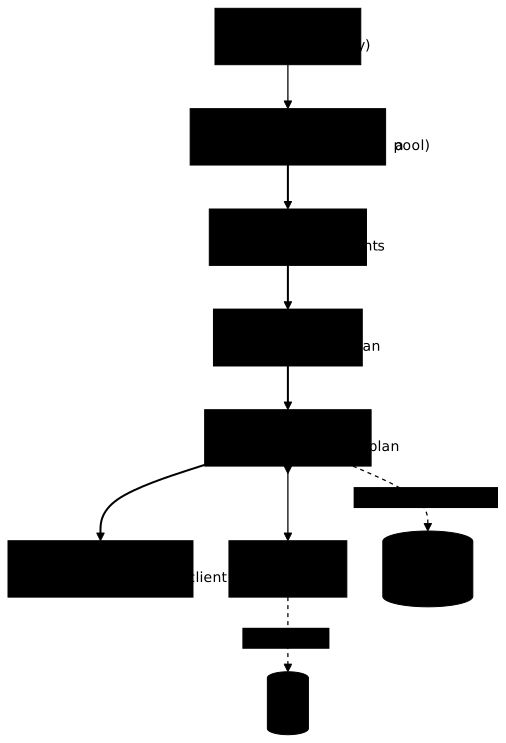
Parsing checks that the query is well written and that the user has the right to touch it. Planning is the stage that surprises: the SQL language, that of relational databases, is declarative, you describe what you want, not how to obtain it. The planner compares several possible strategies, relies on statistics (table sizes, distribution of values) and picks an execution plan. The database therefore does not run your queries in the order you wrote them.
For "the open incidents of web-01", the planner chooses between scanning the whole table and going through an index (a sorted directory that avoids reading everything), depending on the number of rows it estimates are concerned. The same query text can thus change plan as the data grows, and stale statistics lead to a bad plan. Reading a plan is taught, with measurements, in Indexes and EXPLAIN (in French).
Why does a database rarely read the disk?
The server cuts its files into fixed-size pages and keeps recently used pages in memory, in the page cache. Reading from memory is markedly faster than reading from disk. When the wanted page is already there, it is a cache hit; otherwise the server loads it from the data files, then keeps it.
This explains the slow first access: after a restart, the cache is cold, and the first queries pay for the disk reads until it fills up. A write, for its part, modifies the page in the cache without writing it back right away: that page is called dirty. The data in everyday use, the working set, ideally fits in this cache, which the lesson Partitioning and sharding takes up as a symptom.
Do not confuse this cache with an application cache placed in front of the database: the first lives inside the server and works on pages, the second is a separate component, which the cited lesson places among the answers to a saturated database.
How does a database survive a power cut?
The server confirms a write after recording it in a log, not in the data files. Writing a page at an arbitrary place on the disk is slow and scattered; appending a line at the end of a log is fast and sequential. The write-ahead log (WAL) obeys one rule: every change is recorded in it before being applied to the data files. At commit, when the client validates its transaction (a group of operations confirmed together), the server forces the log to be written to disk, then answers "committed". The dirty pages stay in memory.
The checkpoint is the moment when the server writes the dirty pages to disk and notes how far the log is reflected in the data files. After a cut, the server restarts from the last checkpoint and replays the log: committed transactions are recovered, the others are ignored. You get a fast confirmation and survival of the abrupt stop.
The trap is to believe that commit writes the data to disk: it only writes the log. Engines allow you to relax the wait for this write to gain speed, at the price of the last transactions confirmed: after a cut, they are lost, without the database being corrupted. This is not a harmless setting.
The name of this log and the place where it lives depend on the engine: see Discover PostgreSQL and Discover MySQL (in French). The guarantee of durability, for its part, is that of ACID: Transactions: what ACID and BASE promise.
Why does a reader not block a writer?
A reader does not block a writer because the server keeps several versions of the same row: this is MVCC (multi-version concurrency control). When a technician closes an incident, the server does not destroy the old row right away: it records a new version and keeps the old one as long as a transaction may still need it. Each transaction reads the version valid at the moment it took its snapshot of the data. The status page reading during the closing sees the old version, without waiting.
The alternative is locking: the reader waits for the writer to finish. It is simple, but reads pile up behind writes. With MVCC, two writers modifying the same row still have to wait for each other, and there is a price: old versions accumulate and a background cleanup, specific to each engine, must remove them, otherwise the files bloat.
MVCC is a mechanism here; what it guarantees, together with the isolation levels, is covered in the lesson on ACID cited above. To see two truly concurrent sessions, go through Transactions and concurrency (in French).
Key takeaways
- A database is a server because several clients share a single set of data: it arbitrates their access, whereas an embedded database serves a single program.
- Opening a connection costs: authentication, session, memory. The number of connections is capped, hence the connection pool.
- SQL is declarative: the planner chooses a plan, the database does not run your queries in the written order.
- The page cache keeps the pages in use in memory: the first access, or a cold cache after a restart, is slower. It lives in the server, not to be confused with an application cache in front of the database.
- Commit does not write the data to disk: it forces the write-ahead log to be written, and the checkpoint catches up the data files.
- After a cut, the server replays the log from the last checkpoint.
- With MVCC, several versions of a row coexist: a reader does not block a writer, at the price of cleaning up old versions.
Knowledge check
Eight questions on what distinguishes a server from a library, the cost of a connection, the role of the planner, what the page cache avoids, what the log guarantees at commit and what MVCC spares readers.
Knowledge check
Check what you have learned with this interactive quiz
How it works
- The timer starts when you click Start
- Multiple choice, true/false and short answer questions
- You can move between questions
- Detailed results are shown at the end
Starts the quiz and the timer
Review
(0/0)Score by domain
A domain groups several guides and gets several questions, so its score is more reliable than a per-topic score, which often rests on a single question.
Summary
Strengths
No topic passed at 80% on at least two questions yet.
Weak areas
No topic below the pass mark.
Recommended next
Hints before you try again?
Continue the course: Partitioning and sharding a database: when and how to choose
A new full quiz with random questions
Work again only on the questions you missed