
PostgreSQL's factory configuration is deliberately conservative: 128 MB of shared_buffers, no slow-query threshold, no trace of connections. A production server that keeps it under-uses its RAM and says nothing about what happens to it. But changing a parameter is more than writing it in a file: it must be taken into account, either by a reload that disconnects nobody, or by a restart that disconnects everybody.
This lesson teaches you to tune memory, connections, the basic WAL settings and the logs, and above all to know what is applied and what is waiting, by reading the server rather than a file.
What you will learn
- Locate the configuration files and know which one wins when a parameter is written twice
- Tell apart the value in service (
pg_settings) from the one the files declare (pg_file_settings) - Apply a parameter live with
pg_reload_conf(), and readpending_restartfor those waiting on a restart - Size the memory parameters, the connection limit and the basic WAL settings
- Configure the logs to trace slow queries and connections
Prerequisites
- a running PostgreSQL instance, installed as in the Installation guide;
- access to the superuser role (
postgres) to change the configuration; - familiarity with
psqland network access, covered in the lesson Administer a PostgreSQL instance with psql.
This lesson deliberately leaves four neighbouring topics aside. Access control (pg_hba.conf, TLS, roles) belongs to Secure PostgreSQL (in French). Autovacuum and maintenance are covered in Monitor and maintain PostgreSQL (in French). WAL archiving and restoration belong to Back up and restore PostgreSQL (in French). Fine-tuning a single query goes through Indexes and EXPLAIN ANALYZE (in French).
Where is the configuration located?
By default, postgresql.conf and postgresql.auto.conf live in the data directory (PGDATA). On Debian and Ubuntu with the PGDG packages, the packaging separates the configuration files from the data: this is a convention of these packages, not a PostgreSQL rule. The layout there is the following:
| File | Location | Role |
|---|---|---|
postgresql.conf | /etc/postgresql/18/main/postgresql.conf | Main server configuration |
postgresql.auto.conf | /var/lib/postgresql/18/main/postgresql.auto.conf | Written by ALTER SYSTEM, takes precedence |
pg_hba.conf | /etc/postgresql/18/main/pg_hba.conf | Access control (who may connect) |
pg_ident.conf | /etc/postgresql/18/main/pg_ident.conf | Mapping between system users and roles |
The server itself knows where its files are, and asking it is safer than assuming:
SHOW config_file;SHOW hba_file;SHOW data_directory; config_file----------------------------------------- /etc/postgresql/18/main/postgresql.conf
hba_file------------------------------------- /etc/postgresql/18/main/pg_hba.conf
data_directory----------------------------- /var/lib/postgresql/18/mainpostgresql.conf and postgresql.auto.conf: two files, one priority
postgresql.conf is the central file, managed by the administrator or by a configuration tool. It contains hundreds of parameters, most of them commented out (default value): only the uncommented parameters count. postgresql.auto.conf is reserved for the ALTER SYSTEM SET command, which writes the value there and never in postgresql.conf:
# Do not edit this file manually!# It will be overwritten by the ALTER SYSTEM command.shared_buffers = '512MB'work_mem = '16MB'maintenance_work_mem = '128MB'effective_cache_size = '1536MB'Priority rule: postgresql.auto.conf is read after postgresql.conf, and the last value read wins. If a parameter appears in both files, the one from postgresql.auto.conf is therefore applied.
More broadly, the effective value of a parameter follows a chain of levels: postgresql.conf, then postgresql.auto.conf, then ALTER DATABASE ... SET, then ALTER ROLE ... SET, then a session SET. Each level overrides the previous one. ALTER DATABASE and ALTER ROLE apply when each new session opens; SET only holds for the current session.
Opening network access (listen_addresses and a host line in pg_hba.conf) was covered in the lesson on psql; here listen_addresses is an example of a parameter that waits for a restart.
How do you read the active configuration?
There are four ways to read a parameter, and they do not answer the same question. SHOW and current_setting() give the value of your session, pg_settings gives the value in service with its source and context, and pg_file_settings shows what the files declare, whether applied or not. Confusing these views is a classic mistake, and this lesson's lab penalises it.
SHOW is the quickest, current_setting() is used inside a query:
SHOW shared_buffers;SELECT current_setting('work_mem'); shared_buffers---------------- 512MBpg_settings is the complete view. Its source, context and pending_restart columns tell you where the value comes from, how it is changed, and whether it is waiting for a restart:
SELECT name, setting, unit, source, context, pending_restartFROM pg_settingsWHERE name = 'shared_buffers';pg_file_settings walks through the configuration files line by line, including values that are not applied:
SELECT sourcefile, sourceline, name, setting, appliedFROM pg_file_settingsWHERE name = 'shared_buffers'ORDER BY sourcefile; sourcefile | sourceline | name | setting | applied--------------------------------------------------+------------+----------------+---------+--------- /etc/postgresql/18/main/postgresql.conf | 132 | shared_buffers | 128MB | f /var/lib/postgresql/18/main/postgresql.auto.conf | 3 | shared_buffers | 512MB | tHere postgresql.conf contains 128MB (applied = f) but postgresql.auto.conf imposes 512MB (applied = t). The seqno column, which this query does not select, gives the reading order: to know the value the files declare, you keep the line with the highest seqno, which is the last one read.
When does a change take effect?
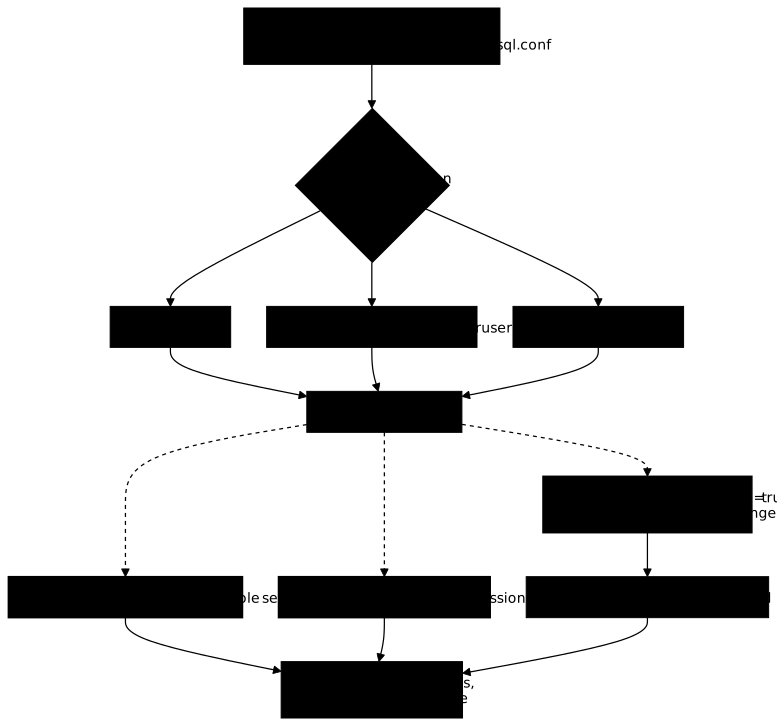
A parameter belongs to a context, visible in the context column of pg_settings, and this context decides how a change is applied. Four families cover most cases: postmaster requires a restart; sighup applies to the whole server after a reload; user and superuser also apply after a reload, including in sessions already open (from their next command), unless the session made its own SET; superuser-backend only holds for new sessions, because its value is frozen when the connection opens.
The diagram below follows a freshly written parameter. Note that the three contexts go through the same reload, but do not come out at the same place: only postmaster ends up pending, and the shared end point is the check in pg_settings, never in the file.
Which parameters require a restart?
postmaster context parameters are only re-read when the service starts. The most common ones:
| Parameter | What it sets |
|---|---|
shared_buffers | Size of the shared memory |
max_connections | Limit of simultaneous connections |
listen_addresses | Network interfaces listened on |
wal_level | Level of detail of the WAL |
logging_collector | Activation of the log collector |
port | TCP port |
The per-operation memory parameters (work_mem, maintenance_work_mem, effective_cache_size, of user context), max_wal_size and log_line_prefix (sighup), log_min_duration_statement (superuser) and log_connections (superuser-backend) reload live. The context column is the only reliable source. For a specific parameter, the answer fits in one query, which saves you from trusting your memory:
SELECT name, context FROM pg_settingsWHERE name IN ('shared_buffers', 'work_mem', 'log_min_duration_statement');How do you reload without restarting?
The following three commands do the same thing: send the SIGHUP signal to the main process, which re-reads the files and propagates the values to its child processes. None of them cuts an ongoing session. The choice depends on where you are working from: pg_reload_conf() from psql is the most direct, the other two assume shell access.
From psql (recommended):
SELECT pg_reload_conf(); pg_reload_conf---------------- tFrom the shell:
sudo systemctl reload postgresql@18-mainWith the cluster management tool of the Debian and Ubuntu packages:
sudo -u postgres pg_ctlcluster 18 main reloadWhy does a reload always succeed?
pg_reload_conf() returns t and systemctl reload exits with 0 as soon as the signal is sent. Neither says whether a parameter was left without effect because it required a restart. The mistake is discovered weeks later, when you realise that the value you set was never used.
The only alarm is the pending_restart column of pg_settings. It becomes true when the server has re-read a file whose value differs from the one in service for a postmaster parameter. Note the consequence: if you write the value without reloading, pending_restart stays false, and the absence of an alert proves nothing.
SELECT name, setting, pending_restartFROM pg_settingsWHERE pending_restart;The query returns one row per pending parameter. To count those waiting: SELECT count(*) FROM pg_settings WHERE pending_restart;.
Where do you read the pending value?
For a pending parameter, pg_settings.setting keeps the value in service: the old one. The value the files declare, the future one, is not read there but in pg_file_settings, by keeping the last line read:
SELECT setting FROM pg_file_settingsWHERE name = 'max_connections'ORDER BY seqno DESC LIMIT 1;You thus read the two faces of a pending parameter: SHOW max_connections; gives the value the server is running with, the query above gives the one it will take at the next start.
The complete workflow for a change
This sequence of four steps applies to every parameter you change. Step 3 matters: read the value in pg_settings, not in a session that may have made its own SET (it then keeps its local value), and open a new session for superuser-backend parameters such as log_connections. Without this, you would wrongly conclude that the reload failed.
-
Set the parameter with
ALTER SYSTEM:ALTER SYSTEM SET work_mem = '32MB'; -
Reload the configuration:
SELECT pg_reload_conf(); -
Check in a new session, in
pg_settings:SELECT setting FROM pg_settings WHERE name = 'work_mem'; -
List the pending parameters, and plan a restart only if there are any:
SELECT name FROM pg_settings WHERE pending_restart;
How do you prove nobody was disconnected?
Applying a configuration on a production server has one constraint: do not cut any session. pg_postmaster_start_time() returns the server start time, and it changes only on a restart. Note it before, read it again after:
SELECT pg_postmaster_start_time();A long-running application session (visible in pg_stat_activity through its application_name) that survives the operation confirms the same thing from the client side. A systemctl restart, a pg_ctl restart or a reboot kills all sessions: a postmaster parameter is therefore set in two steps, written and reloaded now, applied in the planned restart window.
How do you size memory?
Memory is a direct performance lever. PostgreSQL distinguishes shared memory, common to all connections, from per-operation memory, allocated to each sort or hash. The values below are starting points for a typical transactional workload: reliable tuning is based on measurements of your real workload, which the lesson Monitor and maintain PostgreSQL (in French) teaches you to collect.
shared_buffers: the shared cache
The first parameter to tune. It sets the size of the memory where PostgreSQL caches the data pages (8 KB blocks) read from disk. The default value, 128MB, is far too low for production. The usual rule is 25 to 40% of RAM; on a 2 GB server:
ALTER SYSTEM SET shared_buffers = '512MB';Why not 50% or more? Because PostgreSQL also relies on the operating system cache (Linux page cache). If shared_buffers consumes too much RAM, that cache shrinks and performance drops. Raising shared_buffers also calls for raising max_wal_size, to spread out the writing of modified pages. Its context is postmaster: the value stays pending until the restart.
work_mem: memory per sort or hash operation
Each sort operation (ORDER BY, DISTINCT, MERGE JOIN) or hash operation (HASH JOIN, GROUP BY) can use up to work_mem before spilling to disk. Default value: 4MB. The common trap: it is not a per-connection limit but a per-operation one. A query with 5 sort nodes can consume 5 × work_mem, and every concurrent connection does the same.
A cautious calculation starts from available RAM / (max_connections × 2 to 5 operations). A work_mem that is too low forces sorts on disk, visible in EXPLAIN ANALYZE as Sort Method: external merge; too high, it can exhaust RAM. It can be changed live:
ALTER SYSTEM SET work_mem = '16MB';maintenance_work_mem and effective_cache_size
maintenance_work_mem (default 64MB) feeds one-off maintenance operations: VACUUM, CREATE INDEX, ALTER TABLE ADD FOREIGN KEY. Allow 2 to 4 times work_mem, without exceeding 1 to 2 GB. effective_cache_size (default 4GB) allocates no memory: it is a hint given to the planner about the total amount of cache available (shared_buffers plus page cache). A value that is too low pushes it toward sequential scans even when an index would be faster; aim for 50 to 75% of RAM.
ALTER SYSTEM SET maintenance_work_mem = '128MB';ALTER SYSTEM SET effective_cache_size = '1536MB';Which starting values by RAM size?
The table below gives a starting point per server size. The work_mem column is a range because it depends on max_connections: the low bound for 200 connections, the high bound if a PgBouncer brings real concurrency down to a few dozen sessions. Check that shared_buffers + (work_mem × active connections × 2) stays under the physical RAM, otherwise the Linux OOM killer makes the call for you.
| Total RAM | shared_buffers | work_mem | maintenance_work_mem | effective_cache_size |
|---|---|---|---|---|
| 2 GB | 512 MB | 8–16 MB | 128 MB | 1.5 GB |
| 4 GB | 1 GB | 16–32 MB | 256 MB | 3 GB |
| 8 GB | 2 GB | 32–64 MB | 512 MB | 6 GB |
| 16 GB | 4 GB | 64–128 MB | 1 GB | 12 GB |
| 32 GB | 8 GB | 128–256 MB | 2 GB | 24 GB |
The online tool PGTune generates a baseline configuration from the RAM, the number of CPUs and the workload type: a good starting point, to refine afterwards with real metrics.
How do you tune connections?
Each PostgreSQL connection corresponds to a system process. A hundred connections means a hundred processes, each with its own memory (work_mem, catalogs, session state). Beyond a few hundred connections, performance can collapse because of context switches and memory contention.
max_connections: why not raise it to 1,000?
max_connections is 100 by default and its context is postmaster. It is the perfect example of a parameter you prepare without applying it: you write it and reload now, then restart in the planned window.
ALTER SYSTEM SET max_connections = 200;SELECT pg_reload_conf();After these two lines, SHOW max_connections; still answers 100, and pg_settings marks pending_restart as true for this parameter. This is the expected state: the server uses 100 and waits to start with 200.
If an application needs far more connections than the default 100, the answer is not to raise max_connections to 1,000. The right approach is to introduce a connection pooler such as PgBouncer, which keeps a small number of real connections and multiplexes the requests of hundreds of clients onto them: in a typical example, the application sees 500 connections, PostgreSQL handles only 30. These figures are orders of magnitude to measure on your own workload, not a threshold set by the PostgreSQL documentation.
superuser_reserved_connections: the safety net
superuser_reserved_connections (default 3) reserves connections for superusers, even when max_connections is reached. It is what lets you connect to diagnose a saturated server. Never go below 2.
WAL and checkpoints: which basic settings?
The WAL (Write-Ahead Log) guarantees durability: every change is first written to the write-ahead log, before being applied to the data files. Checkpoints are the moments when PostgreSQL syncs the modified pages to disk. Three parameters are enough for a starting setup; archiving and point-in-time recovery belong to the backup lesson (in French).
wal_level (default replica) controls the amount of information written: minimal for a standalone server without PITR backup, replica for physical replication, pg_basebackup and PITR, logical for logical replication. Keep replica unless explicitly needed; changing it requires a restart. max_wal_size (default 1GB) is the volume of WAL accumulated before a checkpoint is forced: the higher it is, the less frequent the checkpoints, but the longer the crash recovery. checkpoint_completion_target (default 0.9) spreads the write over 90% of the interval.
ALTER SYSTEM SET max_wal_size = '2GB';max_wal_size has a sighup context: it reloads live.
How do you configure usable logs?
An instance that logs almost nothing is an instance you cannot diagnose. When the application team reports slowness, three pieces of information are missing: which queries are slow, who connects, and, on each line, when, which process and which role on which database. The three settings below answer these (log_min_duration_statement for slow queries, log_connections for connections, log_line_prefix for the line prefix) and all reload without a restart. Only the file collector (logging_collector), covered first, requires one.
The log collector: a restart to plan
Without logging_collector, PostgreSQL writes to stderr and it is the service manager that decides the fate of the lines. The collector is a dedicated process that captures this output and writes it to dated files, with rotation. logging_collector has a postmaster context: enabling it requires a restart, so plan it at installation time rather than in the middle of operation.
ALTER SYSTEM SET logging_collector = 'on';ALTER SYSTEM SET log_directory = 'log';ALTER SYSTEM SET log_filename = 'postgresql-%Y-%m-%d.log';log_directory is relative to the data directory when it does not start with /, and the log_filename pattern sets the rotation granularity, here one file per day. Logs are written to $PGDATA/log/, that is /var/lib/postgresql/18/main/log/ on Debian.
log_min_duration_statement: finding slow queries
This is a parameter to enable very early in operation: it logs every query whose duration exceeds the threshold, with its exact duration and its full SQL text. It is expressed in milliseconds, and -1 (the factory value) disables it.
ALTER SYSTEM SET log_min_duration_statement = 250;SELECT pg_reload_conf();With 250, every query longer than a quarter of a second appears in the logs. Start at 500 ms instead if the volume worries you, and go down to 100 ms to hunt micro-latencies. The value 0 logs all queries: useful for debugging, dangerous in production. It is the first diagnostic tool before pg_stat_statements.
log_statement: tracing schema changes
log_statement logs queries according to their nature, regardless of their duration. It answers "who changed the schema", whereas log_min_duration_statement answers "what is slow".
| Value | What is logged |
|---|---|
none | Nothing (default) |
ddl | CREATE, ALTER, DROP: recommended in production |
mod | ddl plus INSERT, UPDATE, DELETE |
all | All queries, for debugging only |
Two limits of the all level: it makes the volume explode on an active database, and it does not catch everything: queries with a syntax error are never logged, because the message is emitted after parsing.
log_connections, log_disconnections, log_lock_waits
These three parameters answer questions that the query logs do not cover: where sessions come from, how long they live, which ones block. The connection and disconnection pair lets you spot an application that opens and closes one session per query, a pattern that saturates a server long before the queries become slow.
ALTER SYSTEM SET log_connections = 'all';ALTER SYSTEM SET log_disconnections = 'on';ALTER SYSTEM SET log_lock_waits = 'on';log_connectionslogs incoming connections. New in PostgreSQL 18: it accepts a list of aspects (receipt,authentication,authorization,setup_durations) orall, where earlier versions accepted only a boolean. The valueonis still accepted for compatibility.log_disconnectionslogs each disconnection with the session duration.log_lock_waitslogs the queries that wait for a lock longer thandeadlock_timeout(1 second by default).
Here are log lines captured on an instance with the prefix %m [%p] %q%u@%d:
2026-04-13 10:01:20.273 [6287] postgres@postgres LOG: connection authorized: user=postgres database=postgres application_name=psql2026-04-13 10:01:20.275 [6287] postgres@postgres LOG: disconnection: session time: 0:00:00.003 user=postgres database=postgres host=[local]log_line_prefix: structuring each line
The prefix determines the metadata added to every log line. Without it, the lines cannot be tied to any session. A useful prefix says when (%m), which process (%p), and who on which database (%u and %d):
ALTER SYSTEM SET log_line_prefix = '%m [%p] %q%u@%d/%a ';| Marker | Meaning |
|---|---|
%m | Timestamp with milliseconds |
%p | Process PID |
%q | Stops the prefix for processes without a client session (internal processes) |
%u | Role name |
%d | Database name |
%a | Application name (application_name) |
With %a, you can tell at a glance which queries come from your application, PgBouncer, a cron script or psql.
log_lock_failures (new in PostgreSQL 18)
PostgreSQL 18 adds log_lock_failures. According to the documentation, its scope is still limited to locking failures related to NOWAIT (for example SELECT ... FOR UPDATE NOWAIT on an already locked row). It complements log_lock_waits, which only logs waits beyond deadlock_timeout. This parameter and the all value of log_connections raise an error on a version earlier than 18.
ALTER SYSTEM SET log_lock_failures = 'on';Put it into practice
The lab starts from an instance whose log collector is already active (enabling it would require a restart, which the lab forbids) and where nothing else is tuned. You set a slow-query threshold at 250 ms, connection logging and a complete line prefix, then you prepare raising max_connections to 200 without restarting, before filling in a report of three values. The validation reads the running server in pg_settings and pg_file_settings, checks that max_connections is written but still pending (pending_restart), and checks that a witness session opened by the lab survived: a restart kills it.
Troubleshooting
Almost all configuration problems come down to three causes: a postmaster parameter reloaded when it required a restart, a value overridden in postgresql.auto.conf, or a check made in the wrong place. Before looking further, read the parameter's row in pg_settings: the source, context and pending_restart columns alone answer the first rows of the table.
| Symptom | Likely cause | Fix |
|---|---|---|
SHOW returns the old value after a reload | postmaster context: the parameter waits for a restart | Read pending_restart; restart in the planned window |
pending_restart stays false while the value is written | The server did not re-read the files | SELECT pg_reload_conf(); then read again |
pending_restart stays true | The service was reloaded, never restarted | Restart during the planned window |
| The value read in a new session is right, not in the old one | superuser-backend context (for example log_connections), or a SET made in the session | Reopen the session, or RESET the parameter |
ALTER SYSTEM seems ignored | A configuration management tool rewrites postgresql.conf or the value is overridden lower down | Read pg_file_settings: the line with the highest seqno wins |
No file in the log directory despite log_statement = 'all' | logging_collector disabled: the lines go to stderr | Enable it, then restart |
| Memory saturated, OOM killer | shared_buffers plus work_mem × connections exceeds the RAM | Reduce work_mem or max_connections |
The approach stays the same for every case: write, reload, read in pg_settings, and only then conclude.
Key takeaways
- A factory configuration is conservative: adapt
shared_buffers,work_memand the logs to your server. - A reload always succeeds, even when it leaves a parameter without effect: only the
pending_restartcolumn ofpg_settingstells you. pg_settings.settinggives the value in service;pg_file_settingsgives what the files declare, the last line read winning.- A postmaster parameter (
shared_buffers,max_connections,listen_addresses,logging_collector) is written and reloaded now, then applied at the next restart window. - Writing a value without reloading leaves
pending_restartfalse: the absence of an alert proves nothing. - After a reload,
sighup,userandsuperuseralso hold for open sessions (except a localSET);superuser-backend, likelog_connections, only holds for new sessions. shared_buffers: 25 to 40% of RAM;work_memapplies per operation, not per connection.- When the application needs far more than the default 100 connections (a few hundred), think PgBouncer rather than a higher
max_connections. - Enable
log_min_duration_statement,log_connectionsand a completelog_line_prefixfrom day one. postgresql.auto.conftakes precedence overpostgresql.conf: choose a single management method.
Knowledge check
Eight questions on reading a parameter in service and in the files, the trap of the reload that always succeeds, the postmaster context and pending_restart, and the choice of logging parameters.
Knowledge check
Check what you have learned with this interactive quiz
How it works
- The timer starts when you click Start
- Multiple choice, true/false and short answer questions
- You can move between questions
- Detailed results are shown at the end
Starts the quiz and the timer
Review
(0/0)Score by domain
A domain groups several guides and gets several questions, so its score is more reliable than a per-topic score, which often rests on a single question.
Summary
Strengths
No topic passed at 80% on at least two questions yet.
Weak areas
No topic below the pass mark.
Recommended next
Hints before you try again?
Continue the course: Control access to PostgreSQL: pg_hba.conf, roles and enforced TLS
A new full quiz with random questions
Work again only on the questions you missed