
When you run sudo -u postgres psql (psql is PostgreSQL's command-line client), a postgres=# prompt appears and your queries go through. But what is running underneath? Where is the data, which process is listening, and why do three databases exist when you have not created any? This lesson answers in two steps: the vocabulary (cluster, instance, database, schema, role, tablespace) and then how the server works (connection channels, processes and the WAL, the transaction log: the written trace of every change).
It is for anyone who has never administered PostgreSQL, and it asks for no hands-on step: you read, you configure nothing. You come out able to locate the elements of PGDATA (the directory where PostgreSQL keeps everything it stores) that matter to an operator, and every process of a fresh instance, which the following lessons rely on.
What you will learn
- Tell apart cluster, instance, database and schema
- Locate the PGDATA files and the configuration files
- Distinguish a Unix socket connection from a TCP connection
- Name the processes of an instance and the role of each
- Follow a write from the client to the disk, WAL included
What are the prerequisites, and what does this lesson not cover?
All you need is to have already used a Linux command line: no PostgreSQL instance is required to read. If you want to follow the outputs on your own machine, the installation lesson provides one.
The examples contain a few SQL queries (SELECT ...) and psql meta-commands, commands that start with a backslash (\l, \dn+, \du). You type them in a psql session opened with sudo -u postgres psql. You do not have to know how to write them: each one is explained where it appears, and writing queries belongs to the SQL course (in French).
This lesson lays down the vocabulary and the mental model, nothing more. Installation belongs to the lesson of that name. Opening network access, the practical side of pg_hba.conf (the file of access rules) and .pgpass (the file where the client remembers a password) are covered in Administer a PostgreSQL instance with psql. Parameters and reloading them belong to Configure PostgreSQL, and roles, TLS (connection encryption) and least privilege (granting only the rights that are needed) to Control access to PostgreSQL.
What is a cluster, and how does it differ from an instance?
In the PostgreSQL world, a cluster does not mean several servers working together: it is a single data directory, called PGDATA, which holds all the databases of one server. The word instance, for its part, means the running processes that open this directory and serve it, together with their shared memory. The cluster is therefore what is on the disk, the instance is what runs, and an instance serves exactly one cluster.
This distinction explains sentences that seem contradictory: you can stop the instance without touching the cluster, which stays intact on the disk, and a cluster with no instance is just an inert directory. It also explains why the term has nothing to do with high availability: a set of replicated servers is called something else, and is built with replication.
On Debian and Ubuntu, the installation creates a cluster named main, which the pg_lsclusters tool from the postgresql-common package lists:
pg_lsclustersVer Cluster Port Status Owner Data directory Log file18 main 5432 online postgres /var/lib/postgresql/18/main /var/log/postgresql/postgresql-18-main.logThe Data directory column gives the PGDATA, and the Status online shows that an instance has opened it. On these distributions, several clusters can coexist on one machine, each with its own port and version number.
What does PGDATA contain?
PGDATA contains everything PostgreSQL stores: the data, the transaction log and the internal state. Here is its content on a fresh installation of version 18:
ls -la /var/lib/postgresql/18/main/total 92drwx------ 19 postgres postgres 4096 Apr 13 08:49 .drwxr-xr-x 3 postgres postgres 4096 Apr 13 08:49 ..-rw------- 1 postgres postgres 3 Apr 13 08:49 PG_VERSIONdrwx------ 5 postgres postgres 4096 Apr 13 08:49 basedrwx------ 2 postgres postgres 4096 Apr 13 08:53 globaldrwx------ 2 postgres postgres 4096 Apr 13 08:49 pg_commit_tsdrwx------ 2 postgres postgres 4096 Apr 13 08:49 pg_dynshmemdrwx------ 4 postgres postgres 4096 Apr 13 08:54 pg_logicaldrwx------ 4 postgres postgres 4096 Apr 13 08:49 pg_multixactdrwx------ 2 postgres postgres 4096 Apr 13 08:49 pg_notifydrwx------ 2 postgres postgres 4096 Apr 13 08:49 pg_replslotdrwx------ 2 postgres postgres 4096 Apr 13 08:49 pg_serialdrwx------ 2 postgres postgres 4096 Apr 13 08:49 pg_snapshotsdrwx------ 2 postgres postgres 4096 Apr 13 08:49 pg_statdrwx------ 2 postgres postgres 4096 Apr 13 08:49 pg_stat_tmpdrwx------ 2 postgres postgres 4096 Apr 13 08:49 pg_subtransdrwx------ 2 postgres postgres 4096 Apr 13 08:49 pg_tblspcdrwx------ 2 postgres postgres 4096 Apr 13 08:49 pg_twophasedrwx------ 4 postgres postgres 4096 Apr 13 08:49 pg_waldrwx------ 2 postgres postgres 4096 Apr 13 08:49 pg_xact-rw------- 1 postgres postgres 88 Apr 13 08:49 postgresql.auto.conf-rw------- 1 postgres postgres 130 Apr 13 08:49 postmaster.opts-rw------- 1 postgres postgres 108 Apr 13 08:49 postmaster.pidNot all these subdirectories matter equally to an operator. Six items are enough to find your way around:
| Item | Role |
|---|---|
PG_VERSION | Gives the major version (here 18) |
base/ | Holds the data of each database, one subdirectory per database, named after its numeric identifier (OID) |
global/ | Tables shared by all databases (roles, tablespaces) |
pg_wal/ | The WAL (Write-Ahead Log) files, the transaction log |
pg_tblspc/ | Symbolic links to the additional tablespaces |
postmaster.pid | The PID of the main process, proof that the instance is running |
The postgresql.auto.conf file is there too: it receives the parameters set by ALTER SYSTEM and takes precedence over postgresql.conf. The exact role of these two files is the subject of the configuration lesson.
Where are the configuration files?
On Debian and Ubuntu, the configuration files are not in PGDATA but in /etc/postgresql/18/main/, whereas on Red Hat or in an installation from source everything stays in PGDATA. The server knows where they are itself, and you can ask it:
SELECT name, setting FROM pg_settingsWHERE name IN ('data_directory','config_file','hba_file','ident_file')ORDER BY name; name | setting----------------+----------------------------------------- config_file | /etc/postgresql/18/main/postgresql.conf data_directory | /var/lib/postgresql/18/main hba_file | /etc/postgresql/18/main/pg_hba.conf ident_file | /etc/postgresql/18/main/pg_ident.confAbove all, remember hba_file, which designates the file of access rules, and config_file, the file of parameters. Querying pg_settings saves you from guessing a path that changes from one distribution to another.
How are databases, schemas and tablespaces organized?
Below the cluster, PostgreSQL arranges SQL objects on three levels: the cluster contains one or more databases, each database contains one or more schemas, and each schema contains the objects (tables, views, functions, sequences). A connection always opens on a single database: without an extension (an add-on module such as dblink or postgres_fdw, enabled by CREATE EXTENSION in each database concerned), a query does not reach another database of the same cluster, whereas it crosses schemas freely within one database.
A fresh installation contains three databases, which the \l meta-command (a psql-specific command, not SQL) lists:
\l List of databases Name | Owner | Encoding | Locale Provider | Collate | Ctype | Locale | ICU Rules | Access privileges-----------+----------+----------+-----------------+---------+---------+--------+-----------+----------------------- postgres | postgres | UTF8 | libc | C.UTF-8 | C.UTF-8 | | | template0 | postgres | UTF8 | libc | C.UTF-8 | C.UTF-8 | | | =c/postgres + | | | | | | | | postgres=CTc/postgres template1 | postgres | UTF8 | libc | C.UTF-8 | C.UTF-8 | | | =c/postgres + | | | | | | | | postgres=CTc/postgres| Database | Role |
|---|---|
postgres | Default database for administration. This is where you land with sudo -u postgres psql. |
template1 | Template used automatically by CREATE DATABASE. Any change made here (extensions, schemas) will be inherited by new databases. |
template0 | "Clean" template, never modified. Used to create a database with a different encoding (createdb --template=template0). |
Each database matches a subdirectory of base/, named after its OID (Object Identifier):
SELECT oid, datname FROM pg_database ORDER BY oid; oid | datname-----+----------- 1 | template1 4 | template0 5 | postgresThe base/5/ directory therefore holds the files of the postgres database, which ties the logical view that SQL gives to the physical view that ls gives.
What are the public schema and the search_path setting?
A schema is a namespace inside a database: two schemas can each contain a clients table without conflict. Every database contains at least the public schema, which the \dn+ meta-command lists:
\dn+ List of schemas Name | Owner | Access privileges | Description--------+-------------------+----------------------------------------+------------------------ public | pg_database_owner | pg_database_owner=UC/pg_database_owner+| standard public schema | | =U/pg_database_owner |When a query names a table without a schema, PostgreSQL consults the search_path parameter to know where to look, and where to create:
SHOW search_path; search_path----------------- "$user", publicPostgreSQL first looks for a schema bearing the name of the connected role ("$user"), then for the public schema. If the personal schema does not exist, as on a new installation, everything lands in public. That is why a serious application creates its own schema rather than mixing everything together.
The default privileges of this schema changed with version 15, and databases migrated from an older version did not all benefit from the change. This point belongs to access control, and it is covered in the section on the public schema of Control access to PostgreSQL.
What is a tablespace for?
A tablespace is a physical location, a directory on the disk, where PostgreSQL can store data files outside PGDATA. Typical use cases are placing indexes on a fast SSD, archive tables on a slow disk, or temporary files on a dedicated volume.
In practice, tablespaces are mostly used in production, facing I/O constraints or disk capacity limits. The default tablespace is more than enough to start with, and the pg_tblspc/ directory of PGDATA, empty here, shows that no other one exists.
What is a PostgreSQL role?
PostgreSQL has no separate notion of user and group: there is only one concept, the role. A role that has the LOGIN attribute can connect, like a user; without this attribute (NOLOGIN), it serves as a group to which you attach other roles in order to pass rights on to them. Roles are defined for the whole cluster, not database by database, which is why they are stored in global/.
\du List of roles Role name | Attributes-----------+------------------------------------------------------------ postgres | Superuser, Create role, Create DB, Replication, Bypass RLSThe \du meta-command lists the roles and their attributes, that is, global privileges (creating roles, creating databases, opening a replication connection, bypassing row-level security). On a fresh installation, a single role exists: postgres, the superuser, which holds them all. It bypasses all permission checks and can read anything, modify anything and load extensions, which makes it the equivalent of root on Linux. You therefore do not use it for an application. Creating dedicated roles, their inheritance and least privilege are taught in Control access to PostgreSQL.
Unix socket or TCP: how does a client connect?
A client reaches the server through two channels: the Unix socket, a special file that connects two processes of the same machine without going through the network, or TCP, even towards 127.0.0.1. By default, psql uses the socket. It lives in /var/run/postgresql/ on Debian:
ls -la /var/run/postgresql/srwxrwxrwx 1 postgres postgres 0 Apr 13 08:49 .s.PGSQL.5432-rw------- 1 postgres postgres 69 Apr 13 08:49 .s.PGSQL.5432.lock-rw-r--r-- 1 postgres postgres 5 Apr 13 08:49 18-main.pidThe .s.PGSQL.5432 file is the socket, and the number that ends it is the port. The channel determines the authentication method, which is chosen by the rules of pg_hba.conf, the access control file (HBA stands for host-based authentication) whose path is given above by hba_file. On Debian, a connection through the socket is authenticated by peer: the system supplies the Unix user name, and PostgreSQL compares it with the requested role, with no password. A TCP connection goes through another rule and generally requires a password.
On a new installation, the server only listens on the loopback (the address 127.0.0.1, which only the machine itself can reach): only local connections succeed, through the socket or through TCP. Reading the rules, opening network access, and telling the two channels apart in practice are the hands-on tasks of Administer a PostgreSQL instance with psql. Writing a restrictive pg_hba.conf is the task of Control access to PostgreSQL.
Which processes run, and what does each do?
PostgreSQL is multi-process, not multi-threaded. A main process, named postgres (historically postmaster), listens for connections and starts the auxiliary processes. Here are those of a fresh PostgreSQL 18 instance:
ps auxf | grep postgrespostgres 4323 /usr/lib/postgresql/18/bin/postgres -D /var/lib/postgresql/18/main -c config_file=/etc/postgresql/18/main/postgresql.confpostgres 4324 \_ postgres: 18/main: io worker 0postgres 4325 \_ postgres: 18/main: io worker 2postgres 4326 \_ postgres: 18/main: io worker 1postgres 4327 \_ postgres: 18/main: checkpointerpostgres 4328 \_ postgres: 18/main: background writerpostgres 4330 \_ postgres: 18/main: walwriterpostgres 4331 \_ postgres: 18/main: autovacuum launcherpostgres 4332 \_ postgres: 18/main: logical replication launcherThe main process (PID 4323) started the background processes, which stay active permanently. Three terms in the table below need a definition. The shared buffers are the shared memory area where PostgreSQL keeps the pages (blocks of 8 KB by default, a value fixed at compile time and shown by SHOW block_size) of the data files. A checkpoint is the moment when all the pages modified in memory are written to those files. A backend is the process the server dedicates to each client, described right after the table.
| Process | Role |
|---|---|
| checkpointer | Runs checkpoints at regular intervals: it writes the modified pages of the shared buffers to disk, which creates a consistent restart point. |
| background writer | Writes modified pages ahead of time, to lighten the checkpoints' work. |
| walwriter | Writes to disk, in the background, the WAL records that the backends have not yet written themselves. |
| autovacuum launcher | Triggers the automatic cleanup (VACUUM) of old row versions made useless by an UPDATE or a DELETE, and the refresh of statistics. |
| logical replication launcher | Starts the logical replication workers, if it is configured. |
| io worker (PG 18) | Runs asynchronous disk reads on behalf of the backends. |
Another process, the archiver, does not appear in this list: it only exists if WAL archiving is enabled, which is not the case on a fresh installation. The io workers are new in version 18; on a 16 or a 17 you will not see them, and the behavior stays the same for the client.
Why is there one process per connection?
When a client connects, the main process creates a dedicated child process for it, the backend (type client backend), which runs its queries and disappears at disconnection. The pg_stat_activity view lists these sessions:
SELECT pid, usename, application_name, client_addr, backend_type, stateFROM pg_stat_activity WHERE backend_type = 'client backend'; pid | usename | application_name | client_addr | backend_type | state------+----------+------------------+-------------+----------------+-------- 4744 | postgres | psql | | client backend | activeEach backend consumes memory, hence the max_connections parameter, which caps the number of simultaneous sessions. Tuning it, like the memory per operation, is covered in Configure PostgreSQL. The empty client_addr field in this output shows a connection through the Unix socket, described above.
What happens when a write is committed?
A write always follows the same path, and it is what gives the WAL all its meaning. A transaction groups one or more SQL statements that COMMIT validates in one go, and to flush the log is to force its physical write to disk rather than leave it in a memory buffer. Read the diagram from top to bottom: the timeline shows that the confirmation to the client comes after the log is written to disk, and before the data files are written: that write is deferred and handed to another process.
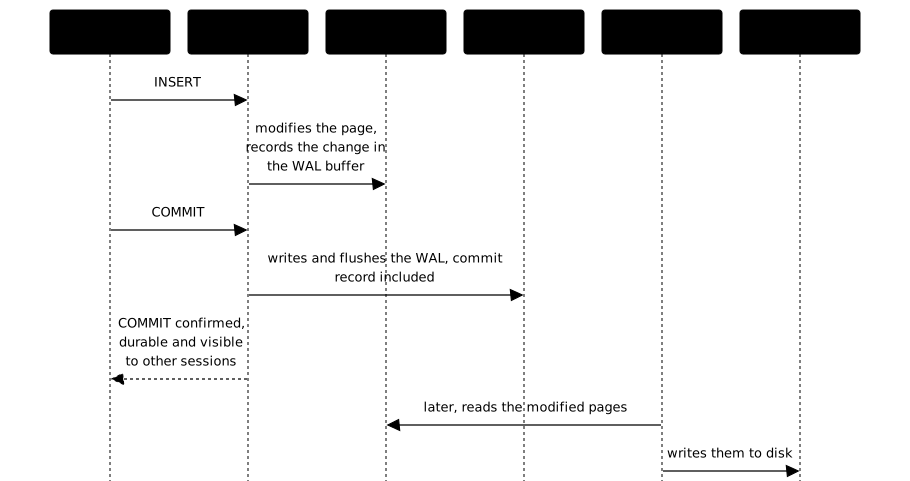
In detail, four moments follow one another:
- The client sends the
INSERTto its backend, through the Unix socket or through TCP. - The backend modifies the page concerned in the shared buffers (the in-memory cache) and records the change in a WAL buffer, also in memory. Nothing is on disk yet, and the row is not visible to other sessions, because the transaction is not committed.
- At
COMMIT, the backend writes the commit record to the WAL and flushes it topg_wal/before replying. The transaction is then durable even in case of a crash, and other sessions see it. - Later, the checkpointer writes the modified pages to the data files. In the meantime, the WAL is enough to replay everything.
The walwriter therefore does not play the leading role: it flushes in the background the WAL that the backends have not flushed yet. It becomes decisive when synchronous_commit is off: the backend then replies without waiting for the flush, and a server crash in the short window that follows can lose the last confirmed transactions. The database stays consistent in that case, but those transactions are not durable.
This mechanism explains why PostgreSQL restarts in a consistent state after a crash: it replays the WAL to bring the data files back in line with the committed transactions.
What is the WAL, and why is it critical?
The WAL (Write-Ahead Log) is PostgreSQL's transaction log. Its principle: every change is written to the log before it is applied to the data files, by a sequential write, hence a fast one. The WAL files live in pg_wal/:
ls /var/lib/postgresql/18/main/pg_wal/000000010000000000000001archive_statussummariesEach WAL file is 16 MB by default. The current write position, the LSN (Log Sequence Number), tells where the log stands:
SELECT pg_current_wal_lsn(); pg_current_wal_lsn-------------------- 0/17A6148The log serves three functions, which is what makes it the foundation of everything else in the training.
| Function | How it works |
|---|---|
| Crash recovery | On restart after a crash, PostgreSQL replays the WAL from the last checkpoint to get back to a consistent state. Transactions whose WAL was flushed are guaranteed. |
| Replication | A standby server receives the WAL from the primary server and replays it continuously: this is streaming replication. |
| PITR (Point-In-Time Recovery) | By archiving the WAL, you restore the database to any moment: the state at 2:32 pm last Tuesday, for example. |
Continuous archiving and point-in-time recovery are taught in Backup and restore (in French), and streaming replication in Replication (in French). Remember here only that the WAL is the reason you can survive a crash and replay changes elsewhere.
Key points
- A PostgreSQL cluster is a PGDATA directory on the disk; an instance is the set of processes that serve it. This has nothing to do with high availability.
- On Debian and Ubuntu, the configuration (
postgresql.conf,pg_hba.conf) is in/etc/postgresql/18/main/, not in PGDATA.pg_settingsgives the real paths. - Three databases exist by default:
postgres(administration),template1(the model forCREATE DATABASE) andtemplate0(a clean model). - A schema is a namespace within a database, and
search_pathdecides where a table without a schema is looked up or created. A tablespace is an extra disk location, unnecessary to get started. - A role replaces users and groups:
LOGINallows connecting,NOLOGINcreates a group role. Thepostgresrole is the superuser. - The Unix socket (
peerauthentication) and TCP are two distinct channels, andpg_hba.confchooses the method for each. - PostgreSQL is multi-process: a main process, permanent background processes and one backend per client.
- At
COMMIT, the backend flushes the WAL; the checkpointer writes the data files later. Withsynchronous_commit = off, the backend replies without waiting for that flush. - The WAL makes crash recovery, replication and PITR possible.
Knowledge check
Eight questions on the meaning of the word cluster, the real location of the configuration on Debian, the template databases and the limit of a connection to a single database, roles, the Unix socket and what the WAL guarantees at commit.
Knowledge check
Check what you have learned with this interactive quiz
How it works
- The timer starts when you click Start
- Multiple choice, true/false and short answer questions
- You can move between questions
- Detailed results are shown at the end
Starts the quiz and the timer
Review
(0/0)Score by domain
A domain groups several guides and gets several questions, so its score is more reliable than a per-topic score, which often rests on a single question.
Summary
Strengths
No topic passed at 80% on at least two questions yet.
Weak areas
No topic below the pass mark.
Recommended next
Hints before you try again?
Continue the course: Install PostgreSQL 18 from the PGDG repository
A new full quiz with random questions
Work again only on the questions you missed