
A PostgreSQL instance that is running is not necessarily a usable one. Three obstacles stand between any service and the server: the server must listen on the right address, it must accept the client, and the client must be able to authenticate without anyone typing a password. This lesson clears them one by one with psql, the official command-line client, then teaches you to read the real state of the server instead of assuming it.
What you will learn
- Connect to an instance over the Unix socket, then over TCP
- Open network access:
listen_addresseson one side, ahostline inpg_hba.confon the other - Set up a
~/.pgpassfile thatpsqlreally honours, and prove it - Create a schema and a table owned by the service role
- Read the real state of the server with
SHOW,pg_settingsand the catalog
Prerequisites
This lesson administers an instance, it does not teach the SQL language. It therefore assumes:
- a PostgreSQL 18 instance installed and running, as in the Installation guide;
- the architecture vocabulary (cluster, database, schema, role), covered in Découvrir PostgreSQL (in French);
- the basics of SQL and of
psqlin scripts, covered in the SQL course: Lire le schéma d'une base PostgreSQL (in French) and psql en script (in French). The\copyimport, the-vand\gsetvariables, exit codes and transactions are explained there, this lesson does not repeat them.
Quick check:
psql --versionpsql (PostgreSQL) 18.3 (Debian 18.3-1.pgdg12+1)Why is a running instance still unreachable?
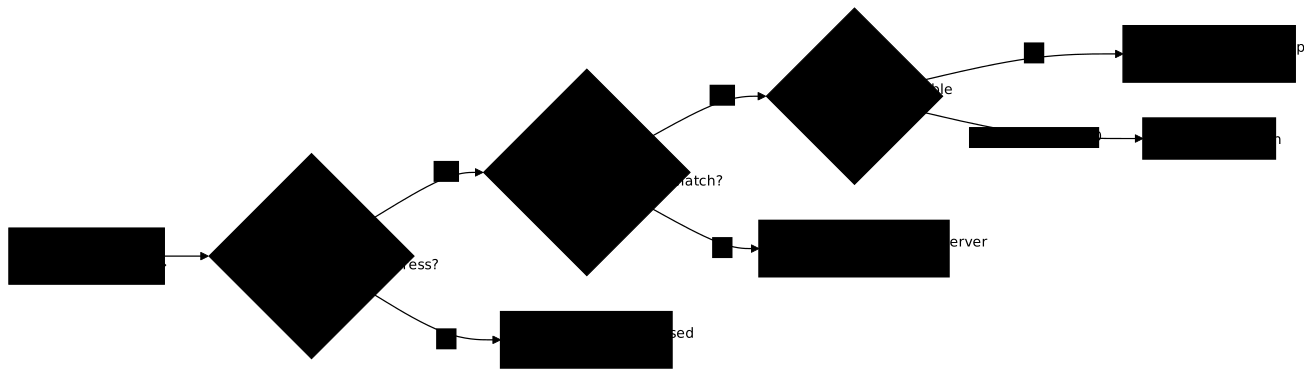
A remote client goes through three successive doors, and each lives in a different place. The first is listen_addresses, in postgresql.conf: until the server's address is listed there, nobody reaches port 5432. The second is pg_hba.conf, which says who gets in, from where and with which method. The third is on the client side: a script cannot type a password, so it needs a .pgpass readable by itself alone.
The diagram below follows a remote client from left to right. Look at where each failure stops and which action fixes it: a door closed by listen_addresses requires a restart, whereas a rejection by pg_hba.conf is settled with a simple reload.
How do you connect over the socket and over TCP?
psql connects through two channels, and the channel decides the authentication method. The Unix socket stays on the server's machine; TCP crosses the network, even toward 127.0.0.1. PostgreSQL also distinguishes the system user from the database role: these are two separate notions, even when they share a name.
Over the Unix socket: peer authentication
On the server itself, the peer method compares the system user with the PostgreSQL role, with no password:
sudo -u postgres psqlThe postgres=# prompt appears. The # indicates a superuser; an ordinary role would see =>. To target a specific database:
sudo -u postgres psql -d lab_adminOver TCP: host, port, role and database
A TCP connection names the host, the port, the role and the database explicitly. It no longer goes through peer but through the method that pg_hba.conf declares for that address, usually scram-sha-256, which asks for a password:
psql -h 127.0.0.1 -p 5432 -U admin_lab -d lab_adminpsql also accepts a full URI, handy in an environment variable: postgresql://admin_lab@127.0.0.1:5432/lab_admin. The format is postgresql://[user[:password]@][host][:port][/dbname][?param=value].
Environment variables and the service file
Repeating -h, -p, -U and -d on every call is tedious and error-prone. Two mechanisms factor them out. The environment variables PGHOST, PGPORT, PGUSER and PGDATABASE are read by psql when the matching option is absent:
export PGHOST=127.0.0.1export PGPORT=5432export PGUSER=admin_labexport PGDATABASE=lab_adminpsqlThe service file ~/.pg_service.conf names a set of connection parameters, in INI format. You then call it by name, which avoids scattering hosts and ports across scripts:
[facturation]host=192.168.122.60port=5432dbname=facturationuser=applipsql "service=facturation"The file is read by default from the account's home directory (~/.pg_service.conf); the PGSERVICEFILE variable points to another one, and PGSERVICE=facturation even spares you from naming the service on the command line. Write each key glued to the = sign: with host = 192.168.122.60, psql answers psql: error: syntax error in service file "/home/bob/.pg_service.conf", line 2. An unknown service name gives psql: error: definition of service "nexiste" not found. A parameter added on the line ("service=facturation dbname=autre") overrides the one in the file.
The password has no place in this file: psql fetches it from ~/.pgpass, which recognises the host given by the service. This lesson's lab does not exercise the service file; the technique is mostly useful when one administration workstation targets several instances.
The .pgpass file: a password without typing
A script cannot type a password. PostgreSQL provides the ~/.pgpass file for that, one line per connection in the format host:port:database:role:password. Create it with the right mode before writing the secret into it, then edit it:
install -m 0600 /dev/null ~/.pgpassnano ~/.pgpass192.168.122.60:5432:facturation:appli:<change-me>The host field must match literally what you pass to -h: a localhost:... line does not serve for -h 192.168.122.60, and psql then reports nothing: the failure looks like that of a file with overly broad permissions, described in the box below. The wildcard * stands for the host, the port, the database or the role (*:*:*:appli:password works).
The only real proof is a connection that succeeds without a password being supplied. The -w option (--no-password) forbids psql from asking for anything: it succeeds or it fails, it never blocks. A closed standard input guarantees that no human answers in its place:
psql -w -h 192.168.122.60 -U appli -d facturation -At -c 'select 1' < /dev/nullThe command must answer 1. For exit codes and the other ways of passing a secret, the lesson psql en script (in French) takes over.
\conninfo: check where you are
Once connected, \conninfo tells you which database, with which role, and through which channel you are talking:
\conninfo Parameter | Value----------------------+--------------------- Database | lab_admin Client User | postgres Socket Directory | /var/run/postgresql Server Port | 5432 Protocol Version | 3.0 Password Used | false SSL Connection | false Superuser | onThree lines are read first: Database (the active database), Password Used (false means peer authentication through the socket) and SSL Connection (false: no encryption). The Socket Directory line appears only for a connection through a socket.
How do you open network access to the instance?
Opening network access takes two files, because each answers a different question. listen_addresses in postgresql.conf decides on which addresses the server listens; pg_hba.conf decides whom it accepts. Setting one without the other leaves the connection failing, with a different message each time.
On Debian, the instance as shipped listens only on localhost. For it to listen on its private address too, edit /etc/postgresql/18/main/postgresql.conf:
listen_addresses = 'localhost,192.168.122.60'listen_addresses is a parameter with the postmaster context: it only takes effect on restart of the service, never live. The lesson Configurer PostgreSQL (in French) explains why and how to know in advance.
sudo systemctl restart postgresql@18-mainss -ltn sport = :5432The second command lists the listeners on port 5432: you must see an address other than the loopback. You still have to tell the server whom to accept, with a host line added to /etc/postgresql/18/main/pg_hba.conf:
host facturation appli 192.168.122.0/24 scram-sha-256The columns read in order: connection type, database, role, client address, method. The server applies the first line that matches. The scram-sha-256 method never carries the password in clear; password sends it as is and trust lets anyone in without asking, which is worse than the starting state. This file is reloaded without cutting anyone off:
sudo systemctl reload postgresql@18-mainThe pg_hba_file_rules view shows how the server read the file and flags the lines in error. Full hardening of pg_hba.conf, TLS included, is covered in Sécuriser PostgreSQL (in French).
How do you read the real state of the server?
An administrator does not guess an instance's configuration, they read it. Three sources complement each other: SHOW for a single value, the pg_settings view for all values with their origin, and the catalog (pg_database, pg_tables, pg_roles) for objects. The psql meta-commands are only a shortcut to that catalog.
SHOW and pg_settings: the parameters in service
SHOW answers for one parameter, the pg_settings view for all of them, with the source of the value and its context (which says how it can be changed):
SHOW server_version;SHOW listen_addresses;SHOW data_checksums;SELECT name, setting, source, contextFROM pg_settingsWHERE name IN ('server_version', 'listen_addresses', 'data_checksums');data_checksums says whether the instance protects its data pages with a checksum. Remember that pg_settings gives the value the server is running with, not what a file contains: the lesson Configurer PostgreSQL (in French) builds on that difference.
Meta-commands that query the catalog
Meta-commands start with \ and are interpreted by psql itself, not by the server. They follow a constant logic: d for describe, followed by a letter that designates the object type (n schema, t table, i index, u role). The + suffix adds details.
\l Name | Owner | Encoding | Locale Provider | Collate | Ctype | Access privileges-----------+-----------+----------+-----------------+---------+---------+----------------------- lab_admin | admin_lab | UTF8 | libc | C.UTF-8 | C.UTF-8 | postgres | postgres | UTF8 | libc | C.UTF-8 | C.UTF-8 | template0 | postgres | UTF8 | libc | C.UTF-8 | C.UTF-8 | =c/postgres + | | | | | | postgres=CTc/postgres template1 | postgres | UTF8 | libc | C.UTF-8 | C.UTF-8 | =c/postgres + | | | | | | postgres=CTc/postgres\l lists the databases and their owner. \du does the same for roles, and \dt app.* for the tables of a schema:
\du Role name | Attributes-----------+------------------------------------------------------------ admin_lab | Create DB postgres | Superuser, Create role, Create DB, Replication, Bypass RLS\dt app.* Schema | Name | Type | Owner--------+-----------+-------+---------- app | clients | table | postgres app | commandes | table | postgresNote the Owner column: here the tables belong to postgres, the superuser. This is precisely what a service instance must not do, as the section "How do you create a service's objects?" shows.
| Command | What it shows |
|---|---|
\l | The databases and their owners |
\c <database> | Connect to another database |
\dn+ | The schemas, with their privileges |
\dt [schema.*] | The tables of a schema |
\d+ <table> | The detailed structure of a table |
\du | The roles and their attributes |
\x auto | Vertical display when the output is too wide |
\h <command> | Help on an SQL command |
\? | The list of all meta-commands |
\q | Quit psql |
None of these commands ends with a semicolon, since psql handles them without sending them to the server.
Two useful administration queries
These two queries read the system views and answer two everyday questions: where the disk space goes, and who is connected. They need no extension.
SELECT datname, pg_size_pretty(pg_database_size(datname)) AS tailleFROM pg_database WHERE datistemplate = falseORDER BY pg_database_size(datname) DESC; datname | taille-----------+--------- lab_admin | 7894 kB postgres | 7654 kBSELECT pid, usename, datname, state, LEFT(query, 60) AS queryFROM pg_stat_activity WHERE backend_type = 'client backend'; pid | usename | datname | state | query------+----------+-----------+--------+-------------------------------------------------------------- 5504 | postgres | lab_admin | active | SELECT pid, usename, datname, state, LEFT(query ...To go beyond these two snapshots of the instance, continuous observation of instance activity and slow queries are covered in Superviser et maintenir PostgreSQL (in French).
How do you create a service's objects?
An application must never write to the database as a superuser. So you create a service role for it, and give it a schema and tables it owns. Objects follow the role that creates them: connecting as postgres to create everything makes postgres the owner, and you then have to fix it.
The appli role and the facturation database already exist (the lab provides them). The schema is created with AUTHORIZATION, which makes appli its owner, from a session opened on the facturation database:
CREATE SCHEMA appli AUTHORIZATION appli;
CREATE TABLE appli.clients (  id  INT GENERATED ALWAYS AS IDENTITY PRIMARY KEY,  nom TEXT NOT NULL);
INSERT INTO appli.clients (nom) VALUES ('Alice Martin'), ('Bob Dupont');
If the table was created by another account, an ALTER TABLE appli.clients OWNER TO appli; restores ownership. Finally check in the catalog, not in your memory:
SELECT tablename, tableowner FROM pg_tables WHERE schemaname = 'appli';The tableowner column must read appli. Counting the tables of a schema is done the same way, with SELECT count(*) FROM pg_tables WHERE schemaname = 'appli';. The SQL language itself (types, constraints, transactions, DROP) is taught in the SQL course, not here.
Put it into practice
The lab replays this path on a PostgreSQL 18 instance that is running but closed: it listens only on the loopback, knows no network line in pg_hba.conf and has neither a .pgpass nor any application object. You open network access, set up a .pgpass in 0600, create the service's schema and table, then fill in a report of four values. The validation reads the state of the machine: listening addresses, pg_hba.conf lines, the .pgpass mode, objects present in the catalog, and each value of the report compared with what the server answers. A TCP connection with no password supplied serves as the final proof.
Troubleshooting
Connection errors are sorted by their origin. A FATAL message comes from the server and concerns the role or the authentication; a message prefixed psql: error: comes from the client, often because it found nobody at the end of the channel. The table links each symptom to the door that blocks, then to the file to fix.
| Symptom | Door | Likely cause | Fix |
|---|---|---|---|
psql: error: connection to server on socket "/var/run/postgresql/.s.PGSQL.5432" failed: No such file or directory, followed by Is the server running locally and accepting connections on that socket? | Service | The service is not started | pg_isready, then sudo systemctl status postgresql@18-main |
connection to server at "192.168.122.60", port 5432 failed: Connection refused, followed by Is the server running on that host and accepting TCP/IP connections? | listen_addresses | The server does not listen on this address (or port) | Fix postgresql.conf, restart, check with ss -ltn sport = :5432 |
FATAL: no pg_hba.conf entry for host "192.168.122.60", user "appli", database "facturation", no encryption (or pg_hba.conf rejects connection for host ... if a reject line matches) | pg_hba.conf | No host line matches the address, the role and the database | Add the line, reload, check pg_hba_file_rules |
FATAL: Peer authentication failed for user "postgres" | Method | Socket connection where the requested role (here -U postgres) differs from the system user | sudo -u postgres psql, or switch to TCP |
FATAL: role "bob" does not exist | Role | The role does not exist | \du, then CREATE ROLE bob LOGIN PASSWORD '<change-me>'; |
Password for user ...: then fe_sendauth: no password supplied with -w | .pgpass | Two causes for the same symptom: a mode other than 0600 (preceded by WARNING: password file "..." has group or world access on stderr), or a host in the file that differs from -h (no warning) | Rerun without 2>/dev/null, chmod 600 and check with stat, then align the file's host with -h |
| The output is truncated or paged | Display | Width or pager | \x auto, \pset pager off |
To tell these causes apart, test in the order of the doors: ss -ltn first, then pg_hba_file_rules, finally psql -w, which fails rather than asking for a password when the .pgpass is ignored. Faced with no password supplied, check the permissions then the host: the two failures look alike.
Key points
- A running instance is not reachable: three doors to go through,
listen_addresses,pg_hba.confand the password on the client side. listen_addressesrequires a restart;pg_hba.confis reloaded.- On a network line,
scram-sha-256is the only acceptable method here:trustlets anyone in without asking,passwordsends the secret in clear. - A
.pgpasswith a mode other than 0600 is ignored, with a warning onstderrthat2>/dev/nullhides; a host that does not match gives the same failure with no warning at all. Create it withinstall -m 0600and prove it withpsql -w. - A service's objects belong to the service role, not to
postgres:CREATE SCHEMA ... AUTHORIZATION,ALTER TABLE ... OWNER TO. pg_settingsand the catalog tell you what the server does, not what you think you wrote.\copy, the-vvariables,\gsetand transactions belong to the SQL course.
Knowledge check
Eight questions on the three doors of a network connection, the trap of an overly permissive .pgpass, the difference between restart and reload, and the ownership of a service's objects.
Knowledge check
Check what you have learned with this interactive quiz
How it works
- The timer starts when you click Start
- Multiple choice, true/false and short answer questions
- You can move between questions
- Detailed results are shown at the end
Starts the quiz and the timer
Review
(0/0)Score by domain
A domain groups several guides and gets several questions, so its score is more reliable than a per-topic score, which often rests on a single question.
Summary
Strengths
No topic passed at 80% on at least two questions yet.
Weak areas
No topic below the pass mark.
Recommended next
Hints before you try again?
Continue the course: Configure PostgreSQL: memory, connections, WAL and logging
A new full quiz with random questions
Work again only on the questions you missed