
dsoxlab start <id> starts a lab from end to end: it sets the context (the
active catalogue section), checks the prerequisites, brings the machines up
when the lab needs them, then prepares the lab and opens the session. It
announces each step together with the command that replays it on its own. This
lesson is for anyone who has already played the demonstration lab and picked a
lab from a catalogue. You will see what run does and does not do, what
start chains around it, and how to read the failure of a step.
What you will learn
- Start a lab with
dsoxlab startand read every step it announces. - Say what
dsoxlab runprepares, and what it leaves aside. - Know which steps a
shelllab does not have, and why. - Replay on its own the step that failed, with the command that
startnames. - Run
startagain without breaking anything, and clean the lab when step 4 asks for it.
Prerequisites
You need the dsoxlab CLI in version 0.8.0 or newer, installed as the lesson
Installing dsoxlab locally describes, and a
catalogue installed with dsoxlab catalog add, as the lesson Installing and
managing your dsoxlab lab catalogues shows. The
lesson Playing your first dsoxlab lab with dsoxlab
demo had you play the demonstration lab. Choosing
a lab is the subject of the lesson Finding your next dsoxlab
lab: here, you have a lab identifier at hand, or
you let next pick one.
A vm lab, which is played on virtual machines, also needs the catalogue's SSH
key, the ssh/id_ed25519 file that dsoxlab instructor bootstrap creates.
Without it, provision stops, and doctor does not flag it.
What does dsoxlab run do, and why is it not enough?
dsoxlab run <id> prepares the lab's environment and opens a session in it,
but it never brings the machines up. A lab has a runtime, its execution
mode: a shell lab is played in a directory on your machine, a vm lab on
virtual machines. On a shell lab, the session is a subshell in the working
directory, challenge/work/ by default, with the lab's starting files (its
fixtures) copied into it. On a vm lab, it is usually an SSH session on the
target machine, opened once the lab's preparation playbook has been played (an
Ansible script that prepares the machine). In both cases, you leave it with
exit.
That is why a first run on a vm lab fails when the machines do not exist:
run exits with code 2 and names provision, the command that brings the
infrastructure up. This is not a breakdown, it is a step nobody had told you
to play beforehand. Here is what dsoxlab run answers on the
epreuve-livrer-une-image lab, a vm lab, as long as no machine of the
catalogue exists. The outputs of this lesson were captured with
DSOXLAB_LANG=fr, so the messages are in French: the same messages exist in
English.
$ dsoxlab run epreuve-livrer-une-imageℹ Démarrage du lab epreuve-livrer-une-image (runtime: vm)…⠋ Running setup.yaml… ━━━━━━━━━━━━━━━━━━━━━━━━━━━━━━ 0/? 0:00:00✘ Ce lab a besoin d'une VM, et aucune ne tourne : l'infrastructure du lab n'estpas provisionnée.Monte-la d'abord : dsoxlab provisionLook at the last two lines: they give the command to type, and the ✘ cross
announces that run stopped without preparing anything. The ⠋ progress line
appears for a moment before the error, and it does not mean that a step
succeeded.
In the subshell of a shell lab, dsoxlab check works as it does from the
outside. This comes down to a detail of the startup: run takes a write lock
on the catalogue (a token that prevents two commands from writing to it at the
same time) while it prepares the lab, then releases it before opening the
session. Without that, the dsoxlab check typed in the session would be
refused by its own session.
On a vm lab, dsoxlab does not exist on the machine: type your dsoxlab
commands in a second terminal, or after exit. Once the session is open, run
also notes which lab is active, which lets you type check without an
identifier.
What does dsoxlab start do, step by step?
dsoxlab start <id> plays the complete sequence that run takes for granted,
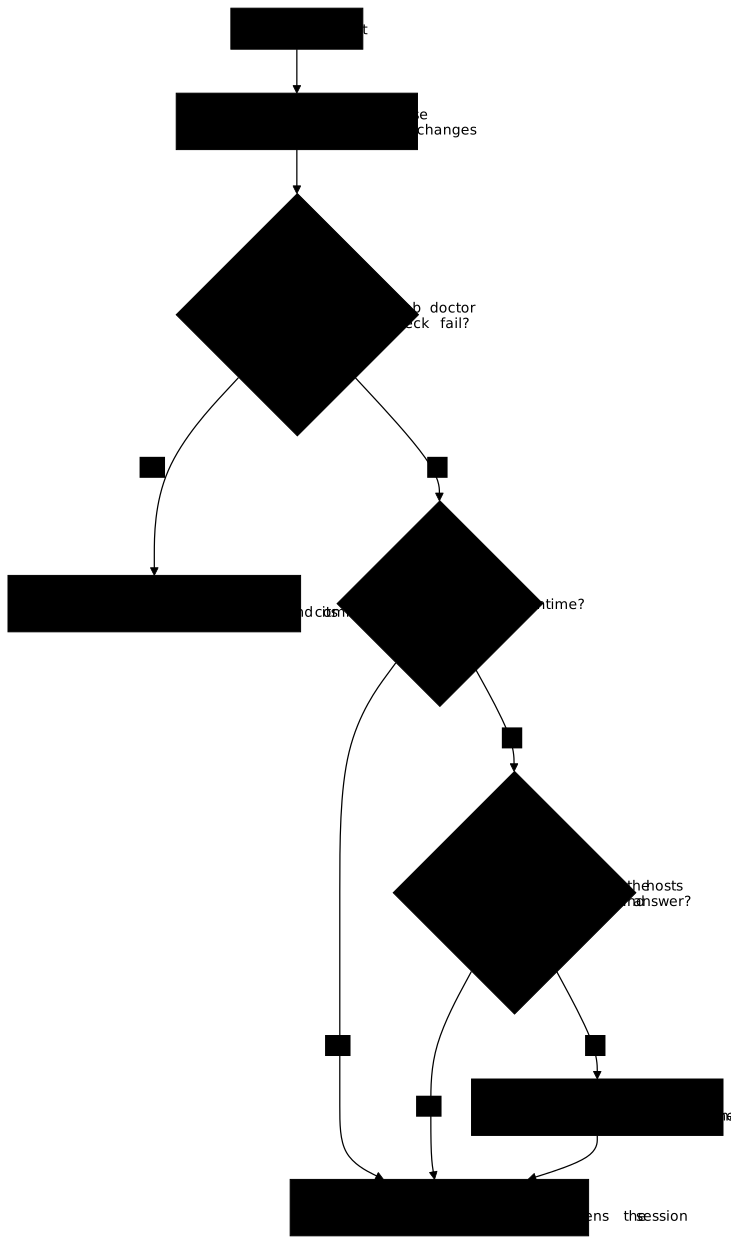
and it announces each step instead of playing it silently. The diagram below
shows its decisions. Look at the two diamonds at the bottom: the infrastructure
step only exists for a lab whose runtime is not shell, and it is skipped when
the hosts are already up and answering.
Each step is announced with its rank, its name and, in parentheses, the command
that replays it on its own. Here is a first start on the
epreuve-livrer-une-image lab, a vm lab of the containers catalogue,
played with dsoxlab 0.8.0 while no machine existed. The outputs of Terraform
and Ansible, very long, are abridged by [...]; the lines wrapped at 80
columns are those of the real output:
$ dsoxlab start epreuve-livrer-une-imageDémarrage de epreuve-livrer-une-image : 4 étapes, chacune annoncée avec sacommande.
▶ 1/4 · contexte actif  (dsoxlab use containers)  section posée sur « containers »
▶ 2/4 · prérequis  (dsoxlab doctor)  17 contrôles requis, tous verts
▶ 3/4 · infrastructure  (dsoxlab provision)ℹ Provisionnement de l'infrastructure (provider : kvm)…[...]✔ Socle en place (bootstrap.yaml). Les labs peuvent désormais le supposer.✔ Provisionnement terminé : 2 hôte(s) prêt(s).ℹ   docker-client.lab → 10.10.120.12ℹ   docker.lab → 10.10.120.11
▶ 4/4 · préparation et session  (dsoxlab run epreuve-livrer-une-image)ℹ Démarrage du lab epreuve-livrer-une-image (runtime: vm)…[...]✔ Lab epreuve-livrer-une-image prêt. Vous êtes connecté à docker.lab.
Read the parenthesis of each line: it is the command you would type by hand to
replay that step on its own. Here, the context changed section ("section posée",
section set), step 3 brought up two machines (docker.lab and
docker-client.lab, with their addresses) and laid down the catalogue's
foundation, then step 4 prepared the lab. The whole thing took about three
minutes on the test machine. Here is the role of each step.
- The context sets the lab's section (
dsoxlab use <section>), but only if it differs from the one already active. The step is displayed all the same when there is nothing to set, so that the total does not move between two runs of the same lab. - The prerequisites replay
dsoxlab doctor. If a required check fails,startlists what is missing and exits with code 2, without trying anything beyond. - The infrastructure replays
dsoxlab provision, and only exists for a lab whose runtime is notshell. It is skipped when the declared hosts have an address in the Terraform state (the list of machines that Terraform has created) and answer on SSH port 22. An address alone is not enough: a switched-off machine has one too. When it brings the machines up, it also lays down the catalogue's foundation (thebootstrap.yaml, here the installation of the Docker engine), so that the labs can take it for granted. - The preparation and the session play
dsoxlab run, which does its whole job: lock, progress bars, opening of the session.
A shell lab therefore has no infrastructure step, and start does not
announce it: there is nothing to bring up, hence nothing to skip. Here is
start on the shell lab lire-du-code, of the dev-pour-ops catalogue:
three steps instead of four, and no machine.
$ dsoxlab start lire-du-codeDémarrage de lire-du-code : 3 étapes, chacune annoncée avec sa commande.
▶ 1/3 · contexte actif  (dsoxlab use fil-rouge)  section posée sur « fil-rouge »
▶ 2/3 · prérequis  (dsoxlab doctor)  6 contrôles requis, tous verts
▶ 3/3 · préparation et session  (dsoxlab run lire-du-code)ℹ Démarrage du lab lire-du-code (runtime: shell)…✔ Lab lire-du-code prêt. Vous êtes dans challenge/work/, votre répertoire detravail isolé.[...]
Compare with the vm lab: the counter announces "3 étapes" (3 steps), and the
last line says that you are in the lab's working directory, not on a machine.
The number of doctor checks (six here, seventeen for the containers
catalogue) depends on the catalogue, not on the type of lab. The [...]
replaces the "Comment fonctionne ce lab" panel (How this lab works).
Without an identifier, start takes the lab that dsoxlab next would suggest,
and says so before continuing. The --target option is the same as the one of
run: it chooses the target machine of a lab that declares several. start
shortens the typing and the order to remember; each command taken on its own
works exactly as before.
What should you do when a step of start fails?
When a step fails, start names it with its command and tries nothing
beyond. You therefore never have to look for which of use, doctor,
provision or run you skipped. Steps 3 (provision) and 4 (run) return
their own exit code. Step 2 is the exception: doctor exits with 0 (or 9
with --strict) even when a required check is missing, so it is start that
then imposes code 2. Here is the failure of the prerequisites step, on a
machine where Terraform and ansible-playbook are not in the PATH (the list
of folders where the shell looks for programs):
$ dsoxlab start epreuve-livrer-une-imageDémarrage de epreuve-livrer-une-image : 4 étapes, chacune annoncée avec sacommande.
▶ 1/4 · contexte actif  (dsoxlab use containers)  déjà sur « containers », rien à poser
▶ 2/4 · prérequis  (dsoxlab doctor)  il manque : Terraform, ansible-playbook✘ L'étape 2/4 (prérequis) a échoué. Rien au-delà n'a été tenté.ℹ Rejoue cette étape seule : dsoxlab doctor
The command exited with code 2, the one that start imposes when a
prerequisite is missing. Look at the last line: it gives the command that
replays this step on its own. Type it, fix what doctor reports
(dsoxlab doctor --fix repairs what can be repaired safely), then run start
again.
On a vm lab, the infrastructure step can fail too. If provision exits with
code 8, the hosts exist but did not answer within the delay: the infrastructure
is not usable as it stands. Run dsoxlab provision again, which resumes
without recreating anything, and lengthen the delay if the machine is slow with
DSOXLAB_HOST_READY_TIMEOUT=360 dsoxlab provision.
When you run start again, it probes the hosts before declaring the
infrastructure ready. The message "les hôtes déclarés ont une adresse" (the
declared hosts have an address) abridges this check: start verifies that
each host has an address, then tries a TCP connection on its port 22 (2 seconds
at most per host), and only skips the step if all of them answer. Bringing the
machines up is explained in the lesson dsoxlab on the trainer side: setting up
the infrastructure of vm labs.
Why does a second start fail at step 4?
Running start again does not bring the machines up again, but step 4
replays the lab's preparation, and some labs refuse to replay it on a workshop
that is already in place. A workshop is the folder that the preparation
creates on the machine for your work. This is the case of the
epreuve-livrer-une-image lab: run again without having undone anything, it
passes the first three steps without doing anything, then stops on a task of
the preparation playbook:
$ dsoxlab start epreuve-livrer-une-imageDémarrage de epreuve-livrer-une-image : 4 étapes, chacune annoncée avec sacommande.
▶ 1/4 · contexte actif  (dsoxlab use containers)  déjà sur « containers », rien à poser
▶ 2/4 · prérequis  (dsoxlab doctor)  17 contrôles requis, tous verts
▶ 3/4 · infrastructure  (dsoxlab provision)  déjà provisionnée : les hôtes déclarés ont une adresse, rien à remonter
▶ 4/4 · préparation et session  (dsoxlab run epreuve-livrer-une-image)ℹ Démarrage du lab epreuve-livrer-une-image (runtime: vm)…[...]  ✔ docker-client.lab: Refuser d'écraser un atelier existant (ok)  ✔ docker.lab: Refuser d'écraser un atelier existant (ok)  ✘ docker.lab: Exiger un atelier propre    /opt/lab-livraison existe déjà ; jouez `dsoxlab clean` d'abord.  ✘ docker-client.lab: Exiger un atelier propre    /opt/lab-livraison existe déjà ; jouez `dsoxlab clean` d'abord.⠴ Tâche : Exiger un atelier propre ━━━━━━━━━━━━━━━━━━━━━━━━━━━━━━ 12/? 0:00:03✘ setup.yaml a échoué pour epreuve-livrer-une-image sur la target « cible »(rc=2, status=failed).[...]✘ L'étape 4/4 (préparation et session) a échoué. Rien au-delà n'a été tenté.ℹ Rejoue cette étape seule : dsoxlab run epreuve-livrer-une-image
Read the message under the failing task, repeated for each machine: it tells
you to play dsoxlab clean to remove the workshop of the previous attempt. The
first [...] replaces the tasks that succeeded before, the second the
per-host recaps and the path of Ansible's full log. The command exited with
code 2.
Once the lab has been cleaned (the lesson Starting over or cleaning up a
dsoxlab lab details clean),
run start again. Here is what this second start gives, played on the
docker-premier-conteneur lab of the same containers catalogue, after a
dsoxlab clean (the statement and the panel that end the output are cut):
$ dsoxlab start docker-premier-conteneurDémarrage de docker-premier-conteneur : 4 étapes, chacune annoncée avec sacommande.
▶ 1/4 · contexte actif  (dsoxlab use containers)  déjà sur « containers », rien à poser
▶ 2/4 · prérequis  (dsoxlab doctor)  17 contrôles requis, tous verts
▶ 3/4 · infrastructure  (dsoxlab provision)  déjà provisionnée : les hôtes déclarés ont une adresse, rien à remonter
▶ 4/4 · préparation et session  (dsoxlab run docker-premier-conteneur)ℹ Démarrage du lab docker-premier-conteneur (runtime: vm)…  ✔ docker.lab: Gathering Facts (ok)[...]  ● docker.lab: Lancer le conteneur que l'apprenant devra ARRÊTER (changed)  ● docker.lab: Créer le conteneur que l'apprenant devra SUPPRIMER (changed)[...]✔ Lab docker-premier-conteneur prêt. Vous êtes connecté à docker.lab.[...]✔ Session terminée pour docker-premier-conteneur. Retour à votre répertoired'origine.
Look first at the first three steps: the first sets nothing, the second passes
its checks, the third skips bringing the machines up, and none of them redoes
any work. Then look at step 4: it replays run, hence the lab's preparation. A
solid bullet ● marks a task that changed something, a tick ✔ a task that
was already in the right state. Here, the two ● show that the containers
removed by clean are created again. The command exits with code 0, and the
lab is back in its starting state, without you having retyped provision or
run.
Troubleshooting
None of these cases is a breakdown of the tool: the step reported is waiting for a gesture that the message names.
| Symptom | Cause | Solution |
|---|---|---|
start stops at the "prérequis" (prerequisites) step with "il manque : …" (missing: …) | A required doctor check fails for this catalogue | dsoxlab doctor, then dsoxlab doctor --fix for what can be repaired safely |
run exits with 2 and names provision | vm lab started without the machines existing | dsoxlab provision, or dsoxlab start <id> |
provision exits with 1 and says to run dsoxlab instructor bootstrap first | The catalogue has no ssh/id_ed25519 SSH key, and doctor does not check it | dsoxlab instructor bootstrap, then dsoxlab provision or dsoxlab start <id> |
provision exits with 8 | The hosts exist but did not answer within the delay | Run dsoxlab provision again, and lengthen DSOXLAB_HOST_READY_TIMEOUT if needed |
start without an identifier exits with 1 | next finds no lab to suggest in the active scope | dsoxlab use --reset, then dsoxlab list-labs |
start stops at step 4 on "Exiger un atelier propre" (Require a clean workshop) | The workshop of the previous attempt still exists on the machine | dsoxlab clean <id>, then dsoxlab start <id> |
Key points
runprepares the environment and opens the session, without ever bringing the machines up.startchains context, prerequisites, infrastructure andrun, announcing each step with its command.- A
shelllab has no infrastructure step. - The infrastructure is skipped only if the hosts have an address and answer on SSH.
- When a step fails,
startnames it and gives the command that replays it; it exits with 2 if it is the prerequisites step, and returns the code ofprovisionorrunfor steps 3 and 4. - Running
startagain does not bring the machines up again; step 4 may nevertheless refuse an existing workshop, anddsoxlab cleanremoves it. - Without an identifier,
starttakes the lab thatdsoxlab nextsuggests.
Knowledge check
Check that you have the essentials of this guide. The questions only cover what has just been explained here.
Knowledge check
Check what you have learned with this interactive quiz
How it works
- The timer starts when you click Start
- Multiple choice, true/false and short answer questions
- You can move between questions
- Detailed results are shown at the end
Starts the quiz and the timer
Review
(0/0)Score by domain
A domain groups several guides and gets several questions, so its score is more reliable than a per-topic score, which often rests on a single question.
Summary
Strengths
No topic passed at 80% on at least two questions yet.
Weak areas
No topic below the pass mark.
Recommended next
Hints before you try again?
Continue the course: Working in a dsoxlab lab: mission, course, ssh, hints
A new full quiz with random questions
Work again only on the questions you missed