
dsoxlab demo installs a catalogue holding a single lab, premiers-pas, and
has you play it in five minutes, with no repository to clone, no virtual machine
and no Docker. This lesson is for anyone who has just installed the CLI and
wants to see one complete loop before choosing a catalogue: read the course,
open the session, read the mission, produce a result, ask for a hint, then have
dsoxlab check validate the work and read the score. The subject of the lab is
dsoxlab itself, so there is nothing else to know. The gestures you learn here
are the ones you will repeat on every lab of the site.
What you will learn
- Install the demonstration catalogue with
dsoxlab demo. - Describe the loop of a lab: course, session, mission, validation, score.
- Produce the state the mission asks for, in the right directory.
- Measure what a hint costs, with
dsoxlab hint. - Interpret the result of
dsoxlab checkand the history ofdsoxlab scores. - Start over from scratch with
dsoxlab demo --force, knowing what it costs.
Prerequisites
You need the dsoxlab CLI (the command-line tool) in version 0.8.0 or newer,
installed as the lesson
Installing dsoxlab locally describes.
The test is simple: dsoxlab --version prints a version number, 0.8.0 or
higher. No administrator rights are needed here, and no hypervisor (the software
that runs virtual machines), because the demonstration lab runs in a plain
directory on your machine.
What does dsoxlab demo do, and what does it leave on your machine?
dsoxlab demo copies a demonstration catalogue into your account's data
directory, then makes it active. A catalogue is a repository of labs described
by a meta.yml file; this one holds a single lab.
The runtime of this lab, that is the way it runs, is shell. A shell lab is
played in a directory on your machine, whereas a vm lab starts real
machines.
The active catalogue is the one dsoxlab serves when you are not inside a
catalogue directory. That is what saves you any cd before typing the commands.
dsoxlab demo✔ Demonstration catalog installed in /home/alice/.local/share/dsoxlab/demoℹ To get started, from any directory: dsoxlab course premiers-pas dsoxlab run premiers-pasThen, once the mission is done: dsoxlab check premiers-pasℹ The lab files live in /home/alice/.local/share/dsoxlab/demoThe success criterion is the first message: the path it cites exists, and
dsoxlab list-labs shows a premiers-pas line. The directory follows
$XDG_DATA_HOME when that variable is set, ~/.local/share otherwise. It also
holds your progress and your answers: that is why the command
refuses to overwrite an existing installation.
Running dsoxlab demo again when the catalogue is already there therefore
touches nothing. The command exits with code 1 (a command's exit code is 0
when all goes well, something else otherwise) and tells you how to pick your lab
up again, or how to start over with --force, a gesture covered at the end of
the lesson. The cd it suggests for picking up is only useful if another
catalogue has become active.
✘ The demonstration catalog is already installed in/home/alice/.local/share/dsoxlab/demo.ℹ It may hold your progress and your answers, so nothing was touched.To pick it up: cd /home/alice/.local/share/dsoxlab/demo && dsoxlab list-labsTo start over: dsoxlab demo --forceWhat is the loop of a dsoxlab lab?
A dsoxlab lab follows the same cycle: you open the session with run,
you rely on the course and the mission, you produce a state, then check
measures it. The diagram below shows that cycle. Look above all at the loop
between "Produce" and check: a red test closes nothing, you fix and run it
again. The hint, dotted, is an optional exit that costs points. The diagram
does not show one detail: check also records the failed attempts, as
dsoxlab scores shows further down.
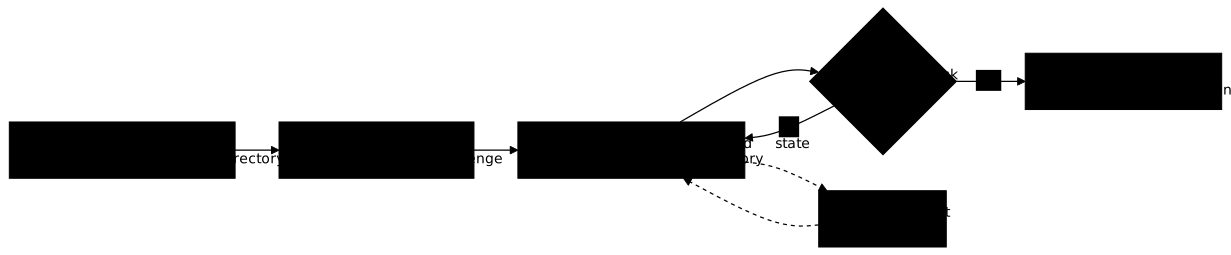
The caption of the diagram gives the rule that matters. check runs tests that
read the state you produced, here files: it does not matter how you created
them. A lab that graded your commands would force you to guess a wording,
whereas here any path to the right state is valid.
How do you play the premiers-pas lab, gesture by gesture?
The lab asks for three files in a reponses/ folder, each holding a word you
find at a precise point of the loop. The three points are the course, the
mission and the hint: producing the three files therefore amounts to playing
the three gestures. You type the commands from any directory, since the
demonstration catalogue is active. The course and the mission are read first,
here, before opening the session, because those two commands do not need it.
Reading the course and the mission
dsoxlab course premiers-pas only prints the first section and a table of
contents; the --all option prints the whole course, in the terminal.
Read it to the end: its last section, "The word of the lesson", gives a word
on a line of its own, which you note down. dsoxlab challenge then prints the
mission, which also contains a word, and says exactly what will be checked.
dsoxlab course premiers-pas --alldsoxlab challenge premiers-pasThe success criterion is being able to answer two questions without reading
again: which word did the course give, and which word did the mission give. At
the bottom, the mission also cites a Working directory: line that says where to
work. When a course or a mission is taller than the terminal, dsoxlab sends it
through a pager (a viewer that scrolls page by page): q quits it.
Opening the session and producing the three files
dsoxlab run premiers-pas prepares the lab and drops you into its working
directory, challenge/work/ for this lab. It is a subshell: a shell
started by dsoxlab, which you leave with exit. Everything you create here is
what will be validated, and nothing else on your machine is touched.
dsoxlab run premiers-pasℹ Starting lab premiers-pas (runtime: shell)…✔ Lab premiers-pas ready. You are now in challenge/work/, your isolated workingdirectory.╭───────────────────────────── How this lab works ─────────────────────────────╮│ ││ dsoxlab course The guided exercises of the course. ││ dsoxlab challenge The mission: what you have to produce. ││ dsoxlab check Run the tests. The score is saved. ││ dsoxlab submit Final submission: saves, then leaves. ││ dsoxlab hint Reveal the next hint, at the cost of points. ││ ││ exit leaves the session at any time, saving nothing. │╰──────────────────────────────────────────────────────────────────────────────╯The welcome panel printed under the message recalls the session commands. In
this subshell, create the reponses/ folder and then the first two files,
replacing the words between angle brackets with the ones you noted:
mkdir -p reponsesecho "<course word>" > reponses/cours.txtecho "<mission word>" > reponses/mission.txtThese commands print nothing when all goes well. You can check with
ls reponses, which must list cours.txt and mission.txt. The tests look for
these files relative to this working directory: creating them elsewhere, in
challenge/ for instance, does not count.
Taking the hint and validating
The third word is nowhere in the course: it comes from dsoxlab hint.
A hint is paid for: the demonstration lab declares one, which removes 20
points out of 100, and the mission announces it before you ask for it. The
command prints the hint with its cost and the total penalty, without asking for
confirmation. Type it in the subshell you are in, where it works; a second
terminal works too.
The cost is recorded at once: replaying the lab does not give it back. In
this lab, dsoxlab reset, which also empties reponses/ on a shell lab, and
dsoxlab demo --force, which also takes the marks away, erase the hints taken.
dsoxlab hint premiers-pas╭──────────────────────────────────── Hint ────────────────────────────────────╮│ 💡 Hint 1/1 ││ ││ The word this hint reveals is: <the word>. Write it to reponses/indice.txt. ││ Notice that dsoxlab scores now shows what this hint cost you: that is the ││ whole point of taking one deliberately. ││ ││ Cost: -20 pts Total hint penalty: -20 pts │╰──────────────────────────────────────────────────────────────────────────────╯The lab is designed to be finished with the hint: take it once, that is the
point of the lesson. Write the word in reponses/indice.txt, then have your work
validated with check.
echo "<hint word>" > reponses/indice.txtdsoxlab check premiers-pasℹ Validating premiers-pas… ✔ test_functional.py::test_le_mot_du_cours ✔ test_functional.py::test_le_mot_de_la_mission ✔ test_functional.py::test_le_mot_de_l_indice Tests premiers-pas finished ━━━━━━━━━━━━━━━━━━━━━━━━━━━━━━ 3/3 0:00:00╭────── Result: premiers-pas ───────╮│ 80 / 100 pts ││ ████████████████████ 3/3 tests ││ 1 hint used, -20 pts │╰───────────────────────────────────╯ℹ Result saved to history (80/100 pts).✔ All tests passed.ℹ Score saved. Run dsoxlab submit to record your final attempt and end thesession.The success criterion is the sentence "All tests passed." and a score of 80
out of 100. If a test fails, check exits with code 1, still records the attempt
and names the red tests in sentences: read them, they say which file is
missing and in which command the expected word is read. Fix, then run check
again, as many times as needed.
How do you read your score?
The score is the proportion of tests passed, applied to a scale of 100 points
reduced by the cost of the hints taken: a lab fully passed with a 20-point hint
is worth 80. dsoxlab check computes that mark and records it on every pass,
and dsoxlab scores prints the history of all passes, failed attempts
included (the 20 most recent by default, --top sets that number).
Hints cut the scale before the proportion applies, not the mark afterwards. With a scale of 100 and a 20-point hint, the usable scale falls to 80: two tests passed out of three are therefore worth 53 out of 100 (2/3 of 80), not 47. Without a hint, two tests out of three are worth 67.
dsoxlab scoresThe table, titled "Recorded scores", carries the columns Lab, Section, Score,
Tests, Hints and Validated on. A Verdict column is added after Score when the
catalogue holds an exam. You must find in it a premiers-pas line with 80/100,
3/3 and one hint. The Score column of dsoxlab list-labs and the
sheet of dsoxlab show premiers-pas then repeat the best score of the lab; the
column shows · as long as no check has been recorded.
dsoxlab submit runs the same validation as check, then closes the
session; you still have to type exit. Leaving the session with exit
without having run check records no mark. The welcome panel recalls it:
every check records its score, and scores shows it. The reset and clean
commands are described in the lesson
Starting over or cleaning up a dsoxlab lab.
How do you replay the lab or start over from scratch?
To replay, simply run dsoxlab run premiers-pas again: your reponses/
files are still there, and check can be run again whenever you want. To start
over from a blank catalogue, dsoxlab demo --force reinstalls the catalogue on
top of the old one, losing the progress and the answers already present.
dsoxlab demo --forceThe output is that of the first installation. The success criterion is that
dsoxlab scores no longer shows a premiers-pas line. Use --force only if you
really want to erase everything: without it, the command protects your
work and touches nothing.
The demonstration lab only serves to understand the mechanics. The real labs live in catalogues that the CLI installs by name or by the URL of their repository, which is the subject of the lesson Installing and managing your dsoxlab lab catalogues.
Troubleshooting
The table gathers the blockages met while playing this first lab. Each row starts from the visible symptom, gives the probable cause and the command that fixes the problem.
| Symptom | Cause | Solution |
|---|---|---|
dsoxlab demo answers that the catalogue is already installed and exits with code 1 | An installation exists and may hold your progress | dsoxlab list-labs to pick it up (from the folder cited if another catalogue is active), or dsoxlab demo --force to erase everything |
check returns a zero score and offers to create a file you have already created | The files are outside the working directory, for instance in challenge/ | Type dsoxlab run premiers-pas, then recreate reponses/ in the directory where the session drops you |
check names a red test on indice.txt | The hint word is missing: dsoxlab hint was not run | Run dsoxlab hint premiers-pas, write the word in reponses/indice.txt, run check again |
dsoxlab answers "Lab not found" on premiers-pas | The demonstration catalogue is not the active one, for instance because a dsoxlab catalog add replaced it; it is not under catalogs/, so catalog use does not restore it | cd ~/.local/share/dsoxlab/demo then run the command again |
dsoxlab hint answers that all hints are used | The lab declares only one and it has already been consumed | Take the word again from reponses/indice.txt if you noted it, otherwise dsoxlab reset premiers-pas, which asks for confirmation before erasing the hint and your reponses/ files |
Key points
dsoxlab demoinstalls a catalogue holding a single lab,premiers-pas, makes it active, and asks for neither a repository to clone nor a virtual machine.- The command refuses to overwrite an existing installation; with
--force, it erases the progress and the answers. - The loop of a lab is
run,course,challenge, production of a state, thencheck, which you run again as many times as needed. checkreads the state produced, never the commands typed, and it records the mark on every pass.dsoxlab hintreveals a hint and deducts its cost from the mark: 20 points on this lab, recorded at once.- Files are created in the working directory where
rundrops you, otherwise the tests do not see them. dsoxlab scoresshows the history, failed attempts included.
Knowledge check
Check that you have the essentials of this guide. The questions only cover what has just been explained here.
Knowledge check
Check what you have learned with this interactive quiz
How it works
- The timer starts when you click Start
- Multiple choice, true/false and short answer questions
- You can move between questions
- Detailed results are shown at the end
Starts the quiz and the timer
Review
(0/0)Score by domain
A domain groups several guides and gets several questions, so its score is more reliable than a per-topic score, which often rests on a single question.
Summary
Strengths
No topic passed at 80% on at least two questions yet.
Weak areas
No topic below the pass mark.
Recommended next
Hints before you try again?
Continue the course: Installing and managing your dsoxlab lab catalogues
A new full quiz with random questions
Work again only on the questions you missed