
A catalogue is a git repository of labs, and dsoxlab catalog add clones it
onto your machine and makes it active in a single command. This lesson is for
anyone who has played the demonstration lab and wants to move on to the real labs
of the site's training paths. It shows how to list the catalogues the CLI knows,
install one by its name or by the URL of its repository, tell which one dsoxlab
serves when you type a command, switch to another, update it, then remove it
without an unpleasant surprise for your progress. One family of commands is
enough: dsoxlab catalog.
What you will learn
- Define what a lab catalogue is and where dsoxlab stores it.
- List the known catalogues and the installed ones.
- Install a catalogue by its name or by the URL of its repository.
- Determine which catalogue dsoxlab serves at a given moment.
- Switch the active catalogue with
dsoxlab catalog use. - Update and remove a catalogue, measuring what is lost.
Prerequisites
The lesson
Playing your first dsoxlab lab with dsoxlab demo
laid down the words used here: catalogue, lab, active catalogue. You also
need git, because catalog add clones a repository, and a connection that
reaches GitHub. The lesson
Installing dsoxlab locally explains how to
check that git is present with dsoxlab doctor.
What is a dsoxlab lab catalogue?
A catalogue is a git repository that carries a meta.yml file at its root,
labs in a labs/ folder, and the progress of whoever plays them. The engine,
the dsoxlab CLI, is published separately: it contains no lab, apart from
the demonstration one. This separation lets you update the CLI without touching
your labs, and allows one catalogue per training path: Linux, Ansible,
Terraform, Kubernetes and others.
Your progress, that is, your marks and the hints taken, is written to a
.dsoxlab.db file at the root of each catalogue. Two catalogues side by side
therefore keep separate histories, and deleting a catalogue deletes its
history with it. That rule explains several precautions of the commands below.
Which catalogues does dsoxlab know by name?
The CLI embeds a manifest of the public catalogues, which dsoxlab catalog list prints before anything else. This manifest restricts nothing: it
makes discovery easier, and catalog add also accepts any git URL. It does give
each catalogue a short identifier (twelve in version 0.6.0), linux,
ansible, terraform or kubernetes for instance, usable in place of a URL.
dsoxlab catalog list Known catalogues┏━━━━━━━━━━━━━━━━┳━━━━━━━━━━━━━━━━━━━━━━━━━━━━━━┳━━━━━━━━━━━━━━━━━━━━━━━━━━━━━━┓┃ Id ┃ Description ┃ Repository ┃┡━━━━━━━━━━━━━━━━╇━━━━━━━━━━━━━━━━━━━━━━━━━━━━━━╇━━━━━━━━━━━━━━━━━━━━━━━━━━━━━━┩│ linux │ Linux administration, RHCSA │ https://github.com/stephrob… ││ │ and LFCS │ ││ ansible │ Ansible, from first playbook │ https://github.com/stephrob… ││ │ to collections │ ││ terraform │ Terraform and infrastructure │ https://github.com/stephrob… ││ │ as code │ ││ kubernetes │ Kubernetes on a kubeadm │ https://github.com/stephrob… ││ │ cluster, for CKA, CKAD and │ ││ │ CKS │ ││ devsecops │ DevSecOps, one application │ https://github.com/stephrob… ││ │ hardened version after │ ││ │ version │ ││ python │ Python, building a security │ https://github.com/stephrob… ││ │ tool step by step │ ││ iam │ Identity and access │ https://github.com/stephrob… ││ │ management, with Keycloak │ ││ │ and a directory │ ││ dev-pour-ops │ Development for ops │ https://github.com/stephrob… ││ │ engineers, around one │ ││ │ inherited tool │ ││ cicd │ CI/CD pipelines, on a local │ https://github.com/stephrob… ││ │ forge and no online account │ ││ cloud │ The cloud, practised against │ https://github.com/stephrob… ││ │ a local emulator │ ││ containers │ Containers, Docker, Compose │ https://github.com/stephrob… ││ │ and Swarm │ ││ github-actions │ GitHub Actions, workflows │ https://github.com/stephrob… ││ │ replayed locally │ │└────────────────┴──────────────────────────────┴──────────────────────────────┘No catalogue installed. Install one: dsoxlab catalog add <id>The "Known catalogues" table lists the identifier, the description and the
repository of each entry. A second table, "Installed catalogues", only appears
when there is at least one; otherwise the command says so in one sentence, as
above. For a script, dsoxlab catalog list --json returns both lists in a single
document, with the keys known and installed. The page
Every lab details the contents of these catalogues, filterable by
skill and by certification.
How do you install a catalogue by its name or its URL?
dsoxlab catalog add <reference> clones the repository, checks that it carries
a meta.yml, then makes it active. The reference is an identifier from the
manifest or a git URL starting with https://, http://, git@, ssh://,
git:// or file://. The clone is shallow (--depth 1), hence fast, and it
does not bring back the git history of the catalogue.
dsoxlab catalog add linuxℹ Installing linux from https://github.com/stephrobert/linux-dsoxlab-training…✔ Catalogue 'linux' installed in/home/alice/.local/share/dsoxlab/catalogs/linux, and made active.ℹ It is usable from any directory: dsoxlab list-labs dsoxlab nextThe success criterion is the line "installed in … and made active", followed
by the two commands offered. For a catalogue absent from the manifest, or for a
repository whose address you prefer to give, pass its URL: the identifier is then
derived from the last segment of the address, lowercased and stripped of its
.git suffix, not the short identifier from the manifest.
dsoxlab catalog add https://github.com/stephrobert/kubernetes-dsoxlab-trainingThe identifier installed here is kubernetes-dsoxlab-training, not kubernetes
as with dsoxlab catalog add kubernetes. It is the name of the folder created
under catalogs/, and it is the one you will have to type in catalog use,
catalog update and catalog remove. If a catalogue requires Ansible
collections that are absent from your machine, catalog add says so right after
the installation and prints the command that installs them: this notice does not
make the add fail, and dsoxlab doctor will repeat it before the first lab.
Running catalog add again on an already installed catalogue fails with code 1
without touching anything, because the folder holds your progress. The
message cites two ways out: catalog update to update it, or --force to
reinstall it, losing the progress and the work it holds.
Where is the catalogue installed, and which one does dsoxlab serve?
Installed catalogues live under ~/.local/share/dsoxlab/catalogs/, one
subfolder per identifier, and the choice of the catalogue served follows a fixed
order. The folder follows $XDG_DATA_HOME when it is set. The active catalogue
is kept separately, in ~/.local/state/dsoxlab/catalogue-actif
($XDG_STATE_HOME when it is set), a one-line file that holds its identifier, or
its path for the demonstration catalogue. Losing it costs one
dsoxlab catalog use, never any work.
The diagram follows the questions dsoxlab asks itself, in order, each time you
type a command. The first is about LAB_HOME, an environment variable that, if
set, designates the folder to serve first. Look above all at the fact that the
active catalogue comes after the folder you are in: this is deliberate, because
someone who steps into a catalogue cloned by hand expects to work on it.
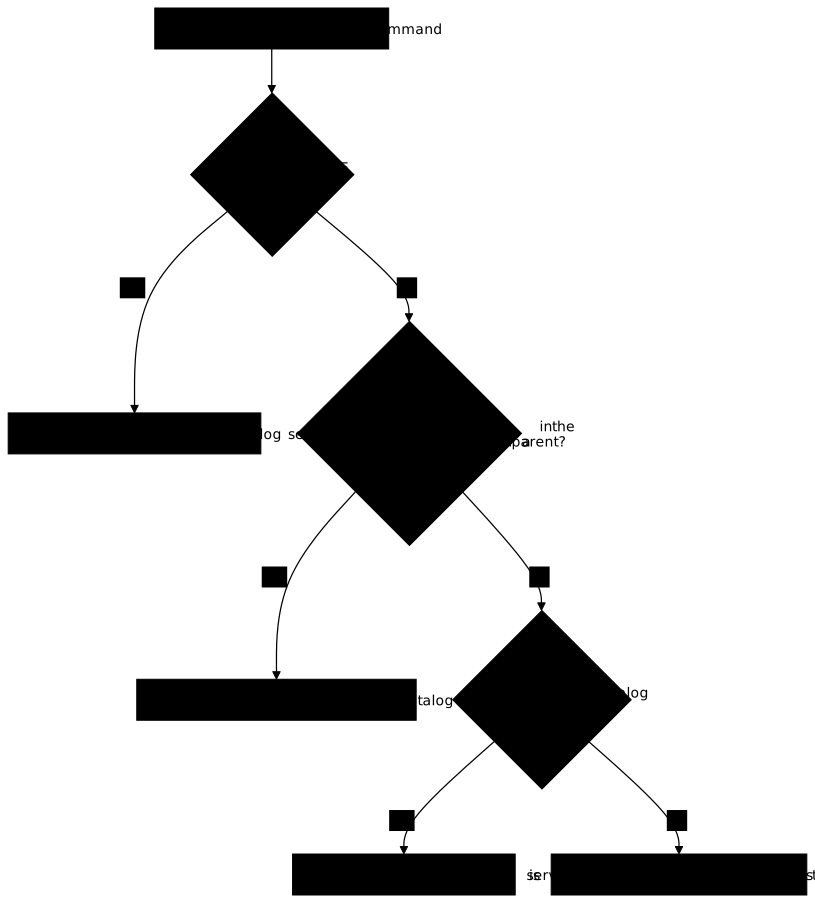
This order has a practical consequence: from any folder without a meta.yml,
your commands target the active catalogue; from inside a catalogue
repository, they target that repository, whichever one is active. If a
command seems to target the wrong catalogue, look first at where you are and
whether LAB_HOME is set, before suspecting catalog use.
How do you switch the active catalogue?
dsoxlab catalog use <identifier> designates the catalogue served outside any
repository, among the installed ones. Every successful catalog add already
makes the catalogue it has just placed active; use is therefore for going
back to a catalogue installed earlier, when you play several in parallel.
dsoxlab catalog use linux✔ Active catalogue: 'linux' (/home/alice/.local/share/dsoxlab/catalogs/linux)To check, dsoxlab catalog list marks with a ✔, in the "Active" column of the
"Installed catalogues" table, the catalogue that has just been chosen. An
identifier that is not installed gives the message "No catalogue … installed" and
an exit code of 1: check the spelling with catalog list, remembering that the
identifier of a catalogue installed by URL is that of the folder created.
Do not confuse catalog use with dsoxlab use, which sets the working context
inside a catalogue, that is, the section and the level. The latter is the
subject of the lesson
Finding your next dsoxlab lab.
How do you update a catalogue?
dsoxlab catalog update [identifier] updates an installed catalogue, or all of
them if you name none. Under the hood, the command runs git pull --ff-only in
the catalogue's folder: it moves the history forward without ever merging.
Your .dsoxlab.db file is not versioned by the catalogue, so the update does
not erase it.
dsoxlab catalog update linuxℹ Catalogue 'linux' is up to date.When the repository has moved forward, the line becomes "Catalogue 'linux'
updated:" followed by git's summary. Without an identifier, update handles all
the installed catalogues one after the other and exits with code 1 if one of them
fails, even if the others succeeded: a script that chains commands reads that
code. With no catalogue installed, the command just says so.
Update the CLI before the catalogues, not the other way round. A recent
catalogue may require a contract version (the format of meta.yml and of the
labs) newer than the one the CLI can read; it then says so, naming the version
found and the one it supports, and the fix is to update the tool, which the
lesson Installing dsoxlab locally explains.
How do you remove a catalogue?
dsoxlab catalog remove <identifier> deletes the catalogue's folder, and
your progress with it. If that catalogue was the active one, the command also
forgets that designation. It asks for no confirmation: check the identifier
before typing it.
dsoxlab catalog remove linux✔ Catalogue 'linux' removed (/home/alice/.local/share/dsoxlab/catalogs/linux).The success criterion is that dsoxlab catalog list no longer shows the line in
"Installed catalogues". If you want to keep your marks, do not remove the
catalogue: the history has no other copy. The demonstration catalogue is
a special case: it is not installed under catalogs/, and you reinstall it
with dsoxlab demo --force, as the lesson on the first lab shows.
Troubleshooting
The table starts from the message printed, gives the cause and the command that fixes it. The messages are those of the CLI in English.
| Symptom | Cause | Solution |
|---|---|---|
| "Unknown catalogue 'xxx'" | catalog add received neither an identifier from the manifest nor a URL | dsoxlab catalog list to see the identifiers, or give the full URL of the repository |
| "git is missing" | catalog add clones a repository and cannot work without git | Install git, then run dsoxlab doctor and the command again |
| "Cloning … failed" | Wrong URL, private repository or network down | Check the URL in a browser, then run again; the half-cloned folder is deleted |
| "Repository … has no meta.yml at its root" | The URL points to a repository that is not a dsoxlab catalogue | Use the catalogue's repository, not that of a tool or a guide |
| "Catalogue '…' is already installed" | The folder exists and holds your progress | dsoxlab catalog update <id>, or --force only to lose everything |
"No catalogue '…' installed" on use, update or remove | The identifier matches no folder of catalogs/ | Reread the identifier in dsoxlab catalog list, "Id" column |
| The update fails with a git message | The repository history has diverged from your copy, --ff-only refuses to merge | Reinstall with dsoxlab catalog add <id> --force, accepting to lose the progress |
| A command targets a catalogue other than the active one | You are in a repository with a meta.yml, or LAB_HOME is set | Move out of the repository, or remove the variable with unset LAB_HOME |
Key points
- A catalogue is a git repository of labs with a
meta.ymlat its root; the CLI embeds none, apart from the demonstration one. dsoxlab catalog listshows the known catalogues by identifier, then the installed ones, and accepts--json.dsoxlab catalog addtakes an identifier or a URL, clones with--depth 1under~/.local/share/dsoxlab/catalogs/and makes the catalogue active.- Inside a catalogue repository, the CLI serves that repository:
LAB_HOMEcomes first, the active catalogue only after. dsoxlab catalog usechanges the active one;catalog updaterunsgit pull --ff-only, on one catalogue or on all of them.- A catalogue installed by URL takes the name of its folder as its identifier,
and that is what
use,updateandremoveexpect. - Progress lives in
.dsoxlab.db, inside the catalogue:removeandadd --forceerase it,updatepreserves it.
Knowledge check
Check that you have the essentials of this guide. The questions only cover what has just been explained here.
Knowledge check
Check what you have learned with this interactive quiz
How it works
- The timer starts when you click Start
- Multiple choice, true/false and short answer questions
- You can move between questions
- Detailed results are shown at the end
Starts the quiz and the timer
Review
(0/0)Score by domain
A domain groups several guides and gets several questions, so its score is more reliable than a per-topic score, which often rests on a single question.
Summary
Strengths
No topic passed at 80% on at least two questions yet.
Weak areas
No topic below the pass mark.
Recommended next
Hints before you try again?
Continue the course: Finding your next dsoxlab lab: use, list-labs, next
A new full quiz with random questions
Work again only on the questions you missed