
This guide explains what Keycloak is, its core concepts, and the architecture to plan before installing it. By the end, you will know whether Keycloak meets your need, which objects you will handle, and how to think about "architecture" before starting a container.
What you will learn
By the end of this lesson, you will know:
- What Keycloak is and what it is not
- The core concepts: realm, client, user, group, role, session
- The 3 integration strategies: primary IdP, LDAP federation, identity brokering
- The typical architecture to plan before installation
- The questions to ask yourself before getting started
What is Keycloak?
Keycloak is a Single Sign-On (SSO) solution for web applications and REST services. It is an Identity Provider (IdP) that centralizes authentication and spares you from recoding auth in every application.
What Keycloak provides without any development
The value of Keycloak lies in what you do not have to write: login pages, password reset, second factor, session management. The table below lists the identity functions it handles. Look for the ones your application implements itself today: they are your candidates. Finding them in Keycloak does not remove the corresponding code by itself: you first have to connect the application to the realm, transpose its access rules, then check that the login journeys behave as they did before.
Two rows demand noticeably more work than the others. Identity Brokering is for when accounts live with a third party, a partner IdP or a public provider, and you want neither to copy nor to administer them. Authorization Services are for when the access decision depends on the targeted resource and its context, and not only on the requester's role. Both mechanisms are configured in several steps, each of which can break a login: plan to handle them separately from the rest.
| Feature | Description |
|---|---|
| SSO | A single authentication for all the applications of a realm |
| Login pages | Ready-made forms, customizable themes |
| OIDC / OAuth 2.0 | Modern protocols for web apps, SPAs, APIs |
| SAML 2.0 | Interoperability with legacy applications |
| Identity management | Users, groups, roles, attributes |
| MFA | TOTP (Google Authenticator), WebAuthn (FIDO2) |
| Federation | Import of users from LDAP/Active Directory |
| Identity Brokering | Delegation of authentication to an external IdP (Google, Azure AD, etc.) |
| Authorization Services | Fine-grained access control (policies, permissions) |
What Keycloak is not
Keycloak is an IdP, not a source directory. It can:
- Store users locally (internal database)
- Federate an existing LDAP/AD (read + sync)
- Broker to another IdP (delegation)
But it is not a replacement for Active Directory. In an enterprise architecture, Keycloak often sits in front of an AD, not instead of it.
The core concepts (the Keycloak "dictionary")
These concepts make up the essential vocabulary of Keycloak. Each term matches an object in the admin console.
Realm
A realm is an isolated space (tenant) holding its own users, clients, roles and settings. It is the unit of isolation in Keycloak.
Keycloak├── master (administration realm)├── prod (realm for your production applications)└── staging (realm for tests)Best practices:
- The master realm is reserved for the global administration of Keycloak
- Create one realm per environment (prod, staging) or per tenant
- Never create your application users in the master realm
Client
A client represents an application or API that uses Keycloak for authentication.
| Client type | Usage | Examples |
|---|---|---|
| Public | Application unable to keep a secret | SPA, mobile app |
| Confidential | Application with a secure backend | API, server-side webapp |
Key settings of a client:
- Redirect URIs: URLs allowed after authentication
- Web Origins: web domains allowed to call Keycloak from a browser (the CORS rule)
- Client authentication: on = confidential, off = public
- Protocol: OIDC (default) or SAML
An API that only validates tokens, without ever starting a login, used to be declared bearer-only. The current Keycloak documentation calls this type deprecated: you now declare an ordinary client (often confidential) whose application simply triggers no login flow.
To create a client and connect a real application, see the hands-on guide Secure an application with Keycloak (OIDC) (in French).
Users
A user always belongs to one realm, and only one: the same
identifier in two realms means two unrelated accounts. This is the direct
consequence of the isolation seen above, and the first surprise when you
create a test account in master hoping to use it elsewhere. The
required actions deserve particular attention: they force a step at the
next login (change the password, verify the email,
enroll an OTP) and block access until they are satisfied.
Each account carries four families of information:
- Identifiers: username, email
- Credentials: password, OTP, WebAuthn
- Attributes: custom data (department, employee number, etc.)
- States: enabled, email verified, required actions
Groups
Groups carry the organization, roles carry the rights. Separating
the two avoids the most common trap in operations: assigning roles
user by user, then no longer knowing who has what six months later.
A group inherits the roles and attributes of its parent, which lets you
declare a policy once at the Engineering level and see it
apply to Backend and Frontend.
Concretely, a group is used to:
- organize users hierarchically;
- assign roles to a set of users in a single gesture;
- propagate attributes to subgroups by inheritance.
Groups├── Employees│ ├── Engineering│ │ ├── Backend│ │ └── Frontend│ └── Marketing└── ContractorsRoles
Roles represent permissions, and they come in two types. The
distinction is not cosmetic: a realm role ends up in the realm_access.roles claim
of the token, a client role in resource_access.<client>.roles. Your
applications therefore do not read from the same place, and an API that looks
for its roles in the wrong place will refuse access to a user who is
nonetheless correctly configured. By default, prefer client roles: they stay readable
as the number of applications grows.
| Type | Description | Example |
|---|---|---|
| Realm role | Global to the realm | admin, user |
| Client role | Specific to one client | myapp:editor, myapp:viewer |
A composite role includes other roles, which gives inheritance: granting the composite role grants at the same time all the roles it contains.
Sessions and tokens
When a user logs in, Keycloak opens an SSO session. As long as this session stays active, the user reaches the other applications of the realm without having to log in again.
A token is a signed token the application receives after login. It carries claims, that is, statements about the user (name, email, roles), and scopes, which bound what the application is allowed to request. The detailed format is described in OpenID Connect (in French). Keycloak issues three kinds:
| Token | Typical lifetime | Content |
|---|---|---|
| Access token | 5 min (default value of a realm you create) | Claims, roles, scopes, sent to APIs |
| Refresh token | 30 min (bounded by SSO Session Idle) | Used to obtain a new access token |
| ID token | 5 min | Information about the user (profile) |
Protocol mappers and claims
Mappers define what is included in the tokens. This is the most frequent friction point in an OIDC integration: the application expects a claim, Keycloak does not issue it, and the error message on the application side talks about authorization while the problem is a missing claim. The diagnostic reflex is always the same: decode the token received and compare it with what the code reads.
Examples of mappers:
- Add the user's groups to the token
- Add a custom attribute (department, tenant ID)
- Rename a claim (
preferred_username→user)
The 3 integration strategies for Keycloak
Before installing, identify your use case. Keycloak supports 3 strategies (which can be combined).
Strategy 1: Keycloak as the primary IdP
This is the configuration that is simplest to start and most demanding to operate: Keycloak becomes the source of truth for identities, so the PostgreSQL backup and the rotation of signing keys become critical topics. On the diagram, note that no arrow leaves toward an external directory: if the database is lost, the accounts are lost with it.
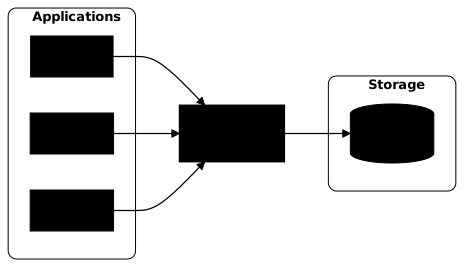
This strategy suits new applications, an organization with no existing directory, or internal SaaS applications. The accounts then live in Keycloak's PostgreSQL database, and nowhere else.
Strategy 2: LDAP/Active Directory federation
Here Keycloak no longer holds the passwords: it delegates them to the directory at each login, or imports the accounts depending on the synchronization mode chosen. The point to settle at design time is the write direction: in read-only mode, every account creation goes through the directory; in write mode, Keycloak modifies the directory and you must grant the corresponding rights to the LDAP service account.
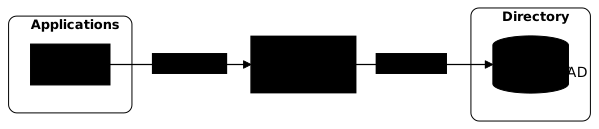
This strategy is a must as soon as a company already runs an Active Directory and wants to reuse its identities. The accounts stay in the directory, which Keycloak synchronizes by full import or on demand. The gain is twofold: no more double management of passwords, and an integration that builds on what exists instead of duplicating it.
For the implementation, see Federate an LDAP or AD directory with Keycloak (in French).
Strategy 3: Identity Brokering
Brokering moves authentication to a third party: Keycloak verifies no password, it validates the token the external IdP sends back and produces a new one for your applications. The advantage is that your applications still know a single issuer. The point to watch is the first broker login flow, the sequence that decides what to do when the user arrives for the first time: create a local account, link it to an existing account by email, or refuse. Misconfigured, it is an open door to account takeover through a mere matching email address.
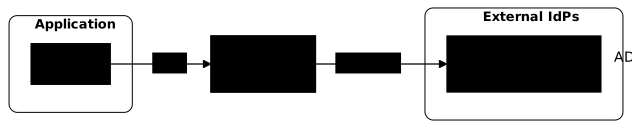
Use cases:
- Social login: "Sign in with Google/GitHub/GitLab"
- B2B federation: your customers have their own IdP (Azure AD)
- Consolidation: one Keycloak in front of several IdPs
The accounts stay with the external provider. Keycloak merely relays the authentication, and it can create a local entry linked to the remote account, which the documentation calls account linking.
For the implementation with a second Keycloak acting as the partner, and the account takeover to avoid, see Inbound federation: delegating login to an IdP (in French).
Keycloak architecture (system view)
Before installing, picture the target architecture.
The components
Four building blocks make up the architecture. PostgreSQL holds the durable state: in development mode, Keycloak starts on an embedded database (H2) that is not meant for production. The reverse proxy, a server placed in front of Keycloak that receives the HTTPS traffic and relays it in clear text, is not a mere convenience: it terminates TLS (the "TLS termination" of the table) and injects the headers Keycloak uses to build its public URLs. Infinispan is embedded by default; you only configure it the day you move to several instances.
| Component | Role |
|---|---|
| Keycloak | IdP server (Quarkus, Java 21) |
| PostgreSQL | Database (users, realms, user sessions since 26.0) |
| Reverse proxy | TLS termination, headers, load balancing |
| Infinispan (embedded) | Distributed caches between pods (authentication sessions, sessions loaded on demand) |
Why hostname and proxy are critical
Keycloak requires an explicit hostname configuration in production. This is a security measure to prevent URL manipulation attacks.
A wrong hostname configuration is paid for immediately: login loops follow one another, the redirect_uri values no longer match, and the .well-known endpoints advertise wrong URLs to the applications.
Critical variables:
KC_HOSTNAME=auth.example.com # Public URLKC_HOSTNAME_STRICT=true # Do not infer the hostname from requestsKC_PROXY_HEADERS=xforwarded # Trust the proxy headersTypical architectures
Lab / development
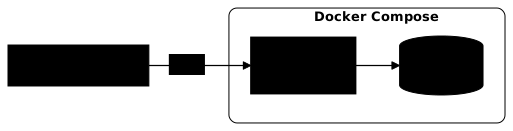
In a lab, everything fits in a docker compose: Keycloak listens in clear text on
port 8080, PostgreSQL runs alongside, and you reach the console through
localhost. It is the only situation where the absence of TLS is acceptable,
precisely because browsers treat localhost as a secure origin. Never carry this setup over as is to an address
reachable from the network.
Standard production (VM)
A single instance is enough for many internal uses, provided you know what this choice implies: if it goes down, or if you stop it for an upgrade, no login succeeds during that time. The criterion is therefore not the size of the organization, it is the authentication outage you accept.
The change compared with the lab is not the number of machines but the chain of trust: TLS stops at the proxy, Keycloak stays in clear text behind it, and it must learn from the proxy which URL the browser actually used. That is the whole point of the items below; the day-to-day operation (proxy, backup, upgrade) is detailed in Operating Keycloak in production (in French).

Key points:
- TLS termination at the reverse proxy level
X-Forwarded-*headers passed on to KeycloakKC_PROXY_HEADERS=xforwardedmandatory- Regular backups of PostgreSQL
HA production (Kubernetes)
Moving to several replicas is not just raising a counter. Since
Keycloak 26.0, user sessions are persisted in the database by default,
then loaded on demand into Infinispan caches distributed between the
pods: a user routed to another pod finds their session again. The
authentication sessions, those of a login in progress, stay in the distributed
authenticationSessions cache: if the pods cannot see each other, a login
in progress may fail when the next request reaches another pod. Since
26.6, the documentation states that sticky sessions no longer bring any significant
benefit and recommends spreading the load evenly.
The step-by-step deployment is described in Deploy Keycloak on Kubernetes with the Operator.

Key points:
- Ingress with TLS, which spreads the load across the replicas
- Keycloak replicas managed by the Keycloak Operator
- Infinispan for the caches distributed between pods (authentication sessions, sessions loaded on demand)
- HA PostgreSQL (Patroni, CloudNativePG, etc.)
Governance and rights model
Least privilege
An IdP concentrates considerable power by nature: whoever can modify a client can modify the redirect URIs, and so divert authorization codes to a domain they control. The three rules below all aim at the same goal, reducing what a compromised account can do before anyone notices.
- Users should only have the roles they need
- Confidential clients should not have more scopes than required
- The admin console should not be publicly exposed
Break glass
Three failures get confused under the phrase "the IdP is down", and they do not call for the same rescue.
When Keycloak itself no longer answers, new logins and token renewals fail. Sessions already open may carry on for a while: it depends on the validity period of the token already issued and on how the application verifies it. This case is fixed through system access to the machine and its database, not through a Keycloak account.
When Keycloak answers but the external authentication is down,
LDAP directory unreachable or partner IdP in error, a local
administrator account of the master realm remains usable: it depends neither on
the directory nor on identity brokering.
When it is administrator access that is lost, forgotten password or last admin account deleted, Keycloak provides a recovery at startup of the server, described in its admin account recovery procedure.
Hence the rule common to the three cases: the emergency access exists outside the usual dependencies, no SSO, no federated directory, no internal tool itself protected by Keycloak. And it is tested periodically: an emergency access that has never been tried is not one. Three measures make it concrete:
- Admin account with MFA
- Documented recovery procedure
- Access through a restricted network (VPN, bastion)
Link with Authorization Services
Roles already decide access: holding a role means holding an authorization, not just an identity label. What Authorization Services add is the ability to write rules that bear on a resource, an action and their context, then to combine several criteria in a single decision. The switch is worth it when your rules depend on the data itself, the owner of a document or membership of a project, and no longer on the requester's profile alone.
The number of calls to Keycloak then depends on the chosen integration. The token
that carries the permissions, called an RPT (Requesting Party Token), is a
token signed by the realm, in the same format as the tokens seen above.
The application can therefore verify it itself, without calling Keycloak at each
check. Mind the meaning of "verify": it is not about reading the content
of the token, but about checking its signature with the realm's public key, then
its validity over time and its audience, the exp, iat and
aud claims. The official guide cited at the end of the section details this list.
Three decisions remain before the first policy: how the application obtains its permissions, when it renews them, and what freshness you accept, since a token verified offline reflects the permissions as they were when it was issued.
An access rule is described with four objects, which combine:
- Resources: what is protected (endpoint, document)
- Scopes: possible actions (read, write, delete)
- Policies: access rules (role-based, group-based, time-based)
- Permissions: association of resource + scope + policy
For this fine-grained access control, see the official Authorization Services guide, at the version taught in this course.
Checklist before installing
Before starting the installation with Docker (in French), answer these questions:
-
How many realms?
- 1 realm per environment (prod, staging)?
- 1 realm per tenant (multi-tenant)?
-
Which protocol for your applications?
- OIDC (modern, recommended)?
- SAML (legacy, interop)?
- Both?
-
Where do the identities come from?
- Local storage in Keycloak?
- LDAP/Active Directory federation?
- Identity brokering (Google, Azure AD)?
-
Where does TLS terminate?
- At the reverse proxy (recommended)?
- In Keycloak (end-to-end)?
-
What is the public hostname?
auth.example.comorkeycloak.internal?- Consistency with the TLS certificates
-
What authentication outage do you accept?
- A single instance suits a lab, and an internal use that tolerates an outage for the length of a restart
- If authentication must survive a failure or a maintenance window, you need several instances and redundancy of their dependencies, PostgreSQL first: the high availability guide describes the reference architectures
-
Backup strategy?
- pg_dump for the DB
- JSON export of the realms
- Rotation of the signing keys
-
Secure admin access?
- Restricted network (VPN, bastion)
- MFA for admins
- Separate admin hostname (optional)
Key takeaways
- Keycloak = open source IdP/SSO (OIDC, SAML, LDAP, MFA)
- Realm = isolated tenant (do not use master for apps)
- Client = declared application (public or confidential; bearer-only is deprecated)
- 3 strategies: primary IdP, LDAP federation, identity brokering
- Production architecture: reverse proxy + TLS → Keycloak → PostgreSQL
- Several instances: user sessions persisted in the database since 26.0, Infinispan caches distributed between pods, authentication sessions in
authenticationSessions; sticky sessions with no significant benefit since 26.6 - Hostname/proxy: critical configuration, the first cause of login loops and broken
redirect_urivalues - Before installing: answer the questions of the checklist
Resources
These references come from the official Keycloak documentation: the two 26.7.0 guides match the version taught in this course, and the other three pages cover the production configuration, hostname and reverse proxy included.
- Server Administration Guide, official documentation of the version taught
- Configuring Keycloak for production, production requirements
- Configuring the hostname, hostname configuration (critical)
- Configuring a reverse proxy, headers and ports
- Authorization Services Guide, fine-grained access control