
SAML 2.0 is still widely used for enterprise federation. Even though OIDC is more modern, many enterprise SaaS applications (Salesforce, ServiceNow, Workday...) offer it. If you integrate enterprise applications, you will run into SAML. This guide gives you the keys to understand it, configure it and debug it.
What you will learn
This guide explains SAML 2.0, the federation protocol of large enterprise applications. By the end, you will be able to:
- Understand why SAML holds its ground against OIDC
- Tell apart the SP-initiated and IdP-initiated flows
- Configure assertions, signatures and attribute mapping
- Diagnose common SAML errors
Prerequisite: having read OpenID Connect (in French).
Why SAML still exists
SAML 2.0 dates from 2005. Why do you still run into it?
Short answer: because the big enterprise applications (Salesforce, ServiceNow, Workday, SAP...) have supported it for years, and it works.
When to use SAML
The choice is only half yours: in most integrations, the target application imposes its protocol. This table therefore mostly helps you decide the cases where you really have a say, typically an application you develop yourself. Keep the general logic in mind: SAML for existing enterprise software and B2B, OIDC for anything new, OAuth 2.0 whenever the point is to authorize API access rather than authenticate a person.
| Situation | Recommended protocol |
|---|---|
| The application only supports SAML | SAML |
| B2B integration with a SAML partner | SAML |
| New web/mobile application | OIDC |
| API to secure | OAuth 2.0 |
SAML vs OIDC: key differences
Understanding these differences helps you pick the right protocol for your context. SAML keeps its place in enterprise applications, while OIDC is the usual choice for recent architectures.
| Aspect | SAML | OIDC |
|---|---|---|
| Year | 2005 | 2014 |
| Format | XML | JSON/JWT |
| Message size | Verbose (several KB) | Compact |
| Signature | XML-DSig + certificates | JWS (JWT signature) |
| Encryption | XML-Enc (optional) | JWE (optional) |
| Configuration | Metadata file exchange | Discovery endpoint |
| Mobile/SPA | Difficult | Native |
| Enterprise legacy | Excellent support | Variable |
| Debugging | Complex (XML, signatures) | Simple (jwt.io, JSON) |
The SAML actors
Three actors take part in every SAML exchange. Knowing their roles is essential for debugging federation problems. What the IdP hands to the SP is called an assertion: a signed XML document that states the user's identity, detailed in the "The SAML assertion" section below.
| Actor | Role | OIDC equivalent |
|---|---|---|
| Identity Provider (IdP) | Authenticates the user, issues assertions | OpenID Provider |
| Service Provider (SP) | Application that consumes assertions | Relying Party |
| Principal | The user who authenticates | End-User |
The two SSO modes
SAML defines two possible starting points for a login, and they are not equal when it comes to security. The difference comes down to a single detail: whether or not there is an AuthnRequest, the authentication request sent by the Service Provider. When it exists, the SP can check that the response it receives matches a request it initiated itself, through the InResponseTo attribute. Without it, this check is impossible.
SP-initiated (recommended)
The user starts from the application (Service Provider).
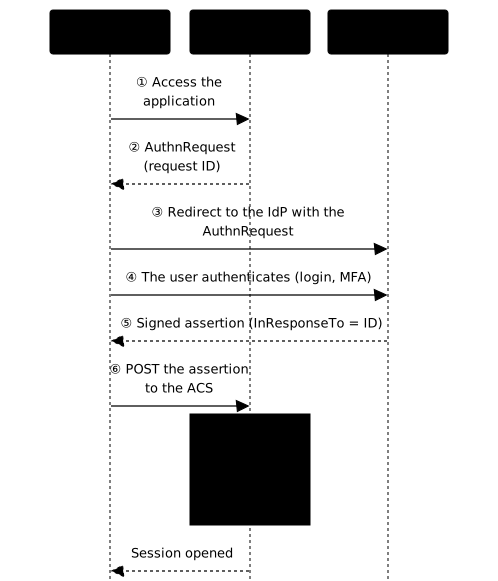
The diagram shows the three actors; the numbered steps below detail each exchange.
-
Access to the application
The user tries to reach https://salesforce.example.com
-
AuthnRequest generation
The SP generates a SAML authentication request (AuthnRequest).
-
Redirect to the IdP
The browser is redirected to the IdP with the AuthnRequest.
-
Authentication
The IdP authenticates the user (login, MFA...).
-
Assertion generation
The IdP creates a signed SAML assertion carrying the identity.
-
Return to the SP (POST)
The browser sends the assertion to the SP (usually via HTTP-POST).
-
Validation and session
The SP validates the signature, the audience, the validity dates and the
InResponseTo, then creates a session for the user.
Advantages:
- The application controls the flow
- Native CSRF protection (the SP generates a request ID)
IdP-initiated
The user starts from the IdP portal.
-
Access to the IdP portal
The user opens the enterprise portal (e.g. the Okta dashboard).
-
Click on the application
The user clicks the application's icon.
-
Direct assertion generation
The IdP generates a SAML assertion without any prior AuthnRequest.
-
Delivery to the SP
The assertion is sent directly to the SP.
-
Validation and session
The SP validates it and creates the session.
Risks:
- No AuthnRequest = no
InResponseToto validate - CSRF risk if the
RelayState(the parameter that carries the intended landing page) is not checked
The SAML assertion
A SAML assertion is an XML document, signed directly or by the Response that wraps it, which contains:
- The identity of the user (NameID)
- The attributes (email, groups, roles...)
- The validity conditions (dates, audience)
- The signature of the IdP
Simplified structure
Here is an assertion reduced to its meaningful elements; in production it is several kilobytes long, most of it taken up by the signature block encoded in base64.
<saml:Assertion xmlns:saml="urn:oasis:names:tc:SAML:2.0:assertion"                ID="_abc123" IssueInstant="2024-02-06T10:00:00Z">
  <!-- Who issued the assertion -->  <saml:Issuer>https://idp.example.com</saml:Issuer>
  <!-- XML signature -->  <ds:Signature>...</ds:Signature>
  <!-- Subject: the authenticated user -->  <saml:Subject>    <saml:NameID Format="urn:oasis:names:tc:SAML:1.1:nameid-format:emailAddress">      alice@example.com    </saml:NameID>  </saml:Subject>
  <!-- Validity conditions -->  <saml:Conditions NotBefore="2024-02-06T10:00:00Z"                   NotOnOrAfter="2024-02-06T10:05:00Z">    <saml:AudienceRestriction>      <saml:Audience>https://salesforce.example.com</saml:Audience>    </saml:AudienceRestriction>  </saml:Conditions>
  <!-- Authentication context -->  <saml:AuthnStatement AuthnInstant="2024-02-06T10:00:00Z">    <saml:AuthnContext>      <saml:AuthnContextClassRef>        urn:oasis:names:tc:SAML:2.0:ac:classes:PasswordProtectedTransport      </saml:AuthnContextClassRef>    </saml:AuthnContext>  </saml:AuthnStatement>
  <!-- Attributes -->  <saml:AttributeStatement>    <saml:Attribute Name="email">      <saml:AttributeValue>alice@example.com</saml:AttributeValue>    </saml:Attribute>    <saml:Attribute Name="groups">      <saml:AttributeValue>developers</saml:AttributeValue>      <saml:AttributeValue>admins</saml:AttributeValue>    </saml:Attribute>  </saml:AttributeStatement>
</saml:Assertion>
Key elements
These are the six tags you will look at first when troubleshooting. Three of them alone decide whether the assertion is accepted or rejected: Conditions for the time window and the recipient, Signature for authenticity, NameID for the match with an existing account on the application side.
| Element | Description |
|---|---|
Issuer | URL of the IdP that issued the assertion |
NameID | Main identifier of the user |
Conditions | Validity period, allowed audience |
AuthnStatement | Proof of authentication |
AttributeStatement | Additional attributes (email, groups...) |
Signature | XML signature of the IdP |
Signatures and certificates
SAML uses XML-DSig to sign assertions (and optionally encrypt them).
What is signed
A SAML response contains two signable envelopes: the Response and the Assertion it carries. For the Web Browser SSO profile, the approved erratum "SAML V2.0 Errata 05" (OASIS, 2012) requires, when the Response is delivered through the HTTP POST binding, that the Response or the assertions it contains be signed. Every assertion must therefore be covered by an IdP signature, either because it is signed itself, or because the Response that wraps it is. A signed Response whose assertion is not signed remains compliant.
Signing both is not required, but some deployments ask for it to cover both the protection of the encryption and the proof of origin of the assertion. When the IdP sends an EncryptedAssertion encrypted with a CBC-mode algorithm, the erratum states that the Response should be signed ("SHOULD" in the vocabulary of standards), in order to protect the integrity of the ciphertext (see section 6.2 of the corrected Core specification).
The danger does not come from which envelope is signed, but from a validation done badly. A library that verifies a signature without making sure that the element it reads afterwards is the one that is covered can be fooled by an XML Signature Wrapping attack: the attacker moves or duplicates elements while keeping a valid signature. Check that your SP only reads the elements whose signature it has validated, and enable the signature of the Response in addition to that of the assertion if your IdP allows it.
| Element | Signed by |
|---|---|
| Response or Assertion | The IdP: at least one of the two (required by the corrected Web SSO profile with the POST binding) |
| Both | The IdP (recommended; with an EncryptedAssertion in CBC mode, the Response should be signed) |
| AuthnRequest | The SP (optional) |
Certificate management
The IdP's signing certificate is copied into the configuration of every Service Provider. This is what makes its rotation tricky: changing it on one side breaks all the others until they have fetched the new one. The remedy is to publish both certificates at the same time in the metadata before switching the signature.
Verification on the SP side
The SP must:
- Obtain the public certificate of the IdP (through metadata or manual import)
- Validate the signature of the
Responseor of the assertion (whichever is signed, and both if both are), then only read the covered elements - Validate the certificate chain (optional depending on the configuration)
Metadata: exchanging configuration
Metadata files contain the SAML configuration of an IdP or an SP.
IdP metadata
The metadata of an IdP publishes two pieces of information the SP cannot guess: the public certificate that will be used to validate signatures, and the URL of the SingleSignOnService to which the user is redirected.
<EntityDescriptor entityID="https://idp.example.com"> <IDPSSODescriptor> <KeyDescriptor use="signing"> <ds:KeyInfo> <ds:X509Data> <ds:X509Certificate>MIIC...</ds:X509Certificate> </ds:X509Data> </ds:KeyInfo> </KeyDescriptor> <SingleSignOnService Binding="urn:oasis:names:tc:SAML:2.0:bindings:HTTP-Redirect" Location="https://idp.example.com/sso"/> </IDPSSODescriptor></EntityDescriptor>SP metadata
On the SP side, the decisive element is the AssertionConsumerService (ACS): it is the exact URL to which the IdP will post the assertion, and the slightest difference in case or trailing slash causes a rejection. The entityID declared here must also match exactly the value the IdP puts in the AudienceRestriction.
<EntityDescriptor entityID="https://salesforce.example.com"> <SPSSODescriptor> <KeyDescriptor use="signing"> <ds:KeyInfo> <ds:X509Data> <ds:X509Certificate>MIID...</ds:X509Certificate> </ds:X509Data> </ds:KeyInfo> </KeyDescriptor> <AssertionConsumerService Binding="urn:oasis:names:tc:SAML:2.0:bindings:HTTP-POST" Location="https://salesforce.example.com/saml/acs" index="0"/> </SPSSODescriptor></EntityDescriptor>Metadata exchange
The exchange is bidirectional: each party must know the other, and a one-way configuration produces an error when the user returns to the application. When the IdP publishes a metadata URL rather than a file, prefer it: the SP then reloads the certificate automatically during rotations.
-
Export the IdP metadata
-
Import it into the SP (or give the metadata URL)
-
Export the SP metadata
-
Import it into the IdP (create a "client" or an "application" depending on the product)
-
Configure the attribute mapping
Attribute mapping
SAML attributes are not standardized. Each vendor uses its own names.
NameID: the main identifier
The NameID is the key the SP uses to match the assertion to a local account, and its format must be identical on both sides. The email address is the most widespread choice but also the most fragile: it changes when the person gets married or changes department, and the user then loses access to their account. The persistent format avoids this problem by providing an opaque and stable identifier for each user/application pair.
| Format | Value | Usage |
|---|---|---|
emailAddress | alice@example.com | The most common |
persistent | Stable opaque ID | Recommended for security |
transient | Temporary ID | Anonymous sessions |
unspecified | Anything | Avoid |
Mapping common attributes
Three mappings come up in almost every integration. They illustrate the same job: the left column is the name imposed by the application, the middle one is the name the attribute carries in your directory, and the mapper configured on the IdP does the translation when the assertion is issued. An attribute missing from this configuration simply will not appear in the AttributeStatement.
| What the SP expects | What the IdP has | Solution |
|---|---|---|
User.Email | email | Map email → User.Email |
memberOf | groups | Map groups → memberOf |
firstName | givenName | Map givenName → firstName |
SAML troubleshooting
Debugging SAML is more thankless than OIDC because messages travel through browser redirects rather than server-to-server calls: they show up in no application log. The method is therefore always to capture the exchange in the browser, decode the assertion, then compare its content with what the SP expects.
Diagnostic tools
These four sources complement each other: the first two give the real content of the exchange, the last two the verdict of each party. Be careful with online decoders: an assertion contains identity data, so do not paste a production assertion into a third-party service.
| Tool | Usage |
|---|---|
| SAML-tracer (browser extension) | Capture SAML requests/responses |
| samltool.com | Decode, validate, generate test assertions |
| Keycloak logs | Errors on the IdP side |
| Application logs | Errors on the SP side |
Common errors
The six messages below are common failures during an integration. They share a point that helps diagnosis: they all come from a configuration mismatch between the IdP and the SP, not from a flaw in the protocol. Find the exact message in the SP's logs, and the middle column tells you which side to look at.
| Symptom | Likely cause | Solution |
|---|---|---|
Invalid signature | Certificate imported wrongly, wrong certificate | Re-import the IdP certificate |
Assertion expired | Clock skew (clock drift) | Synchronize NTP on all servers |
Invalid audience | Audience does not match the SP's entityID | Check the configuration on the IdP side |
ACS URL mismatch | The return URL does not match | Check AssertionConsumerService in the metadata |
Missing attribute | Attribute not mapped | Configure the mapper on the IdP side |
NameID format mismatch | The SP expects a different format | Align the NameID formats |
Troubleshooting checklist
Follow these six checks in order: they go from the most general to the most specific, and each one rules out a family of causes. The first is unavoidable: without a traffic capture you are reduced to guesswork.
-
Capture the traffic with SAML-tracer
-
Decode the Response locally (
base64 -d), or on samltool.com for a test assertion -
Check the timestamps (NotBefore, NotOnOrAfter)
-
Check the Audience
-
Validate the signature (right certificate?)
-
Check the attributes present in the assertion
SAML security
The security of SAML rests entirely on the validation done by the Service Provider. However correctly the IdP signs, an SP library that accepts an assertion without checking its signature, its audience or its validity window cancels all the protection. Historically, many published SAML vulnerabilities were about validation flaws on the SP side rather than about the protocol itself.
Risks and mitigations
This table reads as a checklist to confirm on your implementation, not as a theoretical catalogue. For each row, the question to ask the team that runs the SP is simple: is this check enabled, and have you tested it by making it fail on purpose?
| Risk | Mitigation |
|---|---|
| Signature bypass | Require that the Response or every assertion be signed, validate any signature present, then only read the elements covered by a validated signature |
| XML injection | Secure XML parser, disable entity references |
| Replay attack | Check InResponseTo, track the consumed assertion IDs |
| IdP-initiated CSRF | Validate RelayState, prefer SP-initiated |
| Assertion interception | HTTPS mandatory, optional encryption |
Best practices
These five settings are the ones to apply by default on any new integration. The one most often neglected is the validity duration: an assertion valid for an hour can be replayed for an hour if the SP does not remember the identifiers already consumed.
- Sign at least the
Responseor every assertion, and preferably both if your IdP allows it - Encrypt assertions if they contain sensitive data
- Validate the audience (
AudienceRestriction) - Limit the validity duration of assertions (< 5 min)
- Use SP-initiated whenever possible
Common mistakes
Where the troubleshooting table listed error messages, this one lists the operational flaws that raise no alert as long as SSO works. They show up late, through a sudden outage one morning or an exploited vulnerability, with no apparent change the day before. The right-hand column describes a preventive measure each time, to put in place before the incident.
| Mistake | Consequence | Solution |
|---|---|---|
| Expired certificate not detected | SSO broken | Alerting on expiration dates |
No InResponseTo validation | Vulnerable to replay | Validate the ID of the original request |
| Metadata not up to date | Intermittent failures | Metadata URL + automatic refresh |